Nothing happens when I eject CD Drive

Rocv

New member
Local time
6:59 PM
Messages
5
Location
Brazil
I have exactly the same problem that Sunil related: I can't remove my Huawei mobile. When I click on "Eject CD Drive", nothing happens. I've already made the upgrades for the modem on the Huawei site.
Can anyone help us? Thanks.
 

My Computer

OS
Windows XP/ Windows 7
I have exactly the same problem that Sunil related: I can't remove my Huawei mobile. When I click on "Eject CD Drive", nothing happens. I've already made the upgrades for the modem on the Huawei site.
Can anyone help us? Thanks.

Have you checked in device manager to see if the driver is installed and working correctly? Type device manager in search>go to the dvd tab. Is it listed? does it have a yellow tringle on it?


Ken
 

My Computer

Computer Manufacturer/Model Number
HP Pavillion dv-7 1005 Tx
OS
Win 8 Release candidate 8400
CPU
[email protected]
Memory
4 gigs
Graphics Card(s)
Nvidia 9600M
Sound Card
HD built-in
Monitor(s) Displays
17" Wxga
Screen Resolution
1440x900
Cooling
none
Internet Speed
45Mb down 5Mb up
Have you checked in device manager to see if the driver is installed and working correctly? Type device manager in search>go to the dvd tab. Is it listed? does it have a yellow tringle on it?


Ken

I checked in device manager and it's installed and working correctly. Listed without yellow triangle.
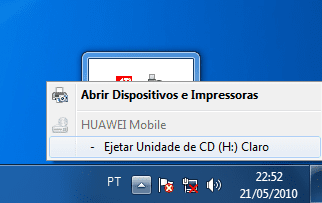
Here is a screen of the problem. (sorry, my Windows 7 is in portuguese...)
The "Huawei mobile" is gray, and when I click on "Eject CD Drive", nothing happens, and I can't remove my modem from USB. Can't eject from "Devices and Printers" too.
In Windows XP I can eject normally.
 

Attachments

  • eject.png
    eject.png
    10.6 KB · Views: 2,832

My Computer

OS
Windows XP/ Windows 7
Since the Release of Windows 7 a number of issues have been reported that require a firmware upgrade to the modem. Huawei have released new firmware to the Operators who have generally made it available on their websites. The Firmware upgrade must be carried out from a machine running Windows XP or Windows Vista and which can see the modem. Once this is comSince the Release of Windows 7 a number of issues have been reported that require a firmware upgrade to the modem. Huawei have released new firmware to the Operators who have generally made it available on their websites. The Firmware upgrade must be carried out from a machine running Windows XP or Windows Vista and which can see the modem. Once this is complete Windows 7 is able to see and use the modem.plete Windows 7 is able to see and use the modem.

Source: Huawei E220 - Wikipedia, the free encyclopedia
 

My Computer

Computer Manufacturer/Model Number
HP, Dell, Gateway, Toshiba - 4 laptops and 2 desktops
OS
Vista, Windows7, Mint Mate, Zorin, Windows 8
CPU
from 1.6GHz Duo to i7
Monitor(s) Displays
2x HP w2207
Hard Drives
5x HDD, 7x SSD, 12x Externals
Keyboard
with trackball - no mices
Mouse
Trackball mice
Internet Speed
DSL 6000
I've already made the firmware upgrade form the Huawei website.
The modem works, but I can't eject it!
 

My Computer

OS
Windows XP/ Windows 7
Could you tell me which site i can download that firmware? thank
 

My Computer

OS
Windows 7 Ultimate 32bit
CPU
Intel(R) Core(TM) i3 CPU M 350 @2.27 GHz
Memory
2.00 GB
Back
Top