Nothing will Update anymore

Danielzxzx

New member
Member
VIP
Local time
3:48 PM
Messages
233
Recently everything stopped updating properly. The Windows Update when it tries to update will always stay at 0% and will never progress any further. It is also the same with the Micosoft Security Essentials that came with the computer it won't update anymore. Can anyone help me?
 

My Computer

OS
Windows 7

My Computer

Computer type
PC/Desktop
Computer Manufacturer/Model Number
Dell XPS 420
OS
Windows 10, Home Clean Install
CPU
Intel Core2 processsor Q8200(2.33Ghz 1333FSB) Quad Core Tech
Motherboard
Dell
Memory
6 gb
Graphics Card(s)
ATI Radeon 256MB HD3650
Sound Card
Intergrated 7.1 Channel Audio
Monitor(s) Displays
Dell SP2009W 20"
Hard Drives
640 GB Serial ATA Hard drive
Cooling
Fan
Keyboard
Dell USB Keyboard
Mouse
Dell Premium Optical USB
Internet Speed
DSL 2.85
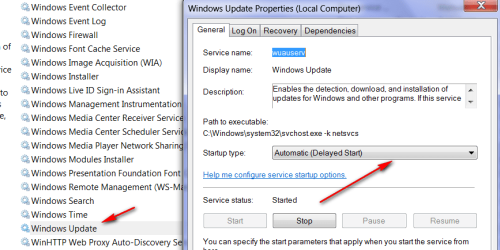
Something seems to be wrong with your "Windows Update". Check in Services that it is set to "Automatic". Else you can run a SFC /SCANNOW in elevated cmd. Maybe it can fix it.

PS: just saw that Richard posted even better solutions - LOL
 

My Computer

Computer Manufacturer/Model Number
HP, Dell, Gateway, Toshiba - 4 laptops and 2 desktops
OS
Vista, Windows7, Mint Mate, Zorin, Windows 8
CPU
from 1.6GHz Duo to i7
Monitor(s) Displays
2x HP w2207
Hard Drives
5x HDD, 7x SSD, 12x Externals
Keyboard
with trackball - no mices
Mouse
Trackball mice
Internet Speed
DSL 6000
Something seems to be wrong with your "Windows Update". Check in Services that it is set to "Automatic". Else you can run a SFC /SCANNOW in elevated cmd. Maybe it can fix it.


How do I get to the Windows Update Services and what is SFC/SCANNOW in elevated cmd?
 

My Computer

OS
Windows 7

My Computer

Computer type
PC/Desktop
Computer Manufacturer/Model Number
Dell XPS 420
OS
Windows 10, Home Clean Install
CPU
Intel Core2 processsor Q8200(2.33Ghz 1333FSB) Quad Core Tech
Motherboard
Dell
Memory
6 gb
Graphics Card(s)
ATI Radeon 256MB HD3650
Sound Card
Intergrated 7.1 Channel Audio
Monitor(s) Displays
Dell SP2009W 20"
Hard Drives
640 GB Serial ATA Hard drive
Cooling
Fan
Keyboard
Dell USB Keyboard
Mouse
Dell Premium Optical USB
Internet Speed
DSL 2.85
Did you install new hardware? Did this happen after installing the hardware?

Click here and validate your Windows Genuine Microsoft Software
 

My Computer

Computer type
PC/Desktop
Computer Manufacturer/Model Number
Bruce ... somewhere in his 40's
OS
Windows 7 Ultimate 32bit SP1
CPU
Intel(R) Core(TM)2 Quad CPU @ 2.40GHz, 2400 MHz
Motherboard
INTEL/D975XBX2
Memory
4 GB
Graphics Card(s)
ATI Radeon HD 2600 Pro
Monitor(s) Displays
Samsung SyncMaster 914v
Screen Resolution
1280 x 1024
Hard Drives
2/500GB each ... ST3500630AS ATA Device.
One is not connected
PSU
Rocketfish 700 W
Case
G.Skill Gigabyte Chassis
Keyboard
Standard PS/2 Keyboard
Mouse
Microsoft PS/2 Mouse
Internet Speed
DSL
Antivirus
Avira Internet Security
Browser
IE 11
Other Info
ATI HDMI Audio
Something seems to be wrong with your "Windows Update". Check in Services that it is set to "Automatic". Else you can run a SFC /SCANNOW in elevated cmd. Maybe it can fix it.


How do I get to the Windows Update Services and what is SFC/SCANNOW in elevated cmd?
Type Services into Start/search and hit Enter. Then navigate to "Windows Update" > right click on it > click on Properties > and check whether it is set to "Automatic" or "Automatic (delayed start)".
 

Attachments

  • 2010-12-22_1749.png
    2010-12-22_1749.png
    27.1 KB · Views: 20

My Computer

Computer Manufacturer/Model Number
HP, Dell, Gateway, Toshiba - 4 laptops and 2 desktops
OS
Vista, Windows7, Mint Mate, Zorin, Windows 8
CPU
from 1.6GHz Duo to i7
Monitor(s) Displays
2x HP w2207
Hard Drives
5x HDD, 7x SSD, 12x Externals
Keyboard
with trackball - no mices
Mouse
Trackball mice
Internet Speed
DSL 6000
Recently everything stopped updating properly. The Windows Update when it tries to update will always stay at 0% and will never progress any further. It is also the same with the Micosoft Security Essentials that came with the computer it won't update anymore. Can anyone help me?

Besides the other good advice here, make sure the time/date are correct on your machine. Windows update doesn't work properly unless they are correct.
 

My Computer

Computer type
PC/Desktop
Computer Manufacturer/Model Number
Home built
OS
Windows 7 Ult, Windows 8.1 Pro,
CPU
Q9650-4.275GHz, E8600 4.5GHz, E6750-3.8GHz
Motherboard
Evga 780i FTW
Memory
G.Skill PC2 9600 1200Mhz 5 5 5 15 2T
Graphics Card(s)
GTX480
Sound Card
Asus Xonar D2
Monitor(s) Displays
HannsG
Screen Resolution
1680X1050
Hard Drives
GSkill Phoenix Pro 120GB SSD
PSU
ThermalTake Toughpower 1000Watt modular
Case
ThermalTake XaserV
Cooling
Xigmatek S1283
Keyboard
Logitech G15
Mouse
Logitech G9
Internet Speed
T1
I have given you the methods and tools suggested by MS. Give it a try.
 

My Computer

Computer type
PC/Desktop
Computer Manufacturer/Model Number
Dell XPS 420
OS
Windows 10, Home Clean Install
CPU
Intel Core2 processsor Q8200(2.33Ghz 1333FSB) Quad Core Tech
Motherboard
Dell
Memory
6 gb
Graphics Card(s)
ATI Radeon 256MB HD3650
Sound Card
Intergrated 7.1 Channel Audio
Monitor(s) Displays
Dell SP2009W 20"
Hard Drives
640 GB Serial ATA Hard drive
Cooling
Fan
Keyboard
Dell USB Keyboard
Mouse
Dell Premium Optical USB
Internet Speed
DSL 2.85
Like Danielzxzx, I am having the same problem. Virtually nothing will update. I went to Dell who said they didn’t have the expertise to fix the problem and referred me to their business partner – Gizmo – who guarantee “No Fix No Fee”. Gizmo spent about two hours and gave up and said re-install. I have tried manual updates and using System Update Readiness Tool (Windows6.1-KB947821-v8-x64.msu). Tried Microsoft Fix it 50202 and manual reset windows update components. No Luck. Any clues?
 

My Computer

Computer Manufacturer/Model Number
Dell Studio XPS 1645
OS
Windows 7 Ultimate x64
Like Danielzxzx, I am having the same problem. Virtually nothing will update. I went to Dell who said they didn’t have the expertise to fix the problem and referred me to their business partner – Gizmo – who guarantee “No Fix No Fee”. Gizmo spent about two hours and gave up and said re-install. I have tried manual updates and using System Update Readiness Tool (Windows6.1-KB947821-v8-x64.msu). Tried Microsoft Fix it 50202 and manual reset windows update components. No Luck. Any clues?

Hello, and welcome to the Seven Forums!

If Gizmo can't fix it, then we may not be able to either, but you can give us a try, if you like! Please create your own thread here: Windows Updates & Activation - Windows 7 Forums

and tell us a bit more about your problem. Have you ever received any error codes? Can you please list them for us? Remember that if one update fails, the whole group fails. Try them individually. If there are specific updates failing, number their KBs. If they all fail, don't bother.

Did the System Update Readiness Tool succeed, or fail (with what error code?)

Navigate to C:\Windows\Logs, and copy the CBS folder to your Desktop. Right click > Send to > Compressed (zipped) folder, and upload it to this forum.

Please put all of this information in your new thread, and not on this thread.

Thanks!

Richard

 

My Computer

Computer Manufacturer/Model Number
Dell XPS 420
OS
Vista Home Premium x86 SP2
CPU
Intel Core 2 Quad Q9300 2.50GHz
Motherboard
Stock Dell 0TP406
Memory
4 gb (DDR2 800) 400MHz
Graphics Card(s)
ATI Radeon HD 3870 (512 MBytes)
Monitor(s) Displays
1 x Dell 2007FP and 1 x (old) Sonic flat screen
Screen Resolution
1600 x 1200 and 1280 x 1204
Hard Drives
1 x 640Gb (SATA 300) Western Digital: WDC WD6400AAKS-75A7B0 1 x 1Tb (SATA 600) Western Digital: Caviar Black, SATA 6GB/S, 64Mb cache, 8ms Western Digital: WDC WD1002FAEX-00Z3A0 ATA Device
Case
Dell XPS 420
Cooling
Stock Fan
Keyboard
Dell Bluetooth
Mouse
Advent Optical ADE-WG01 (colour change light up)
Internet Speed
Varies from 10kb/s to 170kb/s. So unreliable it is not funny
Other Info
ASUS USB 3.0 5Gbps/SATA 6Gbps - PCI-Express Combo Controller Card (U3S6)
It finally is working now! My Security software finally updated and the update for it was removed from the windows update since it updated it. Now the update is working again. I guess maybe there was a problem with the place that windows update checks and they needed to fix it in order for windows update to work again but it works fine now.
 

My Computer

OS
Windows 7
Excellent! That is really excellent news! Well done!

If you have any more questions, don't hesitate to ask!

Richard
 

My Computer

Computer Manufacturer/Model Number
Dell XPS 420
OS
Vista Home Premium x86 SP2
CPU
Intel Core 2 Quad Q9300 2.50GHz
Motherboard
Stock Dell 0TP406
Memory
4 gb (DDR2 800) 400MHz
Graphics Card(s)
ATI Radeon HD 3870 (512 MBytes)
Monitor(s) Displays
1 x Dell 2007FP and 1 x (old) Sonic flat screen
Screen Resolution
1600 x 1200 and 1280 x 1204
Hard Drives
1 x 640Gb (SATA 300) Western Digital: WDC WD6400AAKS-75A7B0 1 x 1Tb (SATA 600) Western Digital: Caviar Black, SATA 6GB/S, 64Mb cache, 8ms Western Digital: WDC WD1002FAEX-00Z3A0 ATA Device
Case
Dell XPS 420
Cooling
Stock Fan
Keyboard
Dell Bluetooth
Mouse
Advent Optical ADE-WG01 (colour change light up)
Internet Speed
Varies from 10kb/s to 170kb/s. So unreliable it is not funny
Other Info
ASUS USB 3.0 5Gbps/SATA 6Gbps - PCI-Express Combo Controller Card (U3S6)
Like Danielzxzx, I am having the same problem. Virtually nothing will update. I went to Dell who said they didn’t have the expertise to fix the problem and referred me to their business partner – Gizmo – who guarantee “No Fix No Fee”. Gizmo spent about two hours and gave up and said re-install. I have tried manual updates and using System Update Readiness Tool (Windows6.1-KB947821-v8-x64.msu). Tried Microsoft Fix it 50202 and manual reset windows update components. No Luck. Any clues?

Hello, and welcome to the Seven Forums!

If Gizmo can't fix it, then we may not be able to either, but you can give us a try, if you like! Please create your own thread here: Windows Updates & Activation - Windows 7 Forums

and tell us a bit more about your problem. Have you ever received any error codes? Can you please list them for us? Remember that if one update fails, the whole group fails. Try them individually. If there are specific updates failing, number their KBs. If they all fail, don't bother.

Did the System Update Readiness Tool succeed, or fail (with what error code?)

Navigate to C:\Windows\Logs, and copy the CBS folder to your Desktop. Right click > Send to > Compressed (zipped) folder, and upload it to this forum.

Please put all of this information in your new thread, and not on this thread.

Thanks!

Richard

Resbumitted at
"Windows 7 Update Continually Fails on Certain Updates" on 6 Jan 2011
 

My Computer

Computer Manufacturer/Model Number
Dell Studio XPS 1645
OS
Windows 7 Ultimate x64
Back
Top