Notification Area Icon: Windows Update missing

meridius21

New member
Member
Local time
10:12 AM
Messages
69
On one of the laptops the Windows Update icon is missing in 'Control Panel\All Control Panel Items\Notification Area Icons'.

Windows Update is actually working but I am not getting this prompt in the bottom right taskbar area.

Could this be anything to do with registry settings or a missing KB? Should I click on 'Restore default icon behaviors' in Notification Area Icons of the control panel?

Any ideas?
 

My Computer

Computer type
PC/Desktop
OS
Windows 7 HP & Pro 64 bit
I just noticed that Windows Update has not been checking for updates on that laptop for the last two days. I will go through problem solving as usual using the methods in my main post and get back to this post again with more information.
 

My Computer

Computer type
PC/Desktop
OS
Windows 7 HP & Pro 64 bit
On one of the laptops the Windows Update icon is missing in 'Control Panel\All Control Panel Items\Notification Area Icons'.

Windows Update is actually working but I am not getting this prompt in the bottom right taskbar area.

Could this be anything to do with registry settings or a missing KB? Should I click on 'Restore default icon behaviors' in Notification Area Icons of the control panel?

Any ideas?
For most this happened months ago. Search around for several threads about it.
 

My Computer

Computer Manufacturer/Model Number
HP p6608f
OS
Win 7 Home Premium x64
CPU
Intel Core i3-540 3.07 GHz
Motherboard
MS-7613 (Iona-GL8E)
Memory
4 GB (2 X 2) Dual-Channel PC-10600 DDR3 @ 665MHz (9-9-9-24)
Graphics Card(s)
Integrated Intel H57
Sound Card
Integrated Realtek ALC888S Audio
Monitor(s) Displays
17" SDM-HS73 (a vestige from my old computer)
Screen Resolution
1280 X 1024
Hard Drives
750GB SATA 7200 RPM
PSU
250W
Keyboard
HP USB keyboard
Mouse
HP USB optical mouse
Internet Speed
15Mbps/1Mbps
Well I have had to go back to basics with this problem as it is more than a missing icon. The update process has reverted to the original problem which will take the usual amount of time and frustration to resolve. The other laptop which does not have a problem is the clean install one.

I am now just wondering if Windows 10 is actually safer than Windows 7? However my understanding is that Windows 10 is a spying and marketing operating system and that we as users actually have less control over it.
 
Last edited:

My Computer

Computer type
PC/Desktop
OS
Windows 7 HP & Pro 64 bit
As bru has mentioned - for many of us, the problem appeared months ago and I could not find a solution either.

However, a few weeks ago I downloaded the portable version of the GWX Control Panel program - which stops all the nagware and "encouragements" from Microsoft to update to Windows 10 for those users (like myself) who are still running Windows 7.

After running the program and configuring it to deflect the Windows 10 nags and forced updates - lo and behold the little blue Windows Update icon began reappearing in lower right taskbar, just as it had done for years - and has continued to do so normally over the past two months when the new updates were published and pushed out.

I have not taken the time to delve into the connection, but can only assume that the GWX Control Panel reconfigures the Windows Update process in some manner (possibly in the registry?) - which caused this happy result.

I don't know why - but am happy to report the little blue icon now shows up for new updates. Perhaps someone here with a little more tech skill and knowledge might be able to explain the connection.
 

My Computer

Computer type
PC/Desktop
Computer Manufacturer/Model Number
HP
OS
Windows 7 Home Premium 64 Bit
CPU
AMD
Memory
4 Gigs
Antivirus
Microsoft Security Essentials
Browser
Firefox
My "new updates are available" icon vanished months ago. There were many threads on the subject. Most of us just pinned a Windows Update shortcut to the Start Menu.

Windows Update Shortcut - Create in Windows 7

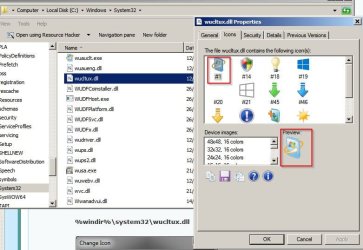
If you look at the icon for %windir%\system32\wucltux.dll as mentioned in the above tutorial you can see which icon is available.

wucltux_dll.jpg

For me: After a full removal of windows updates followed by a reinstall of windows updates (not a fresh install of Windows 7) and a check then repair of .NET Framework I got the blue icon back and still have it show up. I've got the latest WUC. I do not have any trace of those earlier problem WUC's installed.

I guess that wucltux.dll got replaced at some point during WUC upgrades.

Updates Notify.jpg
 
Last edited:

My Computer

Computer type
Laptop
Computer Manufacturer/Model Number
ASUS
OS
Microsoft Windows 7 Home Premium 64-bit 7601 Multiprocessor Free Service Pack 1
CPU
AMD C-60 APU with Radeon(tm) HD Graphics
Motherboard
ASUSTeK COMPUTER INC. X501U
Memory
4.00 GB
Graphics Card(s)
AMD Radeon HD 6290 Graphics
Sound Card
(1) AMD High Definition Audio Device (2) Realtek High Defi
Screen Resolution
1366 x 768 x 32 bits (4294967296 colors) @ 60 Hz
Hard Drives
Hitachi HTS545050A7E380 SATA Disk Device
Antivirus
Comodo CIS & FW, SecureAplus App Whitelisting, Threatfire
Browser
Cyberfox 64bit, Opera 64bit, Airfox
Other Info
Spy-The-Spy, HitmanPro.Alert, Norton Connect Safe, MJRegWatcher, BitDefender TrafficLight, Voodoo Shield, Zemana AntiMalware
Thanks for your reply. I had also pinned the icon to the start menu and was happy with that. I just happened to notice that after running the GWX Control Panel to prevent Windows 10 nags and forced upgrades, the update icon begab reappearing in my taskbar - without any direct action on my part.

I suspect that Microsoft caused the removal of the icon as another way to slip Windows 10 onto every available computer.

Thanks again for your helpful reply. :)
 

My Computer

Computer type
PC/Desktop
Computer Manufacturer/Model Number
HP
OS
Windows 7 Home Premium 64 Bit
CPU
AMD
Memory
4 Gigs
Antivirus
Microsoft Security Essentials
Browser
Firefox
I am pretty sure that Redmond are doing this on purpose. How much money do they make from us still using Windows 7?

However if we all get so fed up with this and 'upgrade' to Windows 10 they can start making money from us through Windows Store as well as using our data and search information etc.

Microsoft woke up to this business model a bit too late and they are now scrambling for revenue. In the meantime people innocently use Windows 10 with no idea about who is spying in the background.
 

My Computer

Computer type
PC/Desktop
OS
Windows 7 HP & Pro 64 bit
I think I've found the answer. See my post here:

http://www.sevenforums.com/news/394...update-slowdowns-post3248767.html#post3248767

KB 3075851 - Aug 2015 - WUC: fixes mess due to KB3065987 [cuts down WUC memory usage, but hides Update notifications if GWX app is active] (replaces 3065987)

So basically if GWX (get Windows 10 app) ever made it's way onto your system - even if you have subsequently disabled/ removed it - the Aug 2015 WUC might well have caused the problem when it was installed.

EDIT:

My mistake: It's KB3065987 Windows Update Client for Windows July 2015 that caused the problem.
 
Last edited:

My Computer

Computer type
Laptop
Computer Manufacturer/Model Number
ASUS
OS
Microsoft Windows 7 Home Premium 64-bit 7601 Multiprocessor Free Service Pack 1
CPU
AMD C-60 APU with Radeon(tm) HD Graphics
Motherboard
ASUSTeK COMPUTER INC. X501U
Memory
4.00 GB
Graphics Card(s)
AMD Radeon HD 6290 Graphics
Sound Card
(1) AMD High Definition Audio Device (2) Realtek High Defi
Screen Resolution
1366 x 768 x 32 bits (4294967296 colors) @ 60 Hz
Hard Drives
Hitachi HTS545050A7E380 SATA Disk Device
Antivirus
Comodo CIS & FW, SecureAplus App Whitelisting, Threatfire
Browser
Cyberfox 64bit, Opera 64bit, Airfox
Other Info
Spy-The-Spy, HitmanPro.Alert, Norton Connect Safe, MJRegWatcher, BitDefender TrafficLight, Voodoo Shield, Zemana AntiMalware
So basically if GWX (get Windows 10 app) ever made it's way onto your system - even if you have subsequently disabled/ removed it - the Aug 2015 WUC might well have caused the problem when it was installed.

EDIT:

My mistake: It's KB3065987 Windows Update Client for Windows July 2015 that caused the problem.
I am pretty sure GWX never made it to either of my Win 7 systems yet I lost the WU icon in the notification area on both. If it is indeed the July 2015 WUC that is the cause would uninstalling it restore the icon?

edit: Can't remove KB3065987 as it isn't listed in installed updates. I am thinking I didn't install it as I was trying to follow the advice given on which updates to ignore. I don't see it in hidden updates so I can't be sure. I definitely lost my WU icon somehow.
 

My Computer

Computer Manufacturer/Model Number
HP p6608f
OS
Win 7 Home Premium x64
CPU
Intel Core i3-540 3.07 GHz
Motherboard
MS-7613 (Iona-GL8E)
Memory
4 GB (2 X 2) Dual-Channel PC-10600 DDR3 @ 665MHz (9-9-9-24)
Graphics Card(s)
Integrated Intel H57
Sound Card
Integrated Realtek ALC888S Audio
Monitor(s) Displays
17" SDM-HS73 (a vestige from my old computer)
Screen Resolution
1280 X 1024
Hard Drives
750GB SATA 7200 RPM
PSU
250W
Keyboard
HP USB keyboard
Mouse
HP USB optical mouse
Internet Speed
15Mbps/1Mbps
I am pretty sure GWX never made it to either of my Win 7 systems yet I lost the WU icon in the notification area on both. If it is indeed the July 2015 WUC that is the cause would uninstalling it restore the icon?

edit: Can't remove KB3065987 as it isn't listed in installed updates. I am thinking I didn't install it as I was trying to follow the advice given on which updates to ignore. I don't see it in hidden updates so I can't be sure. I definitely lost my WU icon somehow.[/QUOTE]

Check WUC versions (installed updates) by running this command:

Code:
get-hotfix -id KB2990214,KB305026,KB3065987,KB3075851,KB3083324,KB3083710,KB3102810,KB3112343,KB3135445,KB3138612

Use Elevated Command Prompt> Powershell. Like this.

http://www.sevenforums.com/performa...emory-leak-random-cpu-spikes.html#post3070782

385734d1461743969t-its-time-microsoft-fix-windows-7-update-slowdowns-installed-wuc-updates.jpg

Post a screenshot of the results.
 

My Computer

Computer type
Laptop
Computer Manufacturer/Model Number
ASUS
OS
Microsoft Windows 7 Home Premium 64-bit 7601 Multiprocessor Free Service Pack 1
CPU
AMD C-60 APU with Radeon(tm) HD Graphics
Motherboard
ASUSTeK COMPUTER INC. X501U
Memory
4.00 GB
Graphics Card(s)
AMD Radeon HD 6290 Graphics
Sound Card
(1) AMD High Definition Audio Device (2) Realtek High Defi
Screen Resolution
1366 x 768 x 32 bits (4294967296 colors) @ 60 Hz
Hard Drives
Hitachi HTS545050A7E380 SATA Disk Device
Antivirus
Comodo CIS & FW, SecureAplus App Whitelisting, Threatfire
Browser
Cyberfox 64bit, Opera 64bit, Airfox
Other Info
Spy-The-Spy, HitmanPro.Alert, Norton Connect Safe, MJRegWatcher, BitDefender TrafficLight, Voodoo Shield, Zemana AntiMalware
Back
Top