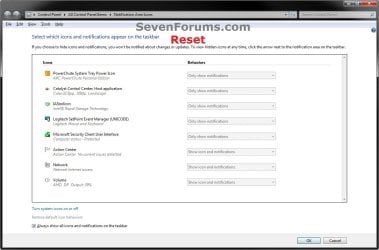
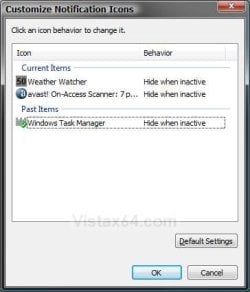
Notification Area Icons - Reset

How to Reset the Notification Area Icons Cache in Vista, Windows 7, and Windows 8

   Information
The notification area is a part of the taskbar that provides a temporary source for notifications and status. It can also be used to display icons for system and program features that are not on the desktop.

This will show you how reset the Notification Area Icons cache to fix any corrupted icons and remove any old icons of uninstalled programs from the Notification area Icons hide or show settings for your account in Windows 7/8 and Vista.


EXAMPLE: Windows 7 and Windows 8 "Notification Area Icons" Before and After Reset
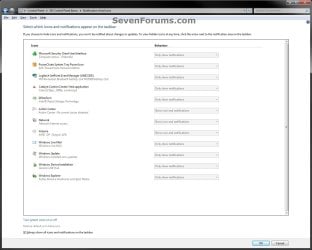
Windows7-Before.jpg

Windows7-After.jpg

EXAMPLE: Vista "Customize Notification Icons" Before and After Reset
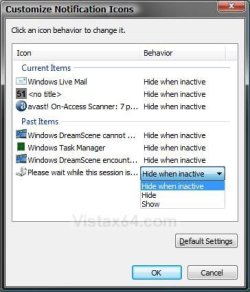
Vista-Before.jpg

Vista-After.jpg


Here's How:

1. Click/tap on the Download button below to download the file below.
Reset_Notification_Area_Icons_Cache.bat

   Note
This .bat (batch) file will confirm with you to kill the explorer.exe process, delete the registry keys IconStreams and PastIconsStream, restart the explorer.exe process, and confirm with you to restart the computer.

TrayNotify.jpg


2. Save the .bat file to your desktop.

3. Double click/tap on the .bat file to run it, click/tap on Run (if prompted by UAC), and follow the onscreen instructions in the command prompt.
NOTE: If you like, you can stop getting the Run prompt by unblocking the .bat file.

4. This is what you will see if the registry keys IconStreams and PastIconsStream have already been deleted.
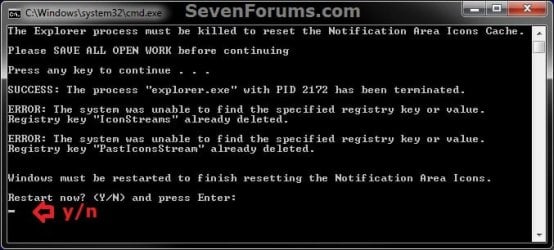
Already_Deleted.jpg
5. This is what you will see if the registry keys IconStreams and PastIconsStream have not already been deleted.
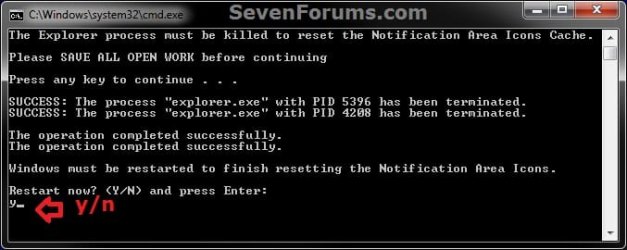
Not_Deleted_Yet.jpg
6. After the computer restarts, the IconStreams and PastIconsStream binary values in the registry will automatically be recreated the next time you make any change to the notification area icons in Windows 7/8 and Vista.


That's it,
Shawn Brink


Attachments

Last edited:
Nice job

I have always contended that computers were tools for humans, not man for the machine. To emphasize that I've always tried to make all the instructions I give to anyone who asks tight, concise and not overly wordy. In other words, if I ask what time it is, I don't have time for you to build me a watch. You seem to subscribe to the same principle. Thanks! :D
 

My Computer

Computer Manufacturer/Model Number
Homebilt
OS
Windows 7 Ultimate x86
CPU
Intel core 2 Duo E4500
Motherboard
Biostar TF7150U-M7
Memory
3 GB 789 MHZ
Graphics Card(s)
NVIDIA Gforce 8400 GS
Sound Card
NVIDIA integrated
Monitor(s) Displays
Samsung SyncMaster Magic CX931E
Hard Drives
(4) 500GB WD Caviar Blacks
PSU
Generic 400 Watt
Case
Apevia Aspire X-QPACK2-NW-BK/500
Cooling
Cooler Master X Dream 4 CPU Cooling Fan plus two 120mm case
Hello LeSpot, and welcome to Seven Forums. I take that as a great compliment. I always try to write my tutorials to be as easy as possible to use and understand for all levels of experience.

Thank you,
Shawn
 

My Computer

Computer type
PC/Desktop
Computer Manufacturer/Model Number
Self built custom
OS
64-bit Windows 11 Pro for Workstations
CPU
Intel i7-8700K OC'd to 5 GHz
Motherboard
ASUS ROG Maximus XI Formula Z390
Memory
64 GB (4x16GB) G.SKILL TridentZ RGB DDR4 3600 MHz
Graphics Card(s)
ASUS ROG-STRIX-GTX1080TI-O11G-GAMING
Sound Card
Integrated
Monitor(s) Displays
2 x Samsung Odyssey G7 27"
Screen Resolution
2560x1440
Hard Drives
1TB Samsung 990 PRO M.2,
4TB Samsung 990 PRO PRO M.2,
TerraMaster F8 SSD Plus NAS
PSU
Seasonic Prime Titanium 850W
Case
Thermaltake Core P3
Cooling
Corsair Hydro H115i
Keyboard
Logitech wireless K800
Mouse
Logitech MX Master 4
Internet Speed
2 Gb/s Download and 100 Mb/s Upload
Antivirus
Malwarebyte Anti-Malware Premium
Browser
Google Chrome
Other Info
Logitech Z625 speaker system,
Logitech BRIO 4K Pro webcam,
HP Color LaserJet Pro MFP M477fdn,
APC SMART-UPS RT 1000 XL - SURT1000XLI,
Galaxy S23 Plus phone
Thanks a lot for another great tutorial.
 

My Computer

OS
Windows 7 Ultimate 32bit
CPU
AMD Phenom II x4 965 3.4GHz
Motherboard
Gigabyte GA-890FXA-UD5 rev2.0
Memory
G.SKILL F3-16000CL8D-4GBPIS (2GBx2)
Graphics Card(s)
Inno3d GTX480 1.5GB GDDR5
Monitor(s) Displays
LG FLATRON W2486L
Screen Resolution
1920x1080@60Hz
Hard Drives
Western Digital Caviar Black WD1002FAEX 1TB 64MB 7200RPM Sata III x3
PSU
Enermax MODU82+ 625W
Case
Thermaltake Element G Middle Tower
I have updated this tutorial for everyone to be able to reset the notification area icons with a simple to use .bat (batch) file now in both Windows 7 and Vista. :)
 

My Computer

Computer type
PC/Desktop
Computer Manufacturer/Model Number
Self built custom
OS
64-bit Windows 11 Pro for Workstations
CPU
Intel i7-8700K OC'd to 5 GHz
Motherboard
ASUS ROG Maximus XI Formula Z390
Memory
64 GB (4x16GB) G.SKILL TridentZ RGB DDR4 3600 MHz
Graphics Card(s)
ASUS ROG-STRIX-GTX1080TI-O11G-GAMING
Sound Card
Integrated
Monitor(s) Displays
2 x Samsung Odyssey G7 27"
Screen Resolution
2560x1440
Hard Drives
1TB Samsung 990 PRO M.2,
4TB Samsung 990 PRO PRO M.2,
TerraMaster F8 SSD Plus NAS
PSU
Seasonic Prime Titanium 850W
Case
Thermaltake Core P3
Cooling
Corsair Hydro H115i
Keyboard
Logitech wireless K800
Mouse
Logitech MX Master 4
Internet Speed
2 Gb/s Download and 100 Mb/s Upload
Antivirus
Malwarebyte Anti-Malware Premium
Browser
Google Chrome
Other Info
Logitech Z625 speaker system,
Logitech BRIO 4K Pro webcam,
HP Color LaserJet Pro MFP M477fdn,
APC SMART-UPS RT 1000 XL - SURT1000XLI,
Galaxy S23 Plus phone
Thanks a lot for your great effort.
 

My Computer

OS
Windows 7 Ultimate 32bit
CPU
AMD Phenom II x4 965 3.4GHz
Motherboard
Gigabyte GA-890FXA-UD5 rev2.0
Memory
G.SKILL F3-16000CL8D-4GBPIS (2GBx2)
Graphics Card(s)
Inno3d GTX480 1.5GB GDDR5
Monitor(s) Displays
LG FLATRON W2486L
Screen Resolution
1920x1080@60Hz
Hard Drives
Western Digital Caviar Black WD1002FAEX 1TB 64MB 7200RPM Sata III x3
PSU
Enermax MODU82+ 625W
Case
Thermaltake Element G Middle Tower
You're most welcome Need4steer, and thank you. :)
 

My Computer

Computer type
PC/Desktop
Computer Manufacturer/Model Number
Self built custom
OS
64-bit Windows 11 Pro for Workstations
CPU
Intel i7-8700K OC'd to 5 GHz
Motherboard
ASUS ROG Maximus XI Formula Z390
Memory
64 GB (4x16GB) G.SKILL TridentZ RGB DDR4 3600 MHz
Graphics Card(s)
ASUS ROG-STRIX-GTX1080TI-O11G-GAMING
Sound Card
Integrated
Monitor(s) Displays
2 x Samsung Odyssey G7 27"
Screen Resolution
2560x1440
Hard Drives
1TB Samsung 990 PRO M.2,
4TB Samsung 990 PRO PRO M.2,
TerraMaster F8 SSD Plus NAS
PSU
Seasonic Prime Titanium 850W
Case
Thermaltake Core P3
Cooling
Corsair Hydro H115i
Keyboard
Logitech wireless K800
Mouse
Logitech MX Master 4
Internet Speed
2 Gb/s Download and 100 Mb/s Upload
Antivirus
Malwarebyte Anti-Malware Premium
Browser
Google Chrome
Other Info
Logitech Z625 speaker system,
Logitech BRIO 4K Pro webcam,
HP Color LaserJet Pro MFP M477fdn,
APC SMART-UPS RT 1000 XL - SURT1000XLI,
Galaxy S23 Plus phone
i used the notication area icon cleaner. now my network icon has an (x) on it , like i dont have a connection. but i do have a connection ???

UPDATE:
sorry to bother you .. i did another restart.. it fixed itself . thanks for the bit. of info i'll save it for later. i usaully use ccleaner to rid of those left overs..
 
Last edited by a moderator:

My Computer

Computer type
PC/Desktop
Computer Manufacturer/Model Number
hpe510f
OS
windows 7 home premium 64 bit
CPU
amd phenom II x6 1055T 2.8 ghz
Motherboard
FOXCONN 2AB1
Memory
8.00 GB Dual-Channel DDR3
Graphics Card(s)
hd6570
Sound Card
Realtek High Definition
Monitor(s) Displays
acer x233h
Screen Resolution
1920X1080
Hard Drives
samsung 830 60gb ssd,WDC WD15 EARS-60MVWB0 SATA 1.5 tb, seagate 500gb hdd
Keyboard
hp
Mouse
hp
Internet Speed
15mb down 1.5 up
Antivirus
mse
Browser
chrome, foxfire, ie11
You're welcome Sandyfeet, and welcome to Seven Forums. It's no bother at all. I'm happy to hear that you got it sorted. :)
 

My Computer

Computer type
PC/Desktop
Computer Manufacturer/Model Number
Self built custom
OS
64-bit Windows 11 Pro for Workstations
CPU
Intel i7-8700K OC'd to 5 GHz
Motherboard
ASUS ROG Maximus XI Formula Z390
Memory
64 GB (4x16GB) G.SKILL TridentZ RGB DDR4 3600 MHz
Graphics Card(s)
ASUS ROG-STRIX-GTX1080TI-O11G-GAMING
Sound Card
Integrated
Monitor(s) Displays
2 x Samsung Odyssey G7 27"
Screen Resolution
2560x1440
Hard Drives
1TB Samsung 990 PRO M.2,
4TB Samsung 990 PRO PRO M.2,
TerraMaster F8 SSD Plus NAS
PSU
Seasonic Prime Titanium 850W
Case
Thermaltake Core P3
Cooling
Corsair Hydro H115i
Keyboard
Logitech wireless K800
Mouse
Logitech MX Master 4
Internet Speed
2 Gb/s Download and 100 Mb/s Upload
Antivirus
Malwarebyte Anti-Malware Premium
Browser
Google Chrome
Other Info
Logitech Z625 speaker system,
Logitech BRIO 4K Pro webcam,
HP Color LaserJet Pro MFP M477fdn,
APC SMART-UPS RT 1000 XL - SURT1000XLI,
Galaxy S23 Plus phone
i used the notication area icon cleaner. now my network icon has an (x) on it , like i dont have a connection. but i do have a connection ???

I thought you might find it amusing that I used this for the exact situation above. I had an "X" in my net icon. This reset it an I find myself much less annoyed.

To me it seemed like a Net framework 4 WU from last week got all my icons messed up. Reverting to a day earlier would make it work aside from the Xed out network icon, but the next boot would make me lose them again. This got me back to where I was before and loaded all the icons I was missing.

Thanks
 

My Computer

OS
Win 7 ultimate 64 7100
CPU
i7 920
Motherboard
MSI 58x Pro-E
Memory
6gigs OCZ trichannel
Graphics Card(s)
ATI 4890
Other Info
Running at 3.8 Ghz with EIST lowering voltages and multiplier as needed.
You're welcome HRM. Thank you for posting back with your results. :)
 

My Computer

Computer type
PC/Desktop
Computer Manufacturer/Model Number
Self built custom
OS
64-bit Windows 11 Pro for Workstations
CPU
Intel i7-8700K OC'd to 5 GHz
Motherboard
ASUS ROG Maximus XI Formula Z390
Memory
64 GB (4x16GB) G.SKILL TridentZ RGB DDR4 3600 MHz
Graphics Card(s)
ASUS ROG-STRIX-GTX1080TI-O11G-GAMING
Sound Card
Integrated
Monitor(s) Displays
2 x Samsung Odyssey G7 27"
Screen Resolution
2560x1440
Hard Drives
1TB Samsung 990 PRO M.2,
4TB Samsung 990 PRO PRO M.2,
TerraMaster F8 SSD Plus NAS
PSU
Seasonic Prime Titanium 850W
Case
Thermaltake Core P3
Cooling
Corsair Hydro H115i
Keyboard
Logitech wireless K800
Mouse
Logitech MX Master 4
Internet Speed
2 Gb/s Download and 100 Mb/s Upload
Antivirus
Malwarebyte Anti-Malware Premium
Browser
Google Chrome
Other Info
Logitech Z625 speaker system,
Logitech BRIO 4K Pro webcam,
HP Color LaserJet Pro MFP M477fdn,
APC SMART-UPS RT 1000 XL - SURT1000XLI,
Galaxy S23 Plus phone
Thanks for this tutorial Brink, Thankfully there are people like you around to show us all the things Microsoft makes seem so difficult. Why can't they just add a simple "remove icon from list" option? Or, if that actually isn't possible, an option to do exactly what your .bat file does?
 

My Computer

Computer Manufacturer/Model Number
Acer Aspire 5741
OS
windows 7 Home Premium
CPU
Intel Core i5 @ 2.27GHz 32nm Technology
Motherboard
Acer Aspire 5741 (CPU)
Memory
DDR3 4.0GB
Graphics Card(s)
Intel(R) Graphics Media Accelerator HD
Sound Card
Realtek High Definition Audio Intel(R) Display Audio
Monitor(s) Displays
Generic PnP Monitor on Intel Graphics Media Accelerator HD
Screen Resolution
1366x768
Hard Drives
Seagate 2.5" SATA 500GB
Keyboard
Synaptics PS/2 Port TouchPad
Mouse
Microsoft Comfort Mouse 4500 (IntelliPoint)
You're most welcome kiwichick. Hopefully Windows 8 will have more of these type of options in it. :)
 

My Computer

Computer type
PC/Desktop
Computer Manufacturer/Model Number
Self built custom
OS
64-bit Windows 11 Pro for Workstations
CPU
Intel i7-8700K OC'd to 5 GHz
Motherboard
ASUS ROG Maximus XI Formula Z390
Memory
64 GB (4x16GB) G.SKILL TridentZ RGB DDR4 3600 MHz
Graphics Card(s)
ASUS ROG-STRIX-GTX1080TI-O11G-GAMING
Sound Card
Integrated
Monitor(s) Displays
2 x Samsung Odyssey G7 27"
Screen Resolution
2560x1440
Hard Drives
1TB Samsung 990 PRO M.2,
4TB Samsung 990 PRO PRO M.2,
TerraMaster F8 SSD Plus NAS
PSU
Seasonic Prime Titanium 850W
Case
Thermaltake Core P3
Cooling
Corsair Hydro H115i
Keyboard
Logitech wireless K800
Mouse
Logitech MX Master 4
Internet Speed
2 Gb/s Download and 100 Mb/s Upload
Antivirus
Malwarebyte Anti-Malware Premium
Browser
Google Chrome
Other Info
Logitech Z625 speaker system,
Logitech BRIO 4K Pro webcam,
HP Color LaserJet Pro MFP M477fdn,
APC SMART-UPS RT 1000 XL - SURT1000XLI,
Galaxy S23 Plus phone
Brink i try you solution , but lookslike not successwhen i try it's IconStreams and PastIconsStream not been deleted,5. This is what you will see if the registry keys IconStreams and PastIconsStream have not already been deleted.

it will be problem or harm to my windows? or other hardware? if that no.5 occurred , iconstreams and past iconstream not already been deleted?
sorry if i ask something like this, i new with this thing, and afraid my windows or hardware will harm or problem or troubleshooting... :cry::cry::cry:

i mean , this Reset_Notification_Area_Icons_Cache.bat is dangerous or not for my windows, registry, or hardware, because when i try the result is failed , and appear the 5. This is what you will see if the registry keys IconStreams and PastIconsStream have not already been deleted. , similiar like with the cmd picture.. http://www.sevenforums.com/attachme...fication-area-icons-reset-already_deleted.jpg

sorry if a silly question :cry::cry::cry:
 

My Computer

OS
Windows 7 Home Premium 64bit
Hello sle3pingz, and welcome to Seven Forums.

No, it will not harm anything. The BAT file only clears the old icons by deleting IconStreams and PastIconsStream, but they are recreated automatically after restarting the computer with only the current notificaton icons included now. :)
 

My Computer

Computer type
PC/Desktop
Computer Manufacturer/Model Number
Self built custom
OS
64-bit Windows 11 Pro for Workstations
CPU
Intel i7-8700K OC'd to 5 GHz
Motherboard
ASUS ROG Maximus XI Formula Z390
Memory
64 GB (4x16GB) G.SKILL TridentZ RGB DDR4 3600 MHz
Graphics Card(s)
ASUS ROG-STRIX-GTX1080TI-O11G-GAMING
Sound Card
Integrated
Monitor(s) Displays
2 x Samsung Odyssey G7 27"
Screen Resolution
2560x1440
Hard Drives
1TB Samsung 990 PRO M.2,
4TB Samsung 990 PRO PRO M.2,
TerraMaster F8 SSD Plus NAS
PSU
Seasonic Prime Titanium 850W
Case
Thermaltake Core P3
Cooling
Corsair Hydro H115i
Keyboard
Logitech wireless K800
Mouse
Logitech MX Master 4
Internet Speed
2 Gb/s Download and 100 Mb/s Upload
Antivirus
Malwarebyte Anti-Malware Premium
Browser
Google Chrome
Other Info
Logitech Z625 speaker system,
Logitech BRIO 4K Pro webcam,
HP Color LaserJet Pro MFP M477fdn,
APC SMART-UPS RT 1000 XL - SURT1000XLI,
Galaxy S23 Plus phone
If you mean the screenshot under step 4 instead, then no it's not a problem. It just means that you have already deleted the IconStreams and PastIconsStream files. Once you restart the computer, Windows 7 will recreate the IconStreams and PastIconsStream files automatically.
 

My Computer

Computer type
PC/Desktop
Computer Manufacturer/Model Number
Self built custom
OS
64-bit Windows 11 Pro for Workstations
CPU
Intel i7-8700K OC'd to 5 GHz
Motherboard
ASUS ROG Maximus XI Formula Z390
Memory
64 GB (4x16GB) G.SKILL TridentZ RGB DDR4 3600 MHz
Graphics Card(s)
ASUS ROG-STRIX-GTX1080TI-O11G-GAMING
Sound Card
Integrated
Monitor(s) Displays
2 x Samsung Odyssey G7 27"
Screen Resolution
2560x1440
Hard Drives
1TB Samsung 990 PRO M.2,
4TB Samsung 990 PRO PRO M.2,
TerraMaster F8 SSD Plus NAS
PSU
Seasonic Prime Titanium 850W
Case
Thermaltake Core P3
Cooling
Corsair Hydro H115i
Keyboard
Logitech wireless K800
Mouse
Logitech MX Master 4
Internet Speed
2 Gb/s Download and 100 Mb/s Upload
Antivirus
Malwarebyte Anti-Malware Premium
Browser
Google Chrome
Other Info
Logitech Z625 speaker system,
Logitech BRIO 4K Pro webcam,
HP Color LaserJet Pro MFP M477fdn,
APC SMART-UPS RT 1000 XL - SURT1000XLI,
Galaxy S23 Plus phone
Hi, I followed the tutorial, It did work :) But my Windows Live messenger stopped working, after few tries It let me log in but I couldnt see anyone online & wasnt able to send msgs, so I uninstalled Messenger & re-installed it but it didnt work, had to restore my laptop setting to earlier date :/ now again my notification area icons is filled with cache icons.

Help!

*I do have CCleaner, when I click on Tray notification Cache, I get msg 'System Tray cache will be reset, you need to restart the explorer.exe process' ok I know its a dumb question but how do you restart explorer.exe process? :o
 

My Computer

Computer type
Laptop
Computer Manufacturer/Model Number
Dell XPS L502X
OS
Windows 7 Home Premium 64-bit
CPU
Intel(R) Core(TM) i5-2410M CPU @ 2.30GHz
Motherboard
Dell Inc. 0NJT03
Memory
6.00 GB
Graphics Card(s)
(1)NVIDIA GeForce GT 540M (2)Intel(R) HD Graphics Family
Sound Card
(1)Realtek High Definition Audio (2)Intel(R) Display Audio
Antivirus
Bitdefender Internet Security
Hello Ava,

The tutorial would have no affect on Windows Live Messenger, so please go ahead and create a new thread about that separate issue in the Software forum area to get more specific help there for it.

You could log off and log on, or restart the computer to also restart explorer. If you like, you could use the tutorial below to make restarting explorer easy to do when needed to. However, the tutorial on the first page does the same thing though.
http://www.sevenforums.com/tutorials/179436-explorer-add-restart-explorer-desktop-context-menu.html
Hope this helps,
Shawn
 

My Computer

Computer type
PC/Desktop
Computer Manufacturer/Model Number
Self built custom
OS
64-bit Windows 11 Pro for Workstations
CPU
Intel i7-8700K OC'd to 5 GHz
Motherboard
ASUS ROG Maximus XI Formula Z390
Memory
64 GB (4x16GB) G.SKILL TridentZ RGB DDR4 3600 MHz
Graphics Card(s)
ASUS ROG-STRIX-GTX1080TI-O11G-GAMING
Sound Card
Integrated
Monitor(s) Displays
2 x Samsung Odyssey G7 27"
Screen Resolution
2560x1440
Hard Drives
1TB Samsung 990 PRO M.2,
4TB Samsung 990 PRO PRO M.2,
TerraMaster F8 SSD Plus NAS
PSU
Seasonic Prime Titanium 850W
Case
Thermaltake Core P3
Cooling
Corsair Hydro H115i
Keyboard
Logitech wireless K800
Mouse
Logitech MX Master 4
Internet Speed
2 Gb/s Download and 100 Mb/s Upload
Antivirus
Malwarebyte Anti-Malware Premium
Browser
Google Chrome
Other Info
Logitech Z625 speaker system,
Logitech BRIO 4K Pro webcam,
HP Color LaserJet Pro MFP M477fdn,
APC SMART-UPS RT 1000 XL - SURT1000XLI,
Galaxy S23 Plus phone
Thanks, just now I having problem, and now is solve :)
 

My Computer

Computer Manufacturer/Model Number
Custom Build
OS
Windows 7 Professional 64 bit SP 1
CPU
Intel(R) Core(TM) i5-2500 CPU 3.30GHz
Motherboard
Asus P8H61-MLE
Memory
4.00 GB DDR3 SDRAM
Graphics Card(s)
NVIDIA GeForce 9500 GT
Sound Card
High Definition Audio Codec:
Monitor(s) Displays
SyncMaster (1280x1024@60Hz)
Screen Resolution
1280x1024
Hard Drives
1465GB Western Digital WDC WD15EARS-00Z5B1 ATA Device (SATA)
977GB Western Digital WDC WD10EADS-00L5B1 ATA Device (SATA)
1863GB Western Digital WDC WD20EARX-00PASB0 ATA Device (SATA)
156GB Seagate ST3160813AS ATA Device (SATA)
PSU
Cooler Master eXtreme Power Plus 650W
Case
Cooler Master Elite 431 Plus
Keyboard
Razer Tarantula
Mouse
Razer Mamba
Other Info
Creative SBS A200 speaker
Back
Top