Notification Icon

pipmeister

New member
Local time
1:37 AM
Messages
7
Location
Newbury
I have looked for a solution for this, and the suggestions that I have found do not agree with what I am seeing on my monitor.

I would like to see a Safely Remove Hardware Icon in my Notification Area.

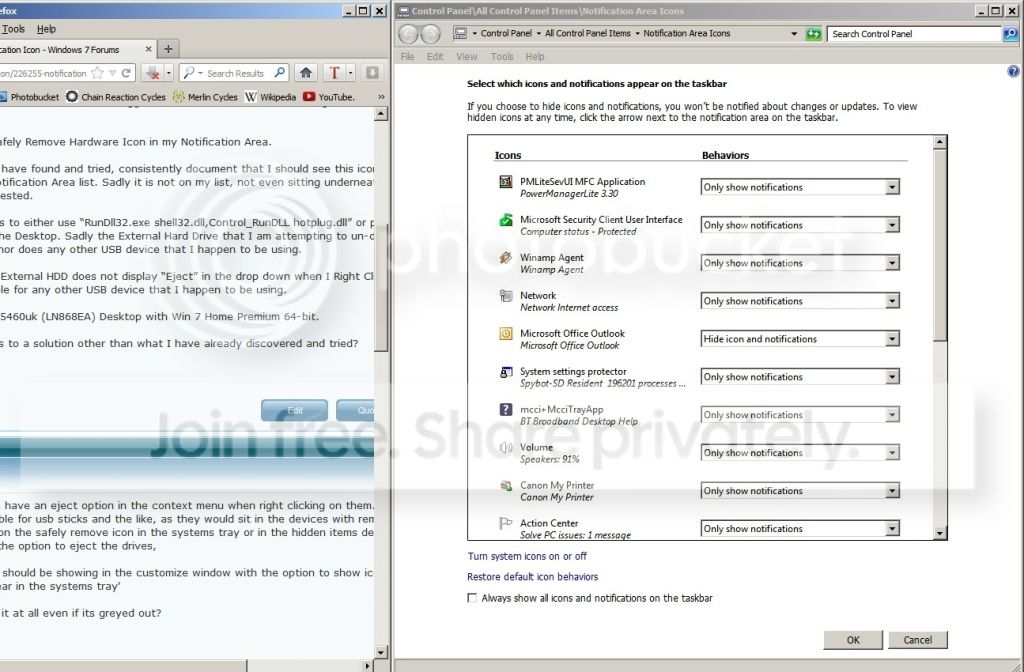
The instructions that I have found and tried, consistently document that I should see this icon after clicking “Customize…” in the Notification Area list. Sadly it is not on my list, not even sitting underneath Windows Explorer, as often suggested.

Another suggestion was to either use “RunDll32.exe shell32.dll,Control_RunDLL hotplug.dll” or paste this to a “Create Shortcut” on the Desktop. Sadly the External Hard Drive that I am attempting to un-dock does not show up in the pop-up box (nor does any other USB device that I happen to be using.

In “My Computer”, the External HDD does not display “Eject” in the drop down when I Right Click on the Drive. This is however available for any other USB device that I happen to be using.

I have an HP Pavilion G5460uk (LN868EA) Desktop with Win 7 Home Premium 64-bit.

Any further suggestions to a solution other than what I have already discovered and tried?

Pip.
 

My Computer

Computer Manufacturer/Model Number
HP Pavilion G5460uk (LN868EA)
OS
7 Home Premium 64
CPU
Intel Core i3 2100
Motherboard
Foxconn Cupertino Intel H61
Memory
4 GB - Speed: PC3-10600 MB/sec
Graphics Card(s)
Intel HD Graphics 1.69GB
Sound Card
Realtek ALC656 CODEC
Monitor(s) Displays
HP S2031a
Hard Drives
1TB SATA 3G
PSU
300W (100V-240V)
Case
Mid Size ATX
Cooling
Unknown
Neither of my externals have an eject option in the context menu when right clicking on them. i think this is only available for usb sticks and the like, as they would sit in the devices with removable storage, However right clicking on the safely remove icon in the systems tray or in the hidden items depending where one has it show does give the option to eject the drives,

the safely remove icon should be showing in the customize window with the option to show icon and notifications. this would have it appear in the systems tray'

is there no instance of it at all even if its greyed out?
 

My Computer

Computer Manufacturer/Model Number
Hewlett packard/p6512uk
OS
Microsoft Windows 7 Home Premium 64-bit 7600
CPU
IIx4 amd athelon 635 processor
Motherboard
FOXCONN 2AA9
Memory
2x2gb
Graphics Card(s)
ati radeon HD 5450
Sound Card
(1) Realtek High Definition Audio (2) AMD High Definition
Monitor(s) Displays
samsung lcd tv 32"
Screen Resolution
1360x 768
Hard Drives
(1) WDC WD10 01FAES-60Z2A0 SATA Disk Device (2) Maxtor OneTouch USB Device (3) ST310003 33AS USB Device (4) WD My Book 1111 USB Device
PSU
?
Cooling
air!
Keyboard
wireless hp
Mouse
wireless Hp,optical
Internet Speed
1.10mb/s
Antivirus
MSE
Browser
Firefox
Neither of my externals have an eject option in the context menu when right clicking on them. i think this is only available for usb sticks and the like, as they would sit in the devices with removable storage, However right clicking on the safely remove icon in the systems tray or in the hidden items depending where one has it show does give the option to eject the drives,

the safely remove icon should be showing in the customize window with the option to show icon and notifications. this would have it appear in the systems tray'

is there no instance of it at all even if its greyed out?

Thank you for your reply.

Is the Icon called “Windows host process (Rundll32)” ?

I have set it to “Show icon and notification”, but I don’t see anything in the Notification Area.

See 2 screen shots below.


NotificationTray.jpg


NotificationTray_2.jpg
 

My Computer

Computer Manufacturer/Model Number
HP Pavilion G5460uk (LN868EA)
OS
7 Home Premium 64
CPU
Intel Core i3 2100
Motherboard
Foxconn Cupertino Intel H61
Memory
4 GB - Speed: PC3-10600 MB/sec
Graphics Card(s)
Intel HD Graphics 1.69GB
Sound Card
Realtek ALC656 CODEC
Monitor(s) Displays
HP S2031a
Hard Drives
1TB SATA 3G
PSU
300W (100V-240V)
Case
Mid Size ATX
Cooling
Unknown
strangely i have two instances of it and one does say Windows host process (Rundll32)

1.png

the other is as it should be

2.png
 

My Computer

Computer Manufacturer/Model Number
Hewlett packard/p6512uk
OS
Microsoft Windows 7 Home Premium 64-bit 7600
CPU
IIx4 amd athelon 635 processor
Motherboard
FOXCONN 2AA9
Memory
2x2gb
Graphics Card(s)
ati radeon HD 5450
Sound Card
(1) Realtek High Definition Audio (2) AMD High Definition
Monitor(s) Displays
samsung lcd tv 32"
Screen Resolution
1360x 768
Hard Drives
(1) WDC WD10 01FAES-60Z2A0 SATA Disk Device (2) Maxtor OneTouch USB Device (3) ST310003 33AS USB Device (4) WD My Book 1111 USB Device
PSU
?
Cooling
air!
Keyboard
wireless hp
Mouse
wireless Hp,optical
Internet Speed
1.10mb/s
Antivirus
MSE
Browser
Firefox

My Computer

Computer Manufacturer/Model Number
Hewlett packard/p6512uk
OS
Microsoft Windows 7 Home Premium 64-bit 7600
CPU
IIx4 amd athelon 635 processor
Motherboard
FOXCONN 2AA9
Memory
2x2gb
Graphics Card(s)
ati radeon HD 5450
Sound Card
(1) Realtek High Definition Audio (2) AMD High Definition
Monitor(s) Displays
samsung lcd tv 32"
Screen Resolution
1360x 768
Hard Drives
(1) WDC WD10 01FAES-60Z2A0 SATA Disk Device (2) Maxtor OneTouch USB Device (3) ST310003 33AS USB Device (4) WD My Book 1111 USB Device
PSU
?
Cooling
air!
Keyboard
wireless hp
Mouse
wireless Hp,optical
Internet Speed
1.10mb/s
Antivirus
MSE
Browser
Firefox
i would run a sfc /scan to check there is any problems with a systems file.

SFC /SCANNOW Command - System File Checker - Windows 7 Forums

Thank you for your suggestion - to be honest I don't really have enough confidence to try this. The Black Screen on the Command Prompt & the Warnings at the top of the thread cause me to think that this is rather beyond me.

Incidentally; When I first started this thread, I claimed that the Icon was not in the list sitting underneath Windows Explorer. I looked a little foolish when it was showing in the 2nd screen shot, albeit with the odd title of “Windows host process (Rundll32)”

I didn't think it was originally there, so please see screen shot below that I took this morning after turning on my P.C. again, where the Icon has disappeared from the list!!

NotificationTray_3.jpg
 

My Computer

Computer Manufacturer/Model Number
HP Pavilion G5460uk (LN868EA)
OS
7 Home Premium 64
CPU
Intel Core i3 2100
Motherboard
Foxconn Cupertino Intel H61
Memory
4 GB - Speed: PC3-10600 MB/sec
Graphics Card(s)
Intel HD Graphics 1.69GB
Sound Card
Realtek ALC656 CODEC
Monitor(s) Displays
HP S2031a
Hard Drives
1TB SATA 3G
PSU
300W (100V-240V)
Case
Mid Size ATX
Cooling
Unknown
dont worry, its very easy, just type sfc/scannow into the command box and then enter , it does it all for you, be sure to right click on the command in start menu and select run as administrator.
it really is that simple. no need to fear it.
 

My Computer

Computer Manufacturer/Model Number
Hewlett packard/p6512uk
OS
Microsoft Windows 7 Home Premium 64-bit 7600
CPU
IIx4 amd athelon 635 processor
Motherboard
FOXCONN 2AA9
Memory
2x2gb
Graphics Card(s)
ati radeon HD 5450
Sound Card
(1) Realtek High Definition Audio (2) AMD High Definition
Monitor(s) Displays
samsung lcd tv 32"
Screen Resolution
1360x 768
Hard Drives
(1) WDC WD10 01FAES-60Z2A0 SATA Disk Device (2) Maxtor OneTouch USB Device (3) ST310003 33AS USB Device (4) WD My Book 1111 USB Device
PSU
?
Cooling
air!
Keyboard
wireless hp
Mouse
wireless Hp,optical
Internet Speed
1.10mb/s
Antivirus
MSE
Browser
Firefox
dont worry, its very easy, just type sfc/scannow into the command box and then enter , it does it all for you, be sure to right click on the command in start menu and select run as administrator.
it really is that simple. no need to fear it.

Thank you for your encouragement. You were of course completely correct - I was very straightforward.

I ran the check 3 times, but sadly the situation remains the same. The Icon of a USB and a green circle with a tick, is now back in the list again but still with the title of “Windows host process (Rundll32)”

If I pop a memory stick in, initially there is no sign of the icon in the Task Bar or Notification Area. If however I right click on the Memory Stick Drive in My Computer and click Eject, the Safely Remove Icon briefly appears in the Task Bar along with a pop-up bubble saying that it is now safe to remove.

The problem with removing my External Drive though, is that the option to Eject does not appear in the dropdown when I right click on the Drive in My Computer. :confused:
 

My Computer

Computer Manufacturer/Model Number
HP Pavilion G5460uk (LN868EA)
OS
7 Home Premium 64
CPU
Intel Core i3 2100
Motherboard
Foxconn Cupertino Intel H61
Memory
4 GB - Speed: PC3-10600 MB/sec
Graphics Card(s)
Intel HD Graphics 1.69GB
Sound Card
Realtek ALC656 CODEC
Monitor(s) Displays
HP S2031a
Hard Drives
1TB SATA 3G
PSU
300W (100V-240V)
Case
Mid Size ATX
Cooling
Unknown

My Computer

Computer type
Laptop
Computer Manufacturer/Model Number
Sager NP9170
OS
Win 7 Pro x64 / Win 10 Pro
CPU
Intel(R) Core(TM) i7-3630QM CPU @ 2.40GHz
Motherboard
CLEVO P170EM
Memory
12 GB
Graphics Card(s)
(1) Intel(R) HD Graphics 4000 (2) NVIDIA GeForce GTX 675M
Sound Card
(1) Realtek High Definition Audio (2) Intel(R) Display Aud
Monitor(s) Displays
17.3
Screen Resolution
1920x1080
Hard Drives
(1) Samsung 860 EVO 500GB(OS) (1) Samsung 860 EVO 500GB(Data)
Keyboard
Backlite
Antivirus
MSE, Malwarebytes Pro
Browser
Firefox
Other Info
DESKTOP: Custom-built.
OS: Win 10 Pro x64.
CASE: Rosewill R5.
CPU: Intel I5 4670K CPU @ 3.40GHz.
CPU COOLER: Cool Master Hyper 212 EVO.
MOTHERBOARD: Asus Z87-A.
MEMORY: Kingston HyperX 2x4 GB.
GPU: Nvidia Geforce 650 TI.
PSU: Corsair TX750.
DRIVES: (1) Samsung 840 120 GB SSD (2) Western Digital blue 500 GB 7200 RPM.
Back
Top