

The Bing Maps Routing and Traffic Team is constantly working to make navigation and route planning easier! Hot on the heels of our previous announcement about traffic coloring, the Bing Maps team is proud to announce that we have made it possible for users to access traffic camera images along a planned driving route! You can now see traffic camera icons along a short to moderate-length route. By clicking on a traffic camera icon, you can view the latest image from the traffic camera at that location.
Confirming Traffic Conditions
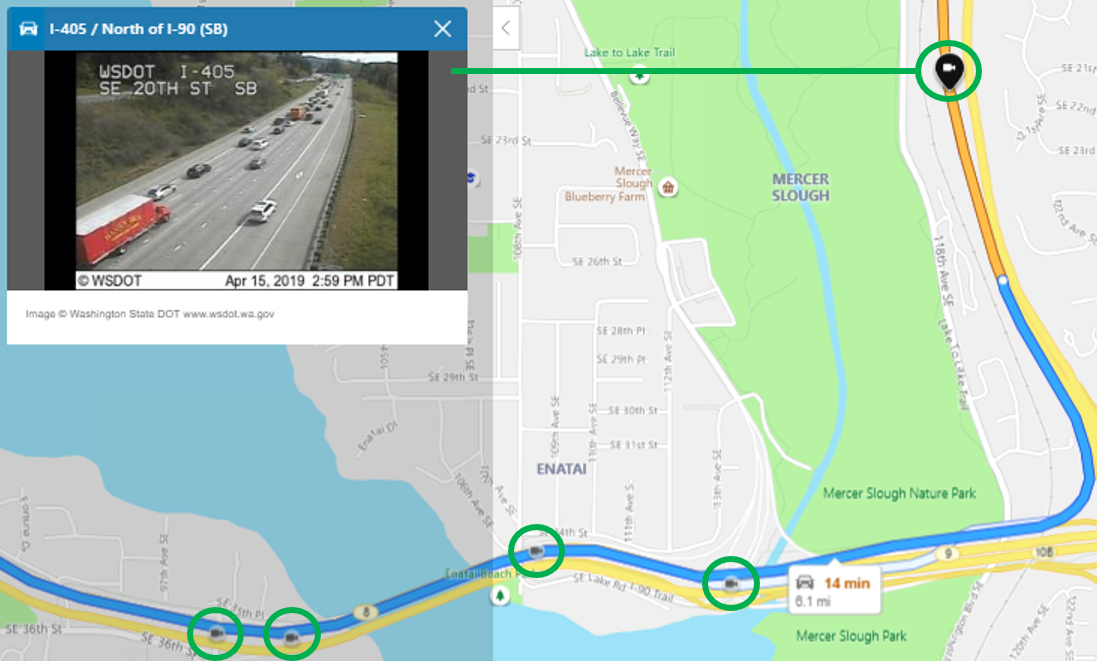
In the example below, the orange colored segment of the route indicates that traffic on I-405 South is starting to get backed up. With traffic camera images now available, you can confirm local traffic conditions with just a click of the camera icon along the route.
Checking Extreme Weather Road Conditions
Gaining access to the traffic camera imagery not only helps with checking for traffic, accidents and general navigation, but can be invaluable to users when traversing areas impacted by extreme weather conditions, such as heavy snowfall, wind storms, flooding, etc.
Getting to and from the resort for your annual ski trip can become both challenging and dangerous when the roads are covered with snow and ice. This past February, Washington state was hit with unprecedented snowfall. Many sections of road near the Snoqualmie Pass were rendered impassible because of record amounts of snow, resulting in motorists getting stuck and stranded. With traffic camera images now accessible along the route, you can quickly check for dangerous road conditions before heading out.
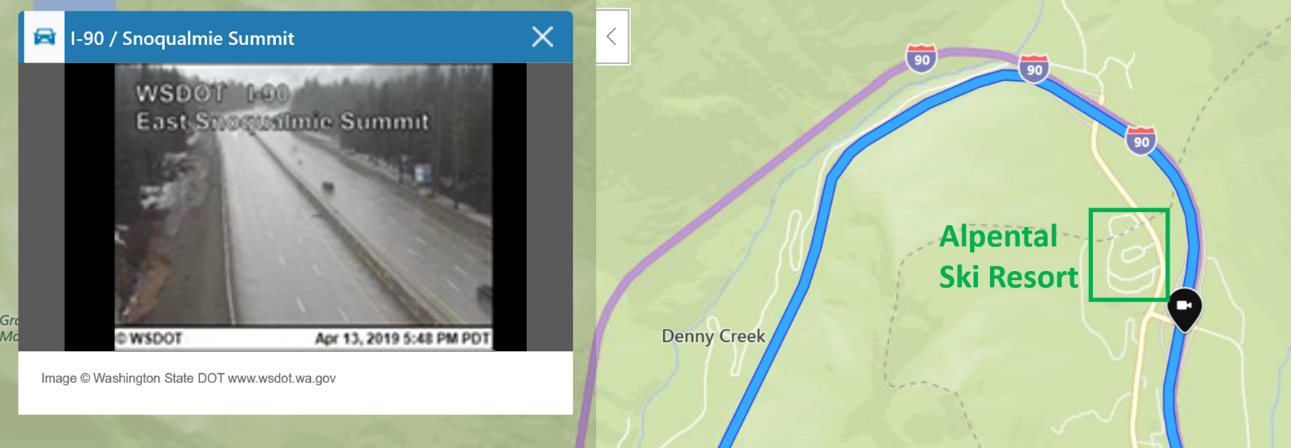
In the example below, it snowed throughout the day at Alpental on April 13. The traffic camera image shows that the road was clear and safe for driving at 5:48 PM despite the snowfall.
Getting a look at the road ahead can help you avoid heavy traffic and tricky road conditions, so be sure to check out the “traffic” option with camera imagery on Bing Maps when you are routing your next trip at https://www.bing.com/maps/.
- Bing Maps Team
Source: https://blogs.bing.com/maps/2019-04/see-the-road-ahead-with-traffic-camera-images-on-bing-maps
My Computer
At a glance
64-bit Windows 11 Pro for WorkstationsIntel i7-8700K OC'd to 5 GHz64 GB (4x16GB) G.SKILL TridentZ RGB DDR4 3600...ASUS ROG-STRIX-GTX1080TI-O11G-GAMING
- Computer type
- PC/Desktop
- Computer Manufacturer/Model Number
- Self built custom
- OS
- 64-bit Windows 11 Pro for Workstations
- CPU
- Intel i7-8700K OC'd to 5 GHz
- Motherboard
- ASUS ROG Maximus XI Formula Z390
- Memory
- 64 GB (4x16GB) G.SKILL TridentZ RGB DDR4 3600 MHz
- Graphics Card(s)
- ASUS ROG-STRIX-GTX1080TI-O11G-GAMING
- Sound Card
- Integrated
- Monitor(s) Displays
- 2 x Samsung Odyssey G7 27"
- Screen Resolution
- 2560x1440
- Hard Drives
- 1TB Samsung 990 PRO M.2,
4TB Samsung 990 PRO PRO M.2,
TerraMaster F8 SSD Plus NAS
- PSU
- Seasonic Prime Titanium 850W
- Case
- Thermaltake Core P3
- Cooling
- Corsair Hydro H115i
- Keyboard
- Logitech wireless K800
- Mouse
- Logitech MX Master 4
- Internet Speed
- 2 Gb/s Download and 100 Mb/s Upload
- Antivirus
- Malwarebyte Anti-Malware Premium
- Browser
- Google Chrome
- Other Info
- Logitech Z625 speaker system,
Logitech BRIO 4K Pro webcam,
HP Color LaserJet Pro MFP M477fdn,
APC SMART-UPS RT 1000 XL - SURT1000XLI,
Galaxy S23 Plus phone
