
We’ve covered how to use the old school CHKDSK command check on disk in Windows 7 yesterday but what we didn’t touch is actually even better. It’s a nice new feature that I didn’t realize its existed either until very recently.
Basically, once the feature is turned on, Window will detect a physical file system error and automatically fix it on the fly without you even noticing it happened. Because of this, you actually have a lot less chances having to run CHKDSK to check the disk manually because most likely the errors you suspected may have been fixed by this self-healing process already.
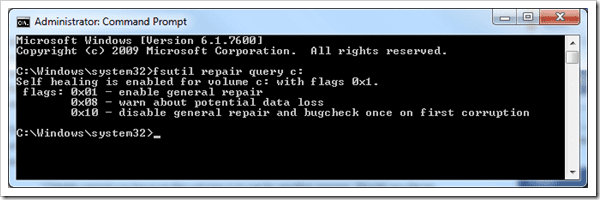
NTFS Self-healing is turned on by default in Windows 7 but if you are not sure you can use the following command to make sure. Note that the command has to be run as Administrator.
fsutil repair query c:
However, there is a possible downside that you may have already been thinking and wondering. Yes, the data may potentially be removed silently without user’s knowledge during the self-healing process. To address this issue, Microsoft added BugCheckOnCorrupt option that does something you may think it’s crazy.
It throws a BSOD (blue screen of death) and shuts everything down instead of attempting to fix the error, if the system discovers any NTFS corruptions.
Yes, not every BSOD is bad. Some of them happened in purpose, just like this as designed. It does sound crazy because why you would want the system crash, but from the data safety perspective, this attempt is actually better because it increases the chances of having the data recovered from the corruption.
Besides, this is not turned on by default and it’s suggested that you only need to turn it on only if you have the doubts on your hard drive.
To turn it on, simply type the following command as Administrator.
fsutil behavior set BugcheckOnCorrupt 1
Reboot your computer and run the following command as Administrator again to set which drive you want to check.
fsutil repair set <drive name> 0×10
To turn it off after it’s turned on:
fsutil behavior set BugcheckOnCorrupt 0
That’s it, hope it helps.
more
My Computer
At a glance
Windows 7 Professional 64-bitIntel E8400 3GHzKingston PC3-10700H 4GbXFX Radeon HD 5850 BlackEd.
- Computer Manufacturer/Model Number
- self built
- OS
- Windows 7 Professional 64-bit
- CPU
- Intel E8400 3GHz
- Motherboard
- Intel DX48BT2
- Memory
- Kingston PC3-10700H 4Gb
- Graphics Card(s)
- XFX Radeon HD 5850 BlackEd.
- Sound Card
- Asus Xonar DG
- Monitor(s) Displays
- 2x Samsung SM-T220HD 22"
- Screen Resolution
- 1680x1050 on two monitors
- Hard Drives
- OCZ Vertex 2 120gb 3.5" (OS)
Seagate Momentus XT 500gb
Samsung F3 1Tb (games)
2x Samsung F1 1Tb
- PSU
- Thermaltake ToughPower 850w
- Case
- Thermaltake Armor
- Cooling
- Scythe Mugen II
- Keyboard
- Microsoft Comfort Curve USB
- Mouse
- Razer Diamondback 3G
- Internet Speed
- 8128/443


