NTLDR is missing!

reedy

New member
Local time
9:22 AM
Messages
27
ive just fixed my girlfriends computer and installed windows 7 from the student iso burned to dvd, installed ok, etc but when i take the instalation dvd out the drive i get the message ntldr is missing ctr alt del to resart etc, but if the disk is in it askes to book from disk you leave it it will load windows 7 fine no prolem at all, ive tried changing the order of the boot in the bios but still get the same problem :( any idea how i can fix it?
cheers :)
 

My Computer

Computer Manufacturer/Model Number
HP Compaq
OS
Windows 7 Home Premium 32-bit
CPU
AMD athlon X2 2.1
Memory
3GB
Try putting win 7 disk in, booting from it, then run startup repair to fix your boot problem (may need to be run up to 3 times to fix the issue)
You need to make sure your boot order is bios is correct also, initially you will want dvd first to run the fix, then HDD first to boot normal win 7

Hope this helps
 

My Computer

Computer type
PC/Desktop
Computer Manufacturer/Model Number
Pauly Special
OS
Win7 Ultimate X64
CPU
Intel i5 3570K
Motherboard
Gigabyte Z77X-DS3H
Memory
8GB DDR3 1600
Graphics Card(s)
Onboard
Sound Card
Onboard
Screen Resolution
1280x1024
Hard Drives
Samsung 840 Evo SSD (OS)
1TB Spinner (Data)
PSU
800W Arctic
Case
Cooler Master
Cooling
3x120mm Fans
Keyboard
MS Wireless
Mouse
MS Wireless
Internet Speed
20M
Sounds like the computer is booting from a non-bootable source. Go into the bios and change the boot order so that it boots from the hard drive first
 

My Computer

Computer type
PC/Desktop
Computer Manufacturer/Model Number
Self Built
OS
Windows 7 Ultimate 64bit
CPU
AMD Phenom Quad core 9950 black edition
Motherboard
Gigabyte
Memory
16Gb
Graphics Card(s)
2x XFX Radeon 5850
Sound Card
PCI Express X-Fi Titanium / Logitech G35
Monitor(s) Displays
2x HP 2410i
Screen Resolution
1920x1080
Hard Drives
2x 500Gb Seagate
1x 300Gb Seagate
1x 1Tb Seagate
2x 1Tb Hitatchi
PSU
Jean Tech Storm 700W
Case
Cooler Master COSMOS S
Cooling
Akasa Evo Blue Pro
Keyboard
Logitech G15
Mouse
Mad Catz M.M.O. 7
Internet Speed
12mb
cheers guys, il try that then, ive tried changing the bios so hdd boots 1st not the dvd and thats when i get the message.....
cheers
 

My Computer

Computer Manufacturer/Model Number
HP Compaq
OS
Windows 7 Home Premium 32-bit
CPU
AMD athlon X2 2.1
Memory
3GB
Do you have 2 hard drives, are you wanting to dual boot with XP?
 

My Computer

Computer Manufacturer/Model Number
Homebuilt
OS
Windows 7 x64
CPU
i7-2600K
Motherboard
Asus P8Z77-v Pro
Memory
8 G
Graphics Card(s)
GTX 480
Sound Card
Onboard
Monitor(s) Displays
LG W2753V
Screen Resolution
1920x1080
Hard Drives
Crucial M4 128 G SSD
it was running XP, but upgraded from that to 7, then formated the 2nd hard drive. no i dont want to duel boot. the other thing is her mum went on it and by accident tried installing windows again as the dvd was left in the drive so i had to do a reinstall and just installed over the top and all the old folders go to a folder called windows.old but none of the old files are there :| which is really annoying! any ideas?
 

My Computer

Computer Manufacturer/Model Number
HP Compaq
OS
Windows 7 Home Premium 32-bit
CPU
AMD athlon X2 2.1
Memory
3GB

My Computer

Computer type
PC/Desktop
Computer Manufacturer/Model Number
Pauly Special
OS
Win7 Ultimate X64
CPU
Intel i5 3570K
Motherboard
Gigabyte Z77X-DS3H
Memory
8GB DDR3 1600
Graphics Card(s)
Onboard
Sound Card
Onboard
Screen Resolution
1280x1024
Hard Drives
Samsung 840 Evo SSD (OS)
1TB Spinner (Data)
PSU
800W Arctic
Case
Cooler Master
Cooling
3x120mm Fans
Keyboard
MS Wireless
Mouse
MS Wireless
Internet Speed
20M
Format an clean install.
 

My Computer

Computer type
PC/Desktop
Computer Manufacturer/Model Number
DELL VOSTRO 3650
OS
Windows 8.1 PRO
CPU
3rd Generation Intel Core i7‐3612QM CPU @ 2.10GHZ
Memory
8GB DDR3
Graphics Card(s)
NVIDIA GeForce GT 525M (128 bit), 1GB Grpahics
Screen Resolution
1920X1080
Hard Drives
750GB 5400RPM

My Computers

System One System Two

  • Computer type
    PC/Desktop
    OS
    7 X64
    CPU
    i5 8400
    Motherboard
    gigabyte b365m ds3h
    Memory
    2x8gb 3200mhz
    Hard Drives
    various
    PSU
    pure power 11 400w cm
    Case
    Coolermaster
    Cooling
    cryorig m9i
  • Computer type
    PC/Desktop
    OS
    7x64
    CPU
    g5400
    Motherboard
    ga b365m ds3h
    Memory
    8gb ddr4 2400
    PSU
    xfx pro 450w
Maybe NTLDR is actually..missing ? Its usually on the actual windows disk, so if you copy that and just place it on your boot drive (or on all the drives and partitions to just make sure it works) (as in just let it lie in C: in no folders/C: being the primary partition.)
But then again, I've heard Windows7 doesn't let this happen, but its worth a try.
If not, just boot from windows disk, get to a command prompt then see if bootcfg /fixmbr or some other command helps.

Or windows repair...

That fixed my problem when I had it...


*but I might also add, maybe there actually is NOTHING on that disk, and the actual best way to resolve this would be a clean formatted install. (NTldr.dll is one of the very first few things loaded in NT windows os')
 

My Computer

Computer Manufacturer/Model Number
Eloi and his Kitchen Table
OS
Windows 7 Professional x64
CPU
Intel core 2 quad Q6600 [email protected]
Motherboard
Asrock Glan 4core-1600 (sucks)
Memory
4GB 800mhz Kingston DDr2 (wants better..)
Graphics Card(s)
ASUS ATI HD5770 1GB(Gddr5) OC 900Mhz + 1300Mhz (Great)
Sound Card
Creative Soundblaster Audigy SE 7.1 (Wouldn't recommend)
Monitor(s) Displays
24inch Samsung Syncmaster P2450H (Kickass)
Screen Resolution
1920x1080
Hard Drives
Hitachi 500gb 7600RPM SATAII 32mb

Unknown DVD drive, its haunted.

320GB Hitachi (Philips external)
1TB Stor-e alu.

2x 500GB on Raid server downstairs. (Usually just hosts games and stuff, but its a "Guest" Pc too)
PSU
600W, unknown make yet decent performance
Case
Unknown (Cheap thing, replacing)
Cooling
Zalman9700LED + 1 High speed 1000-3200rpm 120mm <-- Great.
Keyboard
Saitek 3 Eclipse <-- pretty cool..
Mouse
Logitech G500 (ex lachesis owner)
Internet Speed
1MB/s down 100KBs up
Other Info
Server downstairs is an AMD Phenom X3 705E @ 2.8GHz with a mini ninja scythe cooler.
NTLDR is a boot critical file for XP, not Win7.

You'll need to unplug all other HD's and do a clean reinstall of Win7.

Or post back a screenshot of full Disk Management drive map and we can help you sort it out. Use Snipping Tool in Start Menu, attach file using paper clip in reply box.
 
Anyone think the

bootsect.exe /nt60 all

command would work?
 

My Computer

Computer Manufacturer/Model Number
Homebuilt
OS
Windows 7 x64
CPU
i7-2600K
Motherboard
Asus P8Z77-v Pro
Memory
8 G
Graphics Card(s)
GTX 480
Sound Card
Onboard
Monitor(s) Displays
LG W2753V
Screen Resolution
1920x1080
Hard Drives
Crucial M4 128 G SSD
Good idea Saltgrass - it could well be a damaged bootsector.

Startup repair should do that automatically if needed.
I agree the startup repair should work, it did for me today and it was the first time it took 3 runs to repair the NTLDR error.

Anyway to run the command, the bootsect.exe utility is on the Win 7 install DVD. Load it, go to a command prompt, and type the command with D: being replace by your DVD drive.

d:\boot\bootsect.exe /nt60 all

This is one of the utilities not on the repair CD.
____________________
I did just noticed that EasyBCD seems to have an option to do this. Under Manage Bootloader, it has a "Reinstall Win bootloader" or "Uninstall Win bootloader."
 
Last edited:

My Computer

Computer Manufacturer/Model Number
Homebuilt
OS
Windows 7 x64
CPU
i7-2600K
Motherboard
Asus P8Z77-v Pro
Memory
8 G
Graphics Card(s)
GTX 480
Sound Card
Onboard
Monitor(s) Displays
LG W2753V
Screen Resolution
1920x1080
Hard Drives
Crucial M4 128 G SSD
thanks guys i shall and post a screnshot next time im over at hers which could be a while and i shall try all these methods and let you know how i get on :)
cheers
 

My Computer

Computer Manufacturer/Model Number
HP Compaq
OS
Windows 7 Home Premium 32-bit
CPU
AMD athlon X2 2.1
Memory
3GB
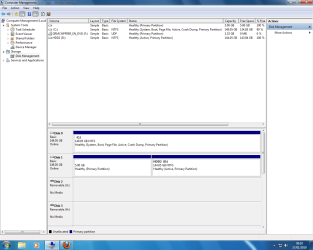
well here is a screen shot, ive tried the repair the boot file in the repair of windows, which it said computer said nooooooo, so thats not good, any other ides?
 

Attachments

  • diskmndment.png
    diskmndment.png
    46 KB · Views: 207

My Computer

Computer Manufacturer/Model Number
HP Compaq
OS
Windows 7 Home Premium 32-bit
CPU
AMD athlon X2 2.1
Memory
3GB
Check your BIOS & make Disk0 first boot drive.

If you have win 7 installed to Disk0,remove disk1 & run startup repair 3 or 4 times.
 

My Computer

OS
ME/XP/Vista/Win7
Theog suggestion should do it.

Otherwise, post back and I will give you the commands.
 

My Computers

System One System Two

  • Computer type
    PC/Desktop
    OS
    7 X64
    CPU
    i5 8400
    Motherboard
    gigabyte b365m ds3h
    Memory
    2x8gb 3200mhz
    Hard Drives
    various
    PSU
    pure power 11 400w cm
    Case
    Coolermaster
    Cooling
    cryorig m9i
  • Computer type
    PC/Desktop
    OS
    7x64
    CPU
    g5400
    Motherboard
    ga b365m ds3h
    Memory
    8gb ddr4 2400
    PSU
    xfx pro 450w
NTLDR is a boot critical file for XP, not Win7.

You'll need to unplug all other HD's and do a clean reinstall of Win7.

Or post back a screenshot of full Disk Management drive map and we can help you sort it out. Use Snipping Tool in Start Menu, attach file using paper clip in reply box.
Everyone needs to get up to speed. NTLDR is outdated and not needed for Windows 7. He's going to need more than a fix cause it looks like he's missing all the bootfiles.
 

My Computer

OS
Windows 7
What do you think theog was suggesting?
 

My Computers

System One System Two

  • Computer type
    PC/Desktop
    OS
    7 X64
    CPU
    i5 8400
    Motherboard
    gigabyte b365m ds3h
    Memory
    2x8gb 3200mhz
    Hard Drives
    various
    PSU
    pure power 11 400w cm
    Case
    Coolermaster
    Cooling
    cryorig m9i
  • Computer type
    PC/Desktop
    OS
    7x64
    CPU
    g5400
    Motherboard
    ga b365m ds3h
    Memory
    8gb ddr4 2400
    PSU
    xfx pro 450w
Back
Top