Nvidia 7950

PRLx1967

New member
Local time
6:16 AM
Messages
12
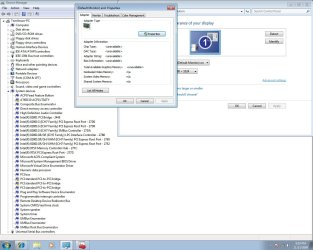
My card shows up as unknows in the screen properties and dosent show up at all on the device manager. When I try to install the new drivers it fails to find my card. I am on Windows 7 64bit.

Attached is a screenshot.
 

Attachments

  • Untitled.jpg
    Untitled.jpg
    134 KB · Views: 196

My Computer

OS
Windows 7 64bit
CPU
Intel Core 2 Duo e6600
Motherboard
Asus P5W Dh Deluxw
Memory
2gig Kingstone 2mms
Graphics Card(s)
NVIDIA 7950GTx2
Sound Card
On board
Monitor(s) Displays
Viewsonic VG2030

My Computer

Computer Manufacturer/Model Number
Compal JFT02 (Custom Build Laptop)
OS
Windows 7 Home Premium x64 - Mac OS X 10.6.4 x64
CPU
Intel Core 2 Duo T9300 2.5 GHz
Motherboard
JFT02
Memory
4GB Kingston DDR2-800
Graphics Card(s)
NVIDIA Geforce 8600M GT (512MB Model)
Sound Card
Realtek HD Audio
Monitor(s) Displays
WUXGA Standard Laptop Display
Screen Resolution
1680*1050
Hard Drives
Toshiba 320GB 5400RPM Laptop HD
PSU
Standard Laptop Power Supply
Case
Standard Laptop Case
Cooling
Standard Laptop Cooling
Keyboard
Standard Laptop 105 Key-Keyboard
Mouse
Synaptics Touchpad
Internet Speed
Verizion Online DSL 3360/864 kbs (dl/up)
Welcome to seven forums. Please fillin you system specs, this will help other s help you now and in the future. From what I can see you have 3 system devices without drivers as well as your monitor. Try making sure your chipset drivers are up to date and your bios. Aslo if your monitor has a driver get that installed. Aslo make sure the card is properly seated and has power supplied to it. Then lets seee where were at. Thanks Fabe
 

My Computer

Computer Manufacturer/Model Number
Self Built
OS
Windows 7 ultimate 64 bit / XP Home sp3
CPU
intel Core 2 Duo E8400 3.0ghz
Motherboard
Asus P5ND bios 1401
Memory
8 gigs 1066 OCZ Fata1ty
Graphics Card(s)
EVGA GTX 580 Call of Duty Black Ops Edition
Sound Card
Creative Soundblaster Audigy 2zs
Monitor(s) Displays
Asus 24in LCD's 2MS X2
Screen Resolution
1920x1080p @60Hz
Hard Drives
WD Caviar 500 Black/ WD Caviar 200 Blue
PSU
OCZ 700W GameXtreme
Case
NZXT Apollo
Cooling
Corsair H50 CPU/120mm x3 /60mm x2 /Corsair Dominator Ram
Keyboard
Logitech Bluetooth Wireless MX5000
Mouse
Logitech Bluetooth Wireless MX1000
Internet Speed
Download 19.83 Upload 0.97
Other Info
Logitech Z2300 Speakers/ Bose Noise Cancelling Headphones/Avermedia PCI-e Hybrid TV Bravo/Epson NX415 all in one/ 4 Port Powered USB Hub/ LG 10x Bluray Burner /TSST Corp DVDRW External
Installed newest stuff from Asus website still no vid card. Same as pic above. The PCI-to-PCI bridge are still yellow !'s. The drivers on Asus's webpage are only for vista 64bit as well. Shouldnt those work?

I have DLed those drivers for the vid card and they start to install but fail when the driver installer fails to find a vid card capatable.

Any other ideas?

EDIT: I updated my system specs as well
 

My Computer

OS
Windows 7 64bit
CPU
Intel Core 2 Duo e6600
Motherboard
Asus P5W Dh Deluxw
Memory
2gig Kingstone 2mms
Graphics Card(s)
NVIDIA 7950GTx2
Sound Card
On board
Monitor(s) Displays
Viewsonic VG2030
Right click on the one with exclamation point and choose update driver software. Browse. Let me pick. Have disk. Browse. Now find and double click on the correct .inf for it from the driver package and hit ok.

I don't know which .inf it is because I've never used the driver at all before, so you'll have to figure that part out.
 

My Computer

Computer Manufacturer/Model Number
self built
OS
7600.20510 x86
CPU
P4 550 3.4 GHz HT running at 3.5 GHz
Motherboard
MSI PM8M3-V (MS-7211 v1.x) Micro-ATX mainboard
Memory
OCZ 2 GB(2x1GB) DDR400mHz running @ 414 mHz
Graphics Card(s)
HIS Radeon HD 3850 IceQ 3 Turbo HDMI Dual DL-DVI AGP
Sound Card
MOTU Traveler firewire studio interface 192 kHz 24 bit
Monitor(s) Displays
22" widescreen Acer X223W LCD, 17" Compaq P75 CRT
Screen Resolution
1680x1050 and 1280x1024
Hard Drives
SATA I x2 WD, 400 GB and 120 GB, SATA 2 WD Caviar Black 1 TB
PSU
350W generic
Case
Cybertronpc, it glows blue
Cooling
stock cpu fan, Ice-Q 3 gpu and system, many case fans
Keyboard
Logitch Classical Keyboard 200
Mouse
Logitech Mediaplay cordless
Internet Speed
1792/448 kbits/sec
Other Info
SATA II PCI fake RAID adapter, 1 GB Readyboost, original ATI Remote Wonder (even works with WMC perfectly), Logitech Rumblepad 2 game controller x2
Right click on the one with exclamation point and choose update driver software. Browse. Let me pick. Have disk. Browse. Now find and double click on the correct .inf for it from the driver package and hit ok.

I don't know which .inf it is because I've never used the driver at all before, so you'll have to figure that part out.

I tired this and every time it fails.

I even tried to reinstall since I saw another person on the forums stating they had no issues with their 7950 but still no luck.
 

My Computer

OS
Windows 7 64bit
CPU
Intel Core 2 Duo e6600
Motherboard
Asus P5W Dh Deluxw
Memory
2gig Kingstone 2mms
Graphics Card(s)
NVIDIA 7950GTx2
Sound Card
On board
Monitor(s) Displays
Viewsonic VG2030
Try updating your BIOS. Some ASUS boards need a BIOS update before SLI setups works on Vista/7.
 

My Computer

Computer type
PC/Desktop
Computer Manufacturer/Model Number
Custom Built
OS
Windows 8.1 Pro x64
CPU
Intel Core i7 4790k
Motherboard
MSI Z97S Krait Edition
Memory
8GB Corsair Dominator 1600MHz
Graphics Card(s)
MSI TwinFrozr GeForce GTX770
Sound Card
ASUS Xonar DX/XD 7.1
Monitor(s) Displays
Dell 24" S2409W + Dell 20" E207WFP
Screen Resolution
1920x1080 + 1680x1050
Hard Drives
1x 120GB OCZ Agility 3, 1x 750GB Western Digital Caviar Black, 1x 1TB Western Digital Caviar Blue
PSU
Corsair HX850 modular
Case
Fractal Design Define R4
Cooling
Corsair H60 w/ twin Corsair SP120 fans
Keyboard
Logitech G510S Keyboard
Mouse
Logitech G500S Laser Mouse
Internet Speed
40Mbps
Antivirus
Microsoft Security Essentials
Browser
Google Chrome
Other Info
LG Blu-Ray player
Those exclamation points in the device manager have to be fixed first.

No sense trying anything with a video driver at all until they are.

Everlong has a great suggestion above about the bios update too.

Do you know the southbridge chipset of the motherboard? Perhaps you may use drivers meant for another system from another manufacturer (with same southbridge chipset), if Asus doesn't provide directly themselves. In this case, install by pointing to the exact inf using the device manager.

Windows Update attempt can't hurt.
 

My Computer

Computer Manufacturer/Model Number
self built
OS
7600.20510 x86
CPU
P4 550 3.4 GHz HT running at 3.5 GHz
Motherboard
MSI PM8M3-V (MS-7211 v1.x) Micro-ATX mainboard
Memory
OCZ 2 GB(2x1GB) DDR400mHz running @ 414 mHz
Graphics Card(s)
HIS Radeon HD 3850 IceQ 3 Turbo HDMI Dual DL-DVI AGP
Sound Card
MOTU Traveler firewire studio interface 192 kHz 24 bit
Monitor(s) Displays
22" widescreen Acer X223W LCD, 17" Compaq P75 CRT
Screen Resolution
1680x1050 and 1280x1024
Hard Drives
SATA I x2 WD, 400 GB and 120 GB, SATA 2 WD Caviar Black 1 TB
PSU
350W generic
Case
Cybertronpc, it glows blue
Cooling
stock cpu fan, Ice-Q 3 gpu and system, many case fans
Keyboard
Logitch Classical Keyboard 200
Mouse
Logitech Mediaplay cordless
Internet Speed
1792/448 kbits/sec
Other Info
SATA II PCI fake RAID adapter, 1 GB Readyboost, original ATI Remote Wonder (even works with WMC perfectly), Logitech Rumblepad 2 game controller x2
update your chipset drivers
 

My Computer

Computer Manufacturer/Model Number
Home Built
OS
Windows 7 Ultimate x64 RTM
CPU
AMD Athlon II X2 240 @ 3.2Ghz
Motherboard
Gigabyte GA-MA785GMT-UD2H
Memory
6GB Mushkin DDR3 PC-1333
Graphics Card(s)
ATI Radeon HD 4200 IGP Hybrid CrossFireX w\ Sapphire HD3450
Sound Card
Onboard Realtek HD audio controller
Monitor(s) Displays
D-SUB: LG W2343T-PF 23" LCD HDMI: LG 32LH20 32" LCD
Screen Resolution
1920*1080
Hard Drives
WD Caviar Green 1TB SATA3
PSU
Cooler Master Elite Power 400W
Case
Cooler Master Elite 360
Cooling
AMD Stock :)
Keyboard
Crappy wirelss logitech
Mouse
crappy wireless logitech
Internet Speed
792k
update your chipset drivers

I have updated the chipset but still no luck. The screenshot above is after I updated the chipset from the Asus webpage.
 

My Computer

OS
Windows 7 64bit
CPU
Intel Core 2 Duo e6600
Motherboard
Asus P5W Dh Deluxw
Memory
2gig Kingstone 2mms
Graphics Card(s)
NVIDIA 7950GTx2
Sound Card
On board
Monitor(s) Displays
Viewsonic VG2030
Have you tried updating your BIOS yet?
 

My Computer

Computer type
PC/Desktop
Computer Manufacturer/Model Number
Custom Built
OS
Windows 8.1 Pro x64
CPU
Intel Core i7 4790k
Motherboard
MSI Z97S Krait Edition
Memory
8GB Corsair Dominator 1600MHz
Graphics Card(s)
MSI TwinFrozr GeForce GTX770
Sound Card
ASUS Xonar DX/XD 7.1
Monitor(s) Displays
Dell 24" S2409W + Dell 20" E207WFP
Screen Resolution
1920x1080 + 1680x1050
Hard Drives
1x 120GB OCZ Agility 3, 1x 750GB Western Digital Caviar Black, 1x 1TB Western Digital Caviar Blue
PSU
Corsair HX850 modular
Case
Fractal Design Define R4
Cooling
Corsair H60 w/ twin Corsair SP120 fans
Keyboard
Logitech G510S Keyboard
Mouse
Logitech G500S Laser Mouse
Internet Speed
40Mbps
Antivirus
Microsoft Security Essentials
Browser
Google Chrome
Other Info
LG Blu-Ray player
My card shows up as unknows in the screen properties and dosent show up at all on the device manager. When I try to install the new drivers it fails to find my card. I am on Windows 7 64bit.

Attached is a screenshot.

My specs are almost the same as yours, and I've run the W 7 x64 for more than 6 months. Never met any problem caused by the hardware (or drivers).

1. Bios version 2801、2901、and 3001 all are OK for our mobo, I updated the bios only for fun:D. If you decide to update the bios, please visit here.

2. I had tried at least 15 versions of the Nvidia Graphic drivers from 18x.xx to 191.66. With modded inf, most of them ran well. My source is from the LaptopVideo2Go.

There are 3 yellow marks in your device manager shown on your sceenshot, why?

Anything to do with your DVD reading function? Or, does your W 7 DVD get hurt?

Why not try to re-install, and check the device manager right after the installation? I believe you will find the problem you yourself.

Good luck to you, and I will follow this thread to accompany you.
 

My Computer

OS
Server 2008 R2 SP1, Win7 x64 Pro SP1
CPU
Intel Core 2 Duo E6700 @3.3GHz
Motherboard
ASUS P5W DH DELUXE
Memory
Transcend DDRII 800 4GB (2 x 2GB )
Graphics Card(s)
GeForce 7950GX2
Sound Card
Realtek ALC882M Integrated on board
Monitor(s) Displays
ACER AL2723 27" LCD
Screen Resolution
1920x1200
Hard Drives
WD 6401 AALS 640G x 1
Seagate 160 GB (Barracuda 7200.7) x 2
PSU
Zippy PSL-6720P(G1)720W
Case
Thermaltake Kandalf VA9000SWA
Cooling
Zalman CNPS9500
Keyboard
Standard
Mouse
Standard
Internet Speed
10M, Cable
Other Info
Above is one of my desktops.
Woolswell, 3001 did it. Next boot on for windows it saw the card. Thx for all the help.
 

My Computer

OS
Windows 7 64bit
CPU
Intel Core 2 Duo e6600
Motherboard
Asus P5W Dh Deluxw
Memory
2gig Kingstone 2mms
Graphics Card(s)
NVIDIA 7950GTx2
Sound Card
On board
Monitor(s) Displays
Viewsonic VG2030
Woolswell, 3001 did it. Next boot on for windows it saw the card. Thx for all the help.

Congratulation, PRLx!!

I was confident that you would overcome the problem you yourself, and you did it! :D
 

My Computer

OS
Server 2008 R2 SP1, Win7 x64 Pro SP1
CPU
Intel Core 2 Duo E6700 @3.3GHz
Motherboard
ASUS P5W DH DELUXE
Memory
Transcend DDRII 800 4GB (2 x 2GB )
Graphics Card(s)
GeForce 7950GX2
Sound Card
Realtek ALC882M Integrated on board
Monitor(s) Displays
ACER AL2723 27" LCD
Screen Resolution
1920x1200
Hard Drives
WD 6401 AALS 640G x 1
Seagate 160 GB (Barracuda 7200.7) x 2
PSU
Zippy PSL-6720P(G1)720W
Case
Thermaltake Kandalf VA9000SWA
Cooling
Zalman CNPS9500
Keyboard
Standard
Mouse
Standard
Internet Speed
10M, Cable
Other Info
Above is one of my desktops.
Back
Top
