Nvidia card doesn't work for some reason!

killjo12

New member
Local time
1:35 AM
Messages
42
I have a problem with my graphics card. I dont know if its borken or anything. It just doesn't seem to work. One day my computer just crashed. Than I shuted it down suddenly. Than when the computer rebooted the videocard drivers didn't seem to work. I unistalled and reinstalled the drivers and same problem. Everything seems to work, but I can't play any games. Every game throws a error message at my face. Most common error is the D3D9 error. I am not sure that my nvidia graphic card is borken or maybe its a overheating problem. I am really not sure. Anyway if anybody has got any ideas, please tell me.
Operating system:NVIDIA GeForce 9800 GT, windows 7 ultimate 32-bit
.
 

My Computer

OS
Microsoft windows 7
Graphics Card(s)
Onboard- Dont ask
Monitor(s) Displays
SyncMaster T220
Internet Speed
2-4 mb

My Computer

Computer type
PC/Desktop
Computer Manufacturer/Model Number
Dwarf Dwf/11/2012 r09/2013
OS
Windows 8.1 Pro RTM x64
CPU
Intel Core-i5-3570K 4-core @ 3.4GHz (Ivy Bridge) (OC 4.4GHz)
Motherboard
ASRock Z77 Extreme4-M
Memory
4 x 4GB DDR3-1600 Corsair Vengeance CMZ8GX3M2A1600C9B (16GB)
Graphics Card(s)
MSI GeForce GTX770 Gaming OC 2GB
Sound Card
Realtek High Definition on board solution (ALC 898)
Monitor(s) Displays
ViewSonic VA1912w Widescreen (VGA)
Screen Resolution
1440x900
Hard Drives
OCZ Agility 3 SSD 120GB SATA III x2 (RAID 0)
Samsung HD501LJ 500GB SATA II x2
Hitachi HDS721010CLA332 1TB SATA II
Iomega 1.5TB Ext USB 2.0
WD 2.0TB Ext USB 3.0
PSU
XFX Pro Series 850W Semi-Modular
Case
Gigabyte IF233
Cooling
1 x 120mm Front Inlet 1 x 120mm Rear Exhaust
Keyboard
Microsoft Comfort Curve Keyboard 3000 (USB)
Mouse
Microsoft Comfort Mouse 3000 for Business (USB)
Internet Speed
NetGear DG834Gv3 ADSL Modem/Router (Ethernet) ~4.0 Mb/s (O2)
Antivirus
Avast! 8.0.1497
Browser
IE 11
Other Info
Optical Drive: HL-DT-ST BD-RE BH10LS30 SATA Bluray
Lexmark S305 Printer/Scanner/Copier (USB)
WEI Score: 8.1/8.1/8.5/8.5/8.25
Asus Eee PC 1011PX Netbook (Windows 7 x86 Starter)
Thanks for the quick reply Dwarf, but saddly that didn't do the trick, still the same error.:cry:. I think I have all the devices up do date so that I could play just fine. There are may other errors that I get when I try starting games, that say that something is wrong with my video card. Like I said before everything worked fine before the restart, so there has to be a problem somewhere else.
 

My Computer

OS
Microsoft windows 7
Graphics Card(s)
Onboard- Dont ask
Monitor(s) Displays
SyncMaster T220
Internet Speed
2-4 mb
What games are you trying to play? Many games that require DirectX come with the version that they require on the CDs. Try installing them from the CDs as well.
 

My Computer

Computer type
PC/Desktop
Computer Manufacturer/Model Number
Dwarf Dwf/11/2012 r09/2013
OS
Windows 8.1 Pro RTM x64
CPU
Intel Core-i5-3570K 4-core @ 3.4GHz (Ivy Bridge) (OC 4.4GHz)
Motherboard
ASRock Z77 Extreme4-M
Memory
4 x 4GB DDR3-1600 Corsair Vengeance CMZ8GX3M2A1600C9B (16GB)
Graphics Card(s)
MSI GeForce GTX770 Gaming OC 2GB
Sound Card
Realtek High Definition on board solution (ALC 898)
Monitor(s) Displays
ViewSonic VA1912w Widescreen (VGA)
Screen Resolution
1440x900
Hard Drives
OCZ Agility 3 SSD 120GB SATA III x2 (RAID 0)
Samsung HD501LJ 500GB SATA II x2
Hitachi HDS721010CLA332 1TB SATA II
Iomega 1.5TB Ext USB 2.0
WD 2.0TB Ext USB 3.0
PSU
XFX Pro Series 850W Semi-Modular
Case
Gigabyte IF233
Cooling
1 x 120mm Front Inlet 1 x 120mm Rear Exhaust
Keyboard
Microsoft Comfort Curve Keyboard 3000 (USB)
Mouse
Microsoft Comfort Mouse 3000 for Business (USB)
Internet Speed
NetGear DG834Gv3 ADSL Modem/Router (Ethernet) ~4.0 Mb/s (O2)
Antivirus
Avast! 8.0.1497
Browser
IE 11
Other Info
Optical Drive: HL-DT-ST BD-RE BH10LS30 SATA Bluray
Lexmark S305 Printer/Scanner/Copier (USB)
WEI Score: 8.1/8.1/8.5/8.5/8.25
Asus Eee PC 1011PX Netbook (Windows 7 x86 Starter)
Have you tried system restore?

If not then type into start menu system restore, click on it. When it comes up choose a time and date prior to your crash then select restore.
 

My Computer

Computer Manufacturer/Model Number
Custom Build.
OS
Windows 7 Ultimate x64.
CPU
i5 760 @ 4.2Ghz. 1.18v
Motherboard
Gigabyte - H55M-USB3
Memory
4g Corsair xms3 ddr3, 1600Mhz.
Graphics Card(s)
Gigabyte GTX-560Ti soc edition
Sound Card
Asus Xonar Dx - Logitech Z5500.
Monitor(s) Displays
Acer 22" LCD Wide screen 1680-1050 -Samsung 42" Plasma....
Screen Resolution
1680/1050 -----1920/1080p.
Hard Drives
2x 2TB Seagate Go Flex,
1x 1TB Seagate,
1x 640WD Black,
x16 Gig sandisc flash drive,
1x8Gig sandisc flash drive.
PSU
XigmaTek 80plus NRP-PC702 - 700w dual 30a.
Case
Venus Gamers Midi Tower Case with LED Display
Cooling
Arctic Freezer 7 Pro Rev 2... x2 Arctic F8 case fans........
Keyboard
Logitech G15-v2 Gaming.
Mouse
Microsoft Sidewinder X8.
Internet Speed
Virgin Media - 50mb down- 8mb up.
Other Info
x2 Xbox 360 wireless controllers...

Dual layer optical disc drive...

Chrome 79million

A.V = MSE
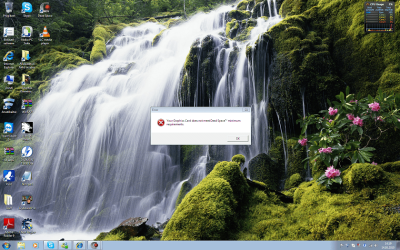
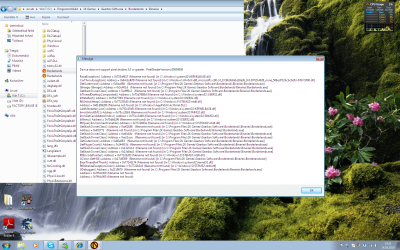
I have done system repair, it didn't help. None of the games that worked before the restart don't work. And there are alot of them. I mean Borderlands, conviction, dead space, hinterlands, age of pirates 2, gta 4 and so on. And there is one other thing, which I really wouldn't call a problem (Shown in the picture 1). If the bar is invisible everything is okay, if white, the problem. At first when the problem occured, the computer worked fine a couple of times when rebooting but the problem came back, and now it has stayed that way.

Problem.png Problem 2.png

Problem 3.png problem 4.png
 
Last edited by a moderator:

My Computer

OS
Microsoft windows 7
Graphics Card(s)
Onboard- Dont ask
Monitor(s) Displays
SyncMaster T220
Internet Speed
2-4 mb
from your snip,i suppose this issues comes from your graphic card itself of Hardware issue i'd say. can you access dxdiag(run type dxdiag and test your graphic card) or device manager to check if your graphic card is detected and check if any driver issue(yellow or red x)
 

My Computer

OS
window's 7
CPU
core 2 quad
Motherboard
gigabyte
Memory
2gb corsair
Graphics Card(s)
ati hd4850
Monitor(s) Displays
lg
Screen Resolution
1600 X 900
Case
power logic
Other Info
none of the spec above is accurate
Well I did the dxdiag, nothing wrong there. But at the device manager the draiver did have a yellow warning on it. It said that windows blocked it. Why? I don't get it. I get the feeling that windows blocks the video card drivers for some reason.
PS:Oo I also forgot to write that when I first experienced the problem I found out that my BIOS had chanced during the restart from the place where I can pick the onboard video card or the regular. So I chanced it back. The computer worked fine for a day than the problem came back. So I hope this will help you help me.
 

My Computer

OS
Microsoft windows 7
Graphics Card(s)
Onboard- Dont ask
Monitor(s) Displays
SyncMaster T220
Internet Speed
2-4 mb
Have you tried removing the the video card drivers, then remove the card through device manager, reboot, reinstall everything. See what happens.

Good luck
 

My Computer

Computer type
PC/Desktop
Computer Manufacturer/Model Number
Custom built by me.
OS
Windows 10 Pro
CPU
Intel Core i7-4770K (3.5Ghz)
Motherboard
Gigabyte G1 Sniper 5 (F10 Bios)
Memory
32 gig Corsair Dominator Platinum (4x8Gig)
Graphics Card(s)
Sapphire Tri-X R9 Fury
Sound Card
Soundblaster ZXR
Monitor(s) Displays
NEC PA242W 24" LCD Monitor
Screen Resolution
1920 x 1200
Hard Drives
Primary - Samsung 850 Pro (512gig), Samsung 840 Pro (256gig), 2TB WD Caviar Black.
PSU
EVGA Supernova 1000 G2
Case
Cooler Master HAF X
Cooling
Corsair H100i with Corsair Air Series SP120 Quiet Fans
Keyboard
Logitech Wireless Wave
Mouse
Logitech Performance MX
Internet Speed
High Speed Cable
Antivirus
Norton Security
Browser
IE11
Other Info
Memory Timings - 1866MHz @ 9-9-9-27-1T @ 1.5 volts
Do you even have the nVidia drivers installed? You'd get directX errors if the machine had reverted to the generic VGA drivers.

The snaps that you posted are nearly unreadable. I can't tell what sort of drivers you have in place.
 

My Computer

Computer Manufacturer/Model Number
homegrown
OS
Windows 7 Pro X64 SP1
CPU
Intel Core I7-3930k
Motherboard
Asus P9X79 Pro
Memory
16 GB Gskill DDR3-2133
Graphics Card(s)
eVGA GTX680
Sound Card
Creative X-Fi Titanium
Monitor(s) Displays
As PA246Q
Screen Resolution
1920 X 1200
Hard Drives
Corsair Force GT, 120 GB
WDC 1.5TB Caviar Black
PSU
PCP&C Silencer 750 Crossfire
Case
Silverstone FT02
Cooling
Noctua NH-D14
Keyboard
cheap Logitech USB
Mouse
Microsoft Intellimouse Explorer (old optical) USB
Internet Speed
6Mb cable
Other Info
Pioneer BDR-205
Samsung SH-203B
Monsoon 5.1 speakers
Have you checked it is seated in the rail properly and that the power is correctly connected.

You may also want to try the fail safe bios approach too as you mention it.

Have you checked it is even connected to the dedicated gpu? From the looks of those pics it's not even displaying the dwm.
 

My Computer

Computer Manufacturer/Model Number
Custom Build.
OS
Windows 7 Ultimate x64.
CPU
i5 760 @ 4.2Ghz. 1.18v
Motherboard
Gigabyte - H55M-USB3
Memory
4g Corsair xms3 ddr3, 1600Mhz.
Graphics Card(s)
Gigabyte GTX-560Ti soc edition
Sound Card
Asus Xonar Dx - Logitech Z5500.
Monitor(s) Displays
Acer 22" LCD Wide screen 1680-1050 -Samsung 42" Plasma....
Screen Resolution
1680/1050 -----1920/1080p.
Hard Drives
2x 2TB Seagate Go Flex,
1x 1TB Seagate,
1x 640WD Black,
x16 Gig sandisc flash drive,
1x8Gig sandisc flash drive.
PSU
XigmaTek 80plus NRP-PC702 - 700w dual 30a.
Case
Venus Gamers Midi Tower Case with LED Display
Cooling
Arctic Freezer 7 Pro Rev 2... x2 Arctic F8 case fans........
Keyboard
Logitech G15-v2 Gaming.
Mouse
Microsoft Sidewinder X8.
Internet Speed
Virgin Media - 50mb down- 8mb up.
Other Info
x2 Xbox 360 wireless controllers...

Dual layer optical disc drive...

Chrome 79million

A.V = MSE
try reseating the card, and also that is has enough power from the power supply.

Also, did it work before and now stopped? it sounds like it used to from your Original Post. I'd check and see if it's fan is spinning n such. if it's not the card could have died. Cuz if it's not working in windows or no drivers are installed. The fan will still spin. or it should.

Also have you tried to uninstall drivers, run Driver Sweeper
Guru3D - Driver Sweeper (Setup) download from Guru3D.com
and then reinstall the LATEST drivers. Windows might a few weeks back or whatever updated to a driver that Nvidia has since pulled cuz it was stopping fan's from working (not good) so I'd try that first also.
 

My Computer

OS
Windows 7 Ultimate Edition x64
CPU
Q9650 E0 @ 4.0 GHz 1.304v
Motherboard
eVGA 750i FTW!
Memory
2x2GB Corsair Dominator PC2-8500C5D 1100 Mhz 5-5-5-15
Graphics Card(s)
eVGA/Gigabyte GTX 480's SLI
Sound Card
X-Fi XtremeGamer
Monitor(s) Displays
Dell U2410 24" IPS Panel (Beautiful)
Screen Resolution
1900 x 1200 & 1680 x 1050
Hard Drives
WD Caviar Black 640GB AALS x2 (Raid0) + Seagate Pro 500GB External x2
PSU
Enermax Revolution 85+ 1050w PSU
Case
Cooler Master HAF 932 H20
Cooling
Apogee GTZ, Feser 360, D5 Vario, Scythe GT 1850's
Keyboard
Logitech G11
Mouse
Logitech MX-518 / G9
Internet Speed
Fast!
Other Info
Nikon D40 DSLR 18-105mm VR - Nikon 35mm f/1.8 & 55-200mm VR
Bose Companion 3 - 16GB Patriot Xporter USB - ATH AD900's & UR Triple.Fi 10 Custom Phones w/ 32GB iPod Touch 3rd Gen -
Google Nexus One (Phone Rocks!) w/ Kingston 16GB MicroSDHC Class 10 running Amon RA1.7 and Cyan 5.06.1
I have all the latest drivers. I have uninstalled them and reinstalled them many times, manually, automatically the result is same. The drivers are there, the comupter wont allow them to work properly. When I let my comupter reinstall the drivers is says VGA compatable.
 

My Computer

OS
Microsoft windows 7
Graphics Card(s)
Onboard- Dont ask
Monitor(s) Displays
SyncMaster T220
Internet Speed
2-4 mb
Does that motherboard have an intergrated graphics card? If so, have you disabled it, so you can use the 9800 GTX.
 

My Computer

Computer type
PC/Desktop
Computer Manufacturer/Model Number
Custom built by me.
OS
Windows 10 Pro
CPU
Intel Core i7-4770K (3.5Ghz)
Motherboard
Gigabyte G1 Sniper 5 (F10 Bios)
Memory
32 gig Corsair Dominator Platinum (4x8Gig)
Graphics Card(s)
Sapphire Tri-X R9 Fury
Sound Card
Soundblaster ZXR
Monitor(s) Displays
NEC PA242W 24" LCD Monitor
Screen Resolution
1920 x 1200
Hard Drives
Primary - Samsung 850 Pro (512gig), Samsung 840 Pro (256gig), 2TB WD Caviar Black.
PSU
EVGA Supernova 1000 G2
Case
Cooler Master HAF X
Cooling
Corsair H100i with Corsair Air Series SP120 Quiet Fans
Keyboard
Logitech Wireless Wave
Mouse
Logitech Performance MX
Internet Speed
High Speed Cable
Antivirus
Norton Security
Browser
IE11
Other Info
Memory Timings - 1866MHz @ 9-9-9-27-1T @ 1.5 volts
.....Uh, can that chance during the sudden restart, and how can I check it? One guy asked if the fan stopped spinning. No it didn't. And how can I check that my video card has enough power form the power supply.
 

My Computer

OS
Microsoft windows 7
Graphics Card(s)
Onboard- Dont ask
Monitor(s) Displays
SyncMaster T220
Internet Speed
2-4 mb
PS:Oo I also forgot to write that when I first experienced the problem I found out that my BIOS had chanced during the restart from the place where I can pick the onboard video card or the regular. So I chanced it back. The computer worked fine for a day than the problem came back. So I hope this will help you help me.

A bios resetting itself is not good. Go back into Bios and reset to defaults. Then review all settings one by one for your specific setup. (If you were overclocked--don't do that yet). Now try your system. If it works fine and then reverts to the error change your CMOS battery. I would also update you Bios to the most current version.
 

My Computer

Computer Manufacturer/Model Number
Homemade
OS
Win 7 64 bit professional
CPU
CPU: 3930K @ 4.8 MHz Stable as a rock
Motherboard
ASUS Rampage IV Extreme LGA 2011
Memory
CORSAIR DOMINATOR GT 16GB (4 x 4GB) 240-Pin DDR3
Graphics Card(s)
EVGA SuperClocked+ GeForce GTX 680
Monitor(s) Displays
Dell 3007WFP
Screen Resolution
2560 x 1600
Hard Drives
Vector(256gb) x 2
RevoDrive 3 X2 space (240 GB)
Crucial C300 256 GB SSD
PSU
CORSAIR AX1200i 1200W Digital ATX12V v2.31 and EPS 2.92 SLI
Cooling
Water cooling EK Supremacy ELITE
Mouse
ratZ-7
Other Info
WEI-7.8
I restored the BOIS to default, nothing new. I doubt I need a BIOS update. I can acctually play some crapy games when I use the onboard video card.
So does anybody have any ideas? The only thing I can think of is that some really small ponitless part in my video card has borken, and my video carddrivers wont accept it and the computer cant find the problem.
I acctually experienced the problem after I played splinter cell conviction. The computer freezed and my screen started flashing, So I did a forced shutdown on my computer. I experienced this problem a few more times during the game, and after a restart the problem came and stayed. All the scans and everything said that everything works fine. So I have my doubts of it being a hardware problem. Also every time I start the windows it block two things: Something called "Tages protection" and the video card drivers for some reason. So are those two things related or something? I am really stumped here. Nobody cant help me and I dont want to spend 20 bucks on diagnoses. Yep I asked, thats how much it costs.
 
Last edited:

My Computer

OS
Microsoft windows 7
Graphics Card(s)
Onboard- Dont ask
Monitor(s) Displays
SyncMaster T220
Internet Speed
2-4 mb
I'm not familiar with Tages Protection, but it's apparently one of those delightful copy protection things installed by some game or other.

It's mentioned in Wikipedia:

Tagès - Wikipedia, the free encyclopedia

I have no idea what is preventing your graphics drivers from installing.

At some point, you may have to do a clean install of Windows. That's assuming that you have no real hardware problems.
 

My Computer

Computer Manufacturer/Model Number
homegrown
OS
Windows 7 Pro X64 SP1
CPU
Intel Core I7-3930k
Motherboard
Asus P9X79 Pro
Memory
16 GB Gskill DDR3-2133
Graphics Card(s)
eVGA GTX680
Sound Card
Creative X-Fi Titanium
Monitor(s) Displays
As PA246Q
Screen Resolution
1920 X 1200
Hard Drives
Corsair Force GT, 120 GB
WDC 1.5TB Caviar Black
PSU
PCP&C Silencer 750 Crossfire
Case
Silverstone FT02
Cooling
Noctua NH-D14
Keyboard
cheap Logitech USB
Mouse
Microsoft Intellimouse Explorer (old optical) USB
Internet Speed
6Mb cable
Other Info
Pioneer BDR-205
Samsung SH-203B
Monsoon 5.1 speakers
I have the drivers installed they just dont work. Anyway I think that I am first going to put a cheap video card on my computer to check for sure that its not a hardware problem, if its not I quess I have nothing left but to make a clean install.
 

My Computer

OS
Microsoft windows 7
Graphics Card(s)
Onboard- Dont ask
Monitor(s) Displays
SyncMaster T220
Internet Speed
2-4 mb
Try a Linux LiveCD, like Ubuntu or Linux Mint. If there are problems with the video on a LiveCD, it's a hardware issue.
 

My Computer

Computer Manufacturer/Model Number
Asus V2-M3M8200 Barebones
OS
Windows 7 Professional x64
CPU
AMD Phenom II X4 925
Motherboard
V2-M3M8200 (basically a M3N78-VM)
Memory
4x1024mb Kingston HyperX DDR2-1066 KHX8500D2/1G
Graphics Card(s)
Asus GTS 450 OC
Sound Card
Creative Sound Blaster X-Fi Titanium PCIe
Monitor(s) Displays
Asus 24" LCD VH242H
Screen Resolution
1920x1080
Hard Drives
WDC WD5000AAKS
WDC WD5002ABYS
Seagate ST325062 USB-to-IDE
Fujitsu 160GB Pocket USB HDD
PSU
Antec Earthwatts EA-430D
Case
Asus V2-M3M8200
Cooling
120mm side fan & 80mm front & 92mm rear fan
Keyboard
Dell USB mini Multimedia
Mouse
Logitech MX518
Internet Speed
Comcast Xfinity
Other Info
Logitech Webcam Pro 9000
Accurian 40-1462 Speakers
little dot MKII Headphone Amp
Back
Top