NVIDIA control panel unaccessible

Berkey

Lost In Space
Power User
VIP
Local time
4:47 PM
Messages
328
Location
Cybertron
Hello I've been looking through some old threads and have seen similar problems as to the one I am having, however they mostly are trying to install a new driver or another problem is holding them up. I am just trying to explore the NVIDIA control panel as I am learning more and more about computers, but have hit a road block with the NVIDIA control panel. When I try to access it this is the error message that shows up:

Problem signature:
Problem Event Name: BEX
Application Name: nvcplui.exe
Application Version: 2.2.275.0
Application Timestamp: 49b10fad
Fault Module Name: StackHash_f923
Fault Module Version: 0.0.0.0
Fault Module Timestamp: 00000000
Exception Offset: 002fe4a0
Exception Code: c0000005
Exception Data: 00000008
OS Version: 6.1.7601.2.1.0.768.3
Locale ID: 1033
Additional Information 1: f923
Additional Information 2: f92312483911ff3caa0758fb27b58954
Additional Information 3: db84
Additional Information 4: db84cb8f7ffe57574cc3ef8e65849df0

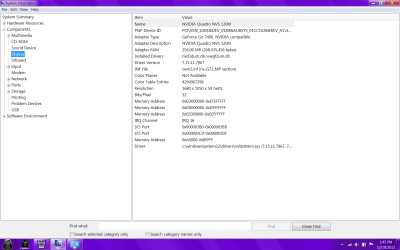
These are the specs (I believe still learning things) of the display (1st pic)
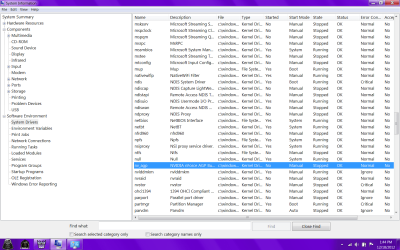
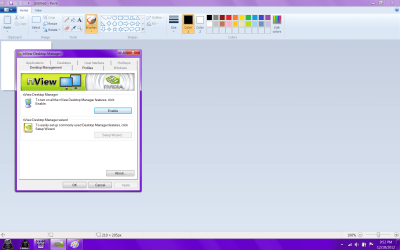
I also looked at the drivers and the only one that had NVIDIA associated with it was turned off, not sure if that has to do with it or if I even have the correct driver(s) installed(2nd pic)

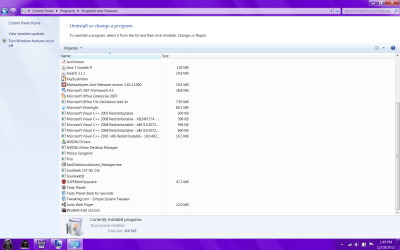
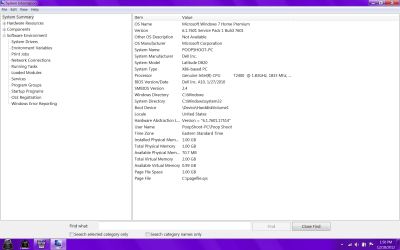
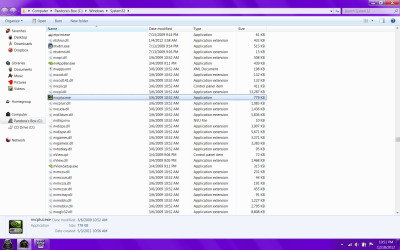
Here are the programs I have installed on this computer(give or take a few that you can't see at the top like chrome and personal programs) and its summary (3&4)

I've learned a lot from reading these forums in the past few months and hope to continue learning much more as to what this error means and how to fix it. Thank you for your time
 

Attachments
  • display.png
    display.png
    54.6 KB · Views: 22
  • driver.png
    driver.png
    92.8 KB · Views: 18
  • install.png
    install.png
    99.5 KB · Views: 12
  • system.png
    system.png
    56.5 KB · Views: 10
Last edited:

My Computer

Computer type
PC/Desktop
OS
Microsoft Windows 7 Professional 64-bit SP1
CPU
Intel(R) Core(TM) i5 CPU M 520 @ 2.40GHz
Motherboard
Dell Inc. 0K42JR
Memory
8.00 GB
Graphics Card(s)
NVIDIA NVS 3100M
Sound Card
(1) NVIDIA High Definition Audio (2) IDT High Definition A
Monitor(s) Displays
1
Screen Resolution
1440 x 900 x 32 bits (4294967296 colors) @ 59 Hz
Hard Drives
Samsung SSD 840 PRO Series ATA Device
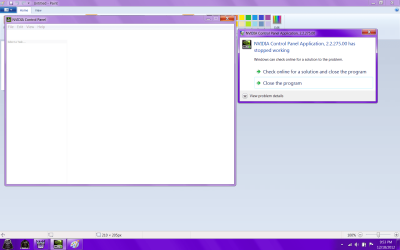
All I do to get the control panel is Start and type in Nvidia and at the top is control panel. You can also right click on Desktop and there is a Nvidia Control Panel there.
Is this a laptop?
 

My Computer

Computer type
PC/Desktop
Computer Manufacturer/Model Number
Home made Desktop
OS
Windows 10 Pro. 64/ version 1709 Windows 7 Pro/64
CPU
Intel i7-6800K @ 4.3
Motherboard
ASUS X-99 Deluxe II
Memory
Corsair Platinum 16 gig @2400
Graphics Card(s)
EVGA GTX 1070 OC
Monitor(s) Displays
Asus 27" LED LCD/VE278Q
Screen Resolution
1920-1080 or 1280-720 HDMI
Hard Drives
INTEL SSD 730-240 Gb Sata 3.0/
PSU
EVGA Platium 1200W
Case
Phanteks Luxe Tempered Glass 8 fans/ one radiator
Cooling
XSPC/ Water Cooled CPU
Keyboard
Das 4 Professional
Mouse
Logitech M705/MX Anywhere 2-S
Internet Speed
100 mbits
Antivirus
Microsoft Security Essentials/ Malwarebytes Premium 3.0/ SAS
Browser
I.E. 11 default/Firefox/ ISP Time Warner Cable/Spectrum
Other Info
LG BluRay Burner/
Sound system-KLipsch-THX/
Icy Dock ssd Hot Swap bays.
All I do to get the control panel is Start and type in Nvidia and at the top is control panel. You can also right click on Desktop and there is a Nvidia Control Panel there.
Is this a laptop?

Hi Layback. Yes it is a lap top: Dell Latitude D820

I am able to get to the menu you have described from the start menu, however when I right click on the desktop and choose the option "NVIDIA Control Panel" it brings up the application has stopped working message and provides the error log above.
 

My Computer

Computer type
PC/Desktop
OS
Microsoft Windows 7 Professional 64-bit SP1
CPU
Intel(R) Core(TM) i5 CPU M 520 @ 2.40GHz
Motherboard
Dell Inc. 0K42JR
Memory
8.00 GB
Graphics Card(s)
NVIDIA NVS 3100M
Sound Card
(1) NVIDIA High Definition Audio (2) IDT High Definition A
Monitor(s) Displays
1
Screen Resolution
1440 x 900 x 32 bits (4294967296 colors) @ 59 Hz
Hard Drives
Samsung SSD 840 PRO Series ATA Device
My Computer

Computer type
PC/Desktop
Computer Manufacturer/Model Number
Home made Desktop
OS
Windows 10 Pro. 64/ version 1709 Windows 7 Pro/64
CPU
Intel i7-6800K @ 4.3
Motherboard
ASUS X-99 Deluxe II
Memory
Corsair Platinum 16 gig @2400
Graphics Card(s)
EVGA GTX 1070 OC
Monitor(s) Displays
Asus 27" LED LCD/VE278Q
Screen Resolution
1920-1080 or 1280-720 HDMI
Hard Drives
INTEL SSD 730-240 Gb Sata 3.0/
PSU
EVGA Platium 1200W
Case
Phanteks Luxe Tempered Glass 8 fans/ one radiator
Cooling
XSPC/ Water Cooled CPU
Keyboard
Das 4 Professional
Mouse
Logitech M705/MX Anywhere 2-S
Internet Speed
100 mbits
Antivirus
Microsoft Security Essentials/ Malwarebytes Premium 3.0/ SAS
Browser
I.E. 11 default/Firefox/ ISP Time Warner Cable/Spectrum
Other Info
LG BluRay Burner/
Sound system-KLipsch-THX/
Icy Dock ssd Hot Swap bays.
If I understand you correctly, using the Start you can access the Nvidia Control Panel but you can't using Right click on desktop. Is that correct.
This may help.
http://www.sevenforums.com/tutorial...ol-panel-add-remove-desktop-context-menu.html

Well, When I click the NVIDIA option from the start menu it brings me to nView desktop manager. The option form the right click is for a NVIDIA control panel. I'm not sure they are the same, since I cannot seem to access the right click, but from pictures I have seen online they do not appear to be the same option

Pic 1 is the menu I can access form the start menu

Pic 2 is the one I cannot
 

Attachments

  • menu 2.png
    menu 2.png
    60.8 KB · Views: 6
  • menu.png
    menu.png
    86.9 KB · Views: 11

My Computer

Computer type
PC/Desktop
OS
Microsoft Windows 7 Professional 64-bit SP1
CPU
Intel(R) Core(TM) i5 CPU M 520 @ 2.40GHz
Motherboard
Dell Inc. 0K42JR
Memory
8.00 GB
Graphics Card(s)
NVIDIA NVS 3100M
Sound Card
(1) NVIDIA High Definition Audio (2) IDT High Definition A
Monitor(s) Displays
1
Screen Resolution
1440 x 900 x 32 bits (4294967296 colors) @ 59 Hz
Hard Drives
Samsung SSD 840 PRO Series ATA Device
Are you seeing this.

nvidia control panel.PNG
 

My Computer

Computer type
PC/Desktop
Computer Manufacturer/Model Number
Home made Desktop
OS
Windows 10 Pro. 64/ version 1709 Windows 7 Pro/64
CPU
Intel i7-6800K @ 4.3
Motherboard
ASUS X-99 Deluxe II
Memory
Corsair Platinum 16 gig @2400
Graphics Card(s)
EVGA GTX 1070 OC
Monitor(s) Displays
Asus 27" LED LCD/VE278Q
Screen Resolution
1920-1080 or 1280-720 HDMI
Hard Drives
INTEL SSD 730-240 Gb Sata 3.0/
PSU
EVGA Platium 1200W
Case
Phanteks Luxe Tempered Glass 8 fans/ one radiator
Cooling
XSPC/ Water Cooled CPU
Keyboard
Das 4 Professional
Mouse
Logitech M705/MX Anywhere 2-S
Internet Speed
100 mbits
Antivirus
Microsoft Security Essentials/ Malwarebytes Premium 3.0/ SAS
Browser
I.E. 11 default/Firefox/ ISP Time Warner Cable/Spectrum
Other Info
LG BluRay Burner/
Sound system-KLipsch-THX/
Icy Dock ssd Hot Swap bays.

My Computer

Computer type
PC/Desktop
OS
Microsoft Windows 7 Professional 64-bit SP1
CPU
Intel(R) Core(TM) i5 CPU M 520 @ 2.40GHz
Motherboard
Dell Inc. 0K42JR
Memory
8.00 GB
Graphics Card(s)
NVIDIA NVS 3100M
Sound Card
(1) NVIDIA High Definition Audio (2) IDT High Definition A
Monitor(s) Displays
1
Screen Resolution
1440 x 900 x 32 bits (4294967296 colors) @ 59 Hz
Hard Drives
Samsung SSD 840 PRO Series ATA Device

My Computer

Computer type
PC/Desktop
Computer Manufacturer/Model Number
Home made Desktop
OS
Windows 10 Pro. 64/ version 1709 Windows 7 Pro/64
CPU
Intel i7-6800K @ 4.3
Motherboard
ASUS X-99 Deluxe II
Memory
Corsair Platinum 16 gig @2400
Graphics Card(s)
EVGA GTX 1070 OC
Monitor(s) Displays
Asus 27" LED LCD/VE278Q
Screen Resolution
1920-1080 or 1280-720 HDMI
Hard Drives
INTEL SSD 730-240 Gb Sata 3.0/
PSU
EVGA Platium 1200W
Case
Phanteks Luxe Tempered Glass 8 fans/ one radiator
Cooling
XSPC/ Water Cooled CPU
Keyboard
Das 4 Professional
Mouse
Logitech M705/MX Anywhere 2-S
Internet Speed
100 mbits
Antivirus
Microsoft Security Essentials/ Malwarebytes Premium 3.0/ SAS
Browser
I.E. 11 default/Firefox/ ISP Time Warner Cable/Spectrum
Other Info
LG BluRay Burner/
Sound system-KLipsch-THX/
Icy Dock ssd Hot Swap bays.
Did you read through this. Post # 4
NVIDIA Control Panel - Add or Remove from Desktop Context Menu
I'm presuming you ticked enabled.

I have the menu option there. The pic shows what I get when I right click on the desktop. The NVIDIA option is there, but when I click on it I get the application stopped working error I posted above.

Also in Brinks link you sent me, it states the the exe is located at C:\Program Files\NVIDIA Corporation\Control Panel Client\nvcplui.exe. However I searched and found mine in the system 32 file, is that a problem?
 

Attachments

  • desk.jpg
    desk.jpg
    339.1 KB · Views: 8

My Computer

Computer type
PC/Desktop
OS
Microsoft Windows 7 Professional 64-bit SP1
CPU
Intel(R) Core(TM) i5 CPU M 520 @ 2.40GHz
Motherboard
Dell Inc. 0K42JR
Memory
8.00 GB
Graphics Card(s)
NVIDIA NVS 3100M
Sound Card
(1) NVIDIA High Definition Audio (2) IDT High Definition A
Monitor(s) Displays
1
Screen Resolution
1440 x 900 x 32 bits (4294967296 colors) @ 59 Hz
Hard Drives
Samsung SSD 840 PRO Series ATA Device
C:\Program Files\NVIDIA Corporation\Control Panel Client\nvcplui.exe
This is where mine are located.
Go to Windows Explorer and Search nvcplui.exe and see what you find and where.
--------------
Is everything else on your system working properly and what anti virus and Firewall are you using?
 

My Computer

Computer type
PC/Desktop
Computer Manufacturer/Model Number
Home made Desktop
OS
Windows 10 Pro. 64/ version 1709 Windows 7 Pro/64
CPU
Intel i7-6800K @ 4.3
Motherboard
ASUS X-99 Deluxe II
Memory
Corsair Platinum 16 gig @2400
Graphics Card(s)
EVGA GTX 1070 OC
Monitor(s) Displays
Asus 27" LED LCD/VE278Q
Screen Resolution
1920-1080 or 1280-720 HDMI
Hard Drives
INTEL SSD 730-240 Gb Sata 3.0/
PSU
EVGA Platium 1200W
Case
Phanteks Luxe Tempered Glass 8 fans/ one radiator
Cooling
XSPC/ Water Cooled CPU
Keyboard
Das 4 Professional
Mouse
Logitech M705/MX Anywhere 2-S
Internet Speed
100 mbits
Antivirus
Microsoft Security Essentials/ Malwarebytes Premium 3.0/ SAS
Browser
I.E. 11 default/Firefox/ ISP Time Warner Cable/Spectrum
Other Info
LG BluRay Burner/
Sound system-KLipsch-THX/
Icy Dock ssd Hot Swap bays.
C:\Program Files\NVIDIA Corporation\Control Panel Client\nvcplui.exe
This is where mine are located.
Go to Windows Explorer and Search nvcplui.exe and see what you find and where.
--------------
Is everything else on your system working properly and what anti virus and Firewall are you using?

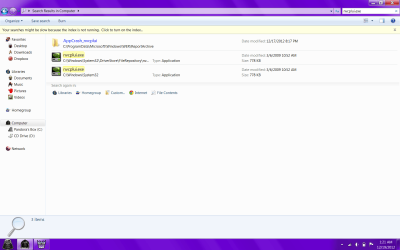
the picture shows where I found it when I clicked "show file location" when I type it, but again once I click it brings up the error. I do not have the location on this computer, nothing in the C: folder at all with NVIDIA corporation

I am running Avast free and windows firewall. I also have run Malwarebytes and superanti spyware with no problems detected (although malwarebytes was not run on a full system scan)

Everything else on this computer works just fine as far as I can tell and I'm not sure how long this has been a problem b/c this is the first time I have tried to access it.
 

Attachments

  • nvid.png
    nvid.png
    99.8 KB · Views: 8

My Computer

Computer type
PC/Desktop
OS
Microsoft Windows 7 Professional 64-bit SP1
CPU
Intel(R) Core(TM) i5 CPU M 520 @ 2.40GHz
Motherboard
Dell Inc. 0K42JR
Memory
8.00 GB
Graphics Card(s)
NVIDIA NVS 3100M
Sound Card
(1) NVIDIA High Definition Audio (2) IDT High Definition A
Monitor(s) Displays
1
Screen Resolution
1440 x 900 x 32 bits (4294967296 colors) @ 59 Hz
Hard Drives
Samsung SSD 840 PRO Series ATA Device
full screen Nvidia.PNG

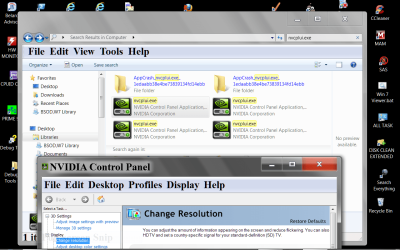
This is what I was looking for. Right click on it and look through properties and find it's location.
I have no idea what Pandora box is. It might of been moved from it's normal location (Tutorial location) to the Pandora box thing.
 

My Computer

Computer type
PC/Desktop
Computer Manufacturer/Model Number
Home made Desktop
OS
Windows 10 Pro. 64/ version 1709 Windows 7 Pro/64
CPU
Intel i7-6800K @ 4.3
Motherboard
ASUS X-99 Deluxe II
Memory
Corsair Platinum 16 gig @2400
Graphics Card(s)
EVGA GTX 1070 OC
Monitor(s) Displays
Asus 27" LED LCD/VE278Q
Screen Resolution
1920-1080 or 1280-720 HDMI
Hard Drives
INTEL SSD 730-240 Gb Sata 3.0/
PSU
EVGA Platium 1200W
Case
Phanteks Luxe Tempered Glass 8 fans/ one radiator
Cooling
XSPC/ Water Cooled CPU
Keyboard
Das 4 Professional
Mouse
Logitech M705/MX Anywhere 2-S
Internet Speed
100 mbits
Antivirus
Microsoft Security Essentials/ Malwarebytes Premium 3.0/ SAS
Browser
I.E. 11 default/Firefox/ ISP Time Warner Cable/Spectrum
Other Info
LG BluRay Burner/
Sound system-KLipsch-THX/
Icy Dock ssd Hot Swap bays.
View attachment 246236

This is what I was looking for. Right click on it and look through properties and find it's location.
I have no idea what Pandora box is. It might of been moved from it's normal location (Tutorial location) to the Pandora box thing.

Sorry about that. This is what I get when I searched in explorer. Also Pandoras box is just what I renamed my C drive to, nothing more than just a name not a separate drive or anything
 

Attachments

  • explore.png
    explore.png
    56.5 KB · Views: 4

My Computer

Computer type
PC/Desktop
OS
Microsoft Windows 7 Professional 64-bit SP1
CPU
Intel(R) Core(TM) i5 CPU M 520 @ 2.40GHz
Motherboard
Dell Inc. 0K42JR
Memory
8.00 GB
Graphics Card(s)
NVIDIA NVS 3100M
Sound Card
(1) NVIDIA High Definition Audio (2) IDT High Definition A
Monitor(s) Displays
1
Screen Resolution
1440 x 900 x 32 bits (4294967296 colors) @ 59 Hz
Hard Drives
Samsung SSD 840 PRO Series ATA Device
If you have completed the Tutorial I posted the only other thing I can think of is; a 3rd party program that changes the appearance of Windows not allowing your right click on desktop to work or the Nvidia Control Panel exe is corrupt.
I'm all out of ideas.
 

My Computer

Computer type
PC/Desktop
Computer Manufacturer/Model Number
Home made Desktop
OS
Windows 10 Pro. 64/ version 1709 Windows 7 Pro/64
CPU
Intel i7-6800K @ 4.3
Motherboard
ASUS X-99 Deluxe II
Memory
Corsair Platinum 16 gig @2400
Graphics Card(s)
EVGA GTX 1070 OC
Monitor(s) Displays
Asus 27" LED LCD/VE278Q
Screen Resolution
1920-1080 or 1280-720 HDMI
Hard Drives
INTEL SSD 730-240 Gb Sata 3.0/
PSU
EVGA Platium 1200W
Case
Phanteks Luxe Tempered Glass 8 fans/ one radiator
Cooling
XSPC/ Water Cooled CPU
Keyboard
Das 4 Professional
Mouse
Logitech M705/MX Anywhere 2-S
Internet Speed
100 mbits
Antivirus
Microsoft Security Essentials/ Malwarebytes Premium 3.0/ SAS
Browser
I.E. 11 default/Firefox/ ISP Time Warner Cable/Spectrum
Other Info
LG BluRay Burner/
Sound system-KLipsch-THX/
Icy Dock ssd Hot Swap bays.
If you have completed the Tutorial I posted the only other thing I can think of is; a 3rd party program that changes the appearance of Windows not allowing your right click on desktop to work or the Nvidia Control Panel exe is corrupt.
I'm all out of ideas.

Hmm, must be corrupt I suppose b/c I can right click on the desktop and I can see the option for NVIDIA control panel in the desktop context menu, its just when click on it it just leads to shutting down. Perhaps uninstall it or update it somehow?
 

My Computer

Computer type
PC/Desktop
OS
Microsoft Windows 7 Professional 64-bit SP1
CPU
Intel(R) Core(TM) i5 CPU M 520 @ 2.40GHz
Motherboard
Dell Inc. 0K42JR
Memory
8.00 GB
Graphics Card(s)
NVIDIA NVS 3100M
Sound Card
(1) NVIDIA High Definition Audio (2) IDT High Definition A
Monitor(s) Displays
1
Screen Resolution
1440 x 900 x 32 bits (4294967296 colors) @ 59 Hz
Hard Drives
Samsung SSD 840 PRO Series ATA Device
Back
Top