
Solved nvidia control panel

Kodiak420

New member
Member
Local time
5:14 PM
Messages
88
Good Day to all....

Had a question...
the nvidia control panel when i try to open the desk top part of the control panel it crashs the program... I am try to run my daul screens at two different res. But apparently i need to do it through Nvidia control panel ?????? Is there a fix to stop the desktop portion of the nvidia control panel from crashing it self?????:cry::cry::cry::cry: Thanx in advance ....
 

My Computer

Computer type
PC/Desktop
Computer Manufacturer/Model Number
home build
OS
Windows 7 Professional 64bit
CPU
Intel(R) Core(tm) i5 cpu 760@ 2.80ghz 2400 mhz, Quad core
Motherboard
Asus P7P55D-E-LX INTEL
Memory
Kinston hyperX 12GB DDR3 PC3-12800 daul
Graphics Card(s)
Asus GeForce GTX 460 1gb GDDR5
Sound Card
Fatal1ty Champ1on recon 3D from Sound Blaster (PCI-E)
Monitor(s) Displays
LG Flatron W2442PA 24''/sony bravia 32'' LCD
Screen Resolution
1920 x 1080
Hard Drives
Western Digital WD1002FAEX 1TB (x2)
Seagate 1TB
Seagate 500GB
Western Digital WD30EFRX-68A 3TB (x2)
Western Digital 2TB
PSU
OCZ 600W +80 ModXStream Pro Power Supply
Case
HAF CoolMaster 912
Cooling
a fan or two or five cool it......
Keyboard
microsoft wireless 700
Mouse
microsoft wireless 700
Internet Speed
50 MGBps download / 4 MGBps upload
Antivirus
Panda Global 2013
Browser
Mozilla
Other Info
Bose 7.1 True surround sound .... and its LOUD!!!!!!!

Asus N53S-V notebook, i7,Nvidia GT 540M, 16 GB ram, Corsair Neutron GTX 250gb SSD and WD 750gb
Hello Kodiak420!

The Nvidia Control Panel follows with your Graphic Driver. Try reinstalling your Driver by using Nvidia Uninstaller (uninstall from your control panel as we know!)

   Warning
Your resolution will change after you restarted your computer, it's all normal because Windows 7 is using the default driver


   Tip
If you want to clean leftover files use the popular software, Driver Sweeper

http://www.sevenforums.com/tutorials/83814-drivers-clean-left-over-files-after-uninstalling.html

If you don't want to uninstall your driver, i'm sure there's some members having other suggestions for you!
Hope this helps.
 

My Computer

Computer Manufacturer/Model Number
Brewed
OS
Microsoft Windows 7 Ultimate: x64 (SP1)
CPU
Intel® Core™ i5-2500K Processor
Motherboard
ASUS P8Z68-V PRO
Memory
Kingston DDR3 HyperX 1600MHz 8GB
Graphics Card(s)
ASUS GTX 560 TI DirectCU II 900MHz
Sound Card
Realtek® ALC892 8-Channel High Definition Audio CODEC
Monitor(s) Displays
ACER LCD P246HBD 1920x1080 (24") - Dell 1280x800
Screen Resolution
ACER LCD P246HBD ~ [1920X1080] - DELL ~ [1280x800]
Hard Drives
500 GB WD Caviar SE116 7200rpm SATA2
PSU
Corsair 750W Power Supply
Case
Coolermaster CM Scout
Cooling
Zalman FS-C77 Fatal1ty CPU Cooler
Keyboard
Logitech G15
Mouse
Coolermaster Sentinel Advanced
Internet Speed
[↓ 10 MB/s DL] [↑ 1 MB/s UL]
Other Info
- ROCCAT™ Kave – Solid 5.1 Surround Sound Gaming Headset
- Not overclocking
Hello Kodiak420!

The Nvidia Control Panel follows with your Graphic Driver. Try reinstalling your Driver by using Nvidia Uninstaller (uninstall from your control panel as we know!)

   Warning
Your resolution will change after you restarted your computer, it's all normal because Windows 7 is using the default driver


   Tip
If you want to clean leftover files use the popular software, Driver Sweeper

http://www.sevenforums.com/tutorials/83814-drivers-clean-left-over-files-after-uninstalling.html

If you don't want to uninstall your driver, i'm sure there's some members having other suggestions for you!
Hope this helps.
When i updated the latest driver (the 270.61 i think don,t qote) I did a complete uninstall then i ran driver sweeper to make sure of it all being gone. then installed.

SO i'm hopeing that i dont need to do all that again.... but thanx fredegail for the input..... :huh::huh::huh:
 

My Computer

Computer type
PC/Desktop
Computer Manufacturer/Model Number
home build
OS
Windows 7 Professional 64bit
CPU
Intel(R) Core(tm) i5 cpu 760@ 2.80ghz 2400 mhz, Quad core
Motherboard
Asus P7P55D-E-LX INTEL
Memory
Kinston hyperX 12GB DDR3 PC3-12800 daul
Graphics Card(s)
Asus GeForce GTX 460 1gb GDDR5
Sound Card
Fatal1ty Champ1on recon 3D from Sound Blaster (PCI-E)
Monitor(s) Displays
LG Flatron W2442PA 24''/sony bravia 32'' LCD
Screen Resolution
1920 x 1080
Hard Drives
Western Digital WD1002FAEX 1TB (x2)
Seagate 1TB
Seagate 500GB
Western Digital WD30EFRX-68A 3TB (x2)
Western Digital 2TB
PSU
OCZ 600W +80 ModXStream Pro Power Supply
Case
HAF CoolMaster 912
Cooling
a fan or two or five cool it......
Keyboard
microsoft wireless 700
Mouse
microsoft wireless 700
Internet Speed
50 MGBps download / 4 MGBps upload
Antivirus
Panda Global 2013
Browser
Mozilla
Other Info
Bose 7.1 True surround sound .... and its LOUD!!!!!!!

Asus N53S-V notebook, i7,Nvidia GT 540M, 16 GB ram, Corsair Neutron GTX 250gb SSD and WD 750gb
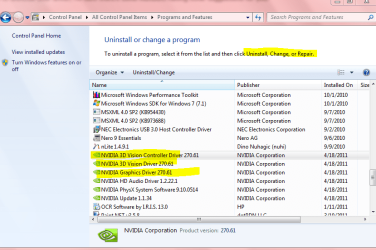
That is it. I just went to Control Panel> Programs and Features. The only option when you highlight and right click is uninstall- no repair option. Some software will have repair. It seems a rarity anymore.
See pic below.

The same if you go to Device Manager. Rollback or delete. No repair.

Mike
 

Attachments

  • Nvidia.PNG
    Nvidia.PNG
    56.3 KB · Views: 700

My Computer

Computer Manufacturer/Model Number
Hopalong/ Godzilla
OS
Windows7 Pro 64bit SP-1; Windows XP Pro 32bit
CPU
Intel Core i7-870 Lynnfield 2.93GHz LGA 1156 95W Quad-Core
Motherboard
ASUS P7P55D-E PRO
Memory
8GB@1400MHz Crucial Ballistix DDR3-1600 4x2GB
Graphics Card(s)
ASUS ENGTX460 DirectCU/2DI/1GD5 1GB 256-bit GDDR5
Sound Card
VIA Onboard
Monitor(s) Displays
Asus VS248H-P 24"; Samsung SyncMaster 941BW 19"ws
Screen Resolution
1920x1080; 1440x900
Hard Drives
Samsung 830 120GB SSD
Intel 320 120GB SSD
Western Digital Caviar Black WD7501AALS 750GB 7200 RPM SATA 3.0Gb/s
Western Digital Caviar Black WD6401AALS 640GB 7200 RPM SATA 3.0Gb/s
PSU
COOLER MASTER Silent Pro RS850-AMBAJ3-US 850W Modular
Case
COOLER MASTER HAF 932 RC-932-KKN5-GP Black
Cooling
Scythe "Mugen-2 Rev.B" (2 ScytheKaze-Jyuni PWM fans)
Keyboard
Logitech K-320
Mouse
Kensington
Antivirus
Avast Inernet Suite
Browser
IE 9 ; Chrome
That is it. I just went to Control Panel> Programs and Features. The only option when you highlight and right click is uninstall- no repair option. Some software will have repair. It seems a rarity anymore.
See pic below.

The same if you go to Device Manager. Rollback or delete. No repair.

Mike
well thats the same as mineCapture 12.PNG I guess i am going to uninstall, sweep again.. but now..
 

My Computer

Computer type
PC/Desktop
Computer Manufacturer/Model Number
home build
OS
Windows 7 Professional 64bit
CPU
Intel(R) Core(tm) i5 cpu 760@ 2.80ghz 2400 mhz, Quad core
Motherboard
Asus P7P55D-E-LX INTEL
Memory
Kinston hyperX 12GB DDR3 PC3-12800 daul
Graphics Card(s)
Asus GeForce GTX 460 1gb GDDR5
Sound Card
Fatal1ty Champ1on recon 3D from Sound Blaster (PCI-E)
Monitor(s) Displays
LG Flatron W2442PA 24''/sony bravia 32'' LCD
Screen Resolution
1920 x 1080
Hard Drives
Western Digital WD1002FAEX 1TB (x2)
Seagate 1TB
Seagate 500GB
Western Digital WD30EFRX-68A 3TB (x2)
Western Digital 2TB
PSU
OCZ 600W +80 ModXStream Pro Power Supply
Case
HAF CoolMaster 912
Cooling
a fan or two or five cool it......
Keyboard
microsoft wireless 700
Mouse
microsoft wireless 700
Internet Speed
50 MGBps download / 4 MGBps upload
Antivirus
Panda Global 2013
Browser
Mozilla
Other Info
Bose 7.1 True surround sound .... and its LOUD!!!!!!!

Asus N53S-V notebook, i7,Nvidia GT 540M, 16 GB ram, Corsair Neutron GTX 250gb SSD and WD 750gb
I think the dual display needs to be setup in Nvidias control panels.

You should be able to just re-install the drivers, and check "Perform a clean Install"


I would unplug 1 monitor for the time being.
Once you get the driver and control panel working, then reconnect it, and set it up in the control panel.
 

My Computer

Computer Manufacturer/Model Number
Custom (Self Build)
OS
Windows 7 Home Premium 64bit
CPU
Intel Core i7 2700k
Motherboard
eVGA P67 SLI
Memory
8GB Mushkin Redline Ridgebacks @1866
Graphics Card(s)
EVGA GTX570 SC
Sound Card
XiFi Titanium HD
Monitor(s) Displays
LG W2453V
Screen Resolution
1920x1080
Hard Drives
Intel 320 80GB -- Intel X25-V 40GB --WD Black 1TB x2 -- WD Blue 640GB
PSU
Seasonic x750
Case
Corsair 600T SE White
Cooling
eVGA Superclocked CPU Cooler
Keyboard
Saitek Cyborg
Antivirus
Kaspersky
Browser
IE
Other Info
LG BD/DVD
You can set the resolutions on each monitor from display properties with no need to go anywhere near the nvidia control panel.
CAN I RUN 2 window task bars TASK BARS
 

My Computer

Computer type
PC/Desktop
Computer Manufacturer/Model Number
home build
OS
Windows 7 Professional 64bit
CPU
Intel(R) Core(tm) i5 cpu 760@ 2.80ghz 2400 mhz, Quad core
Motherboard
Asus P7P55D-E-LX INTEL
Memory
Kinston hyperX 12GB DDR3 PC3-12800 daul
Graphics Card(s)
Asus GeForce GTX 460 1gb GDDR5
Sound Card
Fatal1ty Champ1on recon 3D from Sound Blaster (PCI-E)
Monitor(s) Displays
LG Flatron W2442PA 24''/sony bravia 32'' LCD
Screen Resolution
1920 x 1080
Hard Drives
Western Digital WD1002FAEX 1TB (x2)
Seagate 1TB
Seagate 500GB
Western Digital WD30EFRX-68A 3TB (x2)
Western Digital 2TB
PSU
OCZ 600W +80 ModXStream Pro Power Supply
Case
HAF CoolMaster 912
Cooling
a fan or two or five cool it......
Keyboard
microsoft wireless 700
Mouse
microsoft wireless 700
Internet Speed
50 MGBps download / 4 MGBps upload
Antivirus
Panda Global 2013
Browser
Mozilla
Other Info
Bose 7.1 True surround sound .... and its LOUD!!!!!!!

Asus N53S-V notebook, i7,Nvidia GT 540M, 16 GB ram, Corsair Neutron GTX 250gb SSD and WD 750gb

I think the dual display needs to be setup in Nvidias control panels.

You should be able to just re-install the drivers, and check "Perform a clean Install"


I would unplug 1 monitor for the time being.
Once you get the driver and control panel working, then reconnect it, and set it up in the control panel.
Thanx wishmaster you saved the day again... thanx
 

My Computer

Computer type
PC/Desktop
Computer Manufacturer/Model Number
home build
OS
Windows 7 Professional 64bit
CPU
Intel(R) Core(tm) i5 cpu 760@ 2.80ghz 2400 mhz, Quad core
Motherboard
Asus P7P55D-E-LX INTEL
Memory
Kinston hyperX 12GB DDR3 PC3-12800 daul
Graphics Card(s)
Asus GeForce GTX 460 1gb GDDR5
Sound Card
Fatal1ty Champ1on recon 3D from Sound Blaster (PCI-E)
Monitor(s) Displays
LG Flatron W2442PA 24''/sony bravia 32'' LCD
Screen Resolution
1920 x 1080
Hard Drives
Western Digital WD1002FAEX 1TB (x2)
Seagate 1TB
Seagate 500GB
Western Digital WD30EFRX-68A 3TB (x2)
Western Digital 2TB
PSU
OCZ 600W +80 ModXStream Pro Power Supply
Case
HAF CoolMaster 912
Cooling
a fan or two or five cool it......
Keyboard
microsoft wireless 700
Mouse
microsoft wireless 700
Internet Speed
50 MGBps download / 4 MGBps upload
Antivirus
Panda Global 2013
Browser
Mozilla
Other Info
Bose 7.1 True surround sound .... and its LOUD!!!!!!!

Asus N53S-V notebook, i7,Nvidia GT 540M, 16 GB ram, Corsair Neutron GTX 250gb SSD and WD 750gb

My Computer

Computer type
PC/Desktop
Computer Manufacturer/Model Number
home build
OS
Windows 7 Professional 64bit
CPU
Intel(R) Core(tm) i5 cpu 760@ 2.80ghz 2400 mhz, Quad core
Motherboard
Asus P7P55D-E-LX INTEL
Memory
Kinston hyperX 12GB DDR3 PC3-12800 daul
Graphics Card(s)
Asus GeForce GTX 460 1gb GDDR5
Sound Card
Fatal1ty Champ1on recon 3D from Sound Blaster (PCI-E)
Monitor(s) Displays
LG Flatron W2442PA 24''/sony bravia 32'' LCD
Screen Resolution
1920 x 1080
Hard Drives
Western Digital WD1002FAEX 1TB (x2)
Seagate 1TB
Seagate 500GB
Western Digital WD30EFRX-68A 3TB (x2)
Western Digital 2TB
PSU
OCZ 600W +80 ModXStream Pro Power Supply
Case
HAF CoolMaster 912
Cooling
a fan or two or five cool it......
Keyboard
microsoft wireless 700
Mouse
microsoft wireless 700
Internet Speed
50 MGBps download / 4 MGBps upload
Antivirus
Panda Global 2013
Browser
Mozilla
Other Info
Bose 7.1 True surround sound .... and its LOUD!!!!!!!

Asus N53S-V notebook, i7,Nvidia GT 540M, 16 GB ram, Corsair Neutron GTX 250gb SSD and WD 750gb
@ z3r010


ok that sort of got what i was looking 4 thanx..... One other thing why do the desk top icons open in different screens than originally open.. or is it just me...:D:D:D:D:D
 

My Computer

Computer type
PC/Desktop
Computer Manufacturer/Model Number
home build
OS
Windows 7 Professional 64bit
CPU
Intel(R) Core(tm) i5 cpu 760@ 2.80ghz 2400 mhz, Quad core
Motherboard
Asus P7P55D-E-LX INTEL
Memory
Kinston hyperX 12GB DDR3 PC3-12800 daul
Graphics Card(s)
Asus GeForce GTX 460 1gb GDDR5
Sound Card
Fatal1ty Champ1on recon 3D from Sound Blaster (PCI-E)
Monitor(s) Displays
LG Flatron W2442PA 24''/sony bravia 32'' LCD
Screen Resolution
1920 x 1080
Hard Drives
Western Digital WD1002FAEX 1TB (x2)
Seagate 1TB
Seagate 500GB
Western Digital WD30EFRX-68A 3TB (x2)
Western Digital 2TB
PSU
OCZ 600W +80 ModXStream Pro Power Supply
Case
HAF CoolMaster 912
Cooling
a fan or two or five cool it......
Keyboard
microsoft wireless 700
Mouse
microsoft wireless 700
Internet Speed
50 MGBps download / 4 MGBps upload
Antivirus
Panda Global 2013
Browser
Mozilla
Other Info
Bose 7.1 True surround sound .... and its LOUD!!!!!!!

Asus N53S-V notebook, i7,Nvidia GT 540M, 16 GB ram, Corsair Neutron GTX 250gb SSD and WD 750gb
So does any one now how to independently adjust the settings for each monitor... for example desk top icons medium on one monitor, and small on the other
 

My Computer

Computer type
PC/Desktop
Computer Manufacturer/Model Number
home build
OS
Windows 7 Professional 64bit
CPU
Intel(R) Core(tm) i5 cpu 760@ 2.80ghz 2400 mhz, Quad core
Motherboard
Asus P7P55D-E-LX INTEL
Memory
Kinston hyperX 12GB DDR3 PC3-12800 daul
Graphics Card(s)
Asus GeForce GTX 460 1gb GDDR5
Sound Card
Fatal1ty Champ1on recon 3D from Sound Blaster (PCI-E)
Monitor(s) Displays
LG Flatron W2442PA 24''/sony bravia 32'' LCD
Screen Resolution
1920 x 1080
Hard Drives
Western Digital WD1002FAEX 1TB (x2)
Seagate 1TB
Seagate 500GB
Western Digital WD30EFRX-68A 3TB (x2)
Western Digital 2TB
PSU
OCZ 600W +80 ModXStream Pro Power Supply
Case
HAF CoolMaster 912
Cooling
a fan or two or five cool it......
Keyboard
microsoft wireless 700
Mouse
microsoft wireless 700
Internet Speed
50 MGBps download / 4 MGBps upload
Antivirus
Panda Global 2013
Browser
Mozilla
Other Info
Bose 7.1 True surround sound .... and its LOUD!!!!!!!

Asus N53S-V notebook, i7,Nvidia GT 540M, 16 GB ram, Corsair Neutron GTX 250gb SSD and WD 750gb
Again you might need a 3rd Party application (I think - I do not have multiple moniters)

This is because all the moniters that you have attached is your desktop so Any desktop preferences set for 1 is set for all (Again I am using common sense here)

Josh
 

My Computer

Computer type
PC/Desktop
Computer Manufacturer/Model Number
Custom Built
OS
Windows 7 Professional x64 SP1 ; Windows Server 2012 R2 Standard
CPU
Intel Core i5 2400 @ 3.10GHz
Motherboard
Foxconn H67MP-S/-V/H67MP
Memory
8.0GB DDR3 @ 665MHz (2GBx4)
Graphics Card(s)
AMD Radeon HD 6870
Sound Card
Realtek High Definition Audio
Monitor(s) Displays
AOC 2243W & SMB1930NW
Screen Resolution
1440x900 & 1920x1080
Hard Drives
977GB Seagate ST31000524AS ATA Drive (SATA)
250GB WD iSCSI attached Drive
PSU
750W Gaming PSU
Case
Novatech Night
Cooling
Fan
Keyboard
Dell Standard PS/2 Keyboard
Mouse
R.A.T 07 Gaming Mouse
Internet Speed
Download: 10 Mbps Ping: 30ms Upload: 0.81 Mbps
Browser
Google Chrome
Other Info
Optiarc DVD RW AD-5260S ATA Device
Back
Top