NVIDIA Driver - Convert from Desktop to Mobile (Laptop)

Use this attachment instead. You had two line entries in each section for 0427, confusing the heck out of the installer lol.

Use this with that latest 32 bit from the NVIDIA site.

Good luck. :D
 

Attachments

My Computer My Computer

At a glance

7600.20510 x86P4 550 3.4 GHz HT running at 3.5 GHzOCZ 2 GB(2x1GB) DDR400mHz running @ 414 mHzHIS Radeon HD 3850 IceQ 3 Turbo HDMI Dual DL-...
Computer Manufacturer/Model Number
self built
OS
7600.20510 x86
CPU
P4 550 3.4 GHz HT running at 3.5 GHz
Motherboard
MSI PM8M3-V (MS-7211 v1.x) Micro-ATX mainboard
Memory
OCZ 2 GB(2x1GB) DDR400mHz running @ 414 mHz
Graphics Card(s)
HIS Radeon HD 3850 IceQ 3 Turbo HDMI Dual DL-DVI AGP
Sound Card
MOTU Traveler firewire studio interface 192 kHz 24 bit
Monitor(s) Displays
22" widescreen Acer X223W LCD, 17" Compaq P75 CRT
Screen Resolution
1680x1050 and 1280x1024
Hard Drives
SATA I x2 WD, 400 GB and 120 GB, SATA 2 WD Caviar Black 1 TB
PSU
350W generic
Case
Cybertronpc, it glows blue
Cooling
stock cpu fan, Ice-Q 3 gpu and system, many case fans
Keyboard
Logitch Classical Keyboard 200
Mouse
Logitech Mediaplay cordless
Internet Speed
1792/448 kbits/sec
Other Info
SATA II PCI fake RAID adapter, 1 GB Readyboost, original ATI Remote Wonder (even works with WMC perfectly), Logitech Rumblepad 2 game controller x2
Use this attachment instead. You had two line entries in each section for 0427, confusing the heck out of the installer lol.

Use this with that latest 32 bit from the NVIDIA site.

Good luck. :D
Didn't realize that. Thanks. But unfortunately that .inf did not solve my problem. On restart at the windows logo the screen still gets all distorted.
 

My Computer My Computer

At a glance

windows 7 UltimateIntel Core2 Duo1.00gNVIDIA 8400 M/ 8600M ????
Computer Manufacturer/Model Number
Dell XPS M1530
OS
windows 7 Ultimate
CPU
Intel Core2 Duo
Memory
1.00g
Graphics Card(s)
NVIDIA 8400 M/ 8600M ????
Monitor(s) Displays
Standard VGA Graphics Adapter
Screen Resolution
1280x800
You probably used it with the wrong driver version or something. I dunno.
 

My Computer My Computer

At a glance

7600.20510 x86P4 550 3.4 GHz HT running at 3.5 GHzOCZ 2 GB(2x1GB) DDR400mHz running @ 414 mHzHIS Radeon HD 3850 IceQ 3 Turbo HDMI Dual DL-...
Computer Manufacturer/Model Number
self built
OS
7600.20510 x86
CPU
P4 550 3.4 GHz HT running at 3.5 GHz
Motherboard
MSI PM8M3-V (MS-7211 v1.x) Micro-ATX mainboard
Memory
OCZ 2 GB(2x1GB) DDR400mHz running @ 414 mHz
Graphics Card(s)
HIS Radeon HD 3850 IceQ 3 Turbo HDMI Dual DL-DVI AGP
Sound Card
MOTU Traveler firewire studio interface 192 kHz 24 bit
Monitor(s) Displays
22" widescreen Acer X223W LCD, 17" Compaq P75 CRT
Screen Resolution
1680x1050 and 1280x1024
Hard Drives
SATA I x2 WD, 400 GB and 120 GB, SATA 2 WD Caviar Black 1 TB
PSU
350W generic
Case
Cybertronpc, it glows blue
Cooling
stock cpu fan, Ice-Q 3 gpu and system, many case fans
Keyboard
Logitch Classical Keyboard 200
Mouse
Logitech Mediaplay cordless
Internet Speed
1792/448 kbits/sec
Other Info
SATA II PCI fake RAID adapter, 1 GB Readyboost, original ATI Remote Wonder (even works with WMC perfectly), Logitech Rumblepad 2 game controller x2
I am still confused about the 64 bit process. Do I download the desktop driver for window764bit/vista 64 bit and use the exact same process as before? And how do I disable driver enforcement?
 

My Computer My Computer

At a glance

Window 7 Pro
Computer Manufacturer/Model Number
Sony Vaio VGN-SZ650N
OS
Window 7 Pro
If Windows is x64, always use x64 drivers...correct.

To disable enforcement...I did say please not to ask, if you read it right in the opening of my first post.

But you can find the info in my post at the bottom of the first page.
 

My Computer My Computer

At a glance

7600.20510 x86P4 550 3.4 GHz HT running at 3.5 GHzOCZ 2 GB(2x1GB) DDR400mHz running @ 414 mHzHIS Radeon HD 3850 IceQ 3 Turbo HDMI Dual DL-...
Computer Manufacturer/Model Number
self built
OS
7600.20510 x86
CPU
P4 550 3.4 GHz HT running at 3.5 GHz
Motherboard
MSI PM8M3-V (MS-7211 v1.x) Micro-ATX mainboard
Memory
OCZ 2 GB(2x1GB) DDR400mHz running @ 414 mHz
Graphics Card(s)
HIS Radeon HD 3850 IceQ 3 Turbo HDMI Dual DL-DVI AGP
Sound Card
MOTU Traveler firewire studio interface 192 kHz 24 bit
Monitor(s) Displays
22" widescreen Acer X223W LCD, 17" Compaq P75 CRT
Screen Resolution
1680x1050 and 1280x1024
Hard Drives
SATA I x2 WD, 400 GB and 120 GB, SATA 2 WD Caviar Black 1 TB
PSU
350W generic
Case
Cybertronpc, it glows blue
Cooling
stock cpu fan, Ice-Q 3 gpu and system, many case fans
Keyboard
Logitch Classical Keyboard 200
Mouse
Logitech Mediaplay cordless
Internet Speed
1792/448 kbits/sec
Other Info
SATA II PCI fake RAID adapter, 1 GB Readyboost, original ATI Remote Wonder (even works with WMC perfectly), Logitech Rumblepad 2 game controller x2
Sorry about that. I didnt see it the first time. One last question for you since I am having trouble modifying my own file. I saw that you sent some people a .rar file to use in place of their .inf file. How do i open/convert/use this file. the one you modified for them was an 8400M GS file which is my graphics card so i was hoping to use that
 

My Computer My Computer

At a glance

Window 7 Pro
Computer Manufacturer/Model Number
Sony Vaio VGN-SZ650N
OS
Window 7 Pro
Sorry about that. I didnt see it the first time. One last question for you since I am having trouble modifying my own file. I saw that you sent some people a .rar file to use in place of their .inf file. How do i open/convert/use this file. the one you modified for them was an 8400M GS file which is my graphics card so i was hoping to use that

Delete C:\ATI and everything in it. Extract the driver again to same location again, after.

Find the .infs (*.inf to search, upper right Windows Explorer when in C:\ATI) and compress to a .rar file with Winrar. Attach the .rar to a post using the paperclip.

Also, copy and paste the result when you go to the device manager and find your hardware id strings. Not pictures of this, please.
 

My Computer My Computer

At a glance

7600.20510 x86P4 550 3.4 GHz HT running at 3.5 GHzOCZ 2 GB(2x1GB) DDR400mHz running @ 414 mHzHIS Radeon HD 3850 IceQ 3 Turbo HDMI Dual DL-...
Computer Manufacturer/Model Number
self built
OS
7600.20510 x86
CPU
P4 550 3.4 GHz HT running at 3.5 GHz
Motherboard
MSI PM8M3-V (MS-7211 v1.x) Micro-ATX mainboard
Memory
OCZ 2 GB(2x1GB) DDR400mHz running @ 414 mHz
Graphics Card(s)
HIS Radeon HD 3850 IceQ 3 Turbo HDMI Dual DL-DVI AGP
Sound Card
MOTU Traveler firewire studio interface 192 kHz 24 bit
Monitor(s) Displays
22" widescreen Acer X223W LCD, 17" Compaq P75 CRT
Screen Resolution
1680x1050 and 1280x1024
Hard Drives
SATA I x2 WD, 400 GB and 120 GB, SATA 2 WD Caviar Black 1 TB
PSU
350W generic
Case
Cybertronpc, it glows blue
Cooling
stock cpu fan, Ice-Q 3 gpu and system, many case fans
Keyboard
Logitch Classical Keyboard 200
Mouse
Logitech Mediaplay cordless
Internet Speed
1792/448 kbits/sec
Other Info
SATA II PCI fake RAID adapter, 1 GB Readyboost, original ATI Remote Wonder (even works with WMC perfectly), Logitech Rumblepad 2 game controller x2
I think this what your talking about and that you would do it? If so thank you so much for your help.

PCI\VEN_10DE&DEV_0427&SUBSYS_9008104D&REV_A1
PCI\VEN_10DE&DEV_0427&SUBSYS_9008104D
PCI\VEN_10DE&DEV_0427&CC_030000
PCI\VEN_10DE&DEV_0427&CC_0300
 

Attachments

My Computer My Computer

At a glance

Window 7 Pro
Computer Manufacturer/Model Number
Sony Vaio VGN-SZ650N
OS
Window 7 Pro
Extract from my attachment. Copy and paste the .inf from it over the one you have in the C:\ATI folder. Make sure it asks you if you want to "copy and replace." Click on that choice when copying over.

Then continue to install in the device manager as shown in the original post of this thread.

Enjoy and let us know how it goes for you.
 

Attachments

My Computer My Computer

At a glance

7600.20510 x86P4 550 3.4 GHz HT running at 3.5 GHzOCZ 2 GB(2x1GB) DDR400mHz running @ 414 mHzHIS Radeon HD 3850 IceQ 3 Turbo HDMI Dual DL-...
Computer Manufacturer/Model Number
self built
OS
7600.20510 x86
CPU
P4 550 3.4 GHz HT running at 3.5 GHz
Motherboard
MSI PM8M3-V (MS-7211 v1.x) Micro-ATX mainboard
Memory
OCZ 2 GB(2x1GB) DDR400mHz running @ 414 mHz
Graphics Card(s)
HIS Radeon HD 3850 IceQ 3 Turbo HDMI Dual DL-DVI AGP
Sound Card
MOTU Traveler firewire studio interface 192 kHz 24 bit
Monitor(s) Displays
22" widescreen Acer X223W LCD, 17" Compaq P75 CRT
Screen Resolution
1680x1050 and 1280x1024
Hard Drives
SATA I x2 WD, 400 GB and 120 GB, SATA 2 WD Caviar Black 1 TB
PSU
350W generic
Case
Cybertronpc, it glows blue
Cooling
stock cpu fan, Ice-Q 3 gpu and system, many case fans
Keyboard
Logitch Classical Keyboard 200
Mouse
Logitech Mediaplay cordless
Internet Speed
1792/448 kbits/sec
Other Info
SATA II PCI fake RAID adapter, 1 GB Readyboost, original ATI Remote Wonder (even works with WMC perfectly), Logitech Rumblepad 2 game controller x2
Again thank you so much for doing that. But I am still having problems. After browsing and opening the .inf file it gives me a list of drivers. But the 8400M GS is not listed. There are 4 8400 GS drivers and one 8400 but none of them work. So i went into the file that you modified and saw that you did infact change one of them to 8400M so i am confused why it is not showing up. Sorry to be such a pain.
 

My Computer My Computer

At a glance

Window 7 Pro
Computer Manufacturer/Model Number
Sony Vaio VGN-SZ650N
OS
Window 7 Pro
Follow step 10 better, exactly as it says without modifying anything it says to do.
Post some screenshots of what it says to do in step 10 if you need more help. Use the paperclip in the post box at top.
 

My Computer My Computer

At a glance

7600.20510 x86P4 550 3.4 GHz HT running at 3.5 GHzOCZ 2 GB(2x1GB) DDR400mHz running @ 414 mHzHIS Radeon HD 3850 IceQ 3 Turbo HDMI Dual DL-...
Computer Manufacturer/Model Number
self built
OS
7600.20510 x86
CPU
P4 550 3.4 GHz HT running at 3.5 GHz
Motherboard
MSI PM8M3-V (MS-7211 v1.x) Micro-ATX mainboard
Memory
OCZ 2 GB(2x1GB) DDR400mHz running @ 414 mHz
Graphics Card(s)
HIS Radeon HD 3850 IceQ 3 Turbo HDMI Dual DL-DVI AGP
Sound Card
MOTU Traveler firewire studio interface 192 kHz 24 bit
Monitor(s) Displays
22" widescreen Acer X223W LCD, 17" Compaq P75 CRT
Screen Resolution
1680x1050 and 1280x1024
Hard Drives
SATA I x2 WD, 400 GB and 120 GB, SATA 2 WD Caviar Black 1 TB
PSU
350W generic
Case
Cybertronpc, it glows blue
Cooling
stock cpu fan, Ice-Q 3 gpu and system, many case fans
Keyboard
Logitch Classical Keyboard 200
Mouse
Logitech Mediaplay cordless
Internet Speed
1792/448 kbits/sec
Other Info
SATA II PCI fake RAID adapter, 1 GB Readyboost, original ATI Remote Wonder (even works with WMC perfectly), Logitech Rumblepad 2 game controller x2
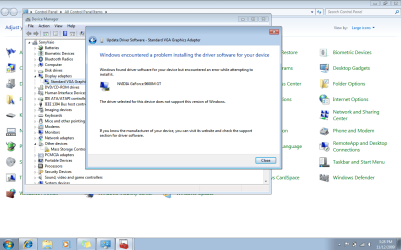
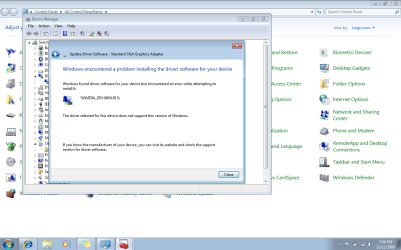
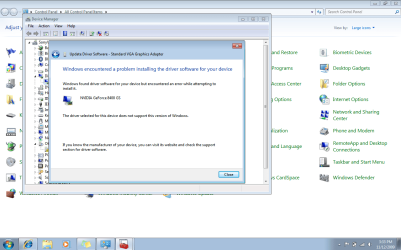
I have tried numerous times so I restarted with everything downloaded all of the nvidia drivers and the modified file. I took some screen shots to show what is happening. I first tried to just hit okay but it selects the first driver in the list. The next time i tried to select the %NVidia_DEV.06E4.01% which was the original title of the modified line in the N_DISP.inf file. The last time i tried to select one of 4 of the 8400 GS drivers. Im at a loss for what to do. I believe i am following the directions completely with the only exception being me having to select from that list but that was not specified
 

Attachments

  • After selecting .inf file.PNG
    After selecting .inf file.PNG
    61.4 KB · Views: 207
  • first try.PNG
    first try.PNG
    58.7 KB · Views: 169
  • selecting one that you modified.PNG
    selecting one that you modified.PNG
    56 KB · Views: 138
  • last try selecting card.PNG
    last try selecting card.PNG
    56.1 KB · Views: 141

My Computer My Computer

At a glance

Window 7 Pro
Computer Manufacturer/Model Number
Sony Vaio VGN-SZ650N
OS
Window 7 Pro
That entry from one of your previous attempts is probably messing it up. The one with % to start, I mean.

Best thing you can do is clean your system of all video card drivers with some software...I believe Driver Sweeper or something like that.

Make sure you're running 64 bit Windows for this driver.

Then install fresh from there.
 

My Computer My Computer

At a glance

7600.20510 x86P4 550 3.4 GHz HT running at 3.5 GHzOCZ 2 GB(2x1GB) DDR400mHz running @ 414 mHzHIS Radeon HD 3850 IceQ 3 Turbo HDMI Dual DL-...
Computer Manufacturer/Model Number
self built
OS
7600.20510 x86
CPU
P4 550 3.4 GHz HT running at 3.5 GHz
Motherboard
MSI PM8M3-V (MS-7211 v1.x) Micro-ATX mainboard
Memory
OCZ 2 GB(2x1GB) DDR400mHz running @ 414 mHz
Graphics Card(s)
HIS Radeon HD 3850 IceQ 3 Turbo HDMI Dual DL-DVI AGP
Sound Card
MOTU Traveler firewire studio interface 192 kHz 24 bit
Monitor(s) Displays
22" widescreen Acer X223W LCD, 17" Compaq P75 CRT
Screen Resolution
1680x1050 and 1280x1024
Hard Drives
SATA I x2 WD, 400 GB and 120 GB, SATA 2 WD Caviar Black 1 TB
PSU
350W generic
Case
Cybertronpc, it glows blue
Cooling
stock cpu fan, Ice-Q 3 gpu and system, many case fans
Keyboard
Logitch Classical Keyboard 200
Mouse
Logitech Mediaplay cordless
Internet Speed
1792/448 kbits/sec
Other Info
SATA II PCI fake RAID adapter, 1 GB Readyboost, original ATI Remote Wonder (even works with WMC perfectly), Logitech Rumblepad 2 game controller x2
I'm not sure that this question is a valid one for this thread, but i'll post it up anyway...

I have a dell laptop a M1210, with a Nvidia Geforce go 7400. After i installed windows 7, just about right afterwords, i went to NVIDIA's driver site and downloaded the latest driver for that gpu. I then installed the driver, rebooted, and it has been working fine. Shortly afterward, windows alerted me to some important updates to download and install, and among other system updates, it also had on the list the drivers for my nvidia card.

So i thought to myself, why not include that in the list to download, thinking that perhaps there was something from the NVIDIA site that was not included in the one windows was requesting...so i downloaded updates and installed, and on next reboot windows gave me a message saying that it couldnt install the driver.

I assume this is because I had already had it applied, but I can't be sure...Just relating this info because I thought it might be pertinent to my question. Also I can access the NVIDIA Control Panel from windows control panel.

My issue/question is this; I have not had any major problems with using windows 7 except for a few things...i once ran Windows media player to play a file, and after i maximized the video it got all distorted, was still outputing the audio, but my screen was essentially black with a little bit of hazy static like lines, so i forced quit the application and then promptly installed VLC to run all my video, and i have not experienced any problems of that sort since...

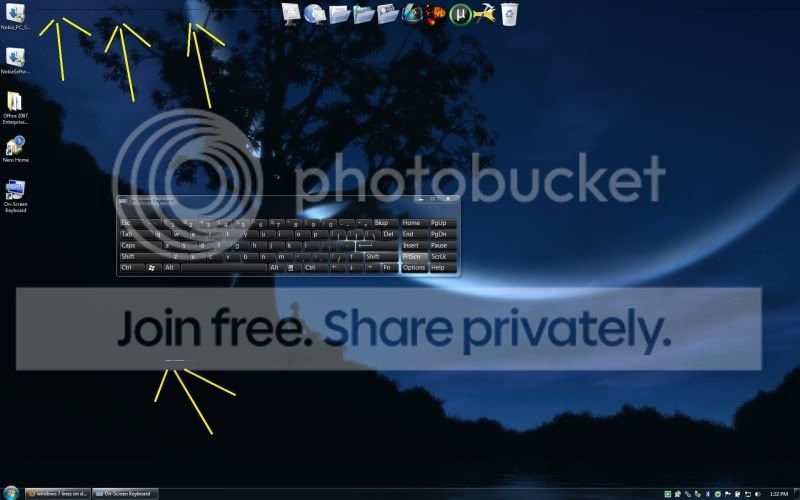
But one thing that still happens....and it's fairly small, are lines on the desktop that appear towards the top and near the middle of the screen. If i click somewhere on the desktop, hold the click, and then drag the mouse over the areas where the lines are located, the lines go away. It will stay fine like this for an undetermined amount of time, and then at some point they will reappear.

Their appearance and dissapearence seem to be linked to the opening and closing of windows, but i cant be sure. Here is a screenshot of what I am talking about...

Is this a problem that can be solved by applying the changes you recommend, torrentg? Or is this some other issue that I am facing? I Hope someone can chime in about this issue.

Thanks in advance.


lines1.jpg
 

My Computer My Computer

At a glance

7 Ultimate
OS
7 Ultimate
I'm not sure that this question is a valid one for this thread, but i'll post it up anyway...

I have a dell laptop a M1210, with a Nvidia Geforce go 7400. After i installed windows 7, just about right afterwords, i went to NVIDIA's driver site and downloaded the latest driver for that gpu. I then installed the driver, rebooted, and it has been working fine. Shortly afterward, windows alerted me to some important updates to download and install, and among other system updates, it also had on the list the drivers for my nvidia card.

So i thought to myself, why not include that in the list to download, thinking that perhaps there was something from the NVIDIA site that was not included in the one windows was requesting...so i downloaded updates and installed, and on next reboot windows gave me a message saying that it couldnt install the driver.

I assume this is because I had already had it applied, but I can't be sure...Just relating this info because I thought it might be pertinent to my question. Also I can access the NVIDIA Control Panel from windows control panel.

My issue/question is this; I have not had any major problems with using windows 7 except for a few things...i once ran Windows media player to play a file, and after i maximized the video it got all distorted, was still outputing the audio, but my screen was essentially black with a little bit of hazy static like lines, so i forced quit the application and then promptly installed VLC to run all my video, and i have not experienced any problems of that sort since...

But one thing that still happens....and it's fairly small, are lines on the desktop that appear towards the top and near the middle of the screen. If i click somewhere on the desktop, hold the click, and then drag the mouse over the areas where the lines are located, the lines go away. It will stay fine like this for an undetermined amount of time, and then at some point they will reappear.

Their appearance and dissapearence seem to be linked to the opening and closing of windows, but i cant be sure. Here is a screenshot of what I am talking about...

Is this a problem that can be solved by applying the changes you recommend, torrentg? Or is this some other issue that I am facing? I Hope someone can chime in about this issue.

Thanks in advance.

Try closing Rocketdock and see if the lines go away.
 

My Computer My Computer

At a glance

7600.20510 x86P4 550 3.4 GHz HT running at 3.5 GHzOCZ 2 GB(2x1GB) DDR400mHz running @ 414 mHzHIS Radeon HD 3850 IceQ 3 Turbo HDMI Dual DL-...
Computer Manufacturer/Model Number
self built
OS
7600.20510 x86
CPU
P4 550 3.4 GHz HT running at 3.5 GHz
Motherboard
MSI PM8M3-V (MS-7211 v1.x) Micro-ATX mainboard
Memory
OCZ 2 GB(2x1GB) DDR400mHz running @ 414 mHz
Graphics Card(s)
HIS Radeon HD 3850 IceQ 3 Turbo HDMI Dual DL-DVI AGP
Sound Card
MOTU Traveler firewire studio interface 192 kHz 24 bit
Monitor(s) Displays
22" widescreen Acer X223W LCD, 17" Compaq P75 CRT
Screen Resolution
1680x1050 and 1280x1024
Hard Drives
SATA I x2 WD, 400 GB and 120 GB, SATA 2 WD Caviar Black 1 TB
PSU
350W generic
Case
Cybertronpc, it glows blue
Cooling
stock cpu fan, Ice-Q 3 gpu and system, many case fans
Keyboard
Logitch Classical Keyboard 200
Mouse
Logitech Mediaplay cordless
Internet Speed
1792/448 kbits/sec
Other Info
SATA II PCI fake RAID adapter, 1 GB Readyboost, original ATI Remote Wonder (even works with WMC perfectly), Logitech Rumblepad 2 game controller x2
It was doing this before I installed rocket dock. I did close rocket dock though and played around with opening and closing windows, and it still happens...
 

My Computer My Computer

At a glance

7 Ultimate
OS
7 Ultimate
Hrrm..I dunno, you could check the cable to see if all pins look perfect.
 

My Computer My Computer

At a glance

7600.20510 x86P4 550 3.4 GHz HT running at 3.5 GHzOCZ 2 GB(2x1GB) DDR400mHz running @ 414 mHzHIS Radeon HD 3850 IceQ 3 Turbo HDMI Dual DL-...
Computer Manufacturer/Model Number
self built
OS
7600.20510 x86
CPU
P4 550 3.4 GHz HT running at 3.5 GHz
Motherboard
MSI PM8M3-V (MS-7211 v1.x) Micro-ATX mainboard
Memory
OCZ 2 GB(2x1GB) DDR400mHz running @ 414 mHz
Graphics Card(s)
HIS Radeon HD 3850 IceQ 3 Turbo HDMI Dual DL-DVI AGP
Sound Card
MOTU Traveler firewire studio interface 192 kHz 24 bit
Monitor(s) Displays
22" widescreen Acer X223W LCD, 17" Compaq P75 CRT
Screen Resolution
1680x1050 and 1280x1024
Hard Drives
SATA I x2 WD, 400 GB and 120 GB, SATA 2 WD Caviar Black 1 TB
PSU
350W generic
Case
Cybertronpc, it glows blue
Cooling
stock cpu fan, Ice-Q 3 gpu and system, many case fans
Keyboard
Logitch Classical Keyboard 200
Mouse
Logitech Mediaplay cordless
Internet Speed
1792/448 kbits/sec
Other Info
SATA II PCI fake RAID adapter, 1 GB Readyboost, original ATI Remote Wonder (even works with WMC perfectly), Logitech Rumblepad 2 game controller x2
What are you referring to when you say cable and pins? The internal guts of the comp?

If you are saying that my hardware might be faulty, you might be correct...I did get a couple, (like 3 at the most) dead green pixels displaying on black backgrounds while i was running xp, i tend to get a few colored pixels on top of the black at the dell bios load screen as well.

But I dont see any kind of video degredation running 7 except for these lines on the desktop....and they only exist on the desktop, if i have windows maximized over them, they dont show....

Also, Torrentg, I'm a little confused as to the aim of the thread...correct me if I'm wrong, but your fix here is so that LAPTOP users can use drivers that are for similar DESKTOP Nvidia cards? What would be the purpose in doing that if NVIDIA has drivers for the GPU you are running on your laptop for windows 7?

I'm just confused as to the reason why you would have to/want to use this fix... can you explain?

And thank you for troubleshooting with me, people like you make forums helpful.
 

My Computer My Computer

At a glance

7 Ultimate
OS
7 Ultimate
I switched over to the non-aero themes, the basic or high contrast themes...and this issue seems not to happen at all under one of these themes, so i'm thinking that it has something to do with the aero experience.... just thought id include this info as it may be helpful
 

My Computer My Computer

At a glance

7 Ultimate
OS
7 Ultimate
What are you referring to when you say cable and pins? The internal guts of the comp?

If you are saying that my hardware might be faulty, you might be correct...I did get a couple, (like 3 at the most) dead green pixels displaying on black backgrounds while i was running xp, i tend to get a few colored pixels on top of the black at the dell bios load screen as well.

But I dont see any kind of video degredation running 7 except for these lines on the desktop....and they only exist on the desktop, if i have windows maximized over them, they dont show....

Also, Torrentg, I'm a little confused as to the aim of the thread...correct me if I'm wrong, but your fix here is so that LAPTOP users can use drivers that are for similar DESKTOP Nvidia cards? What would be the purpose in doing that if NVIDIA has drivers for the GPU you are running on your laptop for windows 7?

I'm just confused as to the reason why you would have to/want to use this fix... can you explain?

And thank you for troubleshooting with me, people like you make forums helpful.

I meant as I said. Check the cable or if not sure how to, use a different cable to connect pc to screen as a test.

Dead pixels are only for monitors themselves and they don't depend on OS or even computer being used.

Those lines are probably not by anything to do with drivers (but may be.) It's most likely some program doing it that you have starting with Windows.

As for using this - it gives all notebook users the latest driver without having to wait on manufacturer. Or in some case like Sony, it's the only solution at all (besides the app that can do it automatically for you, but people don't know how to use it and always ask for help anyway.)
 

My Computer My Computer

At a glance

7600.20510 x86P4 550 3.4 GHz HT running at 3.5 GHzOCZ 2 GB(2x1GB) DDR400mHz running @ 414 mHzHIS Radeon HD 3850 IceQ 3 Turbo HDMI Dual DL-...
Computer Manufacturer/Model Number
self built
OS
7600.20510 x86
CPU
P4 550 3.4 GHz HT running at 3.5 GHz
Motherboard
MSI PM8M3-V (MS-7211 v1.x) Micro-ATX mainboard
Memory
OCZ 2 GB(2x1GB) DDR400mHz running @ 414 mHz
Graphics Card(s)
HIS Radeon HD 3850 IceQ 3 Turbo HDMI Dual DL-DVI AGP
Sound Card
MOTU Traveler firewire studio interface 192 kHz 24 bit
Monitor(s) Displays
22" widescreen Acer X223W LCD, 17" Compaq P75 CRT
Screen Resolution
1680x1050 and 1280x1024
Hard Drives
SATA I x2 WD, 400 GB and 120 GB, SATA 2 WD Caviar Black 1 TB
PSU
350W generic
Case
Cybertronpc, it glows blue
Cooling
stock cpu fan, Ice-Q 3 gpu and system, many case fans
Keyboard
Logitch Classical Keyboard 200
Mouse
Logitech Mediaplay cordless
Internet Speed
1792/448 kbits/sec
Other Info
SATA II PCI fake RAID adapter, 1 GB Readyboost, original ATI Remote Wonder (even works with WMC perfectly), Logitech Rumblepad 2 game controller x2
Back
Top