Nvidia Drivers - general

mjf

New member
Guru
Gold Member
VIP
Local time
4:14 AM
Messages
5,968
Location
Australia
I have a couple of general questions:
I have a GeForce 9500GT video card

1) Is it recommended to keep up with the latest driver? Mine is ~12 months old.
I recently got an ntdll.dll error that could have been driver related??

2) When Windows offers an optional video driver update I'm having difficulty finding out what specific driver version is being offered. I click on "more information" and don't get very far.
 

My Computer

Computer type
PC/Desktop
Computer Manufacturer/Model Number
Own build
OS
Windows 7x64 Home Premium SP1
CPU
Intel i7 2600k
Motherboard
ASUS P8Z68 Deluxe
Memory
G.Skill Ripjaws (DDR3-1600) 2x4GB
Graphics Card(s)
Nvidia GeForce GTS 450; Intel HD Graphics 3000(GT2+)
Monitor(s) Displays
Dell Ultrasharp IPS panel U2311H, Samsung SyncMaster P2350
Screen Resolution
1920x1080
Hard Drives
Samsung 850 Pro SSD 256GB, Samsung SSD 840 120GB, Seagates 1TB Barracuda ST31000528AS x2
PSU
Seasonic M12II 520W
Case
Lian Li Lancool PC-K60
Cooling
Case: 1x120mm, 3x140mm CPU: Hyper 212+
Keyboard
Logitech MK520 (wireless)
Mouse
Logitech MK520
Internet Speed
6-7 Mbps
Antivirus
Norton Security Premium, Malwarebytes on 2 (MSE on 3rd PC)
Browser
FireFox
Other Info
Audio: Logitech Z523 2.1
The standard answer is, if you are not having any problems or are not comfortable performing an update then leave things alone.

However, most the regulars on this site, including myself would say get the latest and greatest directly from the NVIDIA website Drivers - Download NVIDIA Drivers and don't use Windows update for getting your graphics drivers.
 

My Computer

Computer type
PC/Desktop
Computer Manufacturer/Model Number
Custom Build
OS
Windows 7 Home Premium 64 bit SP1
CPU
Intel i7 4790k
Motherboard
MSI Z97-G55 SLI
Memory
16 GB Corsair 2400 MHz DDR3
Graphics Card(s)
Visiontek Radeon R9 285
Sound Card
None
Monitor(s) Displays
Gateway FHX2402L
Screen Resolution
1920 X 1080
Hard Drives
Samsung 840 EVO 500GB
PSU
Corsair 750 TX
Case
Fractal Design
Cooling
Stock fans
Keyboard
Logitech K800
Mouse
Logitech M510
Internet Speed
60.88 Mbps download 10.47 Mbps upload (Speedtest.net)
Antivirus
Norton
Browser
Opera
Other Info
First Computer used: A Commodore Pet of course
Love using Manjaro KDE Linux 64 bit and Windows 7/10 64 bit
The standard answer is, if you are not having any problems or are not comfortable performing an update then leave things alone.

However, most the regulars on this site, including myself would say get the latest and greatest directly from the NVIDIA website Drivers - Download NVIDIA Drivers and don't use Windows update for getting your graphics drivers.

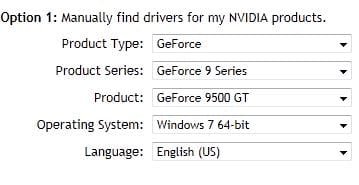
From the link above, based on the card you indicate, put in the following to get the most up to date driver for your card.

Capture.JPG
 

My Computer

Computer type
PC/Desktop
Computer Manufacturer/Model Number
Custom Build
OS
Windows 7 Home Premium 64 bit
CPU
Intel Core i7-4790
Motherboard
GA-Z87X-D3H
Memory
G.SKILL 8GB (2 x 4GB) DDR3 F3-10666CL9D-8GBNT
Graphics Card(s)
AMD Radeon R7 250
Sound Card
Realtek ALC892
Monitor(s) Displays
Samsung UN32EH5000, Dell 1703FPT
Screen Resolution
1920 x 1080, 1280 x 1024
Hard Drives
WD5003AZEX
WD10EZEX
Samsung HD103SJ
Samsung 128 GB 840 PRO
PSU
SeaSonic M12II SS-500GM
Case
Fractal Design Define R4
Cooling
Zalman CNPS9900ALED
Keyboard
Logitech K800
Mouse
Logitech M705
Internet Speed
16 Mbps
Antivirus
Avast
Browser
Firefox
Other Info
Bose Companion 2 Multimedia Speakers
I'm one that usually updates the driver when a new release is available, but sometimes I feel it unnecessary, since the majority of the improvements deal with games, and then usually just the latest games. I'm not much of a game person anymore, so I often look over the changelog to see if anything might be more relevant to my particular usage.
 

My Computer

Computer Manufacturer/Model Number
DIY
OS
W7x64 Pro, SuSe 12.1/** W7 x64 Pro, XP MCE
CPU
Phenom II 1090T w/Noctua NH-D14 /**4400+ X2 w/CM Hyper TX 3
Motherboard
ASRock 890FX Deluxe 4/**A8N-SLI
Memory
2 x 2GB Patriot PGS34g1600LLKA/**4x1GB Corsair VS
Graphics Card(s)
EVGA GTX460 SC/**EVGA 8800GTS
Sound Card
Asus Xonar D2X/**Xonar D1
Monitor(s) Displays
Acer X233H, Dell E152FPc /**LG M237-WD
Screen Resolution
1920x1080 & 1024x768/**1980x1080
Hard Drives
WDC 2TB, 1.5TB, 1TB, 500GB,Seagate 500GB , Maxtor 80GB /**500GB Seagate & WDC 1TB Black
PSU
CM RS600 w/ APC BX1000G/**Antec 500 TP w/ APC BX1000
Case
HAF922/**Antec 1040IIB
Cooling
3x200mm, 1x140 and 1x120mm/**5x80mm fans
Keyboard
Logitech Media USB/**Saitek Eclipse
Mouse
Cordless Trackman Wheel/**Ditto
Internet Speed
3.3Mbps
Other Info
SB 560 5.1 w/ Sennheiser RS140/**Creative T20 speakers, Dvico FusionHDTV7 Gold RT, Cisco E3000, HP 5510V AIO, Linksys E3000, Belkin F5U237 hub and **F5D8055 adapter
(** = 2nd rig)
Also be careful as I have a Nvidia 9800GT and twice in the last year have downloaded latest drivers from the Nvidia site, had problems and had to revert back to the prior driver. I agree with the other posters, if it aint broke, leave the bugger alone.
 

My Computer

Computer type
PC/Desktop
Computer Manufacturer/Model Number
Self built
OS
Windows 7 home premium 64bit
CPU
intel Core i7 4790 3.6Ghz
Motherboard
Gigabyte H97-D3H
Memory
16Gb G.Skill Sniper
Graphics Card(s)
Nvidia GTX 760
Sound Card
Realtek ALC1150 115dB SNR HD Audio
Monitor(s) Displays
LG 32" TV as monitor
Screen Resolution
1920 x 1080
Hard Drives
Samsung 840 PRO series SATA3 256Gb SSD.
Western Digital Black SATA3 -1Tb.
Western Digital external HDD-1TB.

Pioneer DVD-RW.
PSU
Antec HCG 620w
Case
Thermaltake A41
Cooling
Stock fans x 3. After market Arctic Freezer i11 cpu cooler
Keyboard
Logitech M520r wireless
Mouse
Logitech M310t wireless
Internet Speed
Fair to middlin'
Antivirus
Avast free
Browser
Firefox
Other Info
MBAM Pro
SuperAntiSpyware free edition
AdwCleaner
Ccleaner
Revo uninstaller Pro
2) When Windows offers an optional video driver update I'm having difficulty finding out what specific driver version is being offered. I click on "more information" and don't get very far.

Hi mjf,

Understand that Windows Update doesn't seek out the latest drivers. Instead, it relies on manufactures to submit drivers. I can recall many instances where users were given outdated, and at times corrupted, drivers by Windows Update only because those were the only drivers in the Update store. For this reason it's always better to go directly to the manufacture's site.

This is going to be true for any device driver in your system. The only reliable "latest" drivers from Windows Update are going to be Microsoft drivers... which are seldom, if ever, needed.
 

My Computer

OS
7 Ultimate x64
CPU
i5-2500k
Motherboard
Asus P8P67 Pro
Memory
8GB G.Skill Ripjaws X F3-12800CL7D-8GBXH 1866MHz 8-9-8-24
Graphics Card(s)
EVGA GTX 570 SC
Sound Card
X-Fi Titanium Fatality
Monitor(s) Displays
Samsung S27A550H 27" LED
Screen Resolution
1920x1080
Hard Drives
OCZ Vertex 3 120GB.
1TB Samsung F3.
2TB Samsung F4.
PSU
PC Power & Cooling Silencer 760
Case
Lian Li Lancool K62
Cooling
Thermalright Venomous X Black/Scythe S-Flex/Shin-Etsu X23
Keyboard
MS Natural Elite 4000 Ergonomic
Mouse
Logitech G500
Internet Speed
6MB/768
Other Info
Logitech Z-5500 505 watts.
D-Link DGL-4500.
Tripp-Lite Smart Pro 1500.
The drivers that are on windows update are also minimal packages and may not contain all the features of the full driver set from the manufacturer. I.e. minmal gui/options... They are there for usefulness, to get you going right off the install disk or when updating to fix bugs, but MS has heavy restrictions about limiting the package sizes that go on WU or on the install disk, the real driver set from the manufacturers website is ususaly what you want.
 

My Computer

Computer Manufacturer/Model Number
Scratch built
OS
Windows 7 x64 Ultimate
CPU
i7 960
Motherboard
Asus P6X58D
Memory
12 Gig Corsair Dominator
Graphics Card(s)
Nvidia 480
Sound Card
Maudio Delta 44 + breakout box
Monitor(s) Displays
Dell UltraSharp U2410 24in and Samsung 21 dual monitors
Screen Resolution
1920x1200 and 1280x1024
Hard Drives
Primary: Intel X-25M G2 160G SSD
Secondary: Segate baracuda 1.0 TB
HDs in AHCI mode.
PSU
Corasair TX850
Case
Cooler Master HAF
Cooling
Corsair H50
Keyboard
Logitech G15 + N52 game pad
Mouse
Logitech MX518
Internet Speed
15kbs down 4.5kbps up
Other Info
WEI 7.6
CPU & RAM 7.6
Graphics 7.9
Hard disk 7.7
I have a 260 GTX and run W7 x64. I always get the latest drivers from the Nvidia site. Haven't had any real problems doing this and sometimes I've seen an improvement in performance.
The latest ones seemed to have upped my temperature a couple of degrees but nothing to worry about.
I've always done this. With my previous card, an 8800GTS, driver updates drastically improved it's performance over it's lifetime.
 

My Computer

Computer Manufacturer/Model Number
The Monolith. 3.1
OS
Windows 7 Home Premium 64 bit
CPU
i7 [email protected]
Motherboard
Gigabyte Z77-D3H
Memory
2x4GB Corsair Vegeance DDR3
Graphics Card(s)
XFX GTX 260 Black Edition
Sound Card
none-through large stereo hi fi
Monitor(s) Displays
Croosover 27MDP LED IPS Dell 2408 WFP
Screen Resolution
2560x1440 1920x1200
Hard Drives
1x Samsung 840Pro 128GB SSD
1x Samsung Spinpoint F1 1TB
PSU
Corsair AX 850 Watt
Case
Cooler Master ACTS 840
Cooling
Be Quiet! Dark Rock Pro
Keyboard
Enermax Aurora
Mouse
Logitech Ballmouse
Internet Speed
20MBPS
Back
Top