nVidia GeForce 6 Driver Crashing Win7/Vista

shaX 07

New member
Local time
5:38 PM
Messages
29
I recently borrowed a friends video card- an XFX GeForce 6800 XT 256MB PCI-E Video card and I put it in my desktop PC (HP Media Center, Quad Intel 2.4ghz, 4GB RAM, 750GB HD, etc) and I have discovered that the driver is causing my PC to freeze constantly.

I originally thought it was because of a weak power supply but I replaced my OEM with a 550W power supply and it continued to happen. Once I uninstalled the driver, the PC doesn't freeze at all. I tested this by re-installing the driver again and the PC proceeded to keep freezing (once frozen, the only thing I can do is manually power down and turn it back on).

So what on earth do I do here? The driver on nVidia's web site says it is for this card, made for windows vista/7 64 bit.. The same exact thing happened before I upgraded to Windows 7...
 

My Computer My Computer

At a glance

Windows 7 ProfessionalQuad Intel Core 2.4ghz4GB
Computer Manufacturer/Model Number
HP Media Center M8430F
OS
Windows 7 Professional
CPU
Quad Intel Core 2.4ghz
Memory
4GB
Monitor(s) Displays
22" LCD
Hard Drives
750GB Seagate 7200RPM
Hi. Make sure you're running the latest chipset drivers for the motherboard before installing the video card driver. Update to the latest bios if you're not running that.

Do you have any yellow exclamation points in the device manager?
 

My Computer My Computer

At a glance

7600.20510 x86P4 550 3.4 GHz HT running at 3.5 GHzOCZ 2 GB(2x1GB) DDR400mHz running @ 414 mHzHIS Radeon HD 3850 IceQ 3 Turbo HDMI Dual DL-...
Computer Manufacturer/Model Number
self built
OS
7600.20510 x86
CPU
P4 550 3.4 GHz HT running at 3.5 GHz
Motherboard
MSI PM8M3-V (MS-7211 v1.x) Micro-ATX mainboard
Memory
OCZ 2 GB(2x1GB) DDR400mHz running @ 414 mHz
Graphics Card(s)
HIS Radeon HD 3850 IceQ 3 Turbo HDMI Dual DL-DVI AGP
Sound Card
MOTU Traveler firewire studio interface 192 kHz 24 bit
Monitor(s) Displays
22" widescreen Acer X223W LCD, 17" Compaq P75 CRT
Screen Resolution
1680x1050 and 1280x1024
Hard Drives
SATA I x2 WD, 400 GB and 120 GB, SATA 2 WD Caviar Black 1 TB
PSU
350W generic
Case
Cybertronpc, it glows blue
Cooling
stock cpu fan, Ice-Q 3 gpu and system, many case fans
Keyboard
Logitch Classical Keyboard 200
Mouse
Logitech Mediaplay cordless
Internet Speed
1792/448 kbits/sec
Other Info
SATA II PCI fake RAID adapter, 1 GB Readyboost, original ATI Remote Wonder (even works with WMC perfectly), Logitech Rumblepad 2 game controller x2
Hi. Make sure you're running the latest chipset drivers for the motherboard before installing the video card driver. Update to the latest bios if you're not running that.

Do you have any yellow exclamation points in the device manager?

I have no yellow exclamations...

I just tried to install both the BIOS update for my PC and also the updated chipset driver from Intel's web site and both installs said "Your system does not meet the minimum system requirements"...

WTF...
 

My Computer My Computer

At a glance

Windows 7 ProfessionalQuad Intel Core 2.4ghz4GB
Computer Manufacturer/Model Number
HP Media Center M8430F
OS
Windows 7 Professional
CPU
Quad Intel Core 2.4ghz
Memory
4GB
Monitor(s) Displays
22" LCD
Hard Drives
750GB Seagate 7200RPM
Anymore theories here? It is ridiculous that I can't use this video card with Windows 7... Makes no sense to me.. I thought Win7 was supposed to be stable and trouble free.. Yet I can't use a standard nVidia video card driver....
 

My Computer My Computer

At a glance

Windows 7 ProfessionalQuad Intel Core 2.4ghz4GB
Computer Manufacturer/Model Number
HP Media Center M8430F
OS
Windows 7 Professional
CPU
Quad Intel Core 2.4ghz
Memory
4GB
Monitor(s) Displays
22" LCD
Hard Drives
750GB Seagate 7200RPM
Anymore theories here? It is ridiculous that I can't use this video card with Windows 7... Makes no sense to me.. I thought Win7 was supposed to be stable and trouble free.. Yet I can't use a standard nVidia video card driver....

No theory but a fact. It's not the video card or its driver's problem. It's the motherboard. 99% sure of this. If you want, Google to find which motherboard it is and I'll tell you for certain and what you could possibly try.
 

My Computer My Computer

At a glance

7600.20510 x86P4 550 3.4 GHz HT running at 3.5 GHzOCZ 2 GB(2x1GB) DDR400mHz running @ 414 mHzHIS Radeon HD 3850 IceQ 3 Turbo HDMI Dual DL-...
Computer Manufacturer/Model Number
self built
OS
7600.20510 x86
CPU
P4 550 3.4 GHz HT running at 3.5 GHz
Motherboard
MSI PM8M3-V (MS-7211 v1.x) Micro-ATX mainboard
Memory
OCZ 2 GB(2x1GB) DDR400mHz running @ 414 mHz
Graphics Card(s)
HIS Radeon HD 3850 IceQ 3 Turbo HDMI Dual DL-DVI AGP
Sound Card
MOTU Traveler firewire studio interface 192 kHz 24 bit
Monitor(s) Displays
22" widescreen Acer X223W LCD, 17" Compaq P75 CRT
Screen Resolution
1680x1050 and 1280x1024
Hard Drives
SATA I x2 WD, 400 GB and 120 GB, SATA 2 WD Caviar Black 1 TB
PSU
350W generic
Case
Cybertronpc, it glows blue
Cooling
stock cpu fan, Ice-Q 3 gpu and system, many case fans
Keyboard
Logitch Classical Keyboard 200
Mouse
Logitech Mediaplay cordless
Internet Speed
1792/448 kbits/sec
Other Info
SATA II PCI fake RAID adapter, 1 GB Readyboost, original ATI Remote Wonder (even works with WMC perfectly), Logitech Rumblepad 2 game controller x2
Anymore theories here? It is ridiculous that I can't use this video card with Windows 7... Makes no sense to me.. I thought Win7 was supposed to be stable and trouble free.. Yet I can't use a standard nVidia video card driver....

No theory but a fact. It's not the video card or its driver's problem. It's the motherboard. 99% sure of this. If you want, Google to find which motherboard it is and I'll tell you for certain and what you could possibly try.


My PC Specs:

Product Specifications HP Pavilion Media Center m8430f Desktop PC - HP Customer Care (Canada - English)


My Mobo Specs:

Motherboard Specifications, IPIBL-LB (Benicia) HP Pavilion Media Center m8430f Desktop PC - HP Customer Care (Canada - English)
 

My Computer My Computer

At a glance

Windows 7 ProfessionalQuad Intel Core 2.4ghz4GB
Computer Manufacturer/Model Number
HP Media Center M8430F
OS
Windows 7 Professional
CPU
Quad Intel Core 2.4ghz
Memory
4GB
Monitor(s) Displays
22" LCD
Hard Drives
750GB Seagate 7200RPM
Install this using the device manager for board's system devices, before installing the video card driver.
Use the Win7 folder.

Use this instead if that is too confusing.
 

My Computer My Computer

At a glance

7600.20510 x86P4 550 3.4 GHz HT running at 3.5 GHzOCZ 2 GB(2x1GB) DDR400mHz running @ 414 mHzHIS Radeon HD 3850 IceQ 3 Turbo HDMI Dual DL-...
Computer Manufacturer/Model Number
self built
OS
7600.20510 x86
CPU
P4 550 3.4 GHz HT running at 3.5 GHz
Motherboard
MSI PM8M3-V (MS-7211 v1.x) Micro-ATX mainboard
Memory
OCZ 2 GB(2x1GB) DDR400mHz running @ 414 mHz
Graphics Card(s)
HIS Radeon HD 3850 IceQ 3 Turbo HDMI Dual DL-DVI AGP
Sound Card
MOTU Traveler firewire studio interface 192 kHz 24 bit
Monitor(s) Displays
22" widescreen Acer X223W LCD, 17" Compaq P75 CRT
Screen Resolution
1680x1050 and 1280x1024
Hard Drives
SATA I x2 WD, 400 GB and 120 GB, SATA 2 WD Caviar Black 1 TB
PSU
350W generic
Case
Cybertronpc, it glows blue
Cooling
stock cpu fan, Ice-Q 3 gpu and system, many case fans
Keyboard
Logitch Classical Keyboard 200
Mouse
Logitech Mediaplay cordless
Internet Speed
1792/448 kbits/sec
Other Info
SATA II PCI fake RAID adapter, 1 GB Readyboost, original ATI Remote Wonder (even works with WMC perfectly), Logitech Rumblepad 2 game controller x2
Install this using the device manager for board's system devices, before installing the video card driver.
Use the Win7 folder.

Use this instead if that is too confusing.


The ReadME says the software would prompt for a re-boot, but mine never did. I also don't see anything listed in device manager for what you mentioned previously.


Do I have to extract this to a specific location before I install? Or do I just download it and run it from a temp location? It says it installed correctly but it didn't look like the install even did anything...
 

My Computer My Computer

At a glance

Windows 7 ProfessionalQuad Intel Core 2.4ghz4GB
Computer Manufacturer/Model Number
HP Media Center M8430F
OS
Windows 7 Professional
CPU
Quad Intel Core 2.4ghz
Memory
4GB
Monitor(s) Displays
22" LCD
Hard Drives
750GB Seagate 7200RPM
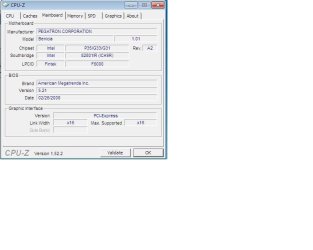
You can use the mainboard tab of CPU-Z to verify which board you have. Other than that, I don't know anything about Intel chipsets because I only have VIA boards.
 

My Computer My Computer

At a glance

7600.20510 x86P4 550 3.4 GHz HT running at 3.5 GHzOCZ 2 GB(2x1GB) DDR400mHz running @ 414 mHzHIS Radeon HD 3850 IceQ 3 Turbo HDMI Dual DL-...
Computer Manufacturer/Model Number
self built
OS
7600.20510 x86
CPU
P4 550 3.4 GHz HT running at 3.5 GHz
Motherboard
MSI PM8M3-V (MS-7211 v1.x) Micro-ATX mainboard
Memory
OCZ 2 GB(2x1GB) DDR400mHz running @ 414 mHz
Graphics Card(s)
HIS Radeon HD 3850 IceQ 3 Turbo HDMI Dual DL-DVI AGP
Sound Card
MOTU Traveler firewire studio interface 192 kHz 24 bit
Monitor(s) Displays
22" widescreen Acer X223W LCD, 17" Compaq P75 CRT
Screen Resolution
1680x1050 and 1280x1024
Hard Drives
SATA I x2 WD, 400 GB and 120 GB, SATA 2 WD Caviar Black 1 TB
PSU
350W generic
Case
Cybertronpc, it glows blue
Cooling
stock cpu fan, Ice-Q 3 gpu and system, many case fans
Keyboard
Logitch Classical Keyboard 200
Mouse
Logitech Mediaplay cordless
Internet Speed
1792/448 kbits/sec
Other Info
SATA II PCI fake RAID adapter, 1 GB Readyboost, original ATI Remote Wonder (even works with WMC perfectly), Logitech Rumblepad 2 game controller x2
Just re-installed the video driver after installing that chipset update and it still freezes like mad..


So what next? Buy a new, non-nVidia video card?
 

My Computer My Computer

At a glance

Windows 7 ProfessionalQuad Intel Core 2.4ghz4GB
Computer Manufacturer/Model Number
HP Media Center M8430F
OS
Windows 7 Professional
CPU
Quad Intel Core 2.4ghz
Memory
4GB
Monitor(s) Displays
22" LCD
Hard Drives
750GB Seagate 7200RPM
Did you use CPU-Z to see if you were correct about the motherboard?
 

My Computer My Computer

At a glance

7600.20510 x86P4 550 3.4 GHz HT running at 3.5 GHzOCZ 2 GB(2x1GB) DDR400mHz running @ 414 mHzHIS Radeon HD 3850 IceQ 3 Turbo HDMI Dual DL-...
Computer Manufacturer/Model Number
self built
OS
7600.20510 x86
CPU
P4 550 3.4 GHz HT running at 3.5 GHz
Motherboard
MSI PM8M3-V (MS-7211 v1.x) Micro-ATX mainboard
Memory
OCZ 2 GB(2x1GB) DDR400mHz running @ 414 mHz
Graphics Card(s)
HIS Radeon HD 3850 IceQ 3 Turbo HDMI Dual DL-DVI AGP
Sound Card
MOTU Traveler firewire studio interface 192 kHz 24 bit
Monitor(s) Displays
22" widescreen Acer X223W LCD, 17" Compaq P75 CRT
Screen Resolution
1680x1050 and 1280x1024
Hard Drives
SATA I x2 WD, 400 GB and 120 GB, SATA 2 WD Caviar Black 1 TB
PSU
350W generic
Case
Cybertronpc, it glows blue
Cooling
stock cpu fan, Ice-Q 3 gpu and system, many case fans
Keyboard
Logitch Classical Keyboard 200
Mouse
Logitech Mediaplay cordless
Internet Speed
1792/448 kbits/sec
Other Info
SATA II PCI fake RAID adapter, 1 GB Readyboost, original ATI Remote Wonder (even works with WMC perfectly), Logitech Rumblepad 2 game controller x2

Attachments

  • motherboard.jpg
    motherboard.jpg
    28.7 KB · Views: 28

My Computer My Computer

At a glance

Windows 7 ProfessionalQuad Intel Core 2.4ghz4GB
Computer Manufacturer/Model Number
HP Media Center M8430F
OS
Windows 7 Professional
CPU
Quad Intel Core 2.4ghz
Memory
4GB
Monitor(s) Displays
22" LCD
Hard Drives
750GB Seagate 7200RPM
Hmm..not really sure what you can do besides this.

Do a Windows Update and see if it has any chipset or motherboard related drivers to install. If it does, then install video driver after.
 

My Computer My Computer

At a glance

7600.20510 x86P4 550 3.4 GHz HT running at 3.5 GHzOCZ 2 GB(2x1GB) DDR400mHz running @ 414 mHzHIS Radeon HD 3850 IceQ 3 Turbo HDMI Dual DL-...
Computer Manufacturer/Model Number
self built
OS
7600.20510 x86
CPU
P4 550 3.4 GHz HT running at 3.5 GHz
Motherboard
MSI PM8M3-V (MS-7211 v1.x) Micro-ATX mainboard
Memory
OCZ 2 GB(2x1GB) DDR400mHz running @ 414 mHz
Graphics Card(s)
HIS Radeon HD 3850 IceQ 3 Turbo HDMI Dual DL-DVI AGP
Sound Card
MOTU Traveler firewire studio interface 192 kHz 24 bit
Monitor(s) Displays
22" widescreen Acer X223W LCD, 17" Compaq P75 CRT
Screen Resolution
1680x1050 and 1280x1024
Hard Drives
SATA I x2 WD, 400 GB and 120 GB, SATA 2 WD Caviar Black 1 TB
PSU
350W generic
Case
Cybertronpc, it glows blue
Cooling
stock cpu fan, Ice-Q 3 gpu and system, many case fans
Keyboard
Logitch Classical Keyboard 200
Mouse
Logitech Mediaplay cordless
Internet Speed
1792/448 kbits/sec
Other Info
SATA II PCI fake RAID adapter, 1 GB Readyboost, original ATI Remote Wonder (even works with WMC perfectly), Logitech Rumblepad 2 game controller x2
Hmm..not really sure what you can do besides this.

Do a Windows Update and see if it has any chipset or motherboard related drivers to install. If it does, then install video driver after.


I've already checked, there's nothing. I've even checked HP's web site for my PC and there's no newer drivers that can be had.

I'm getting sick of dealing with this, i'm ready to go back to Windows XP, i'm done with Windows 7.
 

My Computer My Computer

At a glance

Windows 7 ProfessionalQuad Intel Core 2.4ghz4GB
Computer Manufacturer/Model Number
HP Media Center M8430F
OS
Windows 7 Professional
CPU
Quad Intel Core 2.4ghz
Memory
4GB
Monitor(s) Displays
22" LCD
Hard Drives
750GB Seagate 7200RPM
Back
Top