
Nvidia GeForce GT 610 HDMI Audio Issue

jFlat

New member
Local time
3:03 PM
Messages
19
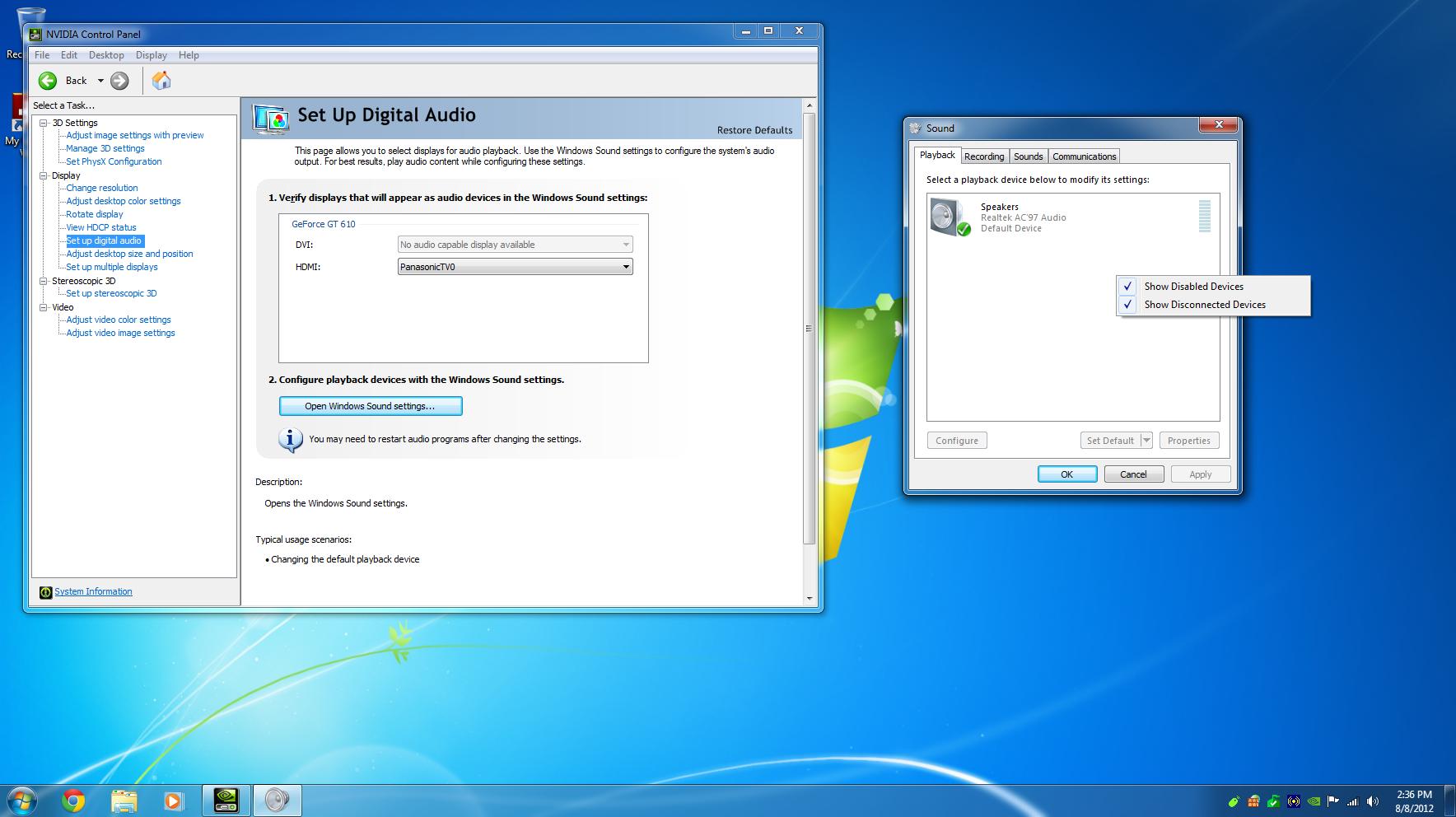
Ok so this is driving me mad. I'm trying to get the audio to work on my GeForce card to my TV via HDMI (This is the only monitor that I own). I am currently at a loss. I have already contacted Nvidia Tech Suport (Transcript) with no luck. I also did both a general google search with no luck as well as a Google Search of this SevenForums, again with no luck. Below is a screen shot of the Playback tab of the Windows Sound settings and Nvidia Control Pannel . I would like to avoid contacting eMachine/Gateway customer support due to the fact that the last time I attempted to get support from them they wanted me to pay for "Premium Support" since this is an "archaic computer".

Thank you in advance,

jFlat
kASV3.jpg
 

My Computer My Computer

Computer Manufacturer/Model Number
eMachines T6412
OS
Windows 7 Ultimate x64 (SP1)
CPU
AMD Athlon 64 3400+ / 2.2 GHz
Memory
3GB
Graphics Card(s)
Nvidia Geforce GT 610
Monitor(s) Displays
Panasonic Viera 55" Plasma
Hard Drives
2 - Seagate ST3160316AS Barracuda 7200.12 Hard Drive - 160GB, SATA-6G
Other Info
Chipset Type: ATI Radeon Xpress 200 (RS482)
I can't find out whether this has the audio chip built on the video card or if this uses audio via an S/PDIF connection to the motherboard.

In any case, check the Device Manager and see what is listed under Sound.

I assume you have installed the latest NVIDIA driver. You can also try uninstalling the video card (but NOT the drivers) in the Device Manager then restart the PC and when Windows starts it will detect and reinstall it. If there is any Windows corruptions that will fix it. You can also try reseating the card (with the PC Powered off when you do that).
 

My Computer My Computer

Computer type
PC/Desktop
Computer Manufacturer/Model Number
My Own Build
OS
Windows 10 64 bit
CPU
Intel i7 6700K
Motherboard
ASUS ROG Maximus VIII Hero
Memory
16GB Corsair Dominator
Graphics Card(s)
Intel CPU Graphics
Sound Card
RealTek
Monitor(s) Displays
27" Dell S2719dgf
Screen Resolution
2560X1440
Hard Drives
1 TB Samsung 850 EVO SSD for Win 10 Pro
500GB Samsung 850 EVO SSD for Win 10 Insider
2 TB drive for backup
PSU
EVGA Supernova 750G2
Case
BeQuiet Silent Base 600
Cooling
Deepcool Captain 120EX
Keyboard
Microsoft Wireless 2000
Mouse
Microsoft wireless
Internet Speed
100 MB/sec (Cable)
Antivirus
Microsoft Defender and Malwarebytes
Browser
Edge/Firefox
Other Info
Cakewalk (Sonar) by BandLab and Studio One 4.1 Pro recording studio software. MOTU 896Mk3 Hybrid recording interface, Frontier Tranzport wireless control unit, Behringer X-Touch Control Surface.
Five USB connected optical drives for CD Audio production using Nero BurningROM
fireberd,

I'm 99.9% sure that its an on-board chip and does not make use of one on-board the motherboard via a S/PDIF connection, but I have been wrong before in my life so hence the .1% chance.

In device manager under "Sound, video and game controllers" the only thing listed is Realtek AC'97 Audio.

As you had assumed, I am using the most up-to-date drivers. Originally I was using the "stable" drivers but than moved to the latest "beta" drivers as requested by Nvidia Tech Support (See above attached transcript). As suggested I removed/uninstalled the video card and rebooted the computer. Unfortunately, Windows did not automatically re-instal the device, so I rebooted a second time, again with no luck. Now I no longer see the video card listed in Device Manager and I'm not quite sure where to go from there to re-install the card. I would like to do that before reseating the card, as I highly doubt that will make a difference as 1) I just installed the card, and 2) video works flawlessly.

Thank you for your time and support,

jFlat
 

My Computer My Computer

Computer Manufacturer/Model Number
eMachines T6412
OS
Windows 7 Ultimate x64 (SP1)
CPU
AMD Athlon 64 3400+ / 2.2 GHz
Memory
3GB
Graphics Card(s)
Nvidia Geforce GT 610
Monitor(s) Displays
Panasonic Viera 55" Plasma
Hard Drives
2 - Seagate ST3160316AS Barracuda 7200.12 Hard Drive - 160GB, SATA-6G
Other Info
Chipset Type: ATI Radeon Xpress 200 (RS482)
Since you reseated and its not coming up right, check to make sure its fully and correctly seated. And, try another reseat.
 

My Computer My Computer

Computer type
PC/Desktop
Computer Manufacturer/Model Number
My Own Build
OS
Windows 10 64 bit
CPU
Intel i7 6700K
Motherboard
ASUS ROG Maximus VIII Hero
Memory
16GB Corsair Dominator
Graphics Card(s)
Intel CPU Graphics
Sound Card
RealTek
Monitor(s) Displays
27" Dell S2719dgf
Screen Resolution
2560X1440
Hard Drives
1 TB Samsung 850 EVO SSD for Win 10 Pro
500GB Samsung 850 EVO SSD for Win 10 Insider
2 TB drive for backup
PSU
EVGA Supernova 750G2
Case
BeQuiet Silent Base 600
Cooling
Deepcool Captain 120EX
Keyboard
Microsoft Wireless 2000
Mouse
Microsoft wireless
Internet Speed
100 MB/sec (Cable)
Antivirus
Microsoft Defender and Malwarebytes
Browser
Edge/Firefox
Other Info
Cakewalk (Sonar) by BandLab and Studio One 4.1 Pro recording studio software. MOTU 896Mk3 Hybrid recording interface, Frontier Tranzport wireless control unit, Behringer X-Touch Control Surface.
Five USB connected optical drives for CD Audio production using Nero BurningROM
I'm still having no luck. I've tried reseating reseating the card and that made no difference. Than I completely uninstalled the card and drivers, than booted the system and remote connected into it. From there I shut the system back down, installed the card, brought the system back up than reinstalled drivers. Still no dice. Video works great... just no audio
 

My Computer My Computer

Computer Manufacturer/Model Number
eMachines T6412
OS
Windows 7 Ultimate x64 (SP1)
CPU
AMD Athlon 64 3400+ / 2.2 GHz
Memory
3GB
Graphics Card(s)
Nvidia Geforce GT 610
Monitor(s) Displays
Panasonic Viera 55" Plasma
Hard Drives
2 - Seagate ST3160316AS Barracuda 7200.12 Hard Drive - 160GB, SATA-6G
Other Info
Chipset Type: ATI Radeon Xpress 200 (RS482)
Update: I just ran Microsoft Fix it for "Hardware and Devices" and "Audio Playback", neither of which helped.

Update 2: I just hooked up a pair of chepo Cyber Acoustics speakers to both the front and back onboard audio jacks and I found that I am getting no sound from there either despite that Windows shows Realtek AC'97 Audio to be properly installed.
 
Last edited:

My Computer My Computer

Computer Manufacturer/Model Number
eMachines T6412
OS
Windows 7 Ultimate x64 (SP1)
CPU
AMD Athlon 64 3400+ / 2.2 GHz
Memory
3GB
Graphics Card(s)
Nvidia Geforce GT 610
Monitor(s) Displays
Panasonic Viera 55" Plasma
Hard Drives
2 - Seagate ST3160316AS Barracuda 7200.12 Hard Drive - 160GB, SATA-6G
Other Info
Chipset Type: ATI Radeon Xpress 200 (RS482)
If you have an Intel chipset, reinstall the Intel motherboard chipset drivers and see if that makes any difference.
 

My Computer My Computer

Computer type
PC/Desktop
Computer Manufacturer/Model Number
My Own Build
OS
Windows 10 64 bit
CPU
Intel i7 6700K
Motherboard
ASUS ROG Maximus VIII Hero
Memory
16GB Corsair Dominator
Graphics Card(s)
Intel CPU Graphics
Sound Card
RealTek
Monitor(s) Displays
27" Dell S2719dgf
Screen Resolution
2560X1440
Hard Drives
1 TB Samsung 850 EVO SSD for Win 10 Pro
500GB Samsung 850 EVO SSD for Win 10 Insider
2 TB drive for backup
PSU
EVGA Supernova 750G2
Case
BeQuiet Silent Base 600
Cooling
Deepcool Captain 120EX
Keyboard
Microsoft Wireless 2000
Mouse
Microsoft wireless
Internet Speed
100 MB/sec (Cable)
Antivirus
Microsoft Defender and Malwarebytes
Browser
Edge/Firefox
Other Info
Cakewalk (Sonar) by BandLab and Studio One 4.1 Pro recording studio software. MOTU 896Mk3 Hybrid recording interface, Frontier Tranzport wireless control unit, Behringer X-Touch Control Surface.
Five USB connected optical drives for CD Audio production using Nero BurningROM
Chipset Type: ATI Radeon Xpress 200 (RS482)
Processor: AMD Athlon 64 3400+ / 2.2 GHz
 

My Computer My Computer

Computer Manufacturer/Model Number
eMachines T6412
OS
Windows 7 Ultimate x64 (SP1)
CPU
AMD Athlon 64 3400+ / 2.2 GHz
Memory
3GB
Graphics Card(s)
Nvidia Geforce GT 610
Monitor(s) Displays
Panasonic Viera 55" Plasma
Hard Drives
2 - Seagate ST3160316AS Barracuda 7200.12 Hard Drive - 160GB, SATA-6G
Other Info
Chipset Type: ATI Radeon Xpress 200 (RS482)
I just went to AMD's website and did a search for my chipset drivers and it gave me this. It didn't really look like what I needed but I gave it a go anyways. Still nothing. :-(
 

My Computer My Computer

Computer Manufacturer/Model Number
eMachines T6412
OS
Windows 7 Ultimate x64 (SP1)
CPU
AMD Athlon 64 3400+ / 2.2 GHz
Memory
3GB
Graphics Card(s)
Nvidia Geforce GT 610
Monitor(s) Displays
Panasonic Viera 55" Plasma
Hard Drives
2 - Seagate ST3160316AS Barracuda 7200.12 Hard Drive - 160GB, SATA-6G
Other Info
Chipset Type: ATI Radeon Xpress 200 (RS482)
I'm talking about the motherboard chipset drivers, not the video card chipset drivers.
 

My Computer My Computer

Computer type
PC/Desktop
Computer Manufacturer/Model Number
My Own Build
OS
Windows 10 64 bit
CPU
Intel i7 6700K
Motherboard
ASUS ROG Maximus VIII Hero
Memory
16GB Corsair Dominator
Graphics Card(s)
Intel CPU Graphics
Sound Card
RealTek
Monitor(s) Displays
27" Dell S2719dgf
Screen Resolution
2560X1440
Hard Drives
1 TB Samsung 850 EVO SSD for Win 10 Pro
500GB Samsung 850 EVO SSD for Win 10 Insider
2 TB drive for backup
PSU
EVGA Supernova 750G2
Case
BeQuiet Silent Base 600
Cooling
Deepcool Captain 120EX
Keyboard
Microsoft Wireless 2000
Mouse
Microsoft wireless
Internet Speed
100 MB/sec (Cable)
Antivirus
Microsoft Defender and Malwarebytes
Browser
Edge/Firefox
Other Info
Cakewalk (Sonar) by BandLab and Studio One 4.1 Pro recording studio software. MOTU 896Mk3 Hybrid recording interface, Frontier Tranzport wireless control unit, Behringer X-Touch Control Surface.
Five USB connected optical drives for CD Audio production using Nero BurningROM
Sorry, I guess I'm not sure how to do that...
 

My Computer My Computer

Computer Manufacturer/Model Number
eMachines T6412
OS
Windows 7 Ultimate x64 (SP1)
CPU
AMD Athlon 64 3400+ / 2.2 GHz
Memory
3GB
Graphics Card(s)
Nvidia Geforce GT 610
Monitor(s) Displays
Panasonic Viera 55" Plasma
Hard Drives
2 - Seagate ST3160316AS Barracuda 7200.12 Hard Drive - 160GB, SATA-6G
Other Info
Chipset Type: ATI Radeon Xpress 200 (RS482)
This is what I did:
I went AMD Support and filled out my info:
i5w6w.png

I clicked "View Results" and it takes me to AMD Catalyst™ Display Driver. I'm not sure how else to go about trying to find the motherboard chipset drivers.
 

My Computer My Computer

Computer Manufacturer/Model Number
eMachines T6412
OS
Windows 7 Ultimate x64 (SP1)
CPU
AMD Athlon 64 3400+ / 2.2 GHz
Memory
3GB
Graphics Card(s)
Nvidia Geforce GT 610
Monitor(s) Displays
Panasonic Viera 55" Plasma
Hard Drives
2 - Seagate ST3160316AS Barracuda 7200.12 Hard Drive - 160GB, SATA-6G
Other Info
Chipset Type: ATI Radeon Xpress 200 (RS482)
Go to the E Machines site and the downloads for your specific model. If there is a chipset driver, download and install that. I see you have an AMD CPU and not all AMD supported motherboards have chipset drivers so there may or may not be any.
 

My Computer My Computer

Computer type
PC/Desktop
Computer Manufacturer/Model Number
My Own Build
OS
Windows 10 64 bit
CPU
Intel i7 6700K
Motherboard
ASUS ROG Maximus VIII Hero
Memory
16GB Corsair Dominator
Graphics Card(s)
Intel CPU Graphics
Sound Card
RealTek
Monitor(s) Displays
27" Dell S2719dgf
Screen Resolution
2560X1440
Hard Drives
1 TB Samsung 850 EVO SSD for Win 10 Pro
500GB Samsung 850 EVO SSD for Win 10 Insider
2 TB drive for backup
PSU
EVGA Supernova 750G2
Case
BeQuiet Silent Base 600
Cooling
Deepcool Captain 120EX
Keyboard
Microsoft Wireless 2000
Mouse
Microsoft wireless
Internet Speed
100 MB/sec (Cable)
Antivirus
Microsoft Defender and Malwarebytes
Browser
Edge/Firefox
Other Info
Cakewalk (Sonar) by BandLab and Studio One 4.1 Pro recording studio software. MOTU 896Mk3 Hybrid recording interface, Frontier Tranzport wireless control unit, Behringer X-Touch Control Surface.
Five USB connected optical drives for CD Audio production using Nero BurningROM

My Computer My Computer

Computer Manufacturer/Model Number
eMachines T6412
OS
Windows 7 Ultimate x64 (SP1)
CPU
AMD Athlon 64 3400+ / 2.2 GHz
Memory
3GB
Graphics Card(s)
Nvidia Geforce GT 610
Monitor(s) Displays
Panasonic Viera 55" Plasma
Hard Drives
2 - Seagate ST3160316AS Barracuda 7200.12 Hard Drive - 160GB, SATA-6G
Other Info
Chipset Type: ATI Radeon Xpress 200 (RS482)
Aha! E Machines only supports Windows 2000 and XP on this model. They do not support Vista or Windows 7. This puts you in a "gray area" with Windows 7 support. There may be a Windows 7 driver for the video card but with the PC not supported that could be the problem.
 

My Computer My Computer

Computer type
PC/Desktop
Computer Manufacturer/Model Number
My Own Build
OS
Windows 10 64 bit
CPU
Intel i7 6700K
Motherboard
ASUS ROG Maximus VIII Hero
Memory
16GB Corsair Dominator
Graphics Card(s)
Intel CPU Graphics
Sound Card
RealTek
Monitor(s) Displays
27" Dell S2719dgf
Screen Resolution
2560X1440
Hard Drives
1 TB Samsung 850 EVO SSD for Win 10 Pro
500GB Samsung 850 EVO SSD for Win 10 Insider
2 TB drive for backup
PSU
EVGA Supernova 750G2
Case
BeQuiet Silent Base 600
Cooling
Deepcool Captain 120EX
Keyboard
Microsoft Wireless 2000
Mouse
Microsoft wireless
Internet Speed
100 MB/sec (Cable)
Antivirus
Microsoft Defender and Malwarebytes
Browser
Edge/Firefox
Other Info
Cakewalk (Sonar) by BandLab and Studio One 4.1 Pro recording studio software. MOTU 896Mk3 Hybrid recording interface, Frontier Tranzport wireless control unit, Behringer X-Touch Control Surface.
Five USB connected optical drives for CD Audio production using Nero BurningROM
Ok thank you. I will try out Widows XP and see how that goes.
 

My Computer My Computer

Computer Manufacturer/Model Number
eMachines T6412
OS
Windows 7 Ultimate x64 (SP1)
CPU
AMD Athlon 64 3400+ / 2.2 GHz
Memory
3GB
Graphics Card(s)
Nvidia Geforce GT 610
Monitor(s) Displays
Panasonic Viera 55" Plasma
Hard Drives
2 - Seagate ST3160316AS Barracuda 7200.12 Hard Drive - 160GB, SATA-6G
Other Info
Chipset Type: ATI Radeon Xpress 200 (RS482)
I still have not gotten this to work... Since my last post:

1) I have been able to get the onboard audio to work (Realtek AC97).
2) I have been able to disable the onboard audio in the BIOS.
3) I tried installing the Nvidia drivers in Safe Mode. This made no difference. The HD Audio was still not detected.
4) Fresh installs of XP and Windows 7. I'm fairly certain my issues are not incompatibility with Windows 7.
5) I went to the store and exchanged it for the same one to rule out a defect in the card itself.
6) Been in contact with both Galaxy & Nvidia. Galaxy is slow and not very helpful. On the other hand I <3 Nvidia. Top notch Tech Support. I just hope that I get this issue fixed. I'm guessing there is some incompatibility with the drivers and my mobo.
 

My Computer My Computer

Computer Manufacturer/Model Number
eMachines T6412
OS
Windows 7 Ultimate x64 (SP1)
CPU
AMD Athlon 64 3400+ / 2.2 GHz
Memory
3GB
Graphics Card(s)
Nvidia Geforce GT 610
Monitor(s) Displays
Panasonic Viera 55" Plasma
Hard Drives
2 - Seagate ST3160316AS Barracuda 7200.12 Hard Drive - 160GB, SATA-6G
Other Info
Chipset Type: ATI Radeon Xpress 200 (RS482)
Did you get this fixed yet?

Had the same problem and had to reset the video selection in the Bios from PCI to
E-PCI. The video trying to run on a PCI address was in conflict with the Microsoft
UAA driver.


Tom
 

My Computer My Computer

OS
xp
It took me awhile to figure out how to do this on my machine. I have to go into my sound settings, playback devices and actually select my TV as the audio device. I was expecting to see a GeForce device in there for audio, but there isn't. When my TV is connected to my GFX card, it comes up under displays in the Nvidia control panel, as well as under playback devices for audio. The only way to get audio to my TV is to click on the TV and click Set As Default Device. Are you certain your monitor has speakers? Perhaps it doesn't support audio via HDMI.

Edit: but it's a TV so it must support audio over hdmi. Disregard that last bit
 
Last edited:

My Computer My Computer

Computer Manufacturer/Model Number
Custom Build
OS
Windows 7 Ultimate x64
CPU
Intel i5-750 @ 2.66Ghz
Motherboard
Asus P7P55D-E Pro
Memory
16GB Patriot DDR3
Graphics Card(s)
2 x EVGA GeForce GTX 570 HD SLI
Sound Card
Onboard VIA High Definition Audio
Monitor(s) Displays
3 x Asus VH222H 21.5"
Screen Resolution
5760*1080
Hard Drives
OCZ Vertex 2 SSD 60GB
WD Caviar Blue HDD 500GB
WD Caviar Green HDD 1.5TB
PSU
Cooler Master Silent Pro M 850 Watt
Case
Cooler Master 690 II Advanced
Cooling
Corsair H60
Keyboard
Saitek Cyborg V.7
Mouse
Cyborg R.A.T. 7
Internet Speed
50Mbps
I have had this problem and fixed it.... I have a Sony TV, a HTPC with a Nvidia GT430 connected to the TV via HDMI through a Yamaha RV767 receiver.

The mobo of the HTPC is providing audio via a Realtek chipset.

When it's all hooked up and the TV is set for 'HDMI control on' in its settings I couldn't get Audio from the HTPC up the HDMI cable - I got an error message that says the 'Selected Audio stream is not supported'.

The problem is caused by the later Nvidia Geforce drivers - Release 275.33 works for definite, anything later doesn't.
 

My Computer My Computer

OS
Windows utimate x64
Back
Top