Nvidia GFX Driver

Anthony

Member
Guru
Local time
11:29 AM
Messages
1,859
Location
Accrington, Lancashire
I Just installed win7beta, and am looking for an nvidia driver for my 8800gts

Any of you guys recommend a certain driver for this card?

I want to play cod5 :D

Thanks in advance.
 

My Computer

Computer type
PC/Desktop
Computer Manufacturer/Model Number
Self Build
OS
MS Windows 7 Professional 64-bit SP1
CPU
AMD FX(tm)-6100 Six-Core Processor Socket AM3+ (942)
Motherboard
ASUSTeK COMPUTER INC. SABERTOOTH 990FX (AM3r2)
Memory
8.00 GB Dual-Channel DDR3 @ 802MHz (11-11-11-36) 1.5Volts
Graphics Card(s)
NVIDIA GeForce GTX 560 Ti
Sound Card
Onboard Realtek HD
Monitor(s) Displays
shimian (1920x1080@60Hz)
Screen Resolution
1920*1080
Hard Drives
OCZ-AGIL ITY3 SATA Disk Device 120GB
PSU
Corsair TX 750
Case
Corsair
Cooling
WaterCooled
Keyboard
Microsoft Wired
Mouse
Logitech USB Optical TiltWheel Mouse
Internet Speed
Realtek PCIe GBE Family Controller 20MB*1MB
Antivirus
Avast
Browser
Firefox
Other Info
150GB Internal Hard Drive for Backing Up Important Files -
Hauppauge Nova-DT Dual DVB-T Tuner Device (+IR) -
USB PC Camera with Mic (SN9C105)

My Computer

Computer type
PC/Desktop
Computer Manufacturer/Model Number
Self built custom
OS
64-bit Windows 11 Pro for Workstations
CPU
Intel i7-8700K OC'd to 5 GHz
Motherboard
ASUS ROG Maximus XI Formula Z390
Memory
64 GB (4x16GB) G.SKILL TridentZ RGB DDR4 3600 MHz
Graphics Card(s)
ASUS ROG-STRIX-GTX1080TI-O11G-GAMING
Sound Card
Integrated
Monitor(s) Displays
2 x Samsung Odyssey G7 27"
Screen Resolution
2560x1440
Hard Drives
1TB Samsung 990 PRO M.2,
4TB Samsung 990 PRO PRO M.2,
TerraMaster F8 SSD Plus NAS
PSU
Seasonic Prime Titanium 850W
Case
Thermaltake Core P3
Cooling
Corsair Hydro H115i
Keyboard
Logitech wireless K800
Mouse
Logitech MX Master 4
Internet Speed
2 Gb/s Download and 100 Mb/s Upload
Antivirus
Malwarebyte Anti-Malware Premium
Browser
Google Chrome
Other Info
Logitech Z625 speaker system,
Logitech BRIO 4K Pro webcam,
HP Color LaserJet Pro MFP M477fdn,
APC SMART-UPS RT 1000 XL - SURT1000XLI,
Galaxy S23 Plus phone
Your best bet, like I did, was Windows Update. That way you'll only get drivers that are certified to work in Windows 7 :)
 

My Computer

OS
Windows 7 x86
Thanks Shawn for the advise.

I have installed the 178.24 and so far so good, even the PhysX works on Win7 :D
After updating DirecX (Nov08), Which i could'ent get to work on vista!!

I must say win7beta runs a lot better than my Vista Premium ever did, so much so that iam going to use it as my main OS!! I also activated win7beta with my old vista beta key :D

Next thing to do is install some games and see how it goes, I will update this post if i come accross any problems.

I really like the forums, very cutting edge.....

Thanks again Shawn

Anthony
 

My Computer

Computer type
PC/Desktop
Computer Manufacturer/Model Number
Self Build
OS
MS Windows 7 Professional 64-bit SP1
CPU
AMD FX(tm)-6100 Six-Core Processor Socket AM3+ (942)
Motherboard
ASUSTeK COMPUTER INC. SABERTOOTH 990FX (AM3r2)
Memory
8.00 GB Dual-Channel DDR3 @ 802MHz (11-11-11-36) 1.5Volts
Graphics Card(s)
NVIDIA GeForce GTX 560 Ti
Sound Card
Onboard Realtek HD
Monitor(s) Displays
shimian (1920x1080@60Hz)
Screen Resolution
1920*1080
Hard Drives
OCZ-AGIL ITY3 SATA Disk Device 120GB
PSU
Corsair TX 750
Case
Corsair
Cooling
WaterCooled
Keyboard
Microsoft Wired
Mouse
Logitech USB Optical TiltWheel Mouse
Internet Speed
Realtek PCIe GBE Family Controller 20MB*1MB
Antivirus
Avast
Browser
Firefox
Other Info
150GB Internal Hard Drive for Backing Up Important Files -
Hauppauge Nova-DT Dual DVB-T Tuner Device (+IR) -
USB PC Camera with Mic (SN9C105)
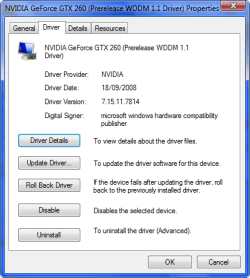
I had the 178.24 driver installed but Windows Update gave the option for a Prerelease Driver for my card 1.1, so I gave it a try and my WEI went from 6 for gaming graphics up 6.5 so I was very happy with that.:)
 

Attachments

  • 2008-11-16_103541.png
    2008-11-16_103541.png
    14.9 KB · Views: 114
  • 2008-11-16_103556.png
    2008-11-16_103556.png
    15.1 KB · Views: 89

My Computer

Computer Manufacturer/Model Number
Home Brew
OS
Windows 7 Ultimate Vista Ultimate x64
CPU
Core 2 Duo E8500 3.16Ghz @ 3.8Ghz
Motherboard
eVGA 750i FTW
Memory
2x2Gigs Patriot PC2-6400 LL
Graphics Card(s)
Inno3D GeForce GTX260 216 SP
Monitor(s) Displays
ASUS VW222U 22" 2ms Response time
Screen Resolution
1680x1050
Hard Drives
SATA 150GB
SATA II 250GB
USB IDE 750GB Ext.
PSU
HYTEC 600W & Thermaltake 650W Toughpower Power Exp
Case
Thermaltake Armor LCS (Liquid Cooling System)
Cooling
Liquid Cooling System
Keyboard
Logitech G15 Gaming Keyboard
Mouse
Logitech G9 Gaming Mouse
Yes, there's a WDM1.1 pre-release driver for my 8400M too available in the Windows Update Catalog, but it isn't being pushed to me...so I tried it anyway, and kept getting BSOD's :(

So then I trusted what Windows Update was pushing, and haven't had any problems since! Glad I could help!
 

My Computer

OS
Windows 7 x86
My score dropped from 4 to 3.6 using the WDM1.1 pre-release driver for my card
 

My Computer

Computer Manufacturer/Model Number
HP Compaq Presario/SR5113WM
OS
Windows 7 Ultimate x64/ Windows Vista Ultimate x64
CPU
AMD Athlon 64 X2 3600+ 1.9Ghz
Motherboard
Asus M2N68-LA
Memory
PNY Optima Memory DDR2 2GB 2x1 kit
Graphics Card(s)
PNY Nvidia 8400 GS 256MB
Sound Card
On board RealTek
Monitor(s) Displays
Acer X163W LCD
Screen Resolution
1366x768
Hard Drives
Western Digital 160 GB SATA 3G (3.0Gb/sec)
7200 rpm
Western Digital 160 GB IDE
PSU
Dynex 400w
Case
Nothin Special
Cooling
Stock
Keyboard
Standard 102 key with volume and sleep buttons
Mouse
Wireless Logitech LX7
Internet Speed
Comcrap 10mb cable
Other Info
Insignia 2.1 speakers, wireless Xbox 360 controller w/plug n play charger, Belkin wireless G + mimo usb network adapter.
Thanks for the heads up Mr Grim, I will see how these drivers go for now, i dont like instslling/uninstalling drivers on a clean install unless i have problems.

My Gfx score is also 6 on a 8800gts, if i trash this install i will try your tip :)

Thanks for your input.
 

My Computer

Computer type
PC/Desktop
Computer Manufacturer/Model Number
Self Build
OS
MS Windows 7 Professional 64-bit SP1
CPU
AMD FX(tm)-6100 Six-Core Processor Socket AM3+ (942)
Motherboard
ASUSTeK COMPUTER INC. SABERTOOTH 990FX (AM3r2)
Memory
8.00 GB Dual-Channel DDR3 @ 802MHz (11-11-11-36) 1.5Volts
Graphics Card(s)
NVIDIA GeForce GTX 560 Ti
Sound Card
Onboard Realtek HD
Monitor(s) Displays
shimian (1920x1080@60Hz)
Screen Resolution
1920*1080
Hard Drives
OCZ-AGIL ITY3 SATA Disk Device 120GB
PSU
Corsair TX 750
Case
Corsair
Cooling
WaterCooled
Keyboard
Microsoft Wired
Mouse
Logitech USB Optical TiltWheel Mouse
Internet Speed
Realtek PCIe GBE Family Controller 20MB*1MB
Antivirus
Avast
Browser
Firefox
Other Info
150GB Internal Hard Drive for Backing Up Important Files -
Hauppauge Nova-DT Dual DVB-T Tuner Device (+IR) -
USB PC Camera with Mic (SN9C105)
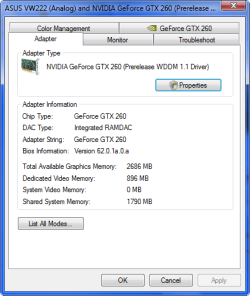
My score dropped from 4 to 3.6 using the WDM1.1 pre-release driver for my card

Thanks mansrm81

I have had some bad luck with windows drivers in the past, Once bitten and all that...:mad:
 

My Computer

Computer type
PC/Desktop
Computer Manufacturer/Model Number
Self Build
OS
MS Windows 7 Professional 64-bit SP1
CPU
AMD FX(tm)-6100 Six-Core Processor Socket AM3+ (942)
Motherboard
ASUSTeK COMPUTER INC. SABERTOOTH 990FX (AM3r2)
Memory
8.00 GB Dual-Channel DDR3 @ 802MHz (11-11-11-36) 1.5Volts
Graphics Card(s)
NVIDIA GeForce GTX 560 Ti
Sound Card
Onboard Realtek HD
Monitor(s) Displays
shimian (1920x1080@60Hz)
Screen Resolution
1920*1080
Hard Drives
OCZ-AGIL ITY3 SATA Disk Device 120GB
PSU
Corsair TX 750
Case
Corsair
Cooling
WaterCooled
Keyboard
Microsoft Wired
Mouse
Logitech USB Optical TiltWheel Mouse
Internet Speed
Realtek PCIe GBE Family Controller 20MB*1MB
Antivirus
Avast
Browser
Firefox
Other Info
150GB Internal Hard Drive for Backing Up Important Files -
Hauppauge Nova-DT Dual DVB-T Tuner Device (+IR) -
USB PC Camera with Mic (SN9C105)
Thanks Shawn for the advise.

I have installed the 178.24 and so far so good, even the PhysX works on Win7 :D
After updating DirecX (Nov08), Which i could'ent get to work on vista!!

I must say win7beta runs a lot better than my Vista Premium ever did, so much so that iam going to use it as my main OS!! I also activated win7beta with my old vista beta key :D

Next thing to do is install some games and see how it goes, I will update this post if i come accross any problems.

I really like the forums, very cutting edge.....

Thanks again Shawn

Anthony

You're welcome Anthony.


The Windows Update WDM1.1 pre-release driver didn't seem to make any difference for my WEI score vs the latest 180.43 Vista beta NVIDIA drivers. Either one worked just fine though, but I ended up using the Vista ones anyway.
 

My Computer

Computer type
PC/Desktop
Computer Manufacturer/Model Number
Self built custom
OS
64-bit Windows 11 Pro for Workstations
CPU
Intel i7-8700K OC'd to 5 GHz
Motherboard
ASUS ROG Maximus XI Formula Z390
Memory
64 GB (4x16GB) G.SKILL TridentZ RGB DDR4 3600 MHz
Graphics Card(s)
ASUS ROG-STRIX-GTX1080TI-O11G-GAMING
Sound Card
Integrated
Monitor(s) Displays
2 x Samsung Odyssey G7 27"
Screen Resolution
2560x1440
Hard Drives
1TB Samsung 990 PRO M.2,
4TB Samsung 990 PRO PRO M.2,
TerraMaster F8 SSD Plus NAS
PSU
Seasonic Prime Titanium 850W
Case
Thermaltake Core P3
Cooling
Corsair Hydro H115i
Keyboard
Logitech wireless K800
Mouse
Logitech MX Master 4
Internet Speed
2 Gb/s Download and 100 Mb/s Upload
Antivirus
Malwarebyte Anti-Malware Premium
Browser
Google Chrome
Other Info
Logitech Z625 speaker system,
Logitech BRIO 4K Pro webcam,
HP Color LaserJet Pro MFP M477fdn,
APC SMART-UPS RT 1000 XL - SURT1000XLI,
Galaxy S23 Plus phone
I do not know the mechanics of Video drivers, but my own experience with one of my laptops might help others with older cards. (Go 7600 in my case)
The built in "7" driver worked fine for me, except for a couple of sites (maybe there were many others) where I got a strange, and unreadable, kind of "quad" effect, There were four, poorly rendered, pictures where there should have been the one. With a lot of tests, it did seem to be some conflict with Java.
I tried different drivers, past and present, even third party. I was on the point of temporarily giving up on "7".
So then I reinstalled, accepting Microsoft's drivers. I downloaded and expanded the latest drivers to a designated folder.
Back into the device management and selected "update drivers". I pointed the panel at my new folder and "7" got excited and installed the drivers. I now have a machine working perfectly, whatever I throw at it! Why it would not work with a normal Nvidia install, I have no idea.
 

My Computer

Computer Manufacturer/Model Number
Three desktops and one laptop with good specs..
OS
Vista and now 7 in 32 and 64 bit.
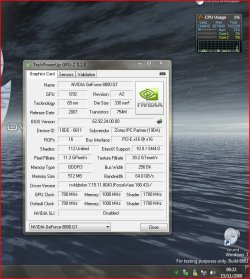
im running the 180.43s with no issues.....
nvi.JPG

:)SK
 

My Computer

Computer Manufacturer/Model Number
myself
OS
SEVEN x64
CPU
Q9450 @ 3.6GHZ 1.34v
Motherboard
ASUS P5K PREMIUM P35
Memory
8GB 1066 buffalo firestix @ 1152mhz CL5
Graphics Card(s)
Sapphire HD 5970 + GTX260 (physX)
Sound Card
Creative X-FI Xtreme Gamer
Monitor(s) Displays
SAMSUNG 20'' & SAMSUNG 23'' (dual screens)
Screen Resolution
2048x1152 & 1680x1050
Hard Drives
1x seagate 160gb IDE & 1x seagate 160gb SATA
PSU
XCILIO 850w (78A)
Case
CM590 1x 120x38mm & 2x92x38mm / 4x 120x25mm
Cooling
AC7 PRO @ 92x38mm blower, Lamptron military bus bay controll
Keyboard
LOGITECH E110
Mouse
logitech NX5
Internet Speed
2MB
Other Info
its a continual ''work in progress''....
XFX Nvidia and Win 7 issues

I installed win7 beta x64 yesterday and allowed the generic drivers to be installed, I have a XFX Nvidia Geforce 8800gs with the (prerelease WDDM 1.1) It plays my games well with the win 7 drivers, but when I play a movie it is not clean or crisp like it should be, adjusted the resolution a couple of different ways and still no joy. I then updated my drivers to 181.20_geforce_winvista_64bit_international_whql and the movies where brilliant and clean and crisp once again, but now my games are flickering everywhere, i tried the adjust the game resolution and even set compatibility to Xp sp2 and still no joy. I have reverted back to the Win7 driver and the games play fine but my video quality is **** once more. :(
Any help would be appreciated.

Windows 7 Ultimate Beta (build 7000)
AMD Athlon x64 dual core 5000+ 2.6ghz
4 gb ATI Crossfire OCZ 800mb DDR2
MSI MS-7280 K9A-Platinum
XFX Nvidia Geforce 8800GS 580M 384MB DDR3 DUAL DVITVPCIE


My Computer

Computer Manufacturer/Model Number
MANUFACTURED BY ME!
OS
Windows 7 Ultimate x64 (7000)
CPU
AMD Athlon x64 dual core 5000+ 2.6ghz
Motherboard
MSI MS-7280 K9A-Platinum
Memory
4 gb ATI Crossfire OCZ 800mb DDR2
Graphics Card(s)
XFX Nvidia Geforce 8800GS 580M 384MB DDR3 DUAL DVITVPCIE
Sound Card
Realtek Intergrated HD audio Realtek ALC883
Monitor(s) Displays
Envision 19" LCD H19W
Screen Resolution
1440 x 900 @60Hz (recommended)
Hard Drives
Samsung HD321KJ - 320gb Sata
Maxtor GY250M0 - 250gb Sata
Hitachi HDT725032VLA360 - 320gb Sata
PSU
Ultra 500 watt LifetimeSeries
Case
ULTRA Gladiator Black Mid-Tower Case ATX
Cooling
Thermaltake Ruby Orb CPU Cooler CL-P0391, 12L Artic Fan (x2)
Keyboard
Dell SK8110
Mouse
IBM 19K2005 Optical Scroll Mouse
Internet Speed
31,298 kbs down - 1985 kbs up
Back
Top