
NVIDIA graphics card issue

DeeCazo

New member
Local time
6:32 AM
Messages
18
After doing a clean install of Windows 7 64-bit because of a computer crash I had that involved the "display drivers have recovered" error or whatever I have re-installed all my drivers except video ones.

I have an m15x alienware laptop that originally had Vista 32-bit and I upgraded to 7 64-bit so I can't use my support disc to install the video drivers.

Then whenever I try downloading the drivers off nvidia or any other site I can't get windows to start up and have to restore because it either freezes at the Windows Starting Up screen or I get the BSOD.

My graphics card isn't showing up in device manager so I can't even search for updates.


Everything else is working perfectly except the graphic stuff and with a gaming laptop that I also use for design work it doesnt mean much to me unless I can fix what is wrong with it.


Help will be very appreciated.
 

My Computer

Computer Manufacturer/Model Number
Alienware m15x
OS
Windows 7 Ultimate x64
CPU
Intel Core 2 Duo
Memory
2 GB RAM, 1 GB TURBO CACHE MEMORY
Graphics Card(s)
NVIDIA 8800M-GTX 512MB,
Sound Card
INTEL MOBILE HIGH-DEFINITION AUDIO SOUND CARD
Monitor(s) Displays
15" WXGA
Hard Drives
SEAGATE 160 GB 5400RPM HYBRID HARD DRIVE SYSTEM, SEAGATE 500 GB EXTERNAL HARD DRIVE.
Try to install the drivers in safe mode
 

My Computer

Computer type
PC/Desktop
Computer Manufacturer/Model Number
Custom Build
OS
Windows 10 Pro x64, Arch Linux
CPU
Intel Core 2 Quad Q8200 OC'd 3.08GHz
Motherboard
Asus Rampage formula LGA775
Memory
8GB DDR2 900Mhz
Graphics Card(s)
MSI GT730 2GB GDDR5 (Kepler)
Sound Card
Supreme FX2
Monitor(s) Displays
Samsung LS22F350 LED
Screen Resolution
1080P
Hard Drives
Kingston SSDNow UV400 120GB, 500GB Hitachi, 2TB Samsung, 500GB Seagate FreeAgent, 640GB Samsung, 160GB Toshiba (Arch)
PSU
AeroCool 500W Bronze
Cooling
Cooler Master V6 + 3X fans
Keyboard
Prolink keyboard
Mouse
Logitech M705
Internet Speed
1MiB/s
Browser
Chrome Beta
After doing a clean install of Windows 7 64-bit because of a computer crash I had that involved the "display drivers have recovered" error or whatever I have re-installed all my drivers except video ones.

I have an m15x alienware laptop that originally had Vista 32-bit and I upgraded to 7 64-bit so I can't use my support disc to install the video drivers.

Then whenever I try downloading the drivers off nvidia or any other site I can't get windows to start up and have to restore because it either freezes at the Windows Starting Up screen or I get the BSOD.

My graphics card isn't showing up in device manager so I can't even search for updates.


Everything else is working perfectly except the graphic stuff and with a gaming laptop that I also use for design work it doesnt mean much to me unless I can fix what is wrong with it.


Help will be very appreciated.
Have a look in the bios and make certain the "onboard video" is disabled ;)
 

My Computer

Computer type
PC/Desktop
Computer Manufacturer/Model Number
self build
OS
win 7 ultimate32bit, Win8.1pro wmc 32bit
CPU
amd phenom x4 9600
Motherboard
asus m2n32-sli deluxe
Memory
corsair twinxs 2x2gb
Graphics Card(s)
2x nvidia 1gb 8500gt
Sound Card
onboard
Monitor(s) Displays
23" PB Viseo 233d
Screen Resolution
1920x1080
Hard Drives
maxtor sata 500gb
maxtor sata 320gb
fujitsu sata200gb
PSU
oryxx tornado 750w
Case
thermaltake xaser lll
Cooling
artic freezer64 pro + 7 case fans
Running it in safe mode didn't even let me install it which is probably why it crashed outside of safe mode.

It told me "The correct hardware isn't present" or something like that. I think that is my biggest problem is getting it identified.
 

My Computer

Computer Manufacturer/Model Number
Alienware m15x
OS
Windows 7 Ultimate x64
CPU
Intel Core 2 Duo
Memory
2 GB RAM, 1 GB TURBO CACHE MEMORY
Graphics Card(s)
NVIDIA 8800M-GTX 512MB,
Sound Card
INTEL MOBILE HIGH-DEFINITION AUDIO SOUND CARD
Monitor(s) Displays
15" WXGA
Hard Drives
SEAGATE 160 GB 5400RPM HYBRID HARD DRIVE SYSTEM, SEAGATE 500 GB EXTERNAL HARD DRIVE.
Running it in safe mode didn't even let me install it which is probably why it crashed outside of safe mode.

It told me "The correct hardware isn't present" or something like that. I think that is my biggest problem is getting it identified.

DeeCazo, you may have the ATI Radeon ,not the Nvidia Drivers & Downloads

have a look in device manager see if a graphic card is listed ;)
 

My Computer

Computer type
PC/Desktop
Computer Manufacturer/Model Number
self build
OS
win 7 ultimate32bit, Win8.1pro wmc 32bit
CPU
amd phenom x4 9600
Motherboard
asus m2n32-sli deluxe
Memory
corsair twinxs 2x2gb
Graphics Card(s)
2x nvidia 1gb 8500gt
Sound Card
onboard
Monitor(s) Displays
23" PB Viseo 233d
Screen Resolution
1920x1080
Hard Drives
maxtor sata 500gb
maxtor sata 320gb
fujitsu sata200gb
PSU
oryxx tornado 750w
Case
thermaltake xaser lll
Cooling
artic freezer64 pro + 7 case fans
The only thing listed is the "Standard VGA Graphics Adapter" and my support CD has the install drivers for NVIDIA and I also have a sheet saying what graphics card I have from alienware.

Like I said though because I went from 32 to 64 I cant use the disc and I cant update drivers because the nvidia card doesnt even appear.

I am dumbfounded.
 

My Computer

Computer Manufacturer/Model Number
Alienware m15x
OS
Windows 7 Ultimate x64
CPU
Intel Core 2 Duo
Memory
2 GB RAM, 1 GB TURBO CACHE MEMORY
Graphics Card(s)
NVIDIA 8800M-GTX 512MB,
Sound Card
INTEL MOBILE HIGH-DEFINITION AUDIO SOUND CARD
Monitor(s) Displays
15" WXGA
Hard Drives
SEAGATE 160 GB 5400RPM HYBRID HARD DRIVE SYSTEM, SEAGATE 500 GB EXTERNAL HARD DRIVE.
The only thing listed is the "Standard VGA Graphics Adapter" and my support CD has the install drivers for NVIDIA and I also have a sheet saying what graphics card I have from alienware.

Like I said though because I went from 32 to 64 I cant use the disc and I cant update drivers because the nvidia card doesnt even appear.

I am dumbfounded.

click on the "blue" drivers and download link in my last post, that will take you to Dells' website to the driver page for your laptop ,download the Nvidia drivers from there they are Win7 64bit drivers ;)
 

My Computer

Computer type
PC/Desktop
Computer Manufacturer/Model Number
self build
OS
win 7 ultimate32bit, Win8.1pro wmc 32bit
CPU
amd phenom x4 9600
Motherboard
asus m2n32-sli deluxe
Memory
corsair twinxs 2x2gb
Graphics Card(s)
2x nvidia 1gb 8500gt
Sound Card
onboard
Monitor(s) Displays
23" PB Viseo 233d
Screen Resolution
1920x1080
Hard Drives
maxtor sata 500gb
maxtor sata 320gb
fujitsu sata200gb
PSU
oryxx tornado 750w
Case
thermaltake xaser lll
Cooling
artic freezer64 pro + 7 case fans
I went on here to download the drivers yesterday and did everything except BIOS because I was told not to and then I am not sure what Nvidia driver to download because my graphics card is the 8800M-gtx while the options shown are:

GTX 460M

Geforce GT 240M

Geforce GTX 260M

What do you suggest I do. Should I update my BIOS then go into safe mode and start trying the nvidia drivers?
 

My Computer

Computer Manufacturer/Model Number
Alienware m15x
OS
Windows 7 Ultimate x64
CPU
Intel Core 2 Duo
Memory
2 GB RAM, 1 GB TURBO CACHE MEMORY
Graphics Card(s)
NVIDIA 8800M-GTX 512MB,
Sound Card
INTEL MOBILE HIGH-DEFINITION AUDIO SOUND CARD
Monitor(s) Displays
15" WXGA
Hard Drives
SEAGATE 160 GB 5400RPM HYBRID HARD DRIVE SYSTEM, SEAGATE 500 GB EXTERNAL HARD DRIVE.
I went on here to download the drivers yesterday and did everything except BIOS because I was told not to and then I am not sure what Nvidia driver to download because my graphics card is the 8800M-gtx while the options shown are:

GTX 460M

Geforce GT 240M

Geforce GTX 260M

What do you suggest I do. Should I update my BIOS then go into safe mode and start trying the nvidia drivers?


This is a tuff one Deecazo, are these the nvidia drivers you are trying to install NVIDIA DRIVERS 260.99 WHQL ? Your laptops bios should be up to date :(
 

My Computer

Computer type
PC/Desktop
Computer Manufacturer/Model Number
self build
OS
win 7 ultimate32bit, Win8.1pro wmc 32bit
CPU
amd phenom x4 9600
Motherboard
asus m2n32-sli deluxe
Memory
corsair twinxs 2x2gb
Graphics Card(s)
2x nvidia 1gb 8500gt
Sound Card
onboard
Monitor(s) Displays
23" PB Viseo 233d
Screen Resolution
1920x1080
Hard Drives
maxtor sata 500gb
maxtor sata 320gb
fujitsu sata200gb
PSU
oryxx tornado 750w
Case
thermaltake xaser lll
Cooling
artic freezer64 pro + 7 case fans

My Computer

Computer Manufacturer/Model Number
Alienware AREA-51 M17x
OS
windows 7 ultimate 64bit
CPU
Intel Core2 Extreme x9000 2.8GHZ
Motherboard
Asus P965 Intel chipset
Memory
4Gig
Graphics Card(s)
2 NVidia GeForce 8800M GTX (SLi)
Sound Card
onboard
Monitor(s) Displays
17in. built-in, 47in JVC LCD
Screen Resolution
1080p
Hard Drives
2 250Gig Hitachi (RAID 0) @ 7200RPM
Case
17in. laptop
Mouse
touchpad, Logitech Anywhere Mouse cordless laser
Internet Speed
cable
I did the detection thing and it says "Has been detected in your system." then on the right side it says "The manufacturer of this system requires that you download the driver for your GPU from their site"

That really doesnt help me lol.
 

My Computer

Computer Manufacturer/Model Number
Alienware m15x
OS
Windows 7 Ultimate x64
CPU
Intel Core 2 Duo
Memory
2 GB RAM, 1 GB TURBO CACHE MEMORY
Graphics Card(s)
NVIDIA 8800M-GTX 512MB,
Sound Card
INTEL MOBILE HIGH-DEFINITION AUDIO SOUND CARD
Monitor(s) Displays
15" WXGA
Hard Drives
SEAGATE 160 GB 5400RPM HYBRID HARD DRIVE SYSTEM, SEAGATE 500 GB EXTERNAL HARD DRIVE.
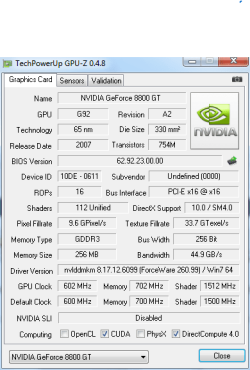
Download and run Download TechPowerUp GPU-Z v0.4.8 | techPowerUp (click on Download now and select a suitable location).

When you have run the tool, please post back a snip showing the Graphics Card tab, just like the example below.

Capture.PNG
 

My Computer

Computer type
PC/Desktop
Computer Manufacturer/Model Number
Dwarf Dwf/11/2012 r09/2013
OS
Windows 8.1 Pro RTM x64
CPU
Intel Core-i5-3570K 4-core @ 3.4GHz (Ivy Bridge) (OC 4.4GHz)
Motherboard
ASRock Z77 Extreme4-M
Memory
4 x 4GB DDR3-1600 Corsair Vengeance CMZ8GX3M2A1600C9B (16GB)
Graphics Card(s)
MSI GeForce GTX770 Gaming OC 2GB
Sound Card
Realtek High Definition on board solution (ALC 898)
Monitor(s) Displays
ViewSonic VA1912w Widescreen (VGA)
Screen Resolution
1440x900
Hard Drives
OCZ Agility 3 SSD 120GB SATA III x2 (RAID 0)
Samsung HD501LJ 500GB SATA II x2
Hitachi HDS721010CLA332 1TB SATA II
Iomega 1.5TB Ext USB 2.0
WD 2.0TB Ext USB 3.0
PSU
XFX Pro Series 850W Semi-Modular
Case
Gigabyte IF233
Cooling
1 x 120mm Front Inlet 1 x 120mm Rear Exhaust
Keyboard
Microsoft Comfort Curve Keyboard 3000 (USB)
Mouse
Microsoft Comfort Mouse 3000 for Business (USB)
Internet Speed
NetGear DG834Gv3 ADSL Modem/Router (Ethernet) ~4.0 Mb/s (O2)
Antivirus
Avast! 8.0.1497
Browser
IE 11
Other Info
Optical Drive: HL-DT-ST BD-RE BH10LS30 SATA Bluray
Lexmark S305 Printer/Scanner/Copier (USB)
WEI Score: 8.1/8.1/8.5/8.5/8.25
Asus Eee PC 1011PX Netbook (Windows 7 x86 Starter)
9ut.png
 

My Computer

Computer Manufacturer/Model Number
Alienware m15x
OS
Windows 7 Ultimate x64
CPU
Intel Core 2 Duo
Memory
2 GB RAM, 1 GB TURBO CACHE MEMORY
Graphics Card(s)
NVIDIA 8800M-GTX 512MB,
Sound Card
INTEL MOBILE HIGH-DEFINITION AUDIO SOUND CARD
Monitor(s) Displays
15" WXGA
Hard Drives
SEAGATE 160 GB 5400RPM HYBRID HARD DRIVE SYSTEM, SEAGATE 500 GB EXTERNAL HARD DRIVE.
This is why I have a problem my graphics card won't show up on here hence why I cant update it or anything?
 

My Computer

Computer Manufacturer/Model Number
Alienware m15x
OS
Windows 7 Ultimate x64
CPU
Intel Core 2 Duo
Memory
2 GB RAM, 1 GB TURBO CACHE MEMORY
Graphics Card(s)
NVIDIA 8800M-GTX 512MB,
Sound Card
INTEL MOBILE HIGH-DEFINITION AUDIO SOUND CARD
Monitor(s) Displays
15" WXGA
Hard Drives
SEAGATE 160 GB 5400RPM HYBRID HARD DRIVE SYSTEM, SEAGATE 500 GB EXTERNAL HARD DRIVE.
see if alienware has a x64 vista driver available for your system. it will probably work.
 

My Computer

Computer Manufacturer/Model Number
Alienware AREA-51 M17x
OS
windows 7 ultimate 64bit
CPU
Intel Core2 Extreme x9000 2.8GHZ
Motherboard
Asus P965 Intel chipset
Memory
4Gig
Graphics Card(s)
2 NVidia GeForce 8800M GTX (SLi)
Sound Card
onboard
Monitor(s) Displays
17in. built-in, 47in JVC LCD
Screen Resolution
1080p
Hard Drives
2 250Gig Hitachi (RAID 0) @ 7200RPM
Case
17in. laptop
Mouse
touchpad, Logitech Anywhere Mouse cordless laser
Internet Speed
cable
I found the alienware m15x vista 64 bit driver for my graphics card installed it in safe mode and as it tried to reboot i was stuck on the Starting Up Windows screen with faded vertical red bars in the background.

I had a feeling it might work too but unfortunately has failed.

If I used my Alienware vista disc and then installed vista 32-bit and then "upgraded" to 64 bit windows 7 would it carry over if not I could always try getting a copy of windows 7 32-bit.

I just want to know if its worth that trouble.
 

My Computer

Computer Manufacturer/Model Number
Alienware m15x
OS
Windows 7 Ultimate x64
CPU
Intel Core 2 Duo
Memory
2 GB RAM, 1 GB TURBO CACHE MEMORY
Graphics Card(s)
NVIDIA 8800M-GTX 512MB,
Sound Card
INTEL MOBILE HIGH-DEFINITION AUDIO SOUND CARD
Monitor(s) Displays
15" WXGA
Hard Drives
SEAGATE 160 GB 5400RPM HYBRID HARD DRIVE SYSTEM, SEAGATE 500 GB EXTERNAL HARD DRIVE.
if you have a retail version of win7, you should have gotten a x86 and an x64 disc.

if you go back to x86 vista, you could try running the win7 upgrade advisor to see if it finds a compatible video driver.

but you could try this first: Guru3D - Driver Sweeper (Setup) download from Guru3D.com

then try the vista x64 driver again. after running driver sweeper,restart, then look in device manager and make sure video adapter is using "standard vga" before trying to install the alienware driver.
 

My Computer

Computer Manufacturer/Model Number
Alienware AREA-51 M17x
OS
windows 7 ultimate 64bit
CPU
Intel Core2 Extreme x9000 2.8GHZ
Motherboard
Asus P965 Intel chipset
Memory
4Gig
Graphics Card(s)
2 NVidia GeForce 8800M GTX (SLi)
Sound Card
onboard
Monitor(s) Displays
17in. built-in, 47in JVC LCD
Screen Resolution
1080p
Hard Drives
2 250Gig Hitachi (RAID 0) @ 7200RPM
Case
17in. laptop
Mouse
touchpad, Logitech Anywhere Mouse cordless laser
Internet Speed
cable
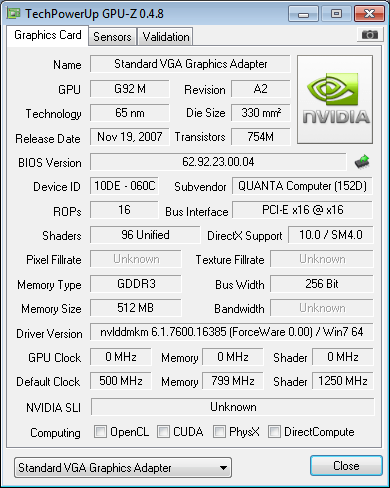
That clearly shows as NVidia, the 10DE is the manufacturer (vendor) code. However, the device ID, 060C, doesn't appear for any manufacturer here:

PCI Vendor and Device Lists
http://www.sevenforums.com/tutorials/73420-hardware-identification.html

This would indicate that it is a custom design for the laptop manufacturer. Of course, it could also indicate that the hardware is failing and is reporting incorrect information (drivers use this information when installing) which would tie in with what you have been saying ("display drivers have recovered" and "faded vertical red bars in the background").
 

My Computer

Computer type
PC/Desktop
Computer Manufacturer/Model Number
Dwarf Dwf/11/2012 r09/2013
OS
Windows 8.1 Pro RTM x64
CPU
Intel Core-i5-3570K 4-core @ 3.4GHz (Ivy Bridge) (OC 4.4GHz)
Motherboard
ASRock Z77 Extreme4-M
Memory
4 x 4GB DDR3-1600 Corsair Vengeance CMZ8GX3M2A1600C9B (16GB)
Graphics Card(s)
MSI GeForce GTX770 Gaming OC 2GB
Sound Card
Realtek High Definition on board solution (ALC 898)
Monitor(s) Displays
ViewSonic VA1912w Widescreen (VGA)
Screen Resolution
1440x900
Hard Drives
OCZ Agility 3 SSD 120GB SATA III x2 (RAID 0)
Samsung HD501LJ 500GB SATA II x2
Hitachi HDS721010CLA332 1TB SATA II
Iomega 1.5TB Ext USB 2.0
WD 2.0TB Ext USB 3.0
PSU
XFX Pro Series 850W Semi-Modular
Case
Gigabyte IF233
Cooling
1 x 120mm Front Inlet 1 x 120mm Rear Exhaust
Keyboard
Microsoft Comfort Curve Keyboard 3000 (USB)
Mouse
Microsoft Comfort Mouse 3000 for Business (USB)
Internet Speed
NetGear DG834Gv3 ADSL Modem/Router (Ethernet) ~4.0 Mb/s (O2)
Antivirus
Avast! 8.0.1497
Browser
IE 11
Other Info
Optical Drive: HL-DT-ST BD-RE BH10LS30 SATA Bluray
Lexmark S305 Printer/Scanner/Copier (USB)
WEI Score: 8.1/8.1/8.5/8.5/8.25
Asus Eee PC 1011PX Netbook (Windows 7 x86 Starter)
if you have a retail version of win7, you should have gotten a x86 and an x64 disc.

if you go back to x86 vista, you could try running the win7 upgrade advisor to see if it finds a compatible video driver.

but you could try this first: Guru3D - Driver Sweeper (Setup) download from Guru3D.com

then try the vista x64 driver again. after running driver sweeper,restart, then look in device manager and make sure video adapter is using "standard vga" before trying to install the alienware driver.

I got a cheap upgrade disc from my college but it was the 64 bit I might get the 32 bit if all fails but first I am trying the clean sweep/alienware install.

Then if that fails ill go vista 32 to windows 7 64.
 

My Computer

Computer Manufacturer/Model Number
Alienware m15x
OS
Windows 7 Ultimate x64
CPU
Intel Core 2 Duo
Memory
2 GB RAM, 1 GB TURBO CACHE MEMORY
Graphics Card(s)
NVIDIA 8800M-GTX 512MB,
Sound Card
INTEL MOBILE HIGH-DEFINITION AUDIO SOUND CARD
Monitor(s) Displays
15" WXGA
Hard Drives
SEAGATE 160 GB 5400RPM HYBRID HARD DRIVE SYSTEM, SEAGATE 500 GB EXTERNAL HARD DRIVE.
you cant upgrade from vista32 to win7 x64. you have to do a clean install.
 

My Computer

Computer Manufacturer/Model Number
Alienware AREA-51 M17x
OS
windows 7 ultimate 64bit
CPU
Intel Core2 Extreme x9000 2.8GHZ
Motherboard
Asus P965 Intel chipset
Memory
4Gig
Graphics Card(s)
2 NVidia GeForce 8800M GTX (SLi)
Sound Card
onboard
Monitor(s) Displays
17in. built-in, 47in JVC LCD
Screen Resolution
1080p
Hard Drives
2 250Gig Hitachi (RAID 0) @ 7200RPM
Case
17in. laptop
Mouse
touchpad, Logitech Anywhere Mouse cordless laser
Internet Speed
cable
Back
Top