
nVidia issues & My not so smooth Window 7 experience.

NHDesigner

New member
Local time
8:20 PM
Messages
12
Location
New Hampshire
I'm on day 3 of attempting to upgrade from Vista 32 to Windows 7 64-bit and what was looking to be a pretty positive experience became a messy situation and the main culprit seems to be nVidia, though I've got an issue with HP as well.

I just thought I'd post my experience, or at least the graphics related part.

I was running a GeForce 8600 GT graphics card which ran fine for 2 years on Vista.

The Windows 7 Clean install seemed to go fine and I began moving my files back and reinstalling all my software (MS Office, Quickbooks, Adobe CS3).
After those were installed I started getting the "display driver stopped working and has restarted" error message and the screen would blink a few times and usually end in a Black Screen where it would just hang. Manually powering down the system was the only way out.

I tried updating the BIOS from HP but they do not have any way to update the BIOS in Windows 7, only Vista. I tried their Vista update anyway, but got a message "Your system does not meet the minimum requirements". I contacted HP support and they said because it's a new OS I have to wait a week or so until they come out with support downloads for Windows 7. Shouldn't they work with the Beta like the rest of the world and have this stuff ready for the launch?

I downloaded the latest drivers from nVidia and that didn't help. Seemed to actually get worse, as now the screen was becoming distorted and began flickering. Tried rolling back the drivers too.

Eventually it would just crash to the BSOD and then would not restart anymore. Just a visual mess of distorted pixels on boot and then a Blue screen of death. Couldn't barely boot to safe mode, but still difficult to see the screen. I tried loading an earlier Restore point. no luck. It ran some Startup repair program which didn't help.

So I pulled the card and reverted back to the onboard graphics card which successfully booted and behaved.

Upon inspection of the GeForce 8600GT I noticed that 5 capacitors had their caps blown. I never heard or smelled them pop, but I'm guessing it happened during this and that is why it doesn't work.

So I went to the store and bought PNY GeForce 9800GT XLR8 1GB graphics card that said it was Windows 7 compatible. I put that in and it would not boot. 2 short beeps, 1 long beep, which is a graphics related error code.
I can only hope that I just need a BIOS update to get this thing working.

Any similar experiences out there?
Any advice?
Anyone want to give me a new Mac :-)

SYSTEM:
HP a6152n
Intel 2.4Ghz Quad-core
8GB RAM
IPIBL-LA Motherboard
Antec 550w TruePower power supply
1TB Seagate 7200
400GB Hitachi
 

My Computer

Computer Manufacturer/Model Number
HP a6152n
OS
Windows 7 64-bit
CPU
Intel 2.4Ghz Quad-core
Motherboard
IPIBL-LA
Memory
8GB
Graphics Card(s)
GeForce 9800GT XLR8 1GB
Monitor(s) Displays
24" HP, 19" Samsung
Hard Drives
Hitachi 400 GB
Seagate 7200 Barracuda 1TB
PSU
Antec TruePower Trio 550w
Case
HP
Mouse
Microsoft Wireless Mobile Mouse 6000
Replacing those caps is simple with basic soldering. If you do so, get low esr type of caps.

The failed card is not Microsoft's or Windows 7's fault. It is either due to a failed electrolyte recipe used by maker or overheating of your card.

For the new card 9800GT, did you connect the internal 6 pin PCI-e power connector from the PSU?

I don't think a bios update will change any kind of compatibility with the new card. I'm incorrect on an occasion or two, so it is still worth a try and peace of mind you have latest bios.
 

My Computer

Computer Manufacturer/Model Number
self built
OS
7600.20510 x86
CPU
P4 550 3.4 GHz HT running at 3.5 GHz
Motherboard
MSI PM8M3-V (MS-7211 v1.x) Micro-ATX mainboard
Memory
OCZ 2 GB(2x1GB) DDR400mHz running @ 414 mHz
Graphics Card(s)
HIS Radeon HD 3850 IceQ 3 Turbo HDMI Dual DL-DVI AGP
Sound Card
MOTU Traveler firewire studio interface 192 kHz 24 bit
Monitor(s) Displays
22" widescreen Acer X223W LCD, 17" Compaq P75 CRT
Screen Resolution
1680x1050 and 1280x1024
Hard Drives
SATA I x2 WD, 400 GB and 120 GB, SATA 2 WD Caviar Black 1 TB
PSU
350W generic
Case
Cybertronpc, it glows blue
Cooling
stock cpu fan, Ice-Q 3 gpu and system, many case fans
Keyboard
Logitch Classical Keyboard 200
Mouse
Logitech Mediaplay cordless
Internet Speed
1792/448 kbits/sec
Other Info
SATA II PCI fake RAID adapter, 1 GB Readyboost, original ATI Remote Wonder (even works with WMC perfectly), Logitech Rumblepad 2 game controller x2
The only thing I've ever seen fry capacitors in a flash is huge over-volting, and that is pretty unlikely to have happened in your circumstances. Capacitors will, however, always deteriorate gradually - it just happens you've noticed it now...
 

My Computer

Computer Manufacturer/Model Number
Custom built machine
OS
W7 x64
CPU
Intel Q9300 2.5Ghz Quad LGA775 (Would like Q9650)
Motherboard
Gigabyte GA-EP45T-UD3R (F6 Bios)
Memory
4Gb OCZ Gold 1,333Mhz
Graphics Card(s)
Palit HD4850 O/C Sonic 512Mb DDR3, Dual DViD's
Sound Card
Azalia to twin Samson 50w Studio Monitors
Monitor(s) Displays
Twin Dell (E-IPS) U2311H 23.6" Screens
Screen Resolution
1920 x 1080 @ 60Hz
Hard Drives
Crucial M4 SSD, archives on twin Western Digital Caviar Black WD2002FAEX, 2TB, 7200rpm HDD's, Samsung Ritemaster CD/DVD Burner...
PSU
OCZ 600w
Case
Lian-Li PC8 acoustifoamed' aluminium tower
Cooling
Scythe 140mm Zipang
Keyboard
Cherry PS/2 custom model
Mouse
Lenovo USB laser "Thinkpad" Mouse
Internet Speed
ADSL2+ @14Mbps downstream & Cat6 Gigabit Ethernet
Antivirus
NOD32
Browser
Opera
Other Info
Silicon Dust HD Homerun Dual FTA (Ethernet) TV Tuners, Dray Tek Vigor 2850Vn router and 8x HP Gigabit Switch. Lian-Li CR26 Card Reader, Canon MF4430 iSensys laser printer/scanner.
I do plan on getting some new caps and soldering them on. These certainly may have blown over the 2 years it's been in use, and it just kept working fine.
It was just strange how it started off working just fine in Windows 7 and then a couple hours into it, the wheels started to fall of the bus and down she went.

There is no 6-pin power connector on the new 9800 GT XLR8 1GB card. I did check.
The card does do a quick power cycle and fan test when I try to start up, but then the 2 short, 1 long beeps come quickly after that.

For now I'm just stuck using the onboard crappy graphics card and 1 monitor.

I am enjoying Windows 7 so far, aside from this issue.
 

My Computer

Computer Manufacturer/Model Number
HP a6152n
OS
Windows 7 64-bit
CPU
Intel 2.4Ghz Quad-core
Motherboard
IPIBL-LA
Memory
8GB
Graphics Card(s)
GeForce 9800GT XLR8 1GB
Monitor(s) Displays
24" HP, 19" Samsung
Hard Drives
Hitachi 400 GB
Seagate 7200 Barracuda 1TB
PSU
Antec TruePower Trio 550w
Case
HP
Mouse
Microsoft Wireless Mobile Mouse 6000
Eventually it would just crash to the BSOD and then would not restart anymore. Just a visual mess of distorted pixels on boot and then a Blue screen of death.

It happened to me too, with a 1-year-old 9800GX2.

I was in the process of adding RAM modules when it happened. I initially put the blame on my incompatible RAM sticks, but when I reverted to my original RAM setup, the problem persisted. It was on W7 RC 64-bit.

Good thing I didn't miss the warranty when it happened (mine was just a day before it expired).

My heaven-sent retailer replaced it with a GTX275 for free. Yay for me. :)
 

My Computer

Computer Manufacturer/Model Number
- custom build -
OS
Windows 7 Professional x64
CPU
Intel Core 2 Quad Q9300
Motherboard
ASUS P5P43TD Pro
Memory
OCZ3P13334GK DDR3-1333 4GB (Kit of 2)
Graphics Card(s)
Inno3D Geforce GTX275
Sound Card
- onboard -
Monitor(s) Displays
LG W2442PA
Screen Resolution
1920x1080
Hard Drives
WD Caviar Blue 160GB x 1
Samsung Spinpoint F3 1TB x 1
PSU
Zephyr HEC 750w
Case
CoolerMaster HAF 922
Cooling
Stock Intel CPU fan, CM case fans (front, rear, top)
Keyboard
Logitech Ultra-Flat Keyboard
Mouse
Labtec Wheel Mouse
Internet Speed
1.5 Mbps DSL
silentcontrol: Interesting about the RAM. I can't see how that could cause these issues, but I also just installed new RAM (8GB Crucial DDR2). That's the only thing hardware related that changed with my system. I put that in right after The Windows 7 install finished.

Did you notice any blown caps or anything on the graphics card?
 

My Computer

Computer Manufacturer/Model Number
HP a6152n
OS
Windows 7 64-bit
CPU
Intel 2.4Ghz Quad-core
Motherboard
IPIBL-LA
Memory
8GB
Graphics Card(s)
GeForce 9800GT XLR8 1GB
Monitor(s) Displays
24" HP, 19" Samsung
Hard Drives
Hitachi 400 GB
Seagate 7200 Barracuda 1TB
PSU
Antec TruePower Trio 550w
Case
HP
Mouse
Microsoft Wireless Mobile Mouse 6000
NH, when I looked up info on your card, it said it needs one supplementary power connector as a minimum system requirement.

Is this page in error?

PNY

Since I don't own PCI-e equipment myself, I can not be sure and I don't know power specs well, but I can not see your card being able to work or being able to be designed without that connector needed. Please have a look again at it.
 

My Computer

Computer Manufacturer/Model Number
self built
OS
7600.20510 x86
CPU
P4 550 3.4 GHz HT running at 3.5 GHz
Motherboard
MSI PM8M3-V (MS-7211 v1.x) Micro-ATX mainboard
Memory
OCZ 2 GB(2x1GB) DDR400mHz running @ 414 mHz
Graphics Card(s)
HIS Radeon HD 3850 IceQ 3 Turbo HDMI Dual DL-DVI AGP
Sound Card
MOTU Traveler firewire studio interface 192 kHz 24 bit
Monitor(s) Displays
22" widescreen Acer X223W LCD, 17" Compaq P75 CRT
Screen Resolution
1680x1050 and 1280x1024
Hard Drives
SATA I x2 WD, 400 GB and 120 GB, SATA 2 WD Caviar Black 1 TB
PSU
350W generic
Case
Cybertronpc, it glows blue
Cooling
stock cpu fan, Ice-Q 3 gpu and system, many case fans
Keyboard
Logitch Classical Keyboard 200
Mouse
Logitech Mediaplay cordless
Internet Speed
1792/448 kbits/sec
Other Info
SATA II PCI fake RAID adapter, 1 GB Readyboost, original ATI Remote Wonder (even works with WMC perfectly), Logitech Rumblepad 2 game controller x2
I'm sure he only needs the extra power if he is running in SLI mode which means he has 2 them mean buggers
 
torrent: yeah, it looks like that's incorrect info on that page. That sys. requirement is not listed on the box, and there is definately no input on the card itself. Just a small 2 prong spdif socket for audio when used with HDMI.
 

My Computer

Computer Manufacturer/Model Number
HP a6152n
OS
Windows 7 64-bit
CPU
Intel 2.4Ghz Quad-core
Motherboard
IPIBL-LA
Memory
8GB
Graphics Card(s)
GeForce 9800GT XLR8 1GB
Monitor(s) Displays
24" HP, 19" Samsung
Hard Drives
Hitachi 400 GB
Seagate 7200 Barracuda 1TB
PSU
Antec TruePower Trio 550w
Case
HP
Mouse
Microsoft Wireless Mobile Mouse 6000
Update:
I'm giving up on the PNY GeForce XLR8 9800 GT 1GB card and will return that to the store. It seems it's just not compatible with my ASUS IPBL-LA motherboard or is a defective card.

I just ordered the ATI Sapphire HD 5750 1GB, which I'm really hoping works. The triple display support is exciting.

Also, I got around to testing the original, GeForce 8800 GT, that died after my Windows 7 Install in another computer. The same symptoms appeared so I concluded that it's the card and not a driver issues for that one. I think if I replace the capacitors it should work. I wonder if Win7 is too much for this card to handle though. Win7 was clearly the cause of death for this card.


I'll post what happens when I get the Sapphire card.
 

My Computer

Computer Manufacturer/Model Number
HP a6152n
OS
Windows 7 64-bit
CPU
Intel 2.4Ghz Quad-core
Motherboard
IPIBL-LA
Memory
8GB
Graphics Card(s)
GeForce 9800GT XLR8 1GB
Monitor(s) Displays
24" HP, 19" Samsung
Hard Drives
Hitachi 400 GB
Seagate 7200 Barracuda 1TB
PSU
Antec TruePower Trio 550w
Case
HP
Mouse
Microsoft Wireless Mobile Mouse 6000
I have 6200A-LE running Win7 since last year, 24x7. Win 7 does not cause hardware failures. Could you imagine the class action lawsuits against Microsoft if it did?
 

My Computer

Computer Manufacturer/Model Number
self built
OS
7600.20510 x86
CPU
P4 550 3.4 GHz HT running at 3.5 GHz
Motherboard
MSI PM8M3-V (MS-7211 v1.x) Micro-ATX mainboard
Memory
OCZ 2 GB(2x1GB) DDR400mHz running @ 414 mHz
Graphics Card(s)
HIS Radeon HD 3850 IceQ 3 Turbo HDMI Dual DL-DVI AGP
Sound Card
MOTU Traveler firewire studio interface 192 kHz 24 bit
Monitor(s) Displays
22" widescreen Acer X223W LCD, 17" Compaq P75 CRT
Screen Resolution
1680x1050 and 1280x1024
Hard Drives
SATA I x2 WD, 400 GB and 120 GB, SATA 2 WD Caviar Black 1 TB
PSU
350W generic
Case
Cybertronpc, it glows blue
Cooling
stock cpu fan, Ice-Q 3 gpu and system, many case fans
Keyboard
Logitch Classical Keyboard 200
Mouse
Logitech Mediaplay cordless
Internet Speed
1792/448 kbits/sec
Other Info
SATA II PCI fake RAID adapter, 1 GB Readyboost, original ATI Remote Wonder (even works with WMC perfectly), Logitech Rumblepad 2 game controller x2
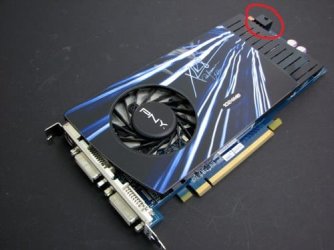
The card is perfectly compatible and DOES need the supplementary power... the plug is found at the very front of the card as seen here
 

Attachments

  • J002N.jpg
    J002N.jpg
    34.9 KB · Views: 22

My Computer

Computer Manufacturer/Model Number
Home Built
OS
Windows 7 Ultimate x64 RTM
CPU
AMD Athlon II X2 240 @ 3.2Ghz
Motherboard
Gigabyte GA-MA785GMT-UD2H
Memory
6GB Mushkin DDR3 PC-1333
Graphics Card(s)
ATI Radeon HD 4200 IGP Hybrid CrossFireX w\ Sapphire HD3450
Sound Card
Onboard Realtek HD audio controller
Monitor(s) Displays
D-SUB: LG W2343T-PF 23" LCD HDMI: LG 32LH20 32" LCD
Screen Resolution
1920*1080
Hard Drives
WD Caviar Green 1TB SATA3
PSU
Cooler Master Elite Power 400W
Case
Cooler Master Elite 360
Cooling
AMD Stock :)
Keyboard
Crappy wirelss logitech
Mouse
crappy wireless logitech
Internet Speed
792k
Good find. +rep
 

My Computer

Computer Manufacturer/Model Number
self built
OS
7600.20510 x86
CPU
P4 550 3.4 GHz HT running at 3.5 GHz
Motherboard
MSI PM8M3-V (MS-7211 v1.x) Micro-ATX mainboard
Memory
OCZ 2 GB(2x1GB) DDR400mHz running @ 414 mHz
Graphics Card(s)
HIS Radeon HD 3850 IceQ 3 Turbo HDMI Dual DL-DVI AGP
Sound Card
MOTU Traveler firewire studio interface 192 kHz 24 bit
Monitor(s) Displays
22" widescreen Acer X223W LCD, 17" Compaq P75 CRT
Screen Resolution
1680x1050 and 1280x1024
Hard Drives
SATA I x2 WD, 400 GB and 120 GB, SATA 2 WD Caviar Black 1 TB
PSU
350W generic
Case
Cybertronpc, it glows blue
Cooling
stock cpu fan, Ice-Q 3 gpu and system, many case fans
Keyboard
Logitch Classical Keyboard 200
Mouse
Logitech Mediaplay cordless
Internet Speed
1792/448 kbits/sec
Other Info
SATA II PCI fake RAID adapter, 1 GB Readyboost, original ATI Remote Wonder (even works with WMC perfectly), Logitech Rumblepad 2 game controller x2
Trust me there is no power required for this card. There are 2 models of it. One being an Energy efficient model which does not require and extra power connection. The standard version does require power.
 

My Computer

Computer Manufacturer/Model Number
HP a6152n
OS
Windows 7 64-bit
CPU
Intel 2.4Ghz Quad-core
Motherboard
IPIBL-LA
Memory
8GB
Graphics Card(s)
GeForce 9800GT XLR8 1GB
Monitor(s) Displays
24" HP, 19" Samsung
Hard Drives
Hitachi 400 GB
Seagate 7200 Barracuda 1TB
PSU
Antec TruePower Trio 550w
Case
HP
Mouse
Microsoft Wireless Mobile Mouse 6000
Sorry you are right they do have an EE version, however I am still confused... The XLR8 9800GT EE only comes in 512MB version, you are telling us you have 1GB version... according to PNY websit no such card exists, and google only brings me 9800 GT 1GB cards that require secondary power... could take a pic of your card and or box and post a pic?
 

My Computer

Computer Manufacturer/Model Number
Home Built
OS
Windows 7 Ultimate x64 RTM
CPU
AMD Athlon II X2 240 @ 3.2Ghz
Motherboard
Gigabyte GA-MA785GMT-UD2H
Memory
6GB Mushkin DDR3 PC-1333
Graphics Card(s)
ATI Radeon HD 4200 IGP Hybrid CrossFireX w\ Sapphire HD3450
Sound Card
Onboard Realtek HD audio controller
Monitor(s) Displays
D-SUB: LG W2343T-PF 23" LCD HDMI: LG 32LH20 32" LCD
Screen Resolution
1920*1080
Hard Drives
WD Caviar Green 1TB SATA3
PSU
Cooler Master Elite Power 400W
Case
Cooler Master Elite 360
Cooling
AMD Stock :)
Keyboard
Crappy wirelss logitech
Mouse
crappy wireless logitech
Internet Speed
792k
Sure...

DSC_0633.jpg
 

My Computer

Computer Manufacturer/Model Number
HP a6152n
OS
Windows 7 64-bit
CPU
Intel 2.4Ghz Quad-core
Motherboard
IPIBL-LA
Memory
8GB
Graphics Card(s)
GeForce 9800GT XLR8 1GB
Monitor(s) Displays
24" HP, 19" Samsung
Hard Drives
Hitachi 400 GB
Seagate 7200 Barracuda 1TB
PSU
Antec TruePower Trio 550w
Case
HP
Mouse
Microsoft Wireless Mobile Mouse 6000
Trust me there is no power required for this card.

I did the first time you said. Then ba5ik's post got me to believe otherwise for a moment there. I will still looking around out of plain curiosity to myself and found energy efficient models. Wasn't sure what to think anymore.

I can plain out see there is no connector but it's still weird to me how that works being a performance model and all. heh
 

My Computer

Computer Manufacturer/Model Number
self built
OS
7600.20510 x86
CPU
P4 550 3.4 GHz HT running at 3.5 GHz
Motherboard
MSI PM8M3-V (MS-7211 v1.x) Micro-ATX mainboard
Memory
OCZ 2 GB(2x1GB) DDR400mHz running @ 414 mHz
Graphics Card(s)
HIS Radeon HD 3850 IceQ 3 Turbo HDMI Dual DL-DVI AGP
Sound Card
MOTU Traveler firewire studio interface 192 kHz 24 bit
Monitor(s) Displays
22" widescreen Acer X223W LCD, 17" Compaq P75 CRT
Screen Resolution
1680x1050 and 1280x1024
Hard Drives
SATA I x2 WD, 400 GB and 120 GB, SATA 2 WD Caviar Black 1 TB
PSU
350W generic
Case
Cybertronpc, it glows blue
Cooling
stock cpu fan, Ice-Q 3 gpu and system, many case fans
Keyboard
Logitch Classical Keyboard 200
Mouse
Logitech Mediaplay cordless
Internet Speed
1792/448 kbits/sec
Other Info
SATA II PCI fake RAID adapter, 1 GB Readyboost, original ATI Remote Wonder (even works with WMC perfectly), Logitech Rumblepad 2 game controller x2
I see you have 8GB ram. Don't ask me why, but if you feel like messing with it, you could try making it bare necessity amount of ram, with the new card (only for testing.) Maybe for some reason you'll get successful post. I'd try if I had same setup/issue.

If this is successful, a slight increase in memory voltage may be the thing needed. Do you know the exact brand and model of memory in use? I see you like performance models of things. Perhaps you are running OCZ memory?

Also for the heck of it, try booting without monitors attached. Post good?
 

My Computer

Computer Manufacturer/Model Number
self built
OS
7600.20510 x86
CPU
P4 550 3.4 GHz HT running at 3.5 GHz
Motherboard
MSI PM8M3-V (MS-7211 v1.x) Micro-ATX mainboard
Memory
OCZ 2 GB(2x1GB) DDR400mHz running @ 414 mHz
Graphics Card(s)
HIS Radeon HD 3850 IceQ 3 Turbo HDMI Dual DL-DVI AGP
Sound Card
MOTU Traveler firewire studio interface 192 kHz 24 bit
Monitor(s) Displays
22" widescreen Acer X223W LCD, 17" Compaq P75 CRT
Screen Resolution
1680x1050 and 1280x1024
Hard Drives
SATA I x2 WD, 400 GB and 120 GB, SATA 2 WD Caviar Black 1 TB
PSU
350W generic
Case
Cybertronpc, it glows blue
Cooling
stock cpu fan, Ice-Q 3 gpu and system, many case fans
Keyboard
Logitch Classical Keyboard 200
Mouse
Logitech Mediaplay cordless
Internet Speed
1792/448 kbits/sec
Other Info
SATA II PCI fake RAID adapter, 1 GB Readyboost, original ATI Remote Wonder (even works with WMC perfectly), Logitech Rumblepad 2 game controller x2
I was all over google and the PNY site inside and out and could not(still can't) find that particular model, which led to my confusion, sorry for that :)... anyway, still don't know why the card won't work have you tried a BIOS update, short of that it may vaery well be the card was DOA.
 

My Computer

Computer Manufacturer/Model Number
Home Built
OS
Windows 7 Ultimate x64 RTM
CPU
AMD Athlon II X2 240 @ 3.2Ghz
Motherboard
Gigabyte GA-MA785GMT-UD2H
Memory
6GB Mushkin DDR3 PC-1333
Graphics Card(s)
ATI Radeon HD 4200 IGP Hybrid CrossFireX w\ Sapphire HD3450
Sound Card
Onboard Realtek HD audio controller
Monitor(s) Displays
D-SUB: LG W2343T-PF 23" LCD HDMI: LG 32LH20 32" LCD
Screen Resolution
1920*1080
Hard Drives
WD Caviar Green 1TB SATA3
PSU
Cooler Master Elite Power 400W
Case
Cooler Master Elite 360
Cooling
AMD Stock :)
Keyboard
Crappy wirelss logitech
Mouse
crappy wireless logitech
Internet Speed
792k
I see you have 8GB ram. Don't ask me why, but if you feel like messing with it, you could try making it bare necessity amount of ram, with the new card (only for testing.) Maybe for some reason you'll get successful post. I'd try if I had same setup/issue.

If this is successful, a slight increase in memory voltage may be the thing needed. Do you know the exact brand and model of memory in use? I see you like performance models of things. Perhaps you are running OCZ memory?

Also for the heck of it, try booting without monitors attached. Post good?

I just tried this and still the same beeps. I even tried putting my old Ram back in.
Also tried without monitor attached. Same thing.
Thanks for the suggestion though.

My MOBO just doesn't like this card.

Perhaps it's something to do with the Energy Efficient model not getting enough power from the board. I wish I had the standard version as well so I could try that and at least narrow down what the issue is.

I'm hoping the new sapphire card in the mail works.
 

My Computer

Computer Manufacturer/Model Number
HP a6152n
OS
Windows 7 64-bit
CPU
Intel 2.4Ghz Quad-core
Motherboard
IPIBL-LA
Memory
8GB
Graphics Card(s)
GeForce 9800GT XLR8 1GB
Monitor(s) Displays
24" HP, 19" Samsung
Hard Drives
Hitachi 400 GB
Seagate 7200 Barracuda 1TB
PSU
Antec TruePower Trio 550w
Case
HP
Mouse
Microsoft Wireless Mobile Mouse 6000
Back
Top