nvlddmkm driver crash

Nemo1985

New member
Local time
2:25 AM
Messages
5
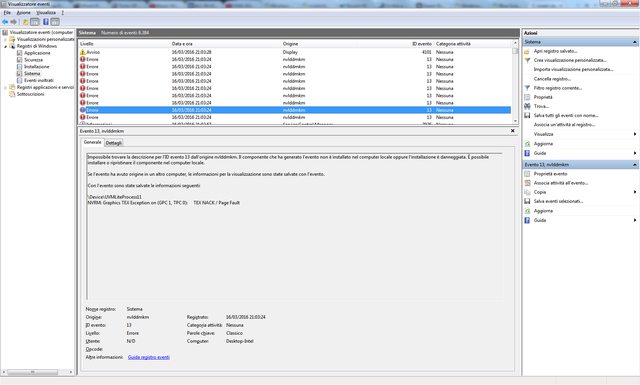
Good evening, I'm experiencing a problem with my video drivers, this happens at least once at day, from months. I tried to update drivers, sfc /scannow and so on...

This is the event viewer description:
Code:
\Device\UVMLiteProcess7
Variable String to Large

\Device\UVMLiteProcess7
NVRM: Graphics TEX Exception on (GPC 0, TPC 0):     TEX LAYOUT

\Device\UVMLiteProcess7
NVRM: Graphics TEX Exception on (GPC 0, TPC 0):     TEX NACK / Page Fault

\Device\UVMLiteProcess7
NVRM: Graphics TEX Exception on (GPC 0, TPC 1):    TEX FORMAT

\Device\UVMLiteProcess7
NVRM: Graphics TEX Exception on (GPC 0, TPC 1):     TEX NACK / Page Fault

\Device\UVMLiteProcess7
NVRM: Graphics TEX Exception on (GPC 2, TPC 0):     TEX LAYOUT

\Device\UVMLiteProcess7
NVRM: Graphics TEX Exception on (GPC 2, TPC 0):     TEX NACK / Page Fault

\Device\UVMLiteProcess7
NVRM: Graphics TEX Exception on (GPC 3, TPC 0):     TEX LAYOUT

\Device\UVMLiteProcess7
NVRM: Graphics TEX Exception on (GPC 3, TPC 0):     TEX NACK / Page Fault


Display driver nvlddmkm stopped responding and has successfully recovered.
This usually happens when i'm using mpc-hc or firefox (which is in the d: drive, a former raid 1 with 2 seagate barracuda st2000dm001, one has died and now I have the degraded raid 1 but it shouldn't be a problem).

I have to say my windows 7 has been installed years ago (the first update has been installed on August 2010) but it always worked without issues...

Please forgive my bad english, I'm italian and thank you in advance for any help you can give me.
 
Last edited:

My Computer

Computer type
PC/Desktop
Computer Manufacturer/Model Number
custom build
OS
Windows 7 Home premium x64
CPU
Intel C2Q X5460
Motherboard
Asus p5q-e
Memory
4gb ddr2 1066 ocz
Graphics Card(s)
Gigabyte GTX 760
Antivirus
nope
Browser
Firefox

My Computer

Computer type
PC/Desktop
Computer Manufacturer/Model Number
Custom build
OS
Windows 7 Home Premium
CPU
i5-3570k
Motherboard
ASUS Sabertooth z77
Memory
16 GB DDR3 G Skill Sniper
Graphics Card(s)
GIGABYTE GeForce GTX 970 GV-N970WF3OC-4GD
Monitor(s) Displays
ASUS ROG PG278Q
Screen Resolution
2560x1440@60Hz/120Hz/144Hz
Hard Drives
56GB KINGSTON SVP200S37A60G
512GB Crucial MX100
1863GB Seagate ST2000DM001-1CH164
2795GB Seagate ST3000DM001-9YN166
PSU
Corsair GS800
Case
Storm Trooper Stryker White
Keyboard
Logitech G910 Orion Spark
Mouse
Logitech G502
Antivirus
MSE
Browser
Firefox/Chrome
Other Info
Logitech G633
Logitech Mouse Matt
Hello an thank you for the welcome, my errors aren't bsod, I can see them on the event viewer, this is why I didn't use DM Log Collector in first place.
4kbw4Zql.png

Imgur: The most awesome images on the Internet

That being said I runned the program and updated the first post.
 

My Computer

Computer type
PC/Desktop
Computer Manufacturer/Model Number
custom build
OS
Windows 7 Home premium x64
CPU
Intel C2Q X5460
Motherboard
Asus p5q-e
Memory
4gb ddr2 1066 ocz
Graphics Card(s)
Gigabyte GTX 760
Antivirus
nope
Browser
Firefox
Hello Nemo.

And thanks for the files, you are facing a 0x124 which is a hardware failure.

There is an update for your graphics card here:
Drivers | GeForce

Cheers, Boris :)
 

My Computer

Computer type
PC/Desktop
Computer Manufacturer/Model Number
Custom build
OS
Windows 7 Home Premium
CPU
i5-3570k
Motherboard
ASUS Sabertooth z77
Memory
16 GB DDR3 G Skill Sniper
Graphics Card(s)
GIGABYTE GeForce GTX 970 GV-N970WF3OC-4GD
Monitor(s) Displays
ASUS ROG PG278Q
Screen Resolution
2560x1440@60Hz/120Hz/144Hz
Hard Drives
56GB KINGSTON SVP200S37A60G
512GB Crucial MX100
1863GB Seagate ST2000DM001-1CH164
2795GB Seagate ST3000DM001-9YN166
PSU
Corsair GS800
Case
Storm Trooper Stryker White
Keyboard
Logitech G910 Orion Spark
Mouse
Logitech G502
Antivirus
MSE
Browser
Firefox/Chrome
Other Info
Logitech G633
Logitech Mouse Matt
Hello Boris... So is my video card broken? I'm reasonably sure it isn't a driver issue because it happened with different drivers, i'm downloading the last version right now by the way...
Thank you.
 

My Computer

Computer type
PC/Desktop
Computer Manufacturer/Model Number
custom build
OS
Windows 7 Home premium x64
CPU
Intel C2Q X5460
Motherboard
Asus p5q-e
Memory
4gb ddr2 1066 ocz
Graphics Card(s)
Gigabyte GTX 760
Antivirus
nope
Browser
Firefox
Hi Nemo.

Here is the problem:
Code:
Use !analyze -v to get detailed debugging information.

BugCheck 124, {0, fffffa8006d72038, 0, 0}

Probably caused by : GenuineIntel

Followup:     MachineOwner
---------

2: kd> !errrec fffffa8006d72038
===============================================================================
Section 2     : x86/x64 MCA
-------------------------------------------------------------------------------
Descriptor    @ fffffa8006d72148
Section       @ fffffa8006d722d0
Offset        : 664
Length        : 264
Flags         : 0x00000000
Severity      : Fatal

Error         : BUSL0_SRC_ERR_M_NOTIMEOUT_ERR (Proc 0 Bank 0)
  Status      : 0xb200004000000800

That error (BUSL0_SRC_ERR_M_NOTIMEOUT_ERR) means the processor sent out a read request to L0 cache, and there was a delay in return (either a cache miss, or invalid data in cache).

I can't see if your CPU is overclocked or not but if it is revert to normal speeds! It might be overheating. Does it pass stress testing without failing? There have been other posts on this forum with the exact same issue, and fixing the cooling or replacing the PSU (or both) have resolved them. However, if the CPU really is bad, there may not be anything you can do other than replacing it - it's something you're going to want to start testing. What kind of cooling are you using on your CPU, for starters, and what temperatures does it get to after a few hours running?

Cheers, Boris :)
 

My Computer

Computer type
PC/Desktop
Computer Manufacturer/Model Number
Custom build
OS
Windows 7 Home Premium
CPU
i5-3570k
Motherboard
ASUS Sabertooth z77
Memory
16 GB DDR3 G Skill Sniper
Graphics Card(s)
GIGABYTE GeForce GTX 970 GV-N970WF3OC-4GD
Monitor(s) Displays
ASUS ROG PG278Q
Screen Resolution
2560x1440@60Hz/120Hz/144Hz
Hard Drives
56GB KINGSTON SVP200S37A60G
512GB Crucial MX100
1863GB Seagate ST2000DM001-1CH164
2795GB Seagate ST3000DM001-9YN166
PSU
Corsair GS800
Case
Storm Trooper Stryker White
Keyboard
Logitech G910 Orion Spark
Mouse
Logitech G502
Antivirus
MSE
Browser
Firefox/Chrome
Other Info
Logitech G633
Logitech Mouse Matt

My Computer

Computer type
PC/Desktop
Computer Manufacturer/Model Number
custom build
OS
Windows 7 Home premium x64
CPU
Intel C2Q X5460
Motherboard
Asus p5q-e
Memory
4gb ddr2 1066 ocz
Graphics Card(s)
Gigabyte GTX 760
Antivirus
nope
Browser
Firefox
Well if you have installed the latest drivers for the graphics card and you still have problems then it might be something different.

What is your PSU(power supply unit) model?
 

My Computer

Computer type
PC/Desktop
Computer Manufacturer/Model Number
Custom build
OS
Windows 7 Home Premium
CPU
i5-3570k
Motherboard
ASUS Sabertooth z77
Memory
16 GB DDR3 G Skill Sniper
Graphics Card(s)
GIGABYTE GeForce GTX 970 GV-N970WF3OC-4GD
Monitor(s) Displays
ASUS ROG PG278Q
Screen Resolution
2560x1440@60Hz/120Hz/144Hz
Hard Drives
56GB KINGSTON SVP200S37A60G
512GB Crucial MX100
1863GB Seagate ST2000DM001-1CH164
2795GB Seagate ST3000DM001-9YN166
PSU
Corsair GS800
Case
Storm Trooper Stryker White
Keyboard
Logitech G910 Orion Spark
Mouse
Logitech G502
Antivirus
MSE
Browser
Firefox/Chrome
Other Info
Logitech G633
Logitech Mouse Matt
Well if you have installed the latest drivers for the graphics card and you still have problems then it might be something different.

What is your PSU(power supply unit) model?

It is a Super flower golden king 550w...It should be enough for my pc...
I believe it could be a windows 7 problem, when I tried windows 10 for a couple of days I didn't have any video drier crash...
 

My Computer

Computer type
PC/Desktop
Computer Manufacturer/Model Number
custom build
OS
Windows 7 Home premium x64
CPU
Intel C2Q X5460
Motherboard
Asus p5q-e
Memory
4gb ddr2 1066 ocz
Graphics Card(s)
Gigabyte GTX 760
Antivirus
nope
Browser
Firefox
Back
Top