Solved Nvme Driver

dmdilks

New member
Member
Local time
6:05 PM
Messages
44
Location
Hanover Pa.
I have just got a HP SSD EX920 M.2 Nvme drive. I have windows 10 install on it and I run both Windows 7 & 10. Everything is fine in Windows 10 that I see all the drives. But in Windows 7 I can't see the new Nvme drive. It tried to install it. But in Device Manager it is showing up as a PCi Device with the "!" point.

I have tried to search for a driver but no luck. I think at one time Microsoft did have a hot fix for this, but not any more. Plus HP doesn't have a driver either. My Bios is up to date too.
 

My Computer

Computer type
PC/Desktop
OS
Windows 10, 7, x64
Hi dmdilks,
Sir,
1) Please update your specs in the proper section. Try to fill all the sections. Then it will be more helpful. You can use Speecy Portable to fetch that information. Better run it from win 10!
Speccy - Portable
2) Mention make & model of your desktop.
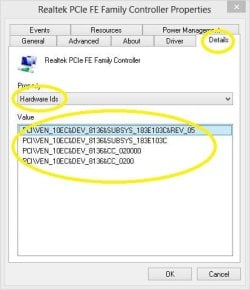
3) Mention Hardware Id of the PCI device with '!' mark.
( Double click the unknown device in the Device Manager. Choose the Details tab and then the Hardware Ids from the drop-down )
For eg.

DM Capture.JPG

4) Why do you think there was a Microsoft Update for that & is not there anymore ? Any past experiences ?
5) What is your BIOS version ? ( Speecy would tell that in the Mother Board section )

Let us know.

Thanks & Regards. ...
 
Last edited:

My Computer

Computer type
Laptop
Computer Manufacturer/Model Number
hp compaq presario c795VU notebook pc
OS
Windows 7 Ultimate x32 With Sp1 + Vista Ultimate x32 with Sp1 & Sp2 !!
CPU
Intel Mobile Core 2 Duo T5750 @ 2.00GHz Merom 65nm Technolog
Motherboard
Hewlett-Packard 30D9 (CPU)
Memory
2.00GB Dual-Channel DDR2 @ 332MHz (5-5-5-15)
Graphics Card(s)
Mobile Intel(R) 965 Express Chipset Family
Sound Card
High Definition Audio Device
Monitor(s) Displays
LP154WX4-TLCB on Mobile Intel 965 Express Chipset Family
Screen Resolution
1280x800 @ 60Hz
Hard Drives
149GB Western Digital WDC WD1600BEVS-60VAT0 ATA Device (SATA)
Keyboard
Standard 101/102-Key or Microsoft Natural PS/2 Key + HP QLB
Mouse
ALPS pointing device
Antivirus
Kaspersky AV 2017(Win 7) & AVG AntiVirus Free 2016 (VISTA)
Browser
google chrome

My Computers

System One System Two

  • Computer type
    PC/Desktop
    OS
    7 X64
    CPU
    i5 8400
    Motherboard
    gigabyte b365m ds3h
    Memory
    2x8gb 3200mhz
    Hard Drives
    various
    PSU
    pure power 11 400w cm
    Case
    Coolermaster
    Cooling
    cryorig m9i
  • Computer type
    PC/Desktop
    OS
    7x64
    CPU
    g5400
    Motherboard
    ga b365m ds3h
    Memory
    8gb ddr4 2400
    PSU
    xfx pro 450w
SIW2
Thanks for the Hotfix driver and that fix it. Just asking was that the Hotfix that Microsoft had but now it says it doesn't. Those Hotfixes will go into my Hotfix folder that I keep. :D
 

My Computer

Computer type
PC/Desktop
OS
Windows 10, 7, x64
was that the Hotfix that Microsoft had

Yes. I suspect they are trying to make things awkward for win 7 users - with the intention of pushing them onto win10.

I have done a thing to :update Win7 installation media.

If you are updating installation media:
Those hotfixes need to be put in the UPDATES\Bootx64 and UPDATES\Installx64 folders before you begin.
You can also include any drivers in the DRIVERS\Bootx64 and DRIVERS\Installx64 folder

(Same for x86 folders if you are updating 32 bit media)
 

My Computers

System One System Two

  • Computer type
    PC/Desktop
    OS
    7 X64
    CPU
    i5 8400
    Motherboard
    gigabyte b365m ds3h
    Memory
    2x8gb 3200mhz
    Hard Drives
    various
    PSU
    pure power 11 400w cm
    Case
    Coolermaster
    Cooling
    cryorig m9i
  • Computer type
    PC/Desktop
    OS
    7x64
    CPU
    g5400
    Motherboard
    ga b365m ds3h
    Memory
    8gb ddr4 2400
    PSU
    xfx pro 450w
Do you have to update the install media or can these hot-fixes be installed post install?
 

My Computer

Computer type
PC/Desktop
Computer Manufacturer/Model Number
Custom
OS
Win 7 Home Premium 64bit, Win7 Ultimate64
CPU
Athlon 880K
Motherboard
A88x-Pro
Memory
16GB DDR3
Graphics Card(s)
GTX 770 4GB
Hard Drives
240GB SSD, 2TB Seagate
Antivirus
Yes
Browser
Yes
Hi Vulcan331,

Welcome to SevenForums!

Do you have to update the install media or can these hot-fixes be installed post install?

From what SIW2 stated in his previous post, it appears that they need to be put in the UPDATES\Bootx64 and UPDATES\Installx64 folders before you begin, and that you can also include any drivers in the DRIVERS\Bootx64 and DRIVERS\Installx64 folder.

I hope this helps!
 

My Computer

Computer type
Laptop
Computer Manufacturer/Model Number
Fujitsu LIFEBOOK
OS
Win 7 HP SP1 64-bit Vista HB SP2 32-bit Linux Mint 18.3
CPU
Intel(R) Pentium(R) CPU P6200 @ 2.13GHz
Motherboard
FUJITSU FJNBB06
Memory
4.00 GB
Graphics Card(s)
Intel(R) Graphics Media Accelerator HD
Sound Card
[1] Realtek High Definition Audio [2] Intel(R) Display Audio
Screen Resolution
1366 x 768 x 32 bits (4294967296 colors) @ 59 Hz
Hard Drives
TOSHIBA MK5076GSX
Antivirus
AVG FREE
It depends what you mean by post install.

If you already have win7 installed on a regular disk and wish to add an nvme device to your machine, then you can just integrate the msu files into the already installed win7 so that it can see the nvme drive.

But, if you want to install win7 onto an nvme device, you will need to integrate the nvme updates into the installation media beforehand.


Do you have to update the install media or can these hot-fixes be installed post install?
 

My Computers

System One System Two

  • Computer type
    PC/Desktop
    OS
    7 X64
    CPU
    i5 8400
    Motherboard
    gigabyte b365m ds3h
    Memory
    2x8gb 3200mhz
    Hard Drives
    various
    PSU
    pure power 11 400w cm
    Case
    Coolermaster
    Cooling
    cryorig m9i
  • Computer type
    PC/Desktop
    OS
    7x64
    CPU
    g5400
    Motherboard
    ga b365m ds3h
    Memory
    8gb ddr4 2400
    PSU
    xfx pro 450w


Literally registered here just for these drivers and wanted to say thanks! My M2 SSD now works like a charm. Surprisingly these drivers are not available at ASUS or ADATA websites. Being my MB maker and where my drive came from I figured they were there but nope.


I went through ASUS support and all they did was have me do the driver install dance (which I already had everything updated). ADATA was more closer, gave me google links to NVMe drivers, but I had already found them.


My big question is why can't these drivers be hosted at their sites? I assume MS doesn't want them too.


Anyway, thanks again dude, much appreciated! :-)


(this driver scavenger hunt reminded of the old days) ;)
 

My Computer

Computer type
PC/Desktop
OS
Windows 7 Ultimate x64
:-)
 

My Computers

System One System Two

  • Computer type
    PC/Desktop
    OS
    7 X64
    CPU
    i5 8400
    Motherboard
    gigabyte b365m ds3h
    Memory
    2x8gb 3200mhz
    Hard Drives
    various
    PSU
    pure power 11 400w cm
    Case
    Coolermaster
    Cooling
    cryorig m9i
  • Computer type
    PC/Desktop
    OS
    7x64
    CPU
    g5400
    Motherboard
    ga b365m ds3h
    Memory
    8gb ddr4 2400
    PSU
    xfx pro 450w
It depends what you mean by post install.

If you already have win7 installed on a regular disk and wish to add an nvme device to your machine, then you can just integrate the msu files into the already installed win7 so that it can see the nvme drive.
How (or where) do I integrate them into a current Windows 7 installation? This is my first time working with .msu files. TIA


/Edit: All set, I googled and found this link, works with Win7...(if Sevenforums has a link too, lmk and I'll update it) Thanks for all your posts, guys, very helpful!

How to install CAB and MSU updates in Windows 10
 
Last edited:

My Computer

OS
Windows 7 Pro x64
How (or where) do I integrate them into a current Windows 7 installation?

Just click on the .msu file.
 

My Computers

System One System Two

  • Computer type
    PC/Desktop
    OS
    7 X64
    CPU
    i5 8400
    Motherboard
    gigabyte b365m ds3h
    Memory
    2x8gb 3200mhz
    Hard Drives
    various
    PSU
    pure power 11 400w cm
    Case
    Coolermaster
    Cooling
    cryorig m9i
  • Computer type
    PC/Desktop
    OS
    7x64
    CPU
    g5400
    Motherboard
    ga b365m ds3h
    Memory
    8gb ddr4 2400
    PSU
    xfx pro 450w
Just click on the .msu file.
I get an error each time...Windows Update Standalone Installer...Installer encountered an error: 0x80240037...etc.

So I unpacked the .msu files with winrar, and using the CMD window, installed the extracted .cab files with the same name with the commands:
dism /online /add-package /packagepath:"C:\Windows6.1-KB3087873-v2-x64\Windows6.1-KB3087873-v2-x64.cab"
dism /online /add-package /packagepath:"C:\Windows6.1-KB2990941-v3-x64\Windows6.1-KB2990941-v3-x64.cab"
 

My Computer

OS
Windows 7 Pro x64
Yeah, that is workaround. Not sure why you got that error.

MSU means microsoft standalone update - so it should work.
 

My Computers

System One System Two

  • Computer type
    PC/Desktop
    OS
    7 X64
    CPU
    i5 8400
    Motherboard
    gigabyte b365m ds3h
    Memory
    2x8gb 3200mhz
    Hard Drives
    various
    PSU
    pure power 11 400w cm
    Case
    Coolermaster
    Cooling
    cryorig m9i
  • Computer type
    PC/Desktop
    OS
    7x64
    CPU
    g5400
    Motherboard
    ga b365m ds3h
    Memory
    8gb ddr4 2400
    PSU
    xfx pro 450w
You are welcome. :-)

Are you going to install windows 7 onto an nvme drive ?
 

My Computers

System One System Two

  • Computer type
    PC/Desktop
    OS
    7 X64
    CPU
    i5 8400
    Motherboard
    gigabyte b365m ds3h
    Memory
    2x8gb 3200mhz
    Hard Drives
    various
    PSU
    pure power 11 400w cm
    Case
    Coolermaster
    Cooling
    cryorig m9i
  • Computer type
    PC/Desktop
    OS
    7x64
    CPU
    g5400
    Motherboard
    ga b365m ds3h
    Memory
    8gb ddr4 2400
    PSU
    xfx pro 450w
Joined especially for the nvme drivers so thanks heaps for that, as it was a task to hunt them down.


I want to clone my existing Win7 disk on to the nvme and use that as a boot, will this work, i have a Asus z97-a board and want to use it with the nvme ssd and a pcie card, as the m.2 slot has only 2 lanes. This mobo is compatible with nvme ssd, via a bios update. I take it doing it this way i can just clone the existing OS, once the hotfix has been applied and use that nvme as the boot disk?
 

My Computer

Computer type
PC/Desktop
Computer Manufacturer/Model Number
Asus
OS
Windows 7 Ultimate x64
CPU
I7-4790k
Motherboard
Asus Z97-a
Memory
Corsair DDR3 16gb
Graphics Card(s)
EVGA 1060 6gb
Hard Drives
Samsung SSD 850 Evo 250gb
Samsung SSD 840 Evo 120gb
Samsung HDD 500gb
Samsung SSHD 1tb
Antivirus
Comodo Internet Security Premium 11
Browser
Firefox,Chrome
Joined especially for the nvme drivers so thanks heaps for that, as it was a task to hunt them down.

I want to clone my existing Win7 disk on to the nvme and use that as a boot, will this work, i have a Asus z97-a board and want to use it with the nvme ssd and a pcie card, as the m.2 slot has only 2 lanes. This mobo is compatible with nvme ssd, via a bios update. I take it doing it this way i can just clone the existing OS, once the hotfix has been applied and use that nvme as the boot disk?

That is the method I used when I got my first m.2 nvme drive and it worked fine.
 

My Computer

Computer type
PC/Desktop
Computer Manufacturer/Model Number
diy
OS
Win7 pro x64
CPU
stock i7 7700k
Motherboard
Gigabyte Z270N-WIFI mini-ITX
Memory
Corsair Vengeance LPX 16GB (2x8GB) DDR4 @ 3200MHz
Graphics Card(s)
integrated Intel HD 630
Sound Card
onboard Realtek ALC1220
Monitor(s) Displays
two vertically mounted samsung 55" 4k un55mu8000
Screen Resolution
1920x1280
Hard Drives
256GB Samsung EVO 960 M.2 pci-e NVMe SSD
PSU
SilverStone Nightjar ST45NF 450Watt Fanless
Case
No case. Motherboard is mounted directly onto power supply
Cooling
Evercool low profile 815EP with Panaflow 12L fan at 7v
Keyboard
Ortek MCK-86 mini
Mouse
Belkin 5-button USB
Internet Speed
spectrum 400mbps
That is the method I used when I got my first m.2 nvme drive and it worked fine.


Great thanks, just what i wanted to know.
 

My Computer

Computer type
PC/Desktop
Computer Manufacturer/Model Number
Asus
OS
Windows 7 Ultimate x64
CPU
I7-4790k
Motherboard
Asus Z97-a
Memory
Corsair DDR3 16gb
Graphics Card(s)
EVGA 1060 6gb
Hard Drives
Samsung SSD 850 Evo 250gb
Samsung SSD 840 Evo 120gb
Samsung HDD 500gb
Samsung SSHD 1tb
Antivirus
Comodo Internet Security Premium 11
Browser
Firefox,Chrome
Back
Top