Solved Nvme Driver

Just before i go ahead and buy a nvme, will i see large difference in boot times with this than the existing Samsung 850 Evo sata ssd, i already use? And would the m.2 slot on the motherboard, (even though it is restricted) be faster than the 850 Evo ssd i have. As the only reason for the upgrade is that i'm now running out of space on the 850 Evo and if real world performance is neglible and not so much noticeable, would it be better to go with a sata ssd or m.2 than a nvme?
 

My Computer

Computer type
PC/Desktop
Computer Manufacturer/Model Number
Asus
OS
Windows 7 Ultimate x64
CPU
I7-4790k
Motherboard
Asus Z97-a
Memory
Corsair DDR3 16gb
Graphics Card(s)
EVGA 1060 6gb
Hard Drives
Samsung SSD 850 Evo 250gb
Samsung SSD 840 Evo 120gb
Samsung HDD 500gb
Samsung SSHD 1tb
Antivirus
Comodo Internet Security Premium 11
Browser
Firefox,Chrome
That is the method I used when I got my first m.2 nvme drive and it worked fine.


I'm unable to get my nvme drive to boot in to windows.


1. I installed the win7 nvme hotfix.
2. Cloned my original boot partition to the nvme disk.
3. Bios settings CSM enabled and Boot from PCI-E/Expansion devices set to UEFI driver first.
4. Can't find the nvme drive in Boot priority only my original win7 disk, but it is visible in win7 when booted from the original boot disk.


Please help, as i don't know if i've missed something or doing something wrong.
 

My Computer

Computer type
PC/Desktop
Computer Manufacturer/Model Number
Asus
OS
Windows 7 Ultimate x64
CPU
I7-4790k
Motherboard
Asus Z97-a
Memory
Corsair DDR3 16gb
Graphics Card(s)
EVGA 1060 6gb
Hard Drives
Samsung SSD 850 Evo 250gb
Samsung SSD 840 Evo 120gb
Samsung HDD 500gb
Samsung SSHD 1tb
Antivirus
Comodo Internet Security Premium 11
Browser
Firefox,Chrome
Some of these issues are motherboard dependent - some have different names for their settings and some have more settings than others. My board is two generations newer than yours and it worked pretty easily. Here's a thread with some ideas to check out. Most points may not apply, but maybe your fix is buried in there.
m2 SSD not detectable in BIOS | TechPowerUp Forums

Couple other things to check are:

- When you boot from your original win7 boot drive...
..... does the nvme drive show up as pci-e, or just sata attached. An m.2 nvme drive can run either way and you obviously want it to be pci-e.
.... Try replacing the microsoft nvme driver with the manufacturer's driver for your nvme. Mine is samsung, I do not use the windows nvme, but some nvme manufacturers do not have their own driver so you have to stick with microsoft.
..... are both drives the same partition type (both MBR or both GPT)

- The instant you finish a clone you need to shutdown and remove the original drive because if you boot again from the original drive, the boot sector of your nvme drive gets altered and may become unbootable. This means when you do things like I suggested above (e.g. check on sata vs pci-e mode with the nvme as the non-boot drive), you will need to re-clone afterward. Alternatively, you could use bootsec or other tool to repair the boot sector but I wont go into that. Easier to just re-clone.

- You mentioned the nvme does not appear on the bios boot menu but if it does not even appear in bios that's another story. The bios itself does not require a valid boot sector in order to detect a drive but the bios boot menu does require a boot sector. So next time you boot from the nvme look in bios to see if it detects the nvme (hopefully as pci-e, not as sata - check both places). If so set it as the boot drive within bios itself, then save the bios settings. Avoiding using the bios boot menu for now.

 

My Computer

Computer type
PC/Desktop
Computer Manufacturer/Model Number
diy
OS
Win7 pro x64
CPU
stock i7 7700k
Motherboard
Gigabyte Z270N-WIFI mini-ITX
Memory
Corsair Vengeance LPX 16GB (2x8GB) DDR4 @ 3200MHz
Graphics Card(s)
integrated Intel HD 630
Sound Card
onboard Realtek ALC1220
Monitor(s) Displays
two vertically mounted samsung 55" 4k un55mu8000
Screen Resolution
1920x1280
Hard Drives
256GB Samsung EVO 960 M.2 pci-e NVMe SSD
PSU
SilverStone Nightjar ST45NF 450Watt Fanless
Case
No case. Motherboard is mounted directly onto power supply
Cooling
Evercool low profile 815EP with Panaflow 12L fan at 7v
Keyboard
Ortek MCK-86 mini
Mouse
Belkin 5-button USB
Internet Speed
spectrum 400mbps
Thanks for reply and help.
1. When i boot to the original win7 the nvme shows up as a pci-e ssd
2. The pci-e that i gor was a pioneer brand no drivers came with it and am not even sure if there any, i will have a look.
3. Both partitions are MBR
4. I did not remove the original boot disk after cloning it to the partition, so maybe that was the issue, if so i can re-clone it and do it that way to see if it works.
5. If you press F8 at the splash screen it is there under Boot selection, but selecting on that seems to take me to the original win7 disk, it is not in bios under boot priority.


I will check the link you sent to see if there are any thing i have missed, possibly as you mentioned taking the original disk out after cloning may probably be the cause.


Thanks once again for your help, most appreciated.
 

My Computer

Computer type
PC/Desktop
Computer Manufacturer/Model Number
Asus
OS
Windows 7 Ultimate x64
CPU
I7-4790k
Motherboard
Asus Z97-a
Memory
Corsair DDR3 16gb
Graphics Card(s)
EVGA 1060 6gb
Hard Drives
Samsung SSD 850 Evo 250gb
Samsung SSD 840 Evo 120gb
Samsung HDD 500gb
Samsung SSHD 1tb
Antivirus
Comodo Internet Security Premium 11
Browser
Firefox,Chrome
Some of these issues are motherboard dependent - some have different names for their settings and some have more settings than others. My board is two generations newer than yours and it worked pretty easily. Here's a thread with some ideas to check out. Most points may not apply, but maybe your fix is buried in there.
m2 SSD not detectable in BIOS | TechPowerUp Forums

Couple other things to check are:

- When you boot from your original win7 boot drive...
..... does the nvme drive show up as pci-e, or just sata attached. An m.2 nvme drive can run either way and you obviously want it to be pci-e.
.... Try replacing the microsoft nvme driver with the manufacturer's driver for your nvme. Mine is samsung, I do not use the windows nvme, but some nvme manufacturers do not have their own driver so you have to stick with microsoft.
..... are both drives the same partition type (both MBR or both GPT)

- The instant you finish a clone you need to shutdown and remove the original drive because if you boot again from the original drive, the boot sector of your nvme drive gets altered and may become unbootable. This means when you do things like I suggested above (e.g. check on sata vs pci-e mode with the nvme as the non-boot drive), you will need to re-clone afterward. Alternatively, you could use bootsec or other tool to repair the boot sector but I wont go into that. Easier to just re-clone.

- You mentioned the nvme does not appear on the bios boot menu but if it does not even appear in bios that's another story. The bios itself does not require a valid boot sector in order to detect a drive but the bios boot menu does require a boot sector. So next time you boot from the nvme look in bios to see if it detects the nvme (hopefully as pci-e, not as sata - check both places). If so set it as the boot drive within bios itself, then save the bios settings. Avoiding using the bios boot menu for now.


Thanks, re-cloned the disk and restarted the pc, with the original disk disconnected, when into bios checked that boot from pci-e ssd was the 1st boot option and saved and it started in Win7. So that was the problem not disconnecting the original drive with the os for the 1st boot with the cloned drive and once it booted and got into os, i shut down connected the other original win7 disk and restarted and everything is working fine.


Once again thanks for your help.


I owe you a beer :-)
 

My Computer

Computer type
PC/Desktop
Computer Manufacturer/Model Number
Asus
OS
Windows 7 Ultimate x64
CPU
I7-4790k
Motherboard
Asus Z97-a
Memory
Corsair DDR3 16gb
Graphics Card(s)
EVGA 1060 6gb
Hard Drives
Samsung SSD 850 Evo 250gb
Samsung SSD 840 Evo 120gb
Samsung HDD 500gb
Samsung SSHD 1tb
Antivirus
Comodo Internet Security Premium 11
Browser
Firefox,Chrome
Cool, glad you got it worked out
 

My Computer

Computer type
PC/Desktop
Computer Manufacturer/Model Number
diy
OS
Win7 pro x64
CPU
stock i7 7700k
Motherboard
Gigabyte Z270N-WIFI mini-ITX
Memory
Corsair Vengeance LPX 16GB (2x8GB) DDR4 @ 3200MHz
Graphics Card(s)
integrated Intel HD 630
Sound Card
onboard Realtek ALC1220
Monitor(s) Displays
two vertically mounted samsung 55" 4k un55mu8000
Screen Resolution
1920x1280
Hard Drives
256GB Samsung EVO 960 M.2 pci-e NVMe SSD
PSU
SilverStone Nightjar ST45NF 450Watt Fanless
Case
No case. Motherboard is mounted directly onto power supply
Cooling
Evercool low profile 815EP with Panaflow 12L fan at 7v
Keyboard
Ortek MCK-86 mini
Mouse
Belkin 5-button USB
Internet Speed
spectrum 400mbps
Thank you!
Finally got my Windows 7 professional working with nvme.
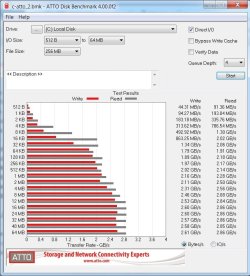
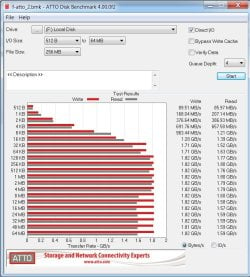
Attached Atto speeds for 2 Intel 660p 1 TB in Raid 0
And single Intel 660p 2 TB, Raid speed could be better...
OS Windows 7 64bit CPU Intel core I77700K Motherboard Msi Z270 sli plus Memory Corsair 32Gb Graphics Card(s) Msi gforce 1050ti 4gb
 

Attachments

  • atto-0.jpg
    atto-0.jpg
    85.6 KB · Views: 1
  • atto-2.jpg
    atto-2.jpg
    91.7 KB · Views: 1

My Computer

Computer type
PC/Desktop
Computer Manufacturer/Model Number
Custom build
OS
Windows 7 64bit
CPU
Intel core I77700K
Motherboard
Msi Z270 sli plus
Memory
Corsair 32Gb
Graphics Card(s)
Msi gforce 1050ti 4gb
Hard Drives
3 x intel 660p m.2
Antivirus
None
Browser
Firefox
Great :D

Now you the MS nvme updates installed, these drivers might improve performance


PCI\VEN_8086&DEV_F1A6.DeviceDesc = "Intel(R) SSD Pro 7600p/760p/E 6100p Series"
PCI\VEN_8086&DEV_F1A8.DeviceDesc = "Intel(R) SSD 660p Series"
PCI\VEN_8086&DEV_0953.DeviceDesc = "Intel(R) Solid-State Drive P3700/P3600/P3500/P3520/750 Series"
PCI\VEN_8086&DEV_0A53.DeviceDesc = "Intel(R) Solid-State Drive DC P3520 Series"
PCI\VEN_8086&DEV_0A54.DeviceDesc = "Intel(R) SSD DC P4500/4600/4501/4601/4608/4510/4610/4511 Series"
PCI\VEN_8086&DEV_0A55.DeviceDesc = "Intel(R) SSD DC P4600 Series"
PCI\VEN_8086&DEV_2700.DeviceDesc = "Intel(R) Optane(tm) SSD 900P/905P Series"
PCI\VEN_8086&DEV_2701.DeviceDesc = "Intel(R) Optane(tm) SSD DC P4800X Series"

For win10/win8/Win7

11/7/2018 [possibly better for non-optane intel ssds]
View attachment Intel-nvme-4.2.0.1002.zip

Latest: 4/9/2019
View attachment Intel-nvme-4.3.0.1006.zip
 
Last edited:

My Computers

System One System Two

  • Computer type
    PC/Desktop
    OS
    7 X64
    CPU
    i5 8400
    Motherboard
    gigabyte b365m ds3h
    Memory
    2x8gb 3200mhz
    Hard Drives
    various
    PSU
    pure power 11 400w cm
    Case
    Coolermaster
    Cooling
    cryorig m9i
  • Computer type
    PC/Desktop
    OS
    7x64
    CPU
    g5400
    Motherboard
    ga b365m ds3h
    Memory
    8gb ddr4 2400
    PSU
    xfx pro 450w
I figured I would just tack this onto the existing thread rather than create a new one.


I just received my new Crucial P1 NVMe M.2 1TB SSD (from Amazon Prime Day no less).
It works just fine (almost full speed - 1600+ MB\s Read) in Windows 10.


Windows 7 is another story.
I am using it for just a data drive for now until I get any bugs ironed out.
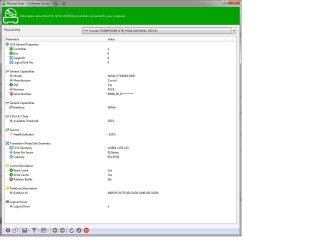
Windows sees the drive in Explorer and Disk Management but when I run Crystal Disk Mark I get 125 MB/s second. Ugh!


Update: Sorry, I picked the wrong drive. Reads are in fact 1648 MB/s.


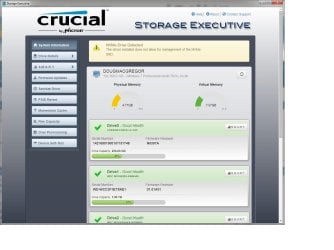
And the Crucial Executive software says the driver installed doesn't allow management of the drive.


I downloaded and installed the 2 Hotfixes but still no joy.
The BIOS sees the drive (v10.01) ASUS 970 Pro Gaming Aura.


Any ideas what's going on?
Thanks.


Sisoft Sandra sees the drive as NVMe.
 

Attachments

  • Crucial P1 NVMe 1TB SSD.jpg
    Crucial P1 NVMe 1TB SSD.jpg
    66.9 KB · Views: 2
  • Storage Executive.jpg
    Storage Executive.jpg
    96.8 KB · Views: 2
Last edited:

My Computer

Computer type
PC/Desktop
Computer Manufacturer/Model Number
Custom
OS
Windows 7 Pro 64-bit SP1/Windows 10 Dual Boot
CPU
AMD FX-8350
Motherboard
ASUS 970 Pro Gaming Aura
Memory
Corsair Vengeance 8GBx2 1866
Graphics Card(s)
Sapphire RX-580 Nitro + 4GB
Sound Card
On-board HD Audio
Monitor(s) Displays
Acer P236H
Screen Resolution
1920x1080
Hard Drives
WD 500GB Blue x 2
WD 500GB Green
Samsung 850 EVO 500 GB
PSU
Corsair RM750
Case
Antec 1100
Keyboard
Kensington Washable
Mouse
Logitech M510
Internet Speed
LTE 30Mbps down/10Mbps up
Antivirus
BitDefender Anti Virus Plus 2019 Paid version
Browser
Firefox, Chrome
Any idea why the Crucial Storage Executive software gives the error and doesn't show the drive in the list?


Just finished talking with Crucial Tech Support and apparently Self Test doesn't work for NVME drives right now.
So I am satisfied.
Thanks all.
 
Last edited:

My Computer

Computer type
PC/Desktop
Computer Manufacturer/Model Number
Custom
OS
Windows 7 Pro 64-bit SP1/Windows 10 Dual Boot
CPU
AMD FX-8350
Motherboard
ASUS 970 Pro Gaming Aura
Memory
Corsair Vengeance 8GBx2 1866
Graphics Card(s)
Sapphire RX-580 Nitro + 4GB
Sound Card
On-board HD Audio
Monitor(s) Displays
Acer P236H
Screen Resolution
1920x1080
Hard Drives
WD 500GB Blue x 2
WD 500GB Green
Samsung 850 EVO 500 GB
PSU
Corsair RM750
Case
Antec 1100
Keyboard
Kensington Washable
Mouse
Logitech M510
Internet Speed
LTE 30Mbps down/10Mbps up
Antivirus
BitDefender Anti Virus Plus 2019 Paid version
Browser
Firefox, Chrome
The hot fix worked on my Windows 7 system. Thanks very much for the support.
 

My Computer

Computer type
PC/Desktop
OS
Windows 7 ultimate x64
THX
 

My Computer

Computer type
PC/Desktop
Computer Manufacturer/Model Number
dell
OS
windows 7
CPU
i7
Motherboard
gigybyte
Memory
16GB
Graphics Card(s)
RTX2080
Hard Drives
HDD 100TB
Antivirus
AVAST
Browser
TOR
I get an error each time...Windows Update Standalone Installer...Installer encountered an error: 0x80240037...etc.

So I unpacked the .msu files with winrar, and using the CMD window, installed the extracted .cab files with the same name with the commands:
dism /online /add-package /packagepath:"C:\Windows6.1-KB3087873-v2-x64\Windows6.1-KB3087873-v2-x64.cab"
dism /online /add-package /packagepath:"C:\Windows6.1-KB2990941-v3-x64\Windows6.1-KB2990941-v3-x64.cab"


I was getting the same error.
This fixed it. Thank you :D
 

My Computer

Computer type
PC/Desktop
OS
7
Unfortunately I'm not having much luck with cloning. Tried before I installed the NVMe drivers which I thought might be the issue. But even after installing the update and then cloning again it still will not boot. So at this point I am scratching my head.

I will attempt to modify the install Flash drive and see if I can install Win7 from scratch but haven't gotten to that point just yet.

And FWIW my Win7 does recognize the drive. I can see it from within Win7 and all the cloned partitions(I dual boot Win7 and Win10). It just won't boot to it.
 

My Computer

Computer type
PC/Desktop
Computer Manufacturer/Model Number
Custom Build
OS
Win7 Pro 64/Win10 Pro 64
CPU
Various
Motherboard
Various
:-)
 

My Computers

System One System Two

  • Computer type
    PC/Desktop
    OS
    7 X64
    CPU
    i5 8400
    Motherboard
    gigabyte b365m ds3h
    Memory
    2x8gb 3200mhz
    Hard Drives
    various
    PSU
    pure power 11 400w cm
    Case
    Coolermaster
    Cooling
    cryorig m9i
  • Computer type
    PC/Desktop
    OS
    7x64
    CPU
    g5400
    Motherboard
    ga b365m ds3h
    Memory
    8gb ddr4 2400
    PSU
    xfx pro 450w
Would this hotfix work on the samsung 970 pro 500gb?

Im planning to add an nvme for the iops performance

Qny lf you guys familiar with ccboot? Im gonna use it qs my writeback. Which really favors iops performance
 

My Computer

Computer type
PC/Desktop
Computer Manufacturer/Model Number
Custom
OS
Win 7 x64 professional
CPU
i7 7700
Motherboard
Gigabyte z170 hd3
Memory
32gb ddr4
Graphics Card(s)
Integrated
Hard Drives
2 hik vision ssd
1apacer panther ssd
1samsung 860 evo
1tb wd black hdd
1 kinston 120gb sv ssd
Antivirus
None
Browser
Chrome
Became a member specifically for those drivers, same as Jaggy. Owe you big, thanks much.
 

My Computer

Computer type
PC/Desktop
OS
Windows 7 64
:-)
 

My Computers

System One System Two

  • Computer type
    PC/Desktop
    OS
    7 X64
    CPU
    i5 8400
    Motherboard
    gigabyte b365m ds3h
    Memory
    2x8gb 3200mhz
    Hard Drives
    various
    PSU
    pure power 11 400w cm
    Case
    Coolermaster
    Cooling
    cryorig m9i
  • Computer type
    PC/Desktop
    OS
    7x64
    CPU
    g5400
    Motherboard
    ga b365m ds3h
    Memory
    8gb ddr4 2400
    PSU
    xfx pro 450w
Back
Top