
O&O Defrag 12

seekermeister

Old School
Guru
Gold Member
VIP
Local time
9:01 PM
Messages
6,618
Location
Indian Territory
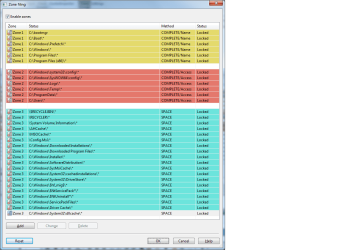
I'm in the trial period for this version of O&O, which is tagged as being compatible with W7, but so far as I can tell, the only significant change is that it defrags into zones on the HD, where as my current version (11) doesn't. From what little that I've read, on the O&O website, this is to harmonize with the file system used in W7, but I'm not quite certain that it is worth paying for and upgraded version.

I just want to see what any of you might think about this...pro or con? Here is a screenshot to show the zones:
 

Attachments
  • O&O Zones.png
    O&O Zones.png
    30.8 KB · Views: 200

My Computer

Computer Manufacturer/Model Number
DIY
OS
W7x64 Pro, SuSe 12.1/** W7 x64 Pro, XP MCE
CPU
Phenom II 1090T w/Noctua NH-D14 /**4400+ X2 w/CM Hyper TX 3
Motherboard
ASRock 890FX Deluxe 4/**A8N-SLI
Memory
2 x 2GB Patriot PGS34g1600LLKA/**4x1GB Corsair VS
Graphics Card(s)
EVGA GTX460 SC/**EVGA 8800GTS
Sound Card
Asus Xonar D2X/**Xonar D1
Monitor(s) Displays
Acer X233H, Dell E152FPc /**LG M237-WD
Screen Resolution
1920x1080 & 1024x768/**1980x1080
Hard Drives
WDC 2TB, 1.5TB, 1TB, 500GB,Seagate 500GB , Maxtor 80GB /**500GB Seagate & WDC 1TB Black
PSU
CM RS600 w/ APC BX1000G/**Antec 500 TP w/ APC BX1000
Case
HAF922/**Antec 1040IIB
Cooling
3x200mm, 1x140 and 1x120mm/**5x80mm fans
Keyboard
Logitech Media USB/**Saitek Eclipse
Mouse
Cordless Trackman Wheel/**Ditto
Internet Speed
3.3Mbps
Other Info
SB 560 5.1 w/ Sennheiser RS140/**Creative T20 speakers, Dvico FusionHDTV7 Gold RT, Cisco E3000, HP 5510V AIO, Linksys E3000, Belkin F5U237 hub and **F5D8055 adapter
(** = 2nd rig)
I just received a response from O&O regarding this question as follows:

Regarding the Zones, your data is inspected according to set criteria, and then filed into separate zones on your disk. A special algorithm organizes the data optimally onto the disk following the defragmentation. System files which have to be accessed quickly, for example, will be separated from the rest. Between the zones there is free space so that new files can be immediately moved to the correct zone. This logical organization considerably reduces the time needed for future fragmentation, and also prevents new fragmentation from occurring in the first place.

You can read more on the function in the handbook here too:

http://www.oo-software.com/en/docs/usersguide/oodv12pro.pdf
This part of the response means nothing to me, but the PDF in the link does have a very short description of setting user defined zones. On the surface, this sounds good, but the thing that I can't get through my skull is if the zones consist of system files that are locked are, then how does one add anything to them? Any files that are created after the installation of the OS would be non-system files...wouldn't they?
 

My Computer

Computer Manufacturer/Model Number
DIY
OS
W7x64 Pro, SuSe 12.1/** W7 x64 Pro, XP MCE
CPU
Phenom II 1090T w/Noctua NH-D14 /**4400+ X2 w/CM Hyper TX 3
Motherboard
ASRock 890FX Deluxe 4/**A8N-SLI
Memory
2 x 2GB Patriot PGS34g1600LLKA/**4x1GB Corsair VS
Graphics Card(s)
EVGA GTX460 SC/**EVGA 8800GTS
Sound Card
Asus Xonar D2X/**Xonar D1
Monitor(s) Displays
Acer X233H, Dell E152FPc /**LG M237-WD
Screen Resolution
1920x1080 & 1024x768/**1980x1080
Hard Drives
WDC 2TB, 1.5TB, 1TB, 500GB,Seagate 500GB , Maxtor 80GB /**500GB Seagate & WDC 1TB Black
PSU
CM RS600 w/ APC BX1000G/**Antec 500 TP w/ APC BX1000
Case
HAF922/**Antec 1040IIB
Cooling
3x200mm, 1x140 and 1x120mm/**5x80mm fans
Keyboard
Logitech Media USB/**Saitek Eclipse
Mouse
Cordless Trackman Wheel/**Ditto
Internet Speed
3.3Mbps
Other Info
SB 560 5.1 w/ Sennheiser RS140/**Creative T20 speakers, Dvico FusionHDTV7 Gold RT, Cisco E3000, HP 5510V AIO, Linksys E3000, Belkin F5U237 hub and **F5D8055 adapter
(** = 2nd rig)
Back
Top