Oblivion problems- again =(

kmakar

New member
Ok, so I installed Oblivion, it seems to work, I go through make my character, etc and when it gets to the point in the game where you go throught the manhole cover tothe sewers it crashes. I have heard of others having this same problem, but i have not heard a solution. I am running Windows 7 64bit on a HP slimline pavillion with an E5200 processor. just bought the computer a month ago- so fairly new stuff. Ive run Oblivion on a similar PC with Xp and no problems there. HELP! thinking of going back to XP if this does not work.
 

My Computer

Computer Manufacturer/Model Number
HP Pavillion Slimline
OS
Window 7 Home Premium 64bit
CPU
Intel Pentium dual core 2.5GHz
Memory
3gb
Graphics Card(s)
Intel G33/G31 Express chipset family
Sound Card
Realtek High Definition Audio
Monitor(s) Displays
HP
Screen Resolution
1366x768
Hard Drives
320GB
Keyboard
HP
Mouse
HP
Internet Speed
3mb/s

My Computer

Computer Manufacturer/Model Number
Sony Vaio Z46GDU
OS
Windows 7 Ultimate x86-64
CPU
[email protected] 1066MHz FSB
Motherboard
Sony branded
Memory
6GB DDR3 1066MHz
Graphics Card(s)
9300M GS 256MB Dedicated (Speed) + Intel4500MHD (Stamina)
Sound Card
Realtek HD Audio
Monitor(s) Displays
13.1' WXGA
Screen Resolution
1600x900
Hard Drives
320GB 7200RPM w/ 16MB cache
Internet Speed
1MB/s
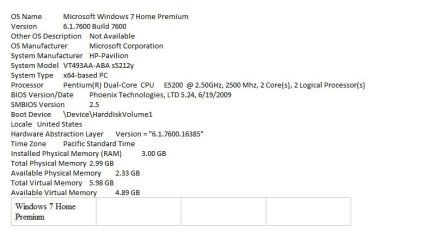
Thanks for replying so fast! attached is my system info. by no means is this a gaming machine- but niether was my other PC which ran XP and Oblivion worked just fine then.
 

Attachments

  • system info.jpg
    system info.jpg
    89.8 KB · Views: 176

My Computer

Computer Manufacturer/Model Number
HP Pavillion Slimline
OS
Window 7 Home Premium 64bit
CPU
Intel Pentium dual core 2.5GHz
Memory
3gb
Graphics Card(s)
Intel G33/G31 Express chipset family
Sound Card
Realtek High Definition Audio
Monitor(s) Displays
HP
Screen Resolution
1366x768
Hard Drives
320GB
Keyboard
HP
Mouse
HP
Internet Speed
3mb/s
Drivers next, once you get HWInfo32 post a shot of the summary screen.
 

My Computer

Computer Manufacturer/Model Number
Sony Vaio Z46GDU
OS
Windows 7 Ultimate x86-64
CPU
[email protected] 1066MHz FSB
Motherboard
Sony branded
Memory
6GB DDR3 1066MHz
Graphics Card(s)
9300M GS 256MB Dedicated (Speed) + Intel4500MHD (Stamina)
Sound Card
Realtek HD Audio
Monitor(s) Displays
13.1' WXGA
Screen Resolution
1600x900
Hard Drives
320GB 7200RPM w/ 16MB cache
Internet Speed
1MB/s
thanks. I am having problems with my internet connection on my desktop (i'm posting this from my laptop) so i'm waiting for it to be fixed- they come out to my house next sunday- i'll try the driver deal then, and let you know the results- again, thanks for trying to help me =)
 

My Computer

Computer Manufacturer/Model Number
HP Pavillion Slimline
OS
Window 7 Home Premium 64bit
CPU
Intel Pentium dual core 2.5GHz
Memory
3gb
Graphics Card(s)
Intel G33/G31 Express chipset family
Sound Card
Realtek High Definition Audio
Monitor(s) Displays
HP
Screen Resolution
1366x768
Hard Drives
320GB
Keyboard
HP
Mouse
HP
Internet Speed
3mb/s
As you are using a laptop, I would say your problem is the graphics card, which will be integrated.
I couldn't see anything about the GPU on the screenshot you posted, if you don't know how to find out what it is, go to the search box on the start menu and type DXDiag, it will be under the 'display' tab.
 

My Computer

Computer Manufacturer/Model Number
Self Built
OS
Windows 7 Home Premium x64(desktop), Windows 7 Professional x86(laptop)
CPU
AMD Phenom II x4 965 @ 3.40GHz Black Edition
Motherboard
ASUS M4A785TD-V Evo
Memory
4GB Corsair XMS3 DDR3
Graphics Card(s)
Sapphire HD 5770 1024MB
Monitor(s) Displays
22" Viewsonic VX2260 Widescreen LCD
Screen Resolution
1900x1080 (1080p)
Hard Drives
Samsung Spinpoint F3 1TB SATA, 32MB Cache, 7200 RPM
PSU
600W OCZ StealthXStream
Case
Antec 902 Ultimate Gaming Case
Cooling
Stock - CPU, GPU, PSU, 3x120MMcase fans 1x200mm case fan
Keyboard
Saitek Eclipse II
Mouse
Roccat Kova Gaming Mouse
Hello, I was wondering what kind of graphics card (if any) you have? I know the slimline's don't accommodate most graphics cards, and lack of graphical processing power is most likely the cause of your crashes. Oblivion is very resource intensive, even with all the the video settings turned down. After you exit the sewers is where the landscape loads and that causes a major draw in resources. I know you stated your problem starts with going through the manhole cover to the sewers, which shouldn't be anymore labor intensive on your machine than the first crawl through the prison underground. I could be wrong though. And although it ran ok on XP, Windows 7 is a bit more of a resource hog, so that might be contributing to crashes.

I have a Gateway gt5404 with a Pentium D 2.8ghz dual core, 2GB of PC5300 RAM, and a BFG GeForce 9800 GT/1GB VRAM. I play Oblivion with video settings at medium or lower. I get the occasional "crash-to-desktop" from time to time, as do most who play. It's almost considered a norm, unless you have a very high end machine.

There are a few mods out there that do a complete texture overhaul for lower end machines. I use some of them myself and they help out a lot. But even with your game modded for performance, you will still need an adequate video card to play Oblivion.
 

My Computer

Computer Manufacturer/Model Number
Gateway GT5404
OS
Windows 7 Premium 32-bit
CPU
2.8ghz Dual core Pentium D
Motherboard
Factory
Memory
2GB
Graphics Card(s)
BFG Nvidea GeForce 9800 GT 1GB VRAM
Sound Card
Onboard
Monitor(s) Displays
Gateway 20" HX2000 Widescreen LCD
Screen Resolution
1600X900
Hard Drives
Seagate SATA 3.5" Barracuda 1TB, 7200rpm
PSU
BFG GX Series ATX12v 2.2 550 Watt Modular Power Supply
Case
Factory
Cooling
Factory
Keyboard
Factory
Mouse
Factory Optical
Internet Speed
12mbps/2mbps
Ok, so I installed Oblivion, it seems to work, I go through make my character, etc and when it gets to the point in the game where you go throught the manhole cover tothe sewers it crashes. I have heard of others having this same problem, but i have not heard a solution. I am running Windows 7 64bit on a HP slimline pavillion with an E5200 processor. just bought the computer a month ago- so fairly new stuff. Ive run Oblivion on a similar PC with Xp and no problems there. HELP! thinking of going back to XP if this does not work.

Oblivion is a great game but it's full of bugs like this so make sure that you have the latest patches installed and that you have the latest hardware drivers for your system from the manufacturer (not windows update)

I've completed Oblivion but I still have it installed on a VMWARE box. If you want to, upload your saved file and I'll take a look. Mine never crashed there; but it crashed in plenty of other places. I did have a problem in the same town with one of the characters never wanting to talk to me and I had to download a patch to fix it. On other occasions if I went away and came back later I could go past the point where it crashed.

Another option might be to press the tilde (~) button and type TGM for total god mode or TCL to float and walk through walls and see if these get you past the crash. Type either again to turn it off.
 

My Computer

Computer Manufacturer/Model Number
Custom Hack job
OS
Windows 7 Ultimate 64 bit
CPU
Intel(R) Core(TM)2 Quad CPU Q8200 @ 2.33GHz
Motherboard
GigaByte EP45-UD3
Memory
8 GB Kingston
Graphics Card(s)
Nvidia GeForce 9600GT
Sound Card
Soundblaster Audigy
Monitor(s) Displays
AOC x2 22"
Hard Drives
2 x Samsung 500GB (RAID)
2 x Samsung 2TB
1 x WD Green 2TB
1 x Seagate 1TB
1 x Samsung 500GB
PSU
Thermaltake QFan 750W
Case
CM Scout Gaming
Cooling
Coolermaster V10
Keyboard
Microsoft Wireless Keyboard 1000
Mouse
Microsoft Wireless Optical 2000
Internet Speed
320
Other Info
Winfast PVR2000CP
LG DVD-RAM DVD/RW/DL Super Multi
Linksys WMP300Nx2 Wireless Adapter
I also should of added, try and run it in XP compatibility mode and/or as administrator. :)
Also make sure that you have full read/write access to the install directory and saved files directory.
 

My Computer

Computer Manufacturer/Model Number
Custom Hack job
OS
Windows 7 Ultimate 64 bit
CPU
Intel(R) Core(TM)2 Quad CPU Q8200 @ 2.33GHz
Motherboard
GigaByte EP45-UD3
Memory
8 GB Kingston
Graphics Card(s)
Nvidia GeForce 9600GT
Sound Card
Soundblaster Audigy
Monitor(s) Displays
AOC x2 22"
Hard Drives
2 x Samsung 500GB (RAID)
2 x Samsung 2TB
1 x WD Green 2TB
1 x Seagate 1TB
1 x Samsung 500GB
PSU
Thermaltake QFan 750W
Case
CM Scout Gaming
Cooling
Coolermaster V10
Keyboard
Microsoft Wireless Keyboard 1000
Mouse
Microsoft Wireless Optical 2000
Internet Speed
320
Other Info
Winfast PVR2000CP
LG DVD-RAM DVD/RW/DL Super Multi
Linksys WMP300Nx2 Wireless Adapter
Resource intensive? The engine is sloppy - my 4890 has no problems with maxing out every settings, although it stutters less without AA. 70FPS, then 40FPS, then 35FPS, then 60FPS - it also has never crashed with no compatibility options.
 

My Computer

Computer Manufacturer/Model Number
Sony Vaio Z46GDU
OS
Windows 7 Ultimate x86-64
CPU
[email protected] 1066MHz FSB
Motherboard
Sony branded
Memory
6GB DDR3 1066MHz
Graphics Card(s)
9300M GS 256MB Dedicated (Speed) + Intel4500MHD (Stamina)
Sound Card
Realtek HD Audio
Monitor(s) Displays
13.1' WXGA
Screen Resolution
1600x900
Hard Drives
320GB 7200RPM w/ 16MB cache
Internet Speed
1MB/s
BTW I'm not running Oblivion on a laptop, I'm just posting here from one. The interwebs on my desktop will not get fixed until this weekend.
The graphics card is whatever came with the box- I'm not sure of the name- I'll check it when I get home.... I still don't understand how that makes a difference now, though because I ran Oblivion on a lesser machine and I NEVER had any problems. No crashes, no bugs, nothing. Got through the entire game, and then some without any problems. Just lucky I guess? I ran it on high, etc and still no problems. Now, I have a faster machine with more ram and windows 7 and I can't get it to work. I understand that a good graphics card makes a difference in the quality and smoothness of the video- but i don't understand why my machine keeps crashing. I can only conclude that the operating system must be part of the problem. I will do what Frostmourne said and try to update the drivers first. I'll keep y'all updated.
 

My Computer

Computer Manufacturer/Model Number
HP Pavillion Slimline
OS
Window 7 Home Premium 64bit
CPU
Intel Pentium dual core 2.5GHz
Memory
3gb
Graphics Card(s)
Intel G33/G31 Express chipset family
Sound Card
Realtek High Definition Audio
Monitor(s) Displays
HP
Screen Resolution
1366x768
Hard Drives
320GB
Keyboard
HP
Mouse
HP
Internet Speed
3mb/s
BTW I'm not running Oblivion on a laptop, I'm just posting here from one. The interwebs on my desktop will not get fixed until this weekend.
The graphics card is whatever came with the box- I'm not sure of the name- I'll check it when I get home.... I still don't understand how that makes a difference now, though because I ran Oblivion on a lesser machine and I NEVER had any problems. No crashes, no bugs, nothing. Got through the entire game, and then some without any problems. Just lucky I guess? I ran it on high, etc and still no problems. Now, I have a faster machine with more ram and windows 7 and I can't get it to work. I understand that a good graphics card makes a difference in the quality and smoothness of the video- but i don't understand why my machine keeps crashing. I can only conclude that the operating system must be part of the problem. I will do what Frostmourne said and try to update the drivers first. I'll keep y'all updated.

The OS is unlikely to be the issue - games go through the DirectX API and then through your GPU drivers - that could be the problem. Incidentally, the game does stutter slighly on 7 with an unpredictable framerate - no matter if AA is off or 4x samples (haven't tried 8x). Essentially 70FPS, then drops to 35FPS, then spikes to 60FPs etc - Bethesda should patch it again.
 

My Computer

Computer Manufacturer/Model Number
Sony Vaio Z46GDU
OS
Windows 7 Ultimate x86-64
CPU
[email protected] 1066MHz FSB
Motherboard
Sony branded
Memory
6GB DDR3 1066MHz
Graphics Card(s)
9300M GS 256MB Dedicated (Speed) + Intel4500MHD (Stamina)
Sound Card
Realtek HD Audio
Monitor(s) Displays
13.1' WXGA
Screen Resolution
1600x900
Hard Drives
320GB 7200RPM w/ 16MB cache
Internet Speed
1MB/s
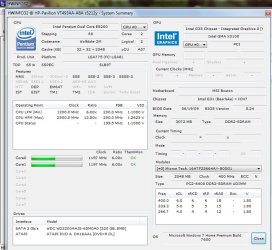
Frostmourne- here is the summary screen you asked for.
 

Attachments

  • HW32 summary.jpg
    HW32 summary.jpg
    450.4 KB · Views: 93

My Computer

Computer Manufacturer/Model Number
HP Pavillion Slimline
OS
Window 7 Home Premium 64bit
CPU
Intel Pentium dual core 2.5GHz
Memory
3gb
Graphics Card(s)
Intel G33/G31 Express chipset family
Sound Card
Realtek High Definition Audio
Monitor(s) Displays
HP
Screen Resolution
1366x768
Hard Drives
320GB
Keyboard
HP
Mouse
HP
Internet Speed
3mb/s
An X3100 GPU will not run Oblivion properly - lower the resolution to 1024x768 and the settings to low - I've fixed 80% of the stuttering by lowering the view distance to 70%, turning AA to 2x and distant land off. Also run the game in XP SP3 as admin.
 

My Computer

Computer Manufacturer/Model Number
Sony Vaio Z46GDU
OS
Windows 7 Ultimate x86-64
CPU
[email protected] 1066MHz FSB
Motherboard
Sony branded
Memory
6GB DDR3 1066MHz
Graphics Card(s)
9300M GS 256MB Dedicated (Speed) + Intel4500MHD (Stamina)
Sound Card
Realtek HD Audio
Monitor(s) Displays
13.1' WXGA
Screen Resolution
1600x900
Hard Drives
320GB 7200RPM w/ 16MB cache
Internet Speed
1MB/s

My Computer

Computer Manufacturer/Model Number
Custom
OS
Windows 7 Ultimate Signature Edition
CPU
Intel Core i7 Extreme 3.33GHz
Motherboard
EVGA X-58 SLI Classified
Memory
12GB DDR3
Graphics Card(s)
2x EVGA 285 2GB in SLI
Sound Card
Creative Labs X-Fi ExtremeGamer
Monitor(s) Displays
30" Viewsonic
Hard Drives
2x1TB Western Digital 7200RPM in RAID 0/1TB WD My Book External HDD
PSU
Thermaltake 1000w supporting quad SLI
Case
Thermaltake Armor Full Tower
Cooling
Thermaltake V1 CPU+DIY Liquid cooling
How do I run in XP mode as admin?
 

My Computer

Computer Manufacturer/Model Number
HP Pavillion Slimline
OS
Window 7 Home Premium 64bit
CPU
Intel Pentium dual core 2.5GHz
Memory
3gb
Graphics Card(s)
Intel G33/G31 Express chipset family
Sound Card
Realtek High Definition Audio
Monitor(s) Displays
HP
Screen Resolution
1366x768
Hard Drives
320GB
Keyboard
HP
Mouse
HP
Internet Speed
3mb/s
How do I run in XP mode as admin?

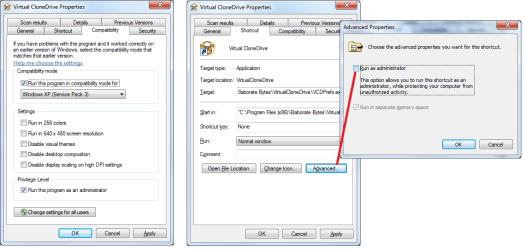
To clarify, there is XP mode and there is XP compatibility.

For XP mode see here http://www.microsoft.com/windows/virtual-pc/download.aspx
For XP compatibility, right click on the program shortcut and configure in the compatibility tab for XP. In the same area, select the 'run this program as an administrator' tickbox. If this is greyed out, look in the shortcut tab (see pic)
 

Attachments

  • xp compat.png
    xp compat.png
    94.2 KB · Views: 74

My Computer

Computer Manufacturer/Model Number
Custom Hack job
OS
Windows 7 Ultimate 64 bit
CPU
Intel(R) Core(TM)2 Quad CPU Q8200 @ 2.33GHz
Motherboard
GigaByte EP45-UD3
Memory
8 GB Kingston
Graphics Card(s)
Nvidia GeForce 9600GT
Sound Card
Soundblaster Audigy
Monitor(s) Displays
AOC x2 22"
Hard Drives
2 x Samsung 500GB (RAID)
2 x Samsung 2TB
1 x WD Green 2TB
1 x Seagate 1TB
1 x Samsung 500GB
PSU
Thermaltake QFan 750W
Case
CM Scout Gaming
Cooling
Coolermaster V10
Keyboard
Microsoft Wireless Keyboard 1000
Mouse
Microsoft Wireless Optical 2000
Internet Speed
320
Other Info
Winfast PVR2000CP
LG DVD-RAM DVD/RW/DL Super Multi
Linksys WMP300Nx2 Wireless Adapter
OK, so I ran as admin, turned on XP compatibility, turned off distant landscape, put setting on low, changed screen resolution... and nothing. no difference. still crashes in same spot. Screen goes black, task manager says Oblivion not responding... shit. i don't know what to do now. :mad:
 

My Computer

Computer Manufacturer/Model Number
HP Pavillion Slimline
OS
Window 7 Home Premium 64bit
CPU
Intel Pentium dual core 2.5GHz
Memory
3gb
Graphics Card(s)
Intel G33/G31 Express chipset family
Sound Card
Realtek High Definition Audio
Monitor(s) Displays
HP
Screen Resolution
1366x768
Hard Drives
320GB
Keyboard
HP
Mouse
HP
Internet Speed
3mb/s
did you install and run the oldblivion link i left up there? it helps weaker graphics cards run olblivion, if that doesn't work after everything else it's safe to say your computer just isn't capable of running the game.
 

My Computer

Computer Manufacturer/Model Number
Custom
OS
Windows 7 Ultimate Signature Edition
CPU
Intel Core i7 Extreme 3.33GHz
Motherboard
EVGA X-58 SLI Classified
Memory
12GB DDR3
Graphics Card(s)
2x EVGA 285 2GB in SLI
Sound Card
Creative Labs X-Fi ExtremeGamer
Monitor(s) Displays
30" Viewsonic
Hard Drives
2x1TB Western Digital 7200RPM in RAID 0/1TB WD My Book External HDD
PSU
Thermaltake 1000w supporting quad SLI
Case
Thermaltake Armor Full Tower
Cooling
Thermaltake V1 CPU+DIY Liquid cooling
Yes, I tried the Oldblivion and still nothing. I think the hardware is too new- I got an error message that said the hardware was not recognized and the settings went auto to medium. I think i'm just screwed- but I still don't think it's a graphics issue- like I said before, I ran Oblivion on an older, crappier machine and it worked fine. I'm not sure what to do at this point- I can't go back to XP-I can only go back one generation and that would land me in Vista territory. I might try an NVIDIA card if it doesn't cost too much to put in- but might be less to just buy a PS3 and play it that way ;)
 

My Computer

Computer Manufacturer/Model Number
HP Pavillion Slimline
OS
Window 7 Home Premium 64bit
CPU
Intel Pentium dual core 2.5GHz
Memory
3gb
Graphics Card(s)
Intel G33/G31 Express chipset family
Sound Card
Realtek High Definition Audio
Monitor(s) Displays
HP
Screen Resolution
1366x768
Hard Drives
320GB
Keyboard
HP
Mouse
HP
Internet Speed
3mb/s
Back
Top