OC i7 930?

johndh

New member
Member
Local time
5:21 AM
Messages
43
I've never looked at overclocking before so I'm wondering what I could do with my current machine:

COOLERMASTER SILEO 500 QUIET MID TOWER CASE
Intel® Core™i7 Processor i7-930 (2.80GHz) 4.8GTs/8MB Cache
ASUS® P6X58D-E: DDR3, USB 3.0, SATA 6.0GB/s, 3-Way SLI
12GB SAMSUNG DDR3 TRI-DDR3 1333MHz
1GB ATI RADEON™ HD 5770 PCI EXPRESS - DirectX® 11
1TB WD CAVIAR BLACK WD1002FAEX, SATA 6 Gb/s, 64MB CACHE, 7200RPM
24x DUAL LAYER DVD WRITER ±R/±RW/RAM
800W Quiet Quad Rail PSU + 120mm Case Fan
TITAN FENRIR EXTREME DIRECT TOUCH COPPER CPU COOLER
ONBOARD 8 CHANNEL (7.1) HIGH DEF AUDIO (AS STANDARD)
ONBOARD 10/100/1000 GIGABIT LAN PORT
6 x USB 2.0 PORTS @ BACK PANEL (MIN 2 FRONT PORTS) AS STANDARD

I've had a look at the cpu temps:

At idle it's stable at 34 deg C. If I run adobe Premiere CS5 and export a video clip in 1080p HD, the cpu stabalises at 62 deg C at 3ghz. with all cores running at about 80% capacity.

I was thinking along the lines of overclocking to 3.5ghz or even 4ghz, but not sure of how to do it, or what to look for regarding limits.

Cheers

John
 

My Computer

OS
Windows 7 (64bit)
CPU
Intel i7 930
Motherboard
AsusP6X58D-E
Memory
12 gig
Graphics Card(s)
Radion HD 5770
Sound Card
On board
Monitor(s) Displays
Iiyama 24in HD Widescreen
Hard Drives
2 X 1Tb Western Digital Caviar Black
PSU
800 w
Just to update those cpu temps.

Managed to load up the cpu to 100% with video coding. CPU stable at 67 deg C. and case temp 35 deg C.
 

My Computer

OS
Windows 7 (64bit)
CPU
Intel i7 930
Motherboard
AsusP6X58D-E
Memory
12 gig
Graphics Card(s)
Radion HD 5770
Sound Card
On board
Monitor(s) Displays
Iiyama 24in HD Widescreen
Hard Drives
2 X 1Tb Western Digital Caviar Black
PSU
800 w
I can't help you with the over clocking but I can tell you I am running the same processor as you are and mine is running @ stable at 4.0GHz pre-over clocked from the manufacturer.

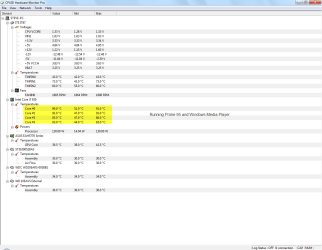
I7 processors do tend to run warm I would suggest that you download Prime 95 and run that for an hour to get a real feel of your temps that will give you a better understanding of your processor temps.

I can also tell you over clocking is not all it is cracked up to be, when I run @ stock settings I am hard pressed to see any real difference compared to the over clock. I have seen your specs and they are impressive, but if you really want to make your rig super fast invest in a decent SSD drive that is what makes all the difference in speed as far as I can tell.


I will warn you that running at 100C will burn your processor out in no time I had a cooling issue with my first Rig and it was running at 100C doing the Prime 95 test I had to RMA it, they put in a new cooler and processor as I had damaged the old one with the Prime 95 test, still under guarantee luckily enough.

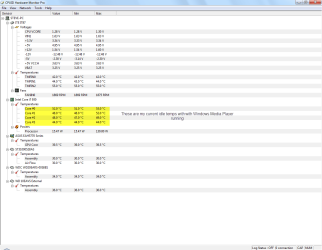
Have attached a couple of pics of my temps.


Steve
 

Attachments

  • 09-07-2010 13-15-21 Idle Temps.png
    09-07-2010 13-15-21 Idle Temps.png
    27.8 KB · Views: 58
  • 09-07-2010 13-21-38 Prime 95.png
    09-07-2010 13-21-38 Prime 95.png
    27.7 KB · Views: 33

My Computer

Computer Manufacturer/Model Number
Over Clockers Ultima Viper 2.80Ghz
OS
Windows 7 Ultimate 64 - OEM Service Pack 1
CPU
Intel Core i7 930 2.80Ghz Bloomfield Socket LGA 1366
Motherboard
Gigabyte GA-X58A-UD3R Intel X58 Socket 1366 DDR3
Memory
Patriot Viper 6GB 3x2GB DDR3 PC3-1200C9 1600Mhz Tri Channel
Graphics Card(s)
Asus ATI Radeon HD 5770 CuCore 1024MB GDDR5 PCI Express
Sound Card
Realtek ALC889 @ Intel 82801JB ICH10 - High Definition Audio
Monitor(s) Displays
Samsung SyncMaster 920N 19"
Screen Resolution
1280*1024
Hard Drives
1 x OCZ Vertex2 Series 120GB 2.5" SATA-II SSD
1 x Seagate Barracuda 7200.12 1TB SATA-II 32MB Cache
1 x Western Digital Caviar Green 2TB SATA-II 64 MB Cache
PSU
Corsair TX 650W ATX SLi
Case
Antec 902 Ultimate Gaming Case Black
Cooling
Prolimatech Megahalems Rev B CPU Cooler Socket 775/1156/1366
Keyboard
Microsoft Comfort Curve Keyboard
Mouse
Microsoft Optical USB
Internet Speed
ADSL24 FTTC 34.2 Mbps Down 7.1Mbps Up
Other Info
OcUK 22x DVDSATA ReWriter Black
Akasa AK-FN058 Apache Black Super Silent 120mm Fan
Printer Epson Stylus Photo R300
Scanner Canon Canoscan 8000F
I can also tell you over clocking is not all it is cracked up to be, when I run @ stock settings I am hard pressed to see any real difference compared to the over clock.


It depends on what tasks you are performing as to how much of a noticeable difference there is.

In some areas there is no discernible difference between stock and 4.0ghz - but in others, it can be very noticeable indeed.


*********

As for overclocking with that board and chip, it can actually be pretty easy to hit 3.5-4.0ghz.


The first step when overclocking is to read and then read some more.

However, here are a few very broad outlines for OC'ing the i7

► Do not exceed 85c on the cores while stress testing. (Prime95, IBT, LinX)

Daily use will not reach those temps.

► Don't go above 1.3625 actual vcore. The amount reported by CPU-Z in Windows is always lower than what is input in the BIOS due to Vdroop

► Disable power saving features like Speedstep and C1E.


► DO NOT leave the CPU Voltage option in the BIOS on AUTO - when you raise the BCLK, it will always 'over compensate' and use more volts than necessary.

(the higher the volts, the higher the temps)

Adjusting the BCLK will also adjust your RAM speed. You can use different multipliers to try and come close to your native 1333mhz.

Some RAM kits will Overclock a fair bit, others not much at all, so it's best to keep as close to the 'native' speed as possible.

Have a read through http://www.sevenforums.com/overclocking-case-mods/5772-core-i7-920-940-overclocking-guide.html

TBH, it's not the best guide - but it's a start.


When overclcking, the two biggest dangers are excess voltages and heat.

If those two are kept within the 'safe' limits - you won't risk permanently damaging anything.


My apologies for the 'vagueness' of this post, but it's pretty late here and I'm rather :sleepy:
 

My Computer

Computer type
PC/Desktop
Computer Manufacturer/Model Number
Systems by SmartEyeball
OS
8 Pro x64
CPU
i7 3770K 4.6GHz
Motherboard
ASUS P8Z77 WS
Memory
16GB G.Skill Trident X 2666mhz
Graphics Card(s)
x2 EVGA 780 Ti Superclocked SLI
Sound Card
SB X-FI Surround 5.1 PRO USB / ATH-AD900 Headphones
Monitor(s) Displays
x3 Dell U2410 / 58" Samsung
Screen Resolution
5760*1200/ 1920*1200
Hard Drives
2x Intel 520 240GB (RAID 0) * 2x WD Caviar Blacks 2TB (RAID 0) * 2TB WD Caviar Black * Sony Optirac DVD
PSU
Silverstone Strider Evolution 1200W
Case
Thermaltake Level 10 GT Snow Edition
Cooling
Noctua NH-D14
Keyboard
Topre Realforce // Ducky Shine MX Black // Filco Ninja TKL
Mouse
Thermaltake Theron (Highly Recommended) + Razer Imperator
Antivirus
MSE
Browser
IE, FF, WaterFox
Other Info
GT Extreme V2 Sim Racing Cockpit + 40" LCD and K/B Mouse stand ▼
Fanatec CSR Elite Wheel + Clubsport V1 Pedals + CSR shifter/7G-H ▼Saitek X52 Pro ▼ TrackIR 5 Pro
Buttkicker v2 Seat Rumbler with Dedicated 5.1 and Sub Woofer attached to frame ▼
=
Bloody Big Grin

My Computer

Computer type
PC/Desktop
Computer Manufacturer/Model Number
Custom built by me.
OS
Windows 10 Pro
CPU
Intel Core i7-4770K (3.5Ghz)
Motherboard
Gigabyte G1 Sniper 5 (F10 Bios)
Memory
32 gig Corsair Dominator Platinum (4x8Gig)
Graphics Card(s)
Sapphire Tri-X R9 Fury
Sound Card
Soundblaster ZXR
Monitor(s) Displays
NEC PA242W 24" LCD Monitor
Screen Resolution
1920 x 1200
Hard Drives
Primary - Samsung 850 Pro (512gig), Samsung 840 Pro (256gig), 2TB WD Caviar Black.
PSU
EVGA Supernova 1000 G2
Case
Cooler Master HAF X
Cooling
Corsair H100i with Corsair Air Series SP120 Quiet Fans
Keyboard
Logitech Wireless Wave
Mouse
Logitech Performance MX
Internet Speed
High Speed Cable
Antivirus
Norton Security
Browser
IE11
Other Info
Memory Timings - 1866MHz @ 9-9-9-27-1T @ 1.5 volts
I've never looked at overclocking before so I'm wondering what I could do with my current machine:

Intel® Core™i7 Processor i7-930 (2.80GHz) 4.8GTs/8MB Cache
1GB ATI RADEON™ HD 5770 PCI EXPRESS - DirectX® 11
What is it you want to accomplish? If the idea behind overclocking is better game performance, then I don't think you're going to see very good returns. Even at stock settings, what's holding game performance back is the 5770, not the cpu.
 

My Computer

OS
7 Ultimate x64
CPU
i5-2500k
Motherboard
Asus P8P67 Pro
Memory
8GB G.Skill Ripjaws X F3-12800CL7D-8GBXH 1866MHz 8-9-8-24
Graphics Card(s)
EVGA GTX 570 SC
Sound Card
X-Fi Titanium Fatality
Monitor(s) Displays
Samsung S27A550H 27" LED
Screen Resolution
1920x1080
Hard Drives
OCZ Vertex 3 120GB.
1TB Samsung F3.
2TB Samsung F4.
PSU
PC Power & Cooling Silencer 760
Case
Lian Li Lancool K62
Cooling
Thermalright Venomous X Black/Scythe S-Flex/Shin-Etsu X23
Keyboard
MS Natural Elite 4000 Ergonomic
Mouse
Logitech G500
Internet Speed
6MB/768
Other Info
Logitech Z-5500 505 watts.
D-Link DGL-4500.
Tripp-Lite Smart Pro 1500.
From a pure games perspective, that's correct. @ stock, the 5770 is the bottleneck.

(Although a few heavily CPU dependant titles will benefit regardless)

But if the OP does a bit/ a lot of CPU intensive tasks (like CS5 ,encoding etc) then it's worth it.
 

My Computer

Computer type
PC/Desktop
Computer Manufacturer/Model Number
Systems by SmartEyeball
OS
8 Pro x64
CPU
i7 3770K 4.6GHz
Motherboard
ASUS P8Z77 WS
Memory
16GB G.Skill Trident X 2666mhz
Graphics Card(s)
x2 EVGA 780 Ti Superclocked SLI
Sound Card
SB X-FI Surround 5.1 PRO USB / ATH-AD900 Headphones
Monitor(s) Displays
x3 Dell U2410 / 58" Samsung
Screen Resolution
5760*1200/ 1920*1200
Hard Drives
2x Intel 520 240GB (RAID 0) * 2x WD Caviar Blacks 2TB (RAID 0) * 2TB WD Caviar Black * Sony Optirac DVD
PSU
Silverstone Strider Evolution 1200W
Case
Thermaltake Level 10 GT Snow Edition
Cooling
Noctua NH-D14
Keyboard
Topre Realforce // Ducky Shine MX Black // Filco Ninja TKL
Mouse
Thermaltake Theron (Highly Recommended) + Razer Imperator
Antivirus
MSE
Browser
IE, FF, WaterFox
Other Info
GT Extreme V2 Sim Racing Cockpit + 40" LCD and K/B Mouse stand ▼
Fanatec CSR Elite Wheel + Clubsport V1 Pedals + CSR shifter/7G-H ▼Saitek X52 Pro ▼ TrackIR 5 Pro
Buttkicker v2 Seat Rumbler with Dedicated 5.1 and Sub Woofer attached to frame ▼
=
Bloody Big Grin
Thanks for everyones input, very helpfull.

The main applications for this machine:

Photoshop CS5
Adobe Premier Pro CS5
Capture NX2 (might bin this unless Nikon sort out various issues soon)
Lightroom 3

Media streaming via LAN to a Sony WS Telly.

Photoshop can give the machine some stick, but the biggest monster is Prem Pro, particularly when rendering and transcoding media for final output, including transcoding on the fly of 1080p media.

At the moment I cannt get the machince stable in its standard form, so I might have been premature in asking about OC in the first place.

John
 

My Computer

OS
Windows 7 (64bit)
CPU
Intel i7 930
Motherboard
AsusP6X58D-E
Memory
12 gig
Graphics Card(s)
Radion HD 5770
Sound Card
On board
Monitor(s) Displays
Iiyama 24in HD Widescreen
Hard Drives
2 X 1Tb Western Digital Caviar Black
PSU
800 w
At the moment I cannt get the machince stable in its standard form, so I might have been premature in asking about OC in the first place.

Yeah, you'll definitely want to get a handle on that to establish a baseline, otherwise you're just chasing ghosts.


My Computer

Computer type
PC/Desktop
Computer Manufacturer/Model Number
Custom built by me.
OS
Windows 10 Pro
CPU
Intel Core i7-4770K (3.5Ghz)
Motherboard
Gigabyte G1 Sniper 5 (F10 Bios)
Memory
32 gig Corsair Dominator Platinum (4x8Gig)
Graphics Card(s)
Sapphire Tri-X R9 Fury
Sound Card
Soundblaster ZXR
Monitor(s) Displays
NEC PA242W 24" LCD Monitor
Screen Resolution
1920 x 1200
Hard Drives
Primary - Samsung 850 Pro (512gig), Samsung 840 Pro (256gig), 2TB WD Caviar Black.
PSU
EVGA Supernova 1000 G2
Case
Cooler Master HAF X
Cooling
Corsair H100i with Corsair Air Series SP120 Quiet Fans
Keyboard
Logitech Wireless Wave
Mouse
Logitech Performance MX
Internet Speed
High Speed Cable
Antivirus
Norton Security
Browser
IE11
Other Info
Memory Timings - 1866MHz @ 9-9-9-27-1T @ 1.5 volts
I will warn you that running at 100C will burn your processor out in no time I had a cooling issue with my first Rig and it was running at 100C doing the Prime 95 test I had to RMA it, they put in a new cooler and processor as I had damaged the old one with the Prime 95 test, still under guarantee luckily enough.

Have attached a couple of pics of my temps.


Steve

Hello Steve

I have a BIG problem
I had an AMD processor and I sold it because Intel was supposed to be "better"

However, now I regret doing that

When I export a movie with Adobe Premiere CS5, the temperature goes up to the 90s

can you tell me, how long were you running your processor at 100C before it damaged?

Today I was exporting a movie in Premiere CS5 with Gaussian Blur set to 7, and man, for a minute or two the temperature of Core #3 reached 96C

With AMD it was always 65C max

What voltage should I have in order to run my processor at 3800 Mhz?

I think the problem was that my voltage was set to 1.35V, that's too high for 3800Mhz

I think I can run 3800Mhz at 1.30V, somebody please confirm that

Right now I exported a movie, and the temperature reached 89C

From what I read here, that might damage my CPU

Next CPU I will go with AMD for sure, I don't want to risk anything, but I can't overclock to 4.2Ghz with my Intel Core i7 875k

I can't even overclock to 4Ghz

My max speed I think will be 3600Mhz-3800Mhz

Please help me overclock properly, and help me understand the limits of my processor

Thanks :)
 

My Computer

OS
Windows 7 64-bit
I will warn you that running at 100C will burn your processor out in no time I had a cooling issue with my first Rig and it was running at 100C doing the Prime 95 test I had to RMA it, they put in a new cooler and processor as I had damaged the old one with the Prime 95 test, still under guarantee luckily enough.

Have attached a couple of pics of my temps.


Steve

Hello Steve

I have a BIG problem
I had an AMD processor and I sold it because Intel was supposed to be "better"

However, now I regret doing that

When I export a movie with Adobe Premiere CS5, the temperature goes up to the 90s

can you tell me, how long were you running your processor at 100C before it damaged?

Today I was exporting a movie in Premiere CS5 with Gaussian Blur set to 7, and man, for a minute or two the temperature of Core #3 reached 96C

With AMD it was always 65C max

What voltage should I have in order to run my processor at 3800 Mhz?

I think the problem was that my voltage was set to 1.35V, that's too high for 3800Mhz

I think I can run 3800Mhz at 1.30V, somebody please confirm that

Right now I exported a movie, and the temperature reached 89C

From what I read here, that might damage my CPU

Next CPU I will go with AMD for sure, I don't want to risk anything, but I can't overclock to 4.2Ghz with my Intel Core i7 875k

I can't even overclock to 4Ghz

My max speed I think will be 3600Mhz-3800Mhz

Please help me overclock properly, and help me understand the limits of my processor

Thanks :)

Hi gamingaccess,

First off it would be impossible to answer your questions as posed since you provide us no system specs.

Secondly.... I would HIGHLY suggest you read some info on overclocking to get an idea of what's involved. This would mean gaining an understanding of the BIOS and it's settings.

Here are two places to start....

- http://www.sevenforums.com/overclock...ing-guide.html
- 3 Step Guide To Overclock Your Core i3, i5, or i7 – Updated! | Overclockers

Be warned..... Overclocking done wrong can and will destroy your system!!!

My two cents

As for your high temps.... again, we need system specs.

Thanks.
 

My Computer

Computer type
PC/Desktop
Computer Manufacturer/Model Number
Custom built by me.
OS
Windows 10 Pro
CPU
Intel Core i7-4770K (3.5Ghz)
Motherboard
Gigabyte G1 Sniper 5 (F10 Bios)
Memory
32 gig Corsair Dominator Platinum (4x8Gig)
Graphics Card(s)
Sapphire Tri-X R9 Fury
Sound Card
Soundblaster ZXR
Monitor(s) Displays
NEC PA242W 24" LCD Monitor
Screen Resolution
1920 x 1200
Hard Drives
Primary - Samsung 850 Pro (512gig), Samsung 840 Pro (256gig), 2TB WD Caviar Black.
PSU
EVGA Supernova 1000 G2
Case
Cooler Master HAF X
Cooling
Corsair H100i with Corsair Air Series SP120 Quiet Fans
Keyboard
Logitech Wireless Wave
Mouse
Logitech Performance MX
Internet Speed
High Speed Cable
Antivirus
Norton Security
Browser
IE11
Other Info
Memory Timings - 1866MHz @ 9-9-9-27-1T @ 1.5 volts
Back
Top