OC'ing

spyknee

Banned
Local time
6:45 PM
Messages
382
Location
NYC
OK,
I read some stuff about the modern i7 boards and whew! Have to read it 10 more times. So, right now I know my limitation is my ram, 1333MHz.
If I bios, 21x multiplier, 8:6 dram ratio, bclk 166, QPI 44x, with i7 920.
I get a incrediably stable [email protected], [email protected], 1333MHz ram, auto volts and auto load line calibration selected. CPU at 41C
If I bios, 18x multiplier, 6:4 dram ratio, bclk 222, QPI 36x, with the i7 920.
I get a [email protected], [email protected], 1333MHz ram, auto volts and auto load line calibration selected, that will not boot. Message said volts to high blah, blah, blah.
The goal was to keep the ram at 1333MHz and of course bump the cpu.
So in laymans terms please, and I realize I'll probably have to upgrade ram,
How come she won't fly, goosed this way?

TY

ps: educate me please
 

My Computer

Computer Manufacturer/Model Number
DIY #3, #2
OS
W7 Ulti/64, XP Pro/32
CPU
INTEL i7 920 DO, Core2 Duo 6400
Motherboard
GIGABYTE EX58 UD3R-SLI, EP45-UD3R
Memory
KINGSTON DDR3 1333MHz, CORSAIR DDR2 800MHz
Graphics Card(s)
EVGA GTX 260 x2, 8800 GTX
Sound Card
REALTEK HD onboard, ditto
Monitor(s) Displays
SONY 40" BRAVIA LCD
Screen Resolution
1360 X 768
Hard Drives
OCZ VERTEX/RAID0 -3, Vertex 30GB
PSU
COOLERMASTER 900W, ENERMAX 850W
Case
COOLERMASTER HAF 932 x2
Cooling
stock
Keyboard
MS
Mouse
MS
Internet Speed
ADSL 3MB/768KBs
Other Info
amateur enthusiast
Can you turn the FSB up that will automatically set the volts and freq for the cpu and memory to somewhere in between if its anything like mine, but thats all i do with mine a 6850 3.0 core duo @ 3.8 maxed - still boot at 3.9 but errors. Mine defaults to 333 and I have it at 410 FSB which gives me a cpu @3.7 for extra stability and less heat and thats with ddr2. Wait for the xperts they will be along soon to help you :).
 

My Computer

OS
XP, Vista, W7 64bit Home Premium
CPU
Intel Core Duo 6850 3.0 ghz @ 3.7 ghz
Motherboard
Asus P5E
Memory
4GB Corsair DDR 2 PC-6400
Graphics Card(s)
Ati 4870 1ghz
Sound Card
Supreme FX 11
Monitor(s) Displays
View Sonic VX1962wm
Screen Resolution
1680 X1050
Hard Drives
3 Seagate Sata Drives 160gb 250gb 500gb
PSU
Thermaltake 600 watt
Case
NZXT Alpha
Cooling
3X120cm Fans
Keyboard
Microsoft Digital Media Pro Keyboard
Mouse
Microsoft Wheel Mouse Optical
Internet Speed
1.5Mb to 8Mb/384k
Whest,
i7 mobos, no longer have a front side bus, its QPI now. Everything is somekind of interconnected ratios. Changing the BCLK settings affects not only the cpu MHz, but the ram MHz is also affected due to the dram ratio. I should have looked at what auto volting was choosing. Probably selected a way to high value and bios prevented boot. My guess is that I need to try taking the voltage settings out of auto mode. Using predifined voltages instead. I know what certain maxes are so....................
Figured I pump the smater guys first.
 

My Computer

Computer Manufacturer/Model Number
DIY #3, #2
OS
W7 Ulti/64, XP Pro/32
CPU
INTEL i7 920 DO, Core2 Duo 6400
Motherboard
GIGABYTE EX58 UD3R-SLI, EP45-UD3R
Memory
KINGSTON DDR3 1333MHz, CORSAIR DDR2 800MHz
Graphics Card(s)
EVGA GTX 260 x2, 8800 GTX
Sound Card
REALTEK HD onboard, ditto
Monitor(s) Displays
SONY 40" BRAVIA LCD
Screen Resolution
1360 X 768
Hard Drives
OCZ VERTEX/RAID0 -3, Vertex 30GB
PSU
COOLERMASTER 900W, ENERMAX 850W
Case
COOLERMASTER HAF 932 x2
Cooling
stock
Keyboard
MS
Mouse
MS
Internet Speed
ADSL 3MB/768KBs
Other Info
amateur enthusiast
So,
I fiddled some more today and pretty much lost.
I did manage to get BCLK to 171x. Cpu 3.586MHz, ram 1368MHZ, QPI 7.5MHz. Its more of a goose to ram by 33MHz. But its stable, cool, and numbers smidge higher. Mobo did not like static volt input of any kind. Wants auto Load Line calib. and auto volt select. Temp same as before (sab). I was not going crazy with volts either. Just some recommended caps, system no likey with "a Know stable", bios config.
So in short, I need faster ram. grrrrrrrr not happening right now.
 

My Computer

Computer Manufacturer/Model Number
DIY #3, #2
OS
W7 Ulti/64, XP Pro/32
CPU
INTEL i7 920 DO, Core2 Duo 6400
Motherboard
GIGABYTE EX58 UD3R-SLI, EP45-UD3R
Memory
KINGSTON DDR3 1333MHz, CORSAIR DDR2 800MHz
Graphics Card(s)
EVGA GTX 260 x2, 8800 GTX
Sound Card
REALTEK HD onboard, ditto
Monitor(s) Displays
SONY 40" BRAVIA LCD
Screen Resolution
1360 X 768
Hard Drives
OCZ VERTEX/RAID0 -3, Vertex 30GB
PSU
COOLERMASTER 900W, ENERMAX 850W
Case
COOLERMASTER HAF 932 x2
Cooling
stock
Keyboard
MS
Mouse
MS
Internet Speed
ADSL 3MB/768KBs
Other Info
amateur enthusiast
I've been messing around with OCing my i7 as well, it can get pretty hairy in there. You want to mess around with your RAM multiplier, this will allow you to change the RAM frequency semi-separately from the CPU, at least you'll be able to lower the RAM frequency without sacrificing CPU power. If you want more comprehensive OCing guides, I suggest Overclock.net - Overclocking.net
 

My Computer

Computer Manufacturer/Model Number
Zen Productions
OS
Windows 7 Ultimate x64
CPU
Intel i7-860
Motherboard
Gigabyte GA-P55A-UD4P
Memory
Corsair Dominator 1600Mhz, 8-8-8-24 1.65v 2x2GB
Graphics Card(s)
ATI Radeon 5770 HD
Sound Card
Intel High Definition Sound
Monitor(s) Displays
Samsung P2570HD
Screen Resolution
1920x1080
Hard Drives
Western Digital Caviar Black 500gb
PSU
Corsair CMPSU-750HX 750W
Case
Antec p183
Cooling
Corsair H50 Water Cooler
Keyboard
Logitech G110
Mouse
Logitech MX Revolution
Internet Speed
768 mb/s
Ah Yes,
But I bought cheap ram, no frills, 1333MHz. Question is how far will it let me push 1399MHz ????????? That would get me above cpu 3.6MHz, solid. Let this setting sit for a month, no issues, I'll goose the BCLK again. I'm not buying any ram this season! LOL
So,
3DMark06, now 24424
WEI, mem subscore now 7.8, cpu still 7.6 bah!
 

My Computer

Computer Manufacturer/Model Number
DIY #3, #2
OS
W7 Ulti/64, XP Pro/32
CPU
INTEL i7 920 DO, Core2 Duo 6400
Motherboard
GIGABYTE EX58 UD3R-SLI, EP45-UD3R
Memory
KINGSTON DDR3 1333MHz, CORSAIR DDR2 800MHz
Graphics Card(s)
EVGA GTX 260 x2, 8800 GTX
Sound Card
REALTEK HD onboard, ditto
Monitor(s) Displays
SONY 40" BRAVIA LCD
Screen Resolution
1360 X 768
Hard Drives
OCZ VERTEX/RAID0 -3, Vertex 30GB
PSU
COOLERMASTER 900W, ENERMAX 850W
Case
COOLERMASTER HAF 932 x2
Cooling
stock
Keyboard
MS
Mouse
MS
Internet Speed
ADSL 3MB/768KBs
Other Info
amateur enthusiast
The secret is, 1600MHz RAM is 1333MHz RAM that has been certified to be good enough to run at higher speeds without issues. You could probably OC your ram to 1600MHz with no problems.
 

My Computer

Computer Manufacturer/Model Number
Zen Productions
OS
Windows 7 Ultimate x64
CPU
Intel i7-860
Motherboard
Gigabyte GA-P55A-UD4P
Memory
Corsair Dominator 1600Mhz, 8-8-8-24 1.65v 2x2GB
Graphics Card(s)
ATI Radeon 5770 HD
Sound Card
Intel High Definition Sound
Monitor(s) Displays
Samsung P2570HD
Screen Resolution
1920x1080
Hard Drives
Western Digital Caviar Black 500gb
PSU
Corsair CMPSU-750HX 750W
Case
Antec p183
Cooling
Corsair H50 Water Cooler
Keyboard
Logitech G110
Mouse
Logitech MX Revolution
Internet Speed
768 mb/s
The secret is, 1600MHz RAM is 1333MHz RAM that has been certified to be good enough to run at higher speeds without issues. You could probably OC your ram to 1600MHz with no problems.


AHH So!
 

My Computer

Computer Manufacturer/Model Number
DIY #3, #2
OS
W7 Ulti/64, XP Pro/32
CPU
INTEL i7 920 DO, Core2 Duo 6400
Motherboard
GIGABYTE EX58 UD3R-SLI, EP45-UD3R
Memory
KINGSTON DDR3 1333MHz, CORSAIR DDR2 800MHz
Graphics Card(s)
EVGA GTX 260 x2, 8800 GTX
Sound Card
REALTEK HD onboard, ditto
Monitor(s) Displays
SONY 40" BRAVIA LCD
Screen Resolution
1360 X 768
Hard Drives
OCZ VERTEX/RAID0 -3, Vertex 30GB
PSU
COOLERMASTER 900W, ENERMAX 850W
Case
COOLERMASTER HAF 932 x2
Cooling
stock
Keyboard
MS
Mouse
MS
Internet Speed
ADSL 3MB/768KBs
Other Info
amateur enthusiast
So,
I played it safe. BCLK 183, x21, x36. Is stable and I get cpu 3.8MHz, ram 1466MHz, QPI 6.5MHz.
WEI score, no change
ATTO score, no change
3DMark06 score, 24791
Temp, 43^C

I lowered QPI multiplier, cuz QPI not stable over 7.99MHz I read, going with the flow. All else auto.
No real heat difference.
Surprised that WEI cpu subscore did not go up.
Did not expect ATTO score to change.
 

My Computer

Computer Manufacturer/Model Number
DIY #3, #2
OS
W7 Ulti/64, XP Pro/32
CPU
INTEL i7 920 DO, Core2 Duo 6400
Motherboard
GIGABYTE EX58 UD3R-SLI, EP45-UD3R
Memory
KINGSTON DDR3 1333MHz, CORSAIR DDR2 800MHz
Graphics Card(s)
EVGA GTX 260 x2, 8800 GTX
Sound Card
REALTEK HD onboard, ditto
Monitor(s) Displays
SONY 40" BRAVIA LCD
Screen Resolution
1360 X 768
Hard Drives
OCZ VERTEX/RAID0 -3, Vertex 30GB
PSU
COOLERMASTER 900W, ENERMAX 850W
Case
COOLERMASTER HAF 932 x2
Cooling
stock
Keyboard
MS
Mouse
MS
Internet Speed
ADSL 3MB/768KBs
Other Info
amateur enthusiast
Hmmm,
No real info flowing, not a popular subject?:huh:
 

My Computer

Computer Manufacturer/Model Number
DIY #3, #2
OS
W7 Ulti/64, XP Pro/32
CPU
INTEL i7 920 DO, Core2 Duo 6400
Motherboard
GIGABYTE EX58 UD3R-SLI, EP45-UD3R
Memory
KINGSTON DDR3 1333MHz, CORSAIR DDR2 800MHz
Graphics Card(s)
EVGA GTX 260 x2, 8800 GTX
Sound Card
REALTEK HD onboard, ditto
Monitor(s) Displays
SONY 40" BRAVIA LCD
Screen Resolution
1360 X 768
Hard Drives
OCZ VERTEX/RAID0 -3, Vertex 30GB
PSU
COOLERMASTER 900W, ENERMAX 850W
Case
COOLERMASTER HAF 932 x2
Cooling
stock
Keyboard
MS
Mouse
MS
Internet Speed
ADSL 3MB/768KBs
Other Info
amateur enthusiast
My board auto adjusts the QPI, so I don't know what's going on there. I haven't had much luck with voltages either. One strange thing is my RAM uses significantly less energy than advertised, a pleasant surprise.
 

My Computer

Computer Manufacturer/Model Number
Zen Productions
OS
Windows 7 Ultimate x64
CPU
Intel i7-860
Motherboard
Gigabyte GA-P55A-UD4P
Memory
Corsair Dominator 1600Mhz, 8-8-8-24 1.65v 2x2GB
Graphics Card(s)
ATI Radeon 5770 HD
Sound Card
Intel High Definition Sound
Monitor(s) Displays
Samsung P2570HD
Screen Resolution
1920x1080
Hard Drives
Western Digital Caviar Black 500gb
PSU
Corsair CMPSU-750HX 750W
Case
Antec p183
Cooling
Corsair H50 Water Cooler
Keyboard
Logitech G110
Mouse
Logitech MX Revolution
Internet Speed
768 mb/s
Ah Yes,
But I bought cheap ram, no frills, 1333MHz.

What are it's stock timings?

Maybe you could get away with a higher OC / higher Ram clock speed if you relax the timings further.

Perhaps even up the volts to 1.64 and bump up the vtt if need be.


WEI, cpu still 7.6 bah!

I wouldn't be too concerned with the WEI. 4.0ghz only nets you 7.7 - The WEI is hardly worth worrying about ;)
 

My Computer

Computer type
PC/Desktop
Computer Manufacturer/Model Number
Systems by SmartEyeball
OS
8 Pro x64
CPU
i7 3770K 4.6GHz
Motherboard
ASUS P8Z77 WS
Memory
16GB G.Skill Trident X 2666mhz
Graphics Card(s)
x2 EVGA 780 Ti Superclocked SLI
Sound Card
SB X-FI Surround 5.1 PRO USB / ATH-AD900 Headphones
Monitor(s) Displays
x3 Dell U2410 / 58" Samsung
Screen Resolution
5760*1200/ 1920*1200
Hard Drives
2x Intel 520 240GB (RAID 0) * 2x WD Caviar Blacks 2TB (RAID 0) * 2TB WD Caviar Black * Sony Optirac DVD
PSU
Silverstone Strider Evolution 1200W
Case
Thermaltake Level 10 GT Snow Edition
Cooling
Noctua NH-D14
Keyboard
Topre Realforce // Ducky Shine MX Black // Filco Ninja TKL
Mouse
Thermaltake Theron (Highly Recommended) + Razer Imperator
Antivirus
MSE
Browser
IE, FF, WaterFox
Other Info
GT Extreme V2 Sim Racing Cockpit + 40" LCD and K/B Mouse stand ▼
Fanatec CSR Elite Wheel + Clubsport V1 Pedals + CSR shifter/7G-H ▼Saitek X52 Pro ▼ TrackIR 5 Pro
Buttkicker v2 Seat Rumbler with Dedicated 5.1 and Sub Woofer attached to frame ▼
=
Bloody Big Grin
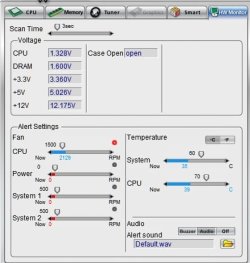
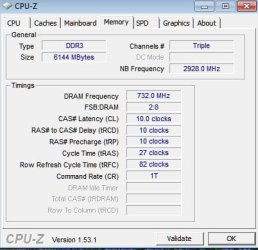
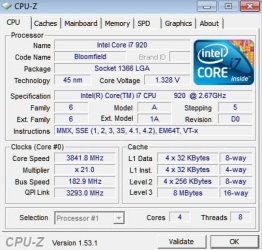
All the dram stuff is on auto. Pushing the ram to 1466MHz, was a help. There timings are 10-10-10-25? Got the cpu to 3.85MHz. I was using the auto volt settings. Now I have the cpu at 1.35v fixed, lowered cpu temp a little. Auto had it at 1.375v. Changed uncore multiplier to 16x from auto( ram at 8X), so NB went from 3660MHz to 2972MHz. Put ram volt at 1.6v fixed, from auto choice.
 

My Computer

Computer Manufacturer/Model Number
DIY #3, #2
OS
W7 Ulti/64, XP Pro/32
CPU
INTEL i7 920 DO, Core2 Duo 6400
Motherboard
GIGABYTE EX58 UD3R-SLI, EP45-UD3R
Memory
KINGSTON DDR3 1333MHz, CORSAIR DDR2 800MHz
Graphics Card(s)
EVGA GTX 260 x2, 8800 GTX
Sound Card
REALTEK HD onboard, ditto
Monitor(s) Displays
SONY 40" BRAVIA LCD
Screen Resolution
1360 X 768
Hard Drives
OCZ VERTEX/RAID0 -3, Vertex 30GB
PSU
COOLERMASTER 900W, ENERMAX 850W
Case
COOLERMASTER HAF 932 x2
Cooling
stock
Keyboard
MS
Mouse
MS
Internet Speed
ADSL 3MB/768KBs
Other Info
amateur enthusiast
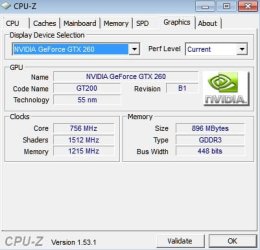
OK, The pics.
I guess from here, I'll start trying to remove things in bios from auto. Mobo definitely likes its auto choices, it also allows me to see what it considers a default value. Auto selects are definitely placing values at the same levels, as peoples online OC'ing strategies. Lowering cpu volts from 1.375 to 1.35 volts was worth 5C in temp difference.
 

Attachments

  • 38C.jpg
    38C.jpg
    27.7 KB · Views: 4
  • cpuz memory.jpg
    cpuz memory.jpg
    27 KB · Views: 2
  • cpuz graphics.jpg
    cpuz graphics.jpg
    24 KB · Views: 5
  • cpuz cpu.jpg
    cpuz cpu.jpg
    37.1 KB · Views: 4

My Computer

Computer Manufacturer/Model Number
DIY #3, #2
OS
W7 Ulti/64, XP Pro/32
CPU
INTEL i7 920 DO, Core2 Duo 6400
Motherboard
GIGABYTE EX58 UD3R-SLI, EP45-UD3R
Memory
KINGSTON DDR3 1333MHz, CORSAIR DDR2 800MHz
Graphics Card(s)
EVGA GTX 260 x2, 8800 GTX
Sound Card
REALTEK HD onboard, ditto
Monitor(s) Displays
SONY 40" BRAVIA LCD
Screen Resolution
1360 X 768
Hard Drives
OCZ VERTEX/RAID0 -3, Vertex 30GB
PSU
COOLERMASTER 900W, ENERMAX 850W
Case
COOLERMASTER HAF 932 x2
Cooling
stock
Keyboard
MS
Mouse
MS
Internet Speed
ADSL 3MB/768KBs
Other Info
amateur enthusiast
I guess from here, I'll start trying to remove things in bios from auto. Mobo definitely likes its auto choices, it also allows me to see what it considers a default value.

Generally, getting as much voltage settings off auto is a good start.

Depending on board/bios - some default voltage settings err on the side of high for stock and some even push them into unsafe territories when OC'ing some values.


Auto selects are definitely placing values at the same levels, as peoples online OC'ing strategies. Lowering cpu volts from 1.375 to 1.35 volts was worth 5C in temp difference.

So far you're on the right track. If you have a good chip, you can probably get away with an even lower vcore. (unlike my DO which needs CO volts :rolleyes:)


Once you are satisfied with CPU OC, then you can start looking at fine tuning some of those those timings to see if you can tighten them back up a little if possible.

ie 10-9-9-24 etc

If it's currently stable @ 3.85ghz - then you've done well so far.


Have you done any stress testing yet?

CPU:

LinX 0.6.4

(Best just copying the files to a folder instead of installing. It has a weird big where it sometimes fails to start when 'installed' )

IBT 2.4

20 runs recommended for both

(Both of those are essentially the same, but with different GUI's and will test all 8 cores if you have Hyper Threading enabled - crashes, freezes etc are usually caused by insufficient vcore.)

CPU + RAM:

Prime 95 x64

(Tortue test > Blend - enable 'round off checking' under Advanced)

8 -24hr recommended


RAM:

Memtest86+

8 pass minimum recommended unless errors appear straight away.


No single test is a guarantee of stability, but they give a good indication of where to look for your next adjustment.

Personally I start with either LinX or IBT because they are quicker, then go for P95 once they pass either of those two.


Good luck :)
 

My Computer

Computer type
PC/Desktop
Computer Manufacturer/Model Number
Systems by SmartEyeball
OS
8 Pro x64
CPU
i7 3770K 4.6GHz
Motherboard
ASUS P8Z77 WS
Memory
16GB G.Skill Trident X 2666mhz
Graphics Card(s)
x2 EVGA 780 Ti Superclocked SLI
Sound Card
SB X-FI Surround 5.1 PRO USB / ATH-AD900 Headphones
Monitor(s) Displays
x3 Dell U2410 / 58" Samsung
Screen Resolution
5760*1200/ 1920*1200
Hard Drives
2x Intel 520 240GB (RAID 0) * 2x WD Caviar Blacks 2TB (RAID 0) * 2TB WD Caviar Black * Sony Optirac DVD
PSU
Silverstone Strider Evolution 1200W
Case
Thermaltake Level 10 GT Snow Edition
Cooling
Noctua NH-D14
Keyboard
Topre Realforce // Ducky Shine MX Black // Filco Ninja TKL
Mouse
Thermaltake Theron (Highly Recommended) + Razer Imperator
Antivirus
MSE
Browser
IE, FF, WaterFox
Other Info
GT Extreme V2 Sim Racing Cockpit + 40" LCD and K/B Mouse stand ▼
Fanatec CSR Elite Wheel + Clubsport V1 Pedals + CSR shifter/7G-H ▼Saitek X52 Pro ▼ TrackIR 5 Pro
Buttkicker v2 Seat Rumbler with Dedicated 5.1 and Sub Woofer attached to frame ▼
=
Bloody Big Grin
Back
Top