ODBC Setup Problem

anorita

New member
Local time
11:46 PM
Messages
4
I have Win 7 Ultimate 64 bit. I have the following problem..
when I try to install an ODBC connection (*mdb),
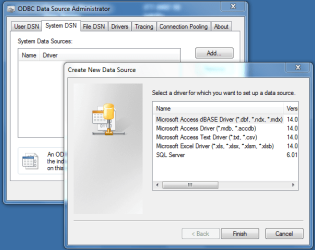
Data sources ODBC > SYSTEM DSN > ADD > (here only sql server is listd, not .mdb) and also
I get the following fault message:
"The Microsoft Access Driver (.mdb) ODBC driver could not be found. Please reinstall the driver". i have ms access 2003.
I need this for database connectivity with webpages. i need to solve this issue urgently...
 

My Computer My Computer

Computer Manufacturer/Model Number
HP probook 4520s
OS
windows 7 ultimate 64bit
please anyone help me ...
 

My Computer My Computer

Computer Manufacturer/Model Number
HP probook 4520s
OS
windows 7 ultimate 64bit

My Computer My Computer

Computer type
PC/Desktop
Computer Manufacturer/Model Number
Dell OP7010
OS
Windows 7 Enterprise (x64); Windows Server 2008 R2 (x64)
Memory
16GB
Monitor(s) Displays
4 Dell 24" LCD
Screen Resolution
1280x1024
Keyboard
Dell
Mouse
Dell Optical
Internet Speed
40meg
I download the file AccessDatabaseEngine.exe. The installation was successfull, but the problem is still there. the instructions to use this file are : ;; can u guide me what to do next?

To use this download:
1.If you are the user of an application, consult your application documentation for details on how to use the appropriate driver.
2.If you are an application developer using OLEDB, set the Provider argument of the ConnectionString property to “Microsoft.ACE.OLEDB.12.0”
◦If you are connecting to Microsoft Office Excel data, add “Excel 14.0” to the Extended Properties of the OLEDB connection string.
3.If you are application developer using ODBC to connect to Microsoft Office Access data, set the Connection String to “Driver={Microsoft Access Driver (*.mdb, *.accdb)};DBQ=path to mdb/accdb file”
4.If you are application developer using ODBC to connect to Microsoft Office Excel data, set the Connection String to “Driver={Microsoft Excel Driver (*.xls, *.xlsx, *.xlsm, *.xlsb)};DBQ=path to xls/xlsx/xlsm/xlsb file”
 

My Computer My Computer

Computer Manufacturer/Model Number
HP probook 4520s
OS
windows 7 ultimate 64bit
Shouldn't you have installed the "AccessDatabaseEngine_X64.exe" version?? I thought you were on 64bit??

Edit: Maybe that is for Office 64bit?? I am Unsure?
 

My Computer My Computer

Computer type
PC/Desktop
Computer Manufacturer/Model Number
Dell OP7010
OS
Windows 7 Enterprise (x64); Windows Server 2008 R2 (x64)
Memory
16GB
Monitor(s) Displays
4 Dell 24" LCD
Screen Resolution
1280x1024
Keyboard
Dell
Mouse
Dell Optical
Internet Speed
40meg
yes i tried to install "AccessDatabaseEngine_X64.exe" version but error came that cannot install becoz office application is in 32 bit..
 

My Computer My Computer

Computer Manufacturer/Model Number
HP probook 4520s
OS
windows 7 ultimate 64bit
yes i tried to install "AccessDatabaseEngine_X64.exe" version but error came that cannot install becoz office application is in 32 bit..

I am not sure what to do from here. Let me see if I can get someone that knows more about this than me to help. -WS
 

My Computer My Computer

Computer type
PC/Desktop
Computer Manufacturer/Model Number
Dell OP7010
OS
Windows 7 Enterprise (x64); Windows Server 2008 R2 (x64)
Memory
16GB
Monitor(s) Displays
4 Dell 24" LCD
Screen Resolution
1280x1024
Keyboard
Dell
Mouse
Dell Optical
Internet Speed
40meg

My Computer My Computer

Computer type
PC/Desktop
Computer Manufacturer/Model Number
Packard Bell
OS
Windows 7 Home Premium 64bit
CPU
Intel(R) Core(TM) i3-2120 CPU @ 3.30GHz
Motherboard
Packard Bell IPISB-AG
Memory
3.00 GB
Graphics Card(s)
(1) Intel(R) HD Graphics (2) VNC Mirror Driver
Sound Card
Realtek High Definition Audio
Monitor(s) Displays
AIO LCD
Screen Resolution
1920 x 1080
Hard Drives
WDC WD10EADX-22TDHB0 ATA Device
Fixed hard disk media
4 partitions
931.51 GB
Keyboard
Wireless
Mouse
Wireless
Antivirus
Microsoft Security Essentials
Browser
IE; Firefox
Other Info
Also:
Samsung N220 Plus Netbook - Windows 7 Home
HP laptop
iPad 5
Ok here is something strange. On my Windows 7 Ultimate machine(s) this acts as the OP states. However on my Windows 7 Enterprise machines the options to add Access connectors are there?? I have no idea why this is?
 

Attachments

  • ODBC.png
    ODBC.png
    28.1 KB · Views: 113

My Computer My Computer

Computer type
PC/Desktop
Computer Manufacturer/Model Number
Dell OP7010
OS
Windows 7 Enterprise (x64); Windows Server 2008 R2 (x64)
Memory
16GB
Monitor(s) Displays
4 Dell 24" LCD
Screen Resolution
1280x1024
Keyboard
Dell
Mouse
Dell Optical
Internet Speed
40meg
Problem while connecting MS Access Database with OLEDB

Hi i am facing the same problem as everybody is facing , my sir says dat its because of the OS those who r having Licensed version of windows 7 ultimate they get all the function of ms acces to connect n those who r using the pirated version have nly the SQL function so plz help me out smebody with this stuff plz gimme the link to install the driver for OLEDB ms access windows 7 ultimate 64 bit
 

My Computer My Computer

OS
Windows 7 Ultimate 64 bit
Back
Top