
Odd behavior from 14" HP laptop

teckneeculler

Member
Power User
VIP
Local time
3:11 AM
Messages
512
This HP14-D054TU (Windows 8 switched to W7) laptop has only been used occasionally. A couple of years ago it finally refused to boot. However, after some recent fiddling I got it to start up, but it displays an odd message on the black screen:

Boot Device Not Found
Please install an operating system on your hard disk
Hard Disk (3F0)
F2 System Diagnostics
For more information, please visit: www.hp.com/go/techcenter/startup


I've tried every startup key combo I can think of but it doesn't seem like there's a BIOS there now, just this one message screen which comes up every time almost instantly, but doesn't go any further.
I tried loading a W7 install CD. The tray opens and closes ok but it doesn't load the system.
I guess it's possible that the 3v BIOS battery might be munted, but if it is, what's powering the screen message?
Advice would be appreciated.
 

My Computer

Computer type
PC/Desktop
Computer Manufacturer/Model Number
My build
OS
Win7 Ultimate SP1
CPU
Intel Core i5 9400 Coffee Lake 14nm
Motherboard
Asus Prime H310M-E R2.0 (LGA1151)
Memory
16G DDR4
Graphics Card(s)
NVidia GeForce GTX 960
Sound Card
Realtek High Definition Audio (mobo)
Monitor(s) Displays
Asus PA248 24" 16:10 format
Screen Resolution
1920x1200@59Hz
Hard Drives
1863GB Seagate ST2000DM
3726GB Seagate ST4000DM
1863GB Seagate ST2000DM
6TB Seagate
465GB NVMe Samsung SSD 970
PSU
750G2
Case
Tower
Cooling
Standard
Keyboard
USB
Mouse
USB
Internet Speed
920Mbs/480Mbs
Antivirus
Malwarebytes
Browser
Firefox
It sounds like it can't find the hard drive. I suspect either a problem with the drive or a problem with the mobo. What was it doing before? Have you tried scanning it with a bootable disk from the drive's manufacturer's website? Have you tried a bootable version of linux? Have you tried another hard drive? Have you tried that drive in another computer? Have you tried checking the cables?
 

My Computers

System One System Two

Its possible the bios is set wrong to uefi, or legacy if your booting legacy and the bios is set to uefi it wont find a boot drive
 

My Computer

Computer type
PC/Desktop
OS
win 8 32 bit
townsbg: The machine was running OK back when, with W7 on a 3.5" SATA drive. And yes, it's possible the drive has gone bad, and if so, no BFD. But it seems odd that I can't access the BIOS. Like, there's no boot screen with a maker's logo, which is usually when you get the opportunity to hit DEL or F10 etc etc. Press the power button and up comes the message I've described. Nothing else. No key presses get any response.
Yes, I've tried several bootable rescue discs and they spin up but don't go any further.
samuria: Yes, it's possible the BIOS is corrupt, but, as I said, I'm not getting an option to enter the BIOS. All I get is the boot screen I've noted. Seems to me I need to get the BIOS sorted before anything else?
 

My Computer

Computer type
PC/Desktop
Computer Manufacturer/Model Number
My build
OS
Win7 Ultimate SP1
CPU
Intel Core i5 9400 Coffee Lake 14nm
Motherboard
Asus Prime H310M-E R2.0 (LGA1151)
Memory
16G DDR4
Graphics Card(s)
NVidia GeForce GTX 960
Sound Card
Realtek High Definition Audio (mobo)
Monitor(s) Displays
Asus PA248 24" 16:10 format
Screen Resolution
1920x1200@59Hz
Hard Drives
1863GB Seagate ST2000DM
3726GB Seagate ST4000DM
1863GB Seagate ST2000DM
6TB Seagate
465GB NVMe Samsung SSD 970
PSU
750G2
Case
Tower
Cooling
Standard
Keyboard
USB
Mouse
USB
Internet Speed
920Mbs/480Mbs
Antivirus
Malwarebytes
Browser
Firefox

My Computers

System One System Two

You might need to do a bios reset.
Precisely. But how? The machine doesn't respond to any of the usual BIOS key prompts, like F2, F10, DEL, ESC etc etc.
 

My Computer

Computer type
PC/Desktop
Computer Manufacturer/Model Number
My build
OS
Win7 Ultimate SP1
CPU
Intel Core i5 9400 Coffee Lake 14nm
Motherboard
Asus Prime H310M-E R2.0 (LGA1151)
Memory
16G DDR4
Graphics Card(s)
NVidia GeForce GTX 960
Sound Card
Realtek High Definition Audio (mobo)
Monitor(s) Displays
Asus PA248 24" 16:10 format
Screen Resolution
1920x1200@59Hz
Hard Drives
1863GB Seagate ST2000DM
3726GB Seagate ST4000DM
1863GB Seagate ST2000DM
6TB Seagate
465GB NVMe Samsung SSD 970
PSU
750G2
Case
Tower
Cooling
Standard
Keyboard
USB
Mouse
USB
Internet Speed
920Mbs/480Mbs
Antivirus
Malwarebytes
Browser
Firefox
I don't know if you followed the steps in that link. It has methods for possibly restoring the bios. IMO something went terribly wrong with your computer (which is why I asked about that previous issue you eluded to) and now it's bricked. I don't know of anything else that you can do. The bios (not the menu) is so important that if it messes up depending upon the level of damage a computer might not be recoverable. Someone else may know of something that you can do but I don't. It isn't the same as replacing windows. The bios is the system that allows communication among the hardware between the cpu, hard drive, graphics card, and peripherals. It is bad if that goes bad, far worse than losing windows. That's why I don't like updating it. Did you try at least removing the battery for a few minutes? That might reset the bios to default settings. Try this link instead of the previous one. It's designed for hp laptops. https://support.hp.com/us-en/document/ish_3932413-2337994-16 If you follow it and nothing works as far as I know your system is gone.

Pertaining your question about the battery it only allows the computer to remember customized bios settings and the system time. If you lose that the settings revert to the default and the computer resets the time each time you turn it off. It doesn't mess up the system.
 

My Computers

System One System Two

Thanks for the tips, the HP link has some good info. I'll try their BIOS recovery method.
 

My Computer

Computer type
PC/Desktop
Computer Manufacturer/Model Number
My build
OS
Win7 Ultimate SP1
CPU
Intel Core i5 9400 Coffee Lake 14nm
Motherboard
Asus Prime H310M-E R2.0 (LGA1151)
Memory
16G DDR4
Graphics Card(s)
NVidia GeForce GTX 960
Sound Card
Realtek High Definition Audio (mobo)
Monitor(s) Displays
Asus PA248 24" 16:10 format
Screen Resolution
1920x1200@59Hz
Hard Drives
1863GB Seagate ST2000DM
3726GB Seagate ST4000DM
1863GB Seagate ST2000DM
6TB Seagate
465GB NVMe Samsung SSD 970
PSU
750G2
Case
Tower
Cooling
Standard
Keyboard
USB
Mouse
USB
Internet Speed
920Mbs/480Mbs
Antivirus
Malwarebytes
Browser
Firefox
according to the link it is Manual BIOS recovery (Windows + b) unlees it has sure start, whatever that is
 

My Computers

System One System Two

  • Computer type
    PC/Desktop
    OS
    7 X64
    CPU
    i5 8400
    Motherboard
    gigabyte b365m ds3h
    Memory
    2x8gb 3200mhz
    Hard Drives
    various
    PSU
    pure power 11 400w cm
    Case
    Coolermaster
    Cooling
    cryorig m9i
  • Computer type
    PC/Desktop
    OS
    7x64
    CPU
    g5400
    Motherboard
    ga b365m ds3h
    Memory
    8gb ddr4 2400
    PSU
    xfx pro 450w
according to the link it is Manual BIOS recovery Windows + b) unlees it has sure start, whatever that is
I tried W+b but no joy, and Sure-Start doesn't appear to one of the laptop's features. Otherwise it would have started ;). No, I'll just have to dismantle the damn thing. Maybe there's a dead cockroach in there.
 

My Computer

Computer type
PC/Desktop
Computer Manufacturer/Model Number
My build
OS
Win7 Ultimate SP1
CPU
Intel Core i5 9400 Coffee Lake 14nm
Motherboard
Asus Prime H310M-E R2.0 (LGA1151)
Memory
16G DDR4
Graphics Card(s)
NVidia GeForce GTX 960
Sound Card
Realtek High Definition Audio (mobo)
Monitor(s) Displays
Asus PA248 24" 16:10 format
Screen Resolution
1920x1200@59Hz
Hard Drives
1863GB Seagate ST2000DM
3726GB Seagate ST4000DM
1863GB Seagate ST2000DM
6TB Seagate
465GB NVMe Samsung SSD 970
PSU
750G2
Case
Tower
Cooling
Standard
Keyboard
USB
Mouse
USB
Internet Speed
920Mbs/480Mbs
Antivirus
Malwarebytes
Browser
Firefox
What I think the article is trying to say:

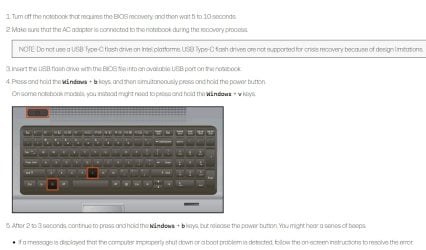
w+b looks for the bios file on an oem partition.

If you dont have the oem partition, it looks for the bios file on a usb stick. The link contains instructions about how to create the usb stick.


HP PCs with the HP Sure Start security feature do not support BIOS recovery using the manual, 4-in-1 USB key, or USB recovery drive methods.


That implies HP PCs without the HP Sure Start security feature do support BIOS recovery using the manual, 4-in-1 USB key, or USB recovery drive methods.

https://www.youtube.com/watch?v=t3S3KgcT-Ao&t=6s


hp-usb-biosrecovery.jpg

- - - Updated - - -

https://youtu.be/KT4GQsgPXyA?t=334
 

My Computers

System One System Two

  • Computer type
    PC/Desktop
    OS
    7 X64
    CPU
    i5 8400
    Motherboard
    gigabyte b365m ds3h
    Memory
    2x8gb 3200mhz
    Hard Drives
    various
    PSU
    pure power 11 400w cm
    Case
    Coolermaster
    Cooling
    cryorig m9i
  • Computer type
    PC/Desktop
    OS
    7x64
    CPU
    g5400
    Motherboard
    ga b365m ds3h
    Memory
    8gb ddr4 2400
    PSU
    xfx pro 450w
SIW2: Thanks, I appreciate you taking the time to explain, and I now understand a little more.
But I'm still puzzled. Like, I'll be very surprised if I pull the drive and find there's no OS there, because I reinstalled W7 just before I last used the machine and it was working OK.
But if it does need an operating system to be installed, how to do that with the drive out of the machine? I mean, I've already tried booting from a W7 install disc and nothing happened.
Now, I can easily prepare a BIOS file on a USB stick, but won't the BIOS need to be told that it should boot from a USB? Or is that implicit in the W+b command?
Anyway, I'll try it and report back.
Cheers.
 

My Computer

Computer type
PC/Desktop
Computer Manufacturer/Model Number
My build
OS
Win7 Ultimate SP1
CPU
Intel Core i5 9400 Coffee Lake 14nm
Motherboard
Asus Prime H310M-E R2.0 (LGA1151)
Memory
16G DDR4
Graphics Card(s)
NVidia GeForce GTX 960
Sound Card
Realtek High Definition Audio (mobo)
Monitor(s) Displays
Asus PA248 24" 16:10 format
Screen Resolution
1920x1200@59Hz
Hard Drives
1863GB Seagate ST2000DM
3726GB Seagate ST4000DM
1863GB Seagate ST2000DM
6TB Seagate
465GB NVMe Samsung SSD 970
PSU
750G2
Case
Tower
Cooling
Standard
Keyboard
USB
Mouse
USB
Internet Speed
920Mbs/480Mbs
Antivirus
Malwarebytes
Browser
Firefox
That's a different story if you don't have an OS installed. That would explain the error. Make sure that you have an OS installed and if the install disk isn't recognizing the drive check to make sure that one is installed and that it is correctly connected. If you have a hard drive correctly installed and you checked the cables then we need to troubleshoot the drive.
 

My Computers

System One System Two

Back
Top