Odd entry in Programs and Features

Vincenzo

New member
Power User
Local time
5:25 PM
Messages
218
In the list of installed programs, I see "CVE-2010-3971" shown twice, with no publisher listed for it.

When I do a search for that term I find that it refers to a vulnerablility that was patched in January 2011. I've not previously seen an entry that looked like this, with no other identifying information.

I can't even find any info on the Microsoft patch that was released for this vulnerabilty, apparently it was superceded by another update, but no info about that is given. MS11-003: Cumulative security update for Internet Explorer


Does anyone have any information about what this might be?

Thanks
 

My Computer

OS
Windows 7 Professional x64
I do not think this entry is harmful. Do not worry about it. Looks safe to me.
 

My Computer

Computer Manufacturer/Model Number
Samsung NP530U4B-S02IN
OS
Windows® 8 Pro (64-bit)
CPU
Intel® Core™ i5 Processor 2467M (1.60GHz, 3MB L3 Cache)
Motherboard
Samsung Electronics
Memory
6GB DDR3 System Memory at 1,333MHz (on BD 4GB + 2GB x 1)
Graphics Card(s)
AMD Radeon™ HD7550M 1GB DDR3 (Ext. Graphic)
Sound Card
Realtek High Definition Audio
Monitor(s) Displays
35.56cm (14.0) SuperBright 300nit HD LED Display
Screen Resolution
1366x768
Hard Drives
1TB S-ATA II Hard Drive (5400RPM) with ExpressCache 16GB SSD
Internet Speed
sucks
Antivirus
Microsoft Security Essentials
Browser
Google Chrome (Sync enabled)
It would be interesting to see what these two entries are actually referring to on your computer, and if they're still valid uninstall entries or just leftover remnants.

All entries listed in Programs and Features have a corresponding registry key containing all the setup/uninstall information under HKEY_LOCAL_MACHINE\SOFTWARE\Microsoft\Windows\CurrentVersion\Uninstall. If you feel comfortable using regedit, you can try to find the CVE entries there.

As there are a LOT of subkeys, it may be easier to navigate to the Uninstall key itself, then simply do a text search in regedit for CVE and see what you end up with (be sure any results found are still within the Uninstall key and not somewhere else in the registry).
 

My Computer

Computer type
PC/Desktop
Computer Manufacturer/Model Number
Custom-built
OS
Windows 7 Professional SP1 32-bit
CPU
Intel Core 2 Duo E6600 2.4GHz
Motherboard
Asus PL5D2
Memory
4GB DDR2-667 (4x1GB in dual-channel config)
Graphics Card(s)
nVidia GeForce 9800 GT
Sound Card
Creative X-Fi XtremeMusic
Monitor(s) Displays
Acer P236H
Screen Resolution
1920x1200 (DVI)
Hard Drives
OCZ SSD Vertex Plus 60GB SATA (Firmware 3.55), 64MB cache
Hitachi HD321KJ SATA, 320GB, 7200rpm, 16MB cache
PSU
Antec TruePower 2.0
Case
Cooler Master Centurion
Cooling
Too many fans
Keyboard
Standard
Mouse
Microsoft wireless optical mouse
Internet Speed
AT&T U-verse (18mbit/sec)
Antivirus
Microsoft Security Essentials
Browser
Firefox
Other Info
Other devices:
Compaq CQ-60 laptop
Google Nexus 7 (2012) tablet
Nvidia SHIELD tablet (US/LTE)
Hardkernel ODROID-XU single-board computer (Samsung Exynos 5420)
Thanks for the suggestions.

I ran a MBAM scan, it came up clean.

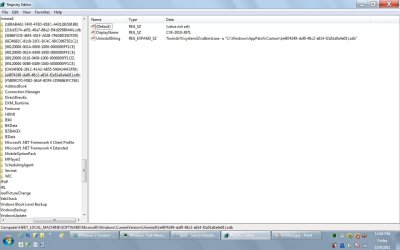
Here is a shot of the Uninstall entry in regedit:

Untitled2.jpg

BTW that's a great tip for looking up uninstall entries
Thanks Corazon
 

My Computer

OS
Windows 7 Professional x64
  • Like
Reactions: JMH

My Computer

Computer Manufacturer/Model Number
Hewlett packard/p6512uk
OS
Microsoft Windows 7 Home Premium 64-bit 7600
CPU
IIx4 amd athelon 635 processor
Motherboard
FOXCONN 2AA9
Memory
2x2gb
Graphics Card(s)
ati radeon HD 5450
Sound Card
(1) Realtek High Definition Audio (2) AMD High Definition
Monitor(s) Displays
samsung lcd tv 32"
Screen Resolution
1360x 768
Hard Drives
(1) WDC WD10 01FAES-60Z2A0 SATA Disk Device (2) Maxtor OneTouch USB Device (3) ST310003 33AS USB Device (4) WD My Book 1111 USB Device
PSU
?
Cooling
air!
Keyboard
wireless hp
Mouse
wireless Hp,optical
Internet Speed
1.10mb/s
Antivirus
MSE
Browser
Firefox
Yes, thanks. That is the blog entry that refers to the vulnerability that was patched by patched by MS11-003: Cumulative security update for Internet Explorer
that I referred to in my first post.
My concern is about why it is presenting itself in this odd manner in Programs and Features/installed programs, with no details or info about it. I am wondering if it is incompletely installed.
I have tried uninstalling it with the intention of reinstalling it, but then it does not come up again as needing to be installed when I then run Windows Update.

Thanks
 

My Computer

OS
Windows 7 Professional x64
Back
Top