
Odd Files Left Over After SP1 - Can't Delete (Long Paths)

Status
Not open for further replies.

war59312

New member
Member
Local time
4:24 PM
Messages
12
Location
SC
Hi,

After installing installing SP1, a folder on my C drive is left over.

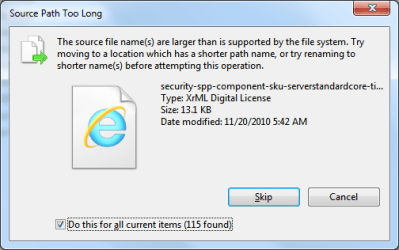
I am unable to delete it since the path is too long, see attachment.

Also, see attached txt file for directory and file info.

I can't rename the files either, rename does not even show up on context menu and F2 does nothing.

So safe to delete these files some how? I get the same error if I try and move it like it recommends in the message. I tried moving just a single file to C drive but same error.

Not a big deal since it's only 2 484 269 bytes or 2.36918354 megabytes worth of files.

Take Care,

Will
 

Attachments
  • oddFilesAfterSP1.txt
    oddFilesAfterSP1.txt
    42.3 KB · Views: 18
  • cantDeleteFilesPathTooLong.png
    cantDeleteFilesPathTooLong.png
    14.1 KB · Views: 40

My Computer My Computer

OS
Windows 7 Ultimate x64 SP1
I'm not sure if it will work with the file you're having problems with, but you can try Windows 7 Disk Cleanup.
There is an option for Service Pack Backup Files.
 

My Computer My Computer

Computer type
PC/Desktop
Computer Manufacturer/Model Number
Custom Build
OS
Windows 7 Home Premium 64 bit
CPU
Intel Core i7-4790
Motherboard
GA-Z87X-D3H
Memory
G.SKILL 8GB (2 x 4GB) DDR3 F3-10666CL9D-8GBNT
Graphics Card(s)
AMD Radeon R7 250
Sound Card
Realtek ALC892
Monitor(s) Displays
Samsung UN32EH5000, Dell 1703FPT
Screen Resolution
1920 x 1080, 1280 x 1024
Hard Drives
WD5003AZEX
WD10EZEX
Samsung HD103SJ
Samsung 128 GB 840 PRO
PSU
SeaSonic M12II SS-500GM
Case
Fractal Design Define R4
Cooling
Zalman CNPS9900ALED
Keyboard
Logitech K800
Mouse
Logitech M705
Internet Speed
16 Mbps
Antivirus
Avast
Browser
Firefox
Other Info
Bose Companion 2 Multimedia Speakers
OK I clicked the "Clean Up System Files" button and choose to delete "Service Pack Backup Files", but folder with files still there.

Nice try. ;)
 

My Computer My Computer

OS
Windows 7 Ultimate x64 SP1

My Computer My Computer

Computer type
PC/Desktop
Computer Manufacturer/Model Number
Custom Built
OS
Windows 10 Pro x64, Windows 8.1 Pro x64, Windows 7 Ultimate x64 SP1,
CPU
INTEL i9-7920X LGA 2066
Motherboard
Gigabyte X299-WU8 F3
Memory
64 GB (4 X 16 GB) G-Skill V Series DDR4 3200 Quad Channel
Graphics Card(s)
EVGA GTX 1060 SC 3 GB
Sound Card
Realtek Onboard ALC1220
Monitor(s) Displays
2 x Samsung S27E310
Screen Resolution
1920x1080
Hard Drives
Samsung 2 x 970 EVO Plus 500 GB NVMe
1 x 6TB WD 6003FZBX SATA
1 x 6TB WD 60EFRX SATA
12 x 3TB WD 30EFRX SATA
PSU
Seasonic X-1050
Case
Thermaltake Armor+
Cooling
Corsair H80i V2 Liquid AOI Cooler
Keyboard
Logitech G510s
Mouse
Logitech MX Master 2S
Internet Speed
200 Mb/s
Antivirus
ESET NOD32 13.1
Browser
EDGE (Dev, Canary, Beta), Chrome
Other Info
ASUS RT-AC68U router
Malwarebytes 4.0.4
Yes that's what I did and files still remain.

Microsoft Windows [Version 6.1.7601]
Copyright (c) 2009 Microsoft Corporation. All rights reserved.

C:\Windows\system32>dism /online /cleanup-image /spsuperseded /hidesp

Deployment Image Servicing and Management tool
Version: 6.1.7600.16385

Image Version: 6.1.7600.16385

Service Pack Cleanup can't proceed: No service pack backup files were found.
The operation completed successfully.
 

My Computer My Computer

OS
Windows 7 Ultimate x64 SP1
Set the attributes for the files from a DOS prompt:

attrib -h -r -s *.*

Then:

Del /f /s /q *.*

That's what I had to do.

y0himba said:
C:\$WINDOWS.~Q\DATA\Windows\ServiceProfiles\NetworkService\AppData\Local\Microsoft\Media Player\Art Cache\LocalMLS"

Why? It has 123,451 Files, 2 Folders, all are +H +R +S, and Windows Cleanup is losing it's mind trying to figure this out. Off to the good old DOS Prompt! "Attrib -h -r -s *.*" took 23 minutes, then "del *.* /s /f /q" took 17 minutes. Disk cleanup then took 7 minutes.

Everything is running fine and I now have SP1 installed.

Let's see what happens when SP2 comes out....
 

My Computer My Computer

Computer type
PC/Desktop
Computer Manufacturer/Model Number
Alienware Aurora-R4
OS
Windows 7 Professional x64
CPU
Intel(R) Core(TM) i7-3820 CPU, 4 Cores, 8 Logical Cores
Motherboard
Alienware
Memory
32 GB DDR3 1600
Graphics Card(s)
ATI Radeon HD 8950 3GB vDDR5 & ATI Radeon HD 7950 3GB vDDR5
Sound Card
Realtek 7.1 Audio
Monitor(s) Displays
Dell SP2309W 23 inch
Screen Resolution
2048x1152
Hard Drives
7.3 TB in 4 drives (Raid 0), 2TB NAS backup drive.
PSU
875w
Case
ALX Chasis with active venting
Cooling
Liquid cooled with active venting and fans.
Keyboard
Alienware TactX
Mouse
Alienware TactX
Internet Speed
15mb Cable
Antivirus
Malwarebytes
Browser
Pale Moon (Optimized Mozilla Based)
Other Info
http://www.y0himba.net
Tried that too.

The path C:\b64127460b9ecf09f24de454232df5\6b90cab9fb68e9c153b6d1e7\a5f2639b8fb8bb11d4486c2c1149\amd64_microsoft-windows-s..-serverstandardcore_31bf3856ad364e35_6.1.7601.17514_none_1b307e702c1c2b57\security-spp-component-sku-serverstandardcore-timebasedeval-ul-oob.xrm-ms is too long.

I'm surprised malware is not using this "trick" yet. ;)
 

My Computer My Computer

OS
Windows 7 Ultimate x64 SP1
you have tune up utilities? its have function to cleanup old windows backup, i delete my sp1 backup but it will take a long time about 1-2 hours..
 

My Computer My Computer

Computer Manufacturer/Model Number
Dell
OS
Windows 7 x86
Try renaming those top four folders to A B C and D to shorten the path? So instead it's C:\A\B\C\D\security-spp-component-sku-serverstandardcore-timebasedeval-ul-oob.xrm-ms
That's what I'd try.
 

My Computer My Computer

OS
7x64 SP1
CPU
Intel 2600K
Motherboard
Intel DZ77GA-70K
Memory
8GB Samsung
Graphics Card(s)
MSI 670
Sound Card
HT Omega Striker 7.1
Monitor(s) Displays
Dell U2412M
Screen Resolution
1920x1200
Hard Drives
2x 3TB WD Green
1x 4TB Hitachi
1x Intel 330 Series 180GB SSD
PSU
Corsair HX850
OK I used Unlocker @ Download Unlocker 1.9.0 - FileHippo.com and renamed the top folder to "1" and then I could delete the "1" folder like normal. :)

Problem solved, well hope it was safe to delete. haha
 

My Computer My Computer

OS
Windows 7 Ultimate x64 SP1
Nice to know Unlocker worked for you. It's helped out here in the past.

Avoid TuneUp Utilities however as it and all other tweaking suites cause problems.
 
For future reference, you could use the SUBST command to assign a drive letter to a long path. This will shorten the path, allowing you to run the commands.

Open a command prompt. Run the SUBST command -- put the actual path, rather than c:\aaaaaaaaaaa.... -- but leave out the actual folder name that you want to delete, so that the path will get you to that folder but won't include it.

SUBST x: c:\aaaaaaaaaaaaaaaaaaaaaaaaaaaaaaa\bbbbbbbbbbbbbbbbbbbbbbbbbb\cccccccccccccccccccccccc\etc

Now, change to that folder by typing X: <ENTER>

Type DIR <ENTER>. You should see the folder listed that you want to delete. Delete it.

The thing that makes this work is that your path will be three characters long, plus the name length of the folder you want to delete, plus one backslash (""), well within the maximum allowable path length.
 

My Computer My Computer

Computer type
PC/Desktop
Computer Manufacturer/Model Number
Dell
OS
Linux Mint 18.2 xfce 64-bit (VMWare host) / Windows 8.1 Pro 32-bit (VMWare guest)
CPU
Haswell
Memory
4 GB
Monitor(s) Displays
Acer 23"
Screen Resolution
1920 x 1080
Hard Drives
Two hard drives, 1TB each: One for Linux, one for my data.
Keyboard
IBM Model M
Antivirus
Sophos (Linux), Trend Micro (Windows)
Browser
Firefox, Opera
Other Info
I use Samba to share my data drive with the other computers at my house and with my guest session in VMWare Workstation Player.
Status
Not open for further replies.
Back
Top