Odd Fonts in Google with IE, Chrome and Firefox?

gabriolinari

New member
Member
VIP
Local time
5:02 PM
Messages
144
hey there,

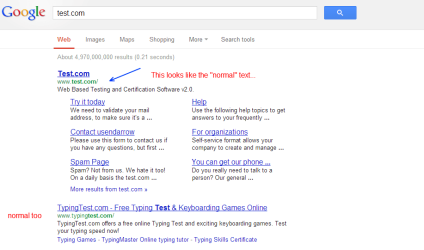
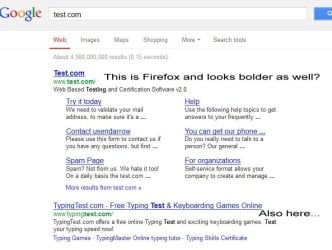
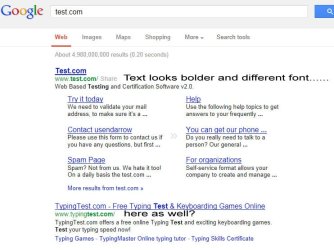
just recently i did some of the "recommended" updates on my win7 laptop and just yesterday ive noticed that google fonts look a bit different, in particular the green part of the SERP seems to have another font and looks more "bolder"....i am not sure if it's google testing out new things which sometimes happens or if i updated something in win7 (latest platform update?) and something changed, let's see some screenshots:

IE > bold (logged on)
FF > bold (not logged)
Chrome > normal (not logged)

the interesting thing is that yesterday Firefox was looking "normal" and today bolder again.....

all searches have been done in google UK and i am in the UK right now..

yeah, not a huge deal but well, just wondering what's going on!

Gabrio
 

Attachments
  • IE.jpg
    IE.jpg
    72.7 KB · Views: 9
  • Chrome.png
    Chrome.png
    19.5 KB · Views: 8
  • Firefox.jpg
    Firefox.jpg
    78.3 KB · Views: 9

My Computer My Computer

At a glance

Windows 7 Ultimate x64
Computer type
PC/Desktop
OS
Windows 7 Ultimate x64
Maybe Google is fanning this out at different times - I've seen it for a while now. Google is just showing you where the match is being made.

Firefox:
bold.png
 

My Computer My Computer

At a glance

W7 Pro SP1 64biti78GBIntel HD Graphics
Computer type
Laptop
Computer Manufacturer/Model Number
Employer provided Dell Latitude
OS
W7 Pro SP1 64bit
CPU
i7
Memory
8GB
Graphics Card(s)
Intel HD Graphics
Hard Drives
crappy SSD
Antivirus
Employer mandated Symantec Endpoint Protection
Browser
Pale Moon 64bit, IE11 64bit & Chrome 64bit
They all look normal to me. I am using Firefox 22
 

My Computer My Computer

At a glance

Win 10 Pro 64Intel Core i7 960 @3.20 GHz24.0 GB DDR3EVGA GTX 750Ti
Computer type
PC/Desktop
Computer Manufacturer/Model Number
Custom Build
OS
Win 10 Pro 64
CPU
Intel Core i7 960 @3.20 GHz
Motherboard
MSI MS7522
Memory
24.0 GB DDR3
Graphics Card(s)
EVGA GTX 750Ti
Monitor(s) Displays
LG E2341 23 Inch
Screen Resolution
1920x1080
Hard Drives
1TB Western Dgital 1002FAEX-00Y9A0
1TB Hitachi HDS721010CLA322
PSU
700 Watt
Case
Haf 912
Cooling
Fans
Keyboard
Logitech MK710
Mouse
Logitech M705
Internet Speed
Cable
Antivirus
AIS 2015 .10.0.2225
Browser
Firefox 49
Other Info
MalwareBytes Anti-Rootkit utility
Oh - I meant to also say that the angle at which I view the display on this laptop makes the bold text seem more obvious at times. Maybe that is why you saw it as "normal" one day and bold the next - or maybe you happen to be hitting different servers. Maybe this has not been deployed on every server in a given region.
 

My Computer My Computer

At a glance

W7 Pro SP1 64biti78GBIntel HD Graphics
Computer type
Laptop
Computer Manufacturer/Model Number
Employer provided Dell Latitude
OS
W7 Pro SP1 64bit
CPU
i7
Memory
8GB
Graphics Card(s)
Intel HD Graphics
Hard Drives
crappy SSD
Antivirus
Employer mandated Symantec Endpoint Protection
Browser
Pale Moon 64bit, IE11 64bit & Chrome 64bit
I believe it's the way each browser renders the text according to their own engine and H/W acceleration. They each use a different one. Chrome uses WebKit, Firefox uses Gecko, and IE uses Trident. Each ones does have some differences on my machines as well.
 

My Computer My Computer

At a glance

Windows 7 Ultimate
Computer type
Laptop
Computer Manufacturer/Model Number
Dell Inspiron
OS
Windows 7 Ultimate
Back
Top