Odd Lock Screen Problem

mpaschall417

New member
Local time
10:59 AM
Messages
5
I have an ASUS G60 laptop that came with Windows 7 Home Premium. I used Windows Anytime Upgrade to move it up to 7 Professional. Now when I resume from standby (or just from locking the machine) I have two locked screens... The first one asks that I press Ctrl+Alt+Del (expected and normal since I'm on a domain.) The second presents my user name and the word Locked. I have to hit enter again to actually type my password. This isn't a huge problem per se, but it is inconsistent with the other computers I use and is annoying.

Anyone else seen the same thing? Am I dealing with ASUS baggage, Home Premium baggage, or something I haven't yet thought of? I've been researching in Local Security Policy, Group Policy, the registry, SevenForums.com and other online sources and have found nothing! Any advice would be appreciated.
 

My Computer

Computer Manufacturer/Model Number
ASUS
OS
Windows 7
Welcome to SF!

You didn't really tell us what you want to do, but I assume you want to change it?

See this tutorial here for Ctl-Alt-Del.

Do you want to make it so that you do not need to type in the password at all? Go into Advanced Power Options, and you will find the option.

I apologize if this does not answer your question. I am sure we can figure it out, if we can get some more details.

~JK
 

My Computer

Computer Manufacturer/Model Number
Custom
OS
Windows 7 Professional x64
CPU
Intel i7 2600K OC'd @ 4620 MHz
Motherboard
Asus P8Z68-V Pro
Memory
16GB GSkill Sniper 2133 Mhz (4x4GB)
Graphics Card(s)
EVGA GeForce GTX 480 SuperClocked+
Sound Card
Realtek High Definition Audio
Monitor(s) Displays
2x Acer S273HLbmii 27"
Screen Resolution
2 x 1920x1080
Hard Drives
64GB Crucial M4 SSD

Storage: Hitachi 1TB 5400RPM, Samsung 1.5TB 5400RPM
PSU
Corsair HW Series 750w (modular)
Case
Cooler Master HAF 932 Advanced Blue Edition
Cooling
CM Hyper 212+ CPU cooler, 3x 230mm + 1x 140mm case fans
Keyboard
Logitech MK320 (wireless)
Mouse
Logitech MK320 (wireless)
Internet Speed
30 Mb/s : 2 Mb/s
Sorry, I wasn't that specific. I don't mind hitting Ctrl+Alt+Del, then typing my password. What I don't want is the screen in between that only makes me hit enter to proceed to the password screen. My other Win7 machines (installed fresh, not upgraded from Home Premium) don't do this and I want this one not to do it either.
 

My Computer

Computer Manufacturer/Model Number
ASUS
OS
Windows 7
Are you the only user on your machine?
 

My Computer

Computer Manufacturer/Model Number
Custom
OS
Windows 7 Professional x64
CPU
Intel i7 2600K OC'd @ 4620 MHz
Motherboard
Asus P8Z68-V Pro
Memory
16GB GSkill Sniper 2133 Mhz (4x4GB)
Graphics Card(s)
EVGA GeForce GTX 480 SuperClocked+
Sound Card
Realtek High Definition Audio
Monitor(s) Displays
2x Acer S273HLbmii 27"
Screen Resolution
2 x 1920x1080
Hard Drives
64GB Crucial M4 SSD

Storage: Hitachi 1TB 5400RPM, Samsung 1.5TB 5400RPM
PSU
Corsair HW Series 750w (modular)
Case
Cooler Master HAF 932 Advanced Blue Edition
Cooling
CM Hyper 212+ CPU cooler, 3x 230mm + 1x 140mm case fans
Keyboard
Logitech MK320 (wireless)
Mouse
Logitech MK320 (wireless)
Internet Speed
30 Mb/s : 2 Mb/s
I have other users (a local administrator user for one) but I am the only one logged on at the time this occurs. This is also the same situation on my other Win7 machines.
 

My Computer

Computer Manufacturer/Model Number
ASUS
OS
Windows 7
Who is the local Administrator?
 

My Computer

Computer type
PC/Desktop
Computer Manufacturer/Model Number
Bruce ... somewhere in his 40's
OS
Windows 7 Ultimate 32bit SP1
CPU
Intel(R) Core(TM)2 Quad CPU @ 2.40GHz, 2400 MHz
Motherboard
INTEL/D975XBX2
Memory
4 GB
Graphics Card(s)
ATI Radeon HD 2600 Pro
Monitor(s) Displays
Samsung SyncMaster 914v
Screen Resolution
1280 x 1024
Hard Drives
2/500GB each ... ST3500630AS ATA Device.
One is not connected
PSU
Rocketfish 700 W
Case
G.Skill Gigabyte Chassis
Keyboard
Standard PS/2 Keyboard
Mouse
Microsoft PS/2 Mouse
Internet Speed
DSL
Antivirus
Avira Internet Security
Browser
IE 11
Other Info
ATI HDMI Audio
Just a local account I created when I set up the computer. I don't use it to log on anymore. I use my domain account.
 

My Computer

Computer Manufacturer/Model Number
ASUS
OS
Windows 7
If you take a look in the tutorials, you will see a way to by-pass the log on screen.
 

My Computer

Computer type
PC/Desktop
Computer Manufacturer/Model Number
Bruce ... somewhere in his 40's
OS
Windows 7 Ultimate 32bit SP1
CPU
Intel(R) Core(TM)2 Quad CPU @ 2.40GHz, 2400 MHz
Motherboard
INTEL/D975XBX2
Memory
4 GB
Graphics Card(s)
ATI Radeon HD 2600 Pro
Monitor(s) Displays
Samsung SyncMaster 914v
Screen Resolution
1280 x 1024
Hard Drives
2/500GB each ... ST3500630AS ATA Device.
One is not connected
PSU
Rocketfish 700 W
Case
G.Skill Gigabyte Chassis
Keyboard
Standard PS/2 Keyboard
Mouse
Microsoft PS/2 Mouse
Internet Speed
DSL
Antivirus
Avira Internet Security
Browser
IE 11
Other Info
ATI HDMI Audio
Sorry, but I don't think that is what I'm looking for. Is the information above not clear? I am not trying to avoid Ctrl-alt-del or logging on. I have an annoying second screen that comes up after I press ctrl-alt-del when the computer is locked, that shows my picture and user ID and says "Locked" with a button. I have to hit enter to get to the screen where I enter my password. I am on a domain. I want the middle screen to go away. I have never seen this screen on any other Win7 machine. I will post a picture later if this doesn't help.
 

My Computer

Computer Manufacturer/Model Number
ASUS
OS
Windows 7
Go ahead and post the picture.
 

My Computer

Computer Manufacturer/Model Number
Custom
OS
Windows 7 Professional x64
CPU
Intel i7 2600K OC'd @ 4620 MHz
Motherboard
Asus P8Z68-V Pro
Memory
16GB GSkill Sniper 2133 Mhz (4x4GB)
Graphics Card(s)
EVGA GeForce GTX 480 SuperClocked+
Sound Card
Realtek High Definition Audio
Monitor(s) Displays
2x Acer S273HLbmii 27"
Screen Resolution
2 x 1920x1080
Hard Drives
64GB Crucial M4 SSD

Storage: Hitachi 1TB 5400RPM, Samsung 1.5TB 5400RPM
PSU
Corsair HW Series 750w (modular)
Case
Cooler Master HAF 932 Advanced Blue Edition
Cooling
CM Hyper 212+ CPU cooler, 3x 230mm + 1x 140mm case fans
Keyboard
Logitech MK320 (wireless)
Mouse
Logitech MK320 (wireless)
Internet Speed
30 Mb/s : 2 Mb/s
Post a screen shot because we apparently aren't clear with what you're saying. :confused:
 

My Computer

Computer type
PC/Desktop
Computer Manufacturer/Model Number
Bruce ... somewhere in his 40's
OS
Windows 7 Ultimate 32bit SP1
CPU
Intel(R) Core(TM)2 Quad CPU @ 2.40GHz, 2400 MHz
Motherboard
INTEL/D975XBX2
Memory
4 GB
Graphics Card(s)
ATI Radeon HD 2600 Pro
Monitor(s) Displays
Samsung SyncMaster 914v
Screen Resolution
1280 x 1024
Hard Drives
2/500GB each ... ST3500630AS ATA Device.
One is not connected
PSU
Rocketfish 700 W
Case
G.Skill Gigabyte Chassis
Keyboard
Standard PS/2 Keyboard
Mouse
Microsoft PS/2 Mouse
Internet Speed
DSL
Antivirus
Avira Internet Security
Browser
IE 11
Other Info
ATI HDMI Audio
I have the same problem. I'm in a domain and this only started happening recently so it must be a security update or a gpo pushed setting.

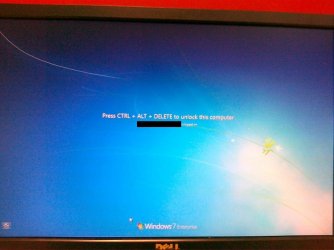
Incl. screenshots here's what happens.
1. I lock my computer using "Windows + L" or "ctrl+alt+del + lock computer"
2. I see the screen in attachment 1 (01042010001.jpg)
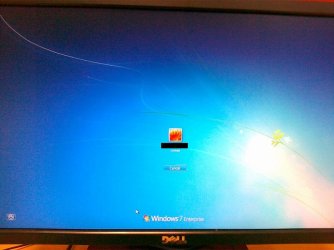
3. I press ctrl+alt+del to unlock the computer and instead of being prompted to enter my password, I have to select what user I want to use (and since only one option is listed this screen is absolutely senseless) - see attachment 2 (01042010002.jpg)
4. I hit enter or click on the user icon
5. I get to the "enter password" screen to unlock the computer - this is what I would expect to see after hitting "ctrl+alt+del" in the first place - see attachment 3 (01042010003.jpg).

Any help is appreciated.. !
 

Attachments

  • 01042010001.jpg
    01042010001.jpg
    61.7 KB · Views: 31
  • 01042010002.jpg
    01042010002.jpg
    63.5 KB · Views: 20
  • 01042010003.jpg
    01042010003.jpg
    60.9 KB · Views: 24

My Computer

Computer Manufacturer/Model Number
HP Elitebook 2530p
OS
7 x32
CPU
Centrino
Motherboard
n/a
Memory
4GB
I have a very similar issue, in a pretty recent installation of Win7 Enterprise 32bit.

When I power up the machine, i get the CAD prompt like it should since it's joined to a domain. Hit CAD, it shows the domain's legal warning. Click ok, and instead of the normal user/pass login prompt, you get a small empty picture frame that says Other User, and a cancel button. Click Other User and you get the normal login box prompting for your username and password, ready to log on to the domain, and you can login just fine from there.

Once I'm already logged in and the screen gets locked (either using Win-L or letting the screen saver lock it), when i move the mouse to wake up the screen it shows me the normal Press CAD to unlock message, with my username below as logged in, but it also shows a Switch User button. If I press CAD, the ONLY thing on screen is a Cancel button. If I click Switch User (at the CAD screen), the screen flickers a bit, then goes to a Press CAD screen (which does NOT indicate that anyone is logged on), and then does the same stuff as the previous paragraph, as if I had just powered on the machine. If I login as the currently logged on user, it logs me back in with all my apps still running just fine, but this adds like 5-6 more clicks and requires me to type in my username just to unlock the machine.

like the original poster, I don't want to disable the CAD prompt - it's supposed to be there since this is a domain computer. I just want the rest of the login/unlock stuff to behave normally:

- when I power up and hit CAD, I want it to remember the last logged in user so I can just enter my password and go.
- when i hit CAD to unlock a machine that i'm already logged onto, I want it to just prompt me for my password and let me get back to work, not jump through a buncha hoops.

It used to be that way, but not anymore. And it certainly isn't normal behavior for windows.
 

My Computer

OS
W7 Enterprise 32bit
Back
Top