
Odd periodic pause during games (about 1 per second)

Gorlash

New member
Local time
4:37 PM
Messages
22
I've been playing various games with no problems, up until recently.
I was playing Witcher 3, and wanted to capture some screen shots, which the game did not internally support. So I ran Fraps V3.5.99 to get the screen shots.

However, as soon as I started the game with Fraps running, I started getting a momentary pause, once per second. This happens *continuously* during the game. Also, it occurs completely independently of any inputs to the game - even when I'm standing motionless, I can see the glitch in moving objects (such as smoke, fires, moving creatures).

I captured my screen shots, then quit the game and halted Fraps, but it still occurred. I even un-installed Fraps, with no effect.

Not only that, but this effect occurs with *all* games !!! Witcher 3, Skyrim SSE, Fallout4.
However, it does *not* occur when I'm viewing large videos in VLC...

Any ideas what could have changed in my system, to cause this periodic hiccup??
It is making game play very awkward...

My system:
Intel Core i7-3820, OC 4GHz
Motherboard: Gigabyte X79-UP4
16GB RAM PC3-12800, *not* OC
Game disk: Samsung 950 Pro SSD (NVMe interface)
Nvidia GTX 980, drivers updated yesterday, *not* OC
Monitor: HP ZR30w, 30" 2560x1600

Note that the Overclocking on the CPU is years old, and did not cause this problem to occur.
The *only* thing that had changed when it began, was running Fraps.

And *yes*, I need to update those specs!!! I haven't had that Gateway laptop for years!!
 
Last edited:

My Computer

Computer type
PC/Desktop
Computer Manufacturer/Model Number
iBuyPower custom build
OS
Windows 7 Professional 64bit
CPU
Intel Core i7-3820 (Sandybridge-E) OC to 4GHz
Motherboard
Gigabyte X79-UP4
Memory
32GB PC3-12800
Graphics Card(s)
NVidia GTX 1070 ti, 8GB GDDR5
Monitor(s) Displays
HP ZR30w 30"
Screen Resolution
2560x1600
Hard Drives
WDC WD2003FZEX-00Z4SA0 - 2TB
OCZ-VERTEX4 256GB
NVMe Samsung SSD 950 512GB
PSU
Corsair TX750
Cooling
Corsair H50
Antivirus
Avast
Browser
Pale Moon
Other Info
System Temperatures during game:
CPUs 40C - 50C
GPU about 55C
Hello and welcome Gorlash now obviously you are referring to a machine that is different to the one listed in the system specs link at bottom left of the post screen. The specs you give do not include for example the motherboard most importantly so can you please let us know what that is.

You have included along with the CPU OC I take it you are overclocking this device? and maybe the RAM??
 

My Computer

Computer type
PC/Desktop
Computer Manufacturer/Model Number
Own build (new) Desk1 / Asus ROG Win 7 / Desk2 1st build
OS
Desk1 7 Home Prem / Desk2 10 Pro / Main lap Asus ROG 10 Pro 2 laptop Toshiba 7 Pro Asus P2520 7 & 10
CPU
Desk1 i5 3750K / Laptop i7 GTX 860M / Desk2 i5 2500
Motherboard
Desk1 Asus P877-V / Desk2 Gigabyte H67 UD3H / Laptop ?
Memory
Desk1 8GB (1866) / Desk2 16GB (1333) / Laptop 8Gb DDR3
Graphics Card(s)
Desk 1& 2NVidia GTX 650 & Laptops on board Intel
Sound Card
Desk 1 & 2 -XONAR DG Realtek High Def audio Laptop
Monitor(s) Displays
Desk 1 Benq HD 2450 / Desk2 Philips 24" / Laptop 17.5"
Screen Resolution
1920x1080 D1 & D2 & Laptop 1
Hard Drives
Desk1 Samsung 120GB 830 SSD
Asus ROG 256GB 850 Pro SSD
Desk2 Samsung 840 256 SSD
Toshiba 120GB EVO
PSU
Desk 1 Corsair HX 1050/ Laptop ? / Desk 2 Corsair HX 650
Case
Desk 1 Cooler HAF XM ? Toshiba laptop / Desk2 Coolermaster
Cooling
Fans on all Desk1 -2 Desk2 - all Coolermasters 5 Laptop ?
Keyboard
Desk 1 MS Sidewinder X6 Desk 2 MS Sidewinder X 4
Mouse
Desk 1&2 - Gigabyte MS 900 gamer - laptop - Logitec wireless
Internet Speed
ADSL2+
Other Info
One other Desktop (tester) and spare Toshba laptop both with SSD's
Running Kaspersky 2016 ISS on all machines config'd identically
Logitec audio stereo systems on each machine (x3)
Canon MG5250MFC
Router/modem TP-Link running WPA2SK
I think what is happening is that the Fraps driver is not completely uninstalled, or there are some remnants. You may have to edit the registry to remove all traces of Fraps and reboot before this problem will go away.

Note that this is just an educated guess. I haven't used Fraps in years because it caused a readout glitch in the frame rate display of my Logitech G15 keyboard.

You could use something like Absolute Uninstaller to remove the remnants:

Absolute Uninstaller - Remove Programs Easily and Completely, Uninstall Software | Glarysoft
 

My Computer

Computer type
PC/Desktop
Computer Manufacturer/Model Number
Mellon Labs (custom build)
OS
Win 7 Pro x64/Win 10 Pro x64 dual boot
CPU
AMD FX 8350 Vishera @ 4200
Motherboard
ASUS M5A97 R2.0
Memory
16 GB Mushkin Blackline DDR3-2400 @ 1866 (9-10-10-10-31)
Graphics Card(s)
XFX Radeon R9 280 Double D Black Edition
Sound Card
Realtek HD Audio on MB. Sounds great.
Monitor(s) Displays
Acer 24", Acer 22"
Screen Resolution
3840 x 1080
Hard Drives
1 x Mushkin Chronos 120 GB SSD (Win 10)
1 x Samsung 850 EVO 250 GB SSD (Win 7)
1 x WD 1TB SATA Blue
1 x WD 1TB SATA Green
PSU
Corsair TX-750
Case
CoolerMaster HAF 912+
Cooling
Coolermaster Seidon 240M Liquid AIO. 6 case fans
Keyboard
Logitech G710+
Mouse
Logitech G500s
Internet Speed
Much better since I got fiber, but still way overpriced.
Antivirus
MSE, Malware Bytes for scanning
Browser
Firefox
Other Info
Corsair VOID USB headphones.

A Mellon Labs X-1 - LCD Smartie driven system status display.

Brought to you by the letter E
hmmm... that makes sense, that Fraps might have left something behind... there are no files, the install directory is completely gone. However, there *could* be something in the registry.

Unfortunately, Absolute Uninstaller didn't find anything; I wonder if I should re-install/re-delete Fraps with Absolute Uninstaller running, and see what it finds?

I also noted that MSI Afterburner has a Fraps profile installed:
"MSI Afterburner/Bundle/OSDServer/ProfileTemplates/Fraps.exe.cfg"
I might try un-installing MSIA, reboot, re-install and see what happens??
 

My Computer

Computer type
PC/Desktop
Computer Manufacturer/Model Number
iBuyPower custom build
OS
Windows 7 Professional 64bit
CPU
Intel Core i7-3820 (Sandybridge-E) OC to 4GHz
Motherboard
Gigabyte X79-UP4
Memory
32GB PC3-12800
Graphics Card(s)
NVidia GTX 1070 ti, 8GB GDDR5
Monitor(s) Displays
HP ZR30w 30"
Screen Resolution
2560x1600
Hard Drives
WDC WD2003FZEX-00Z4SA0 - 2TB
OCZ-VERTEX4 256GB
NVMe Samsung SSD 950 512GB
PSU
Corsair TX750
Cooling
Corsair H50
Antivirus
Avast
Browser
Pale Moon
Other Info
System Temperatures during game:
CPUs 40C - 50C
GPU about 55C
Well, I went through the registry and deleted all references to Fraps.
I also scanned and deleted a couple of frap-related .dll files that I found there.
I then un-installed MSI Afterburner, deleted all files in its directory, rebooted, then re-installed current version.

I still have the periodic pause that I described previously...
 

My Computer

Computer type
PC/Desktop
Computer Manufacturer/Model Number
iBuyPower custom build
OS
Windows 7 Professional 64bit
CPU
Intel Core i7-3820 (Sandybridge-E) OC to 4GHz
Motherboard
Gigabyte X79-UP4
Memory
32GB PC3-12800
Graphics Card(s)
NVidia GTX 1070 ti, 8GB GDDR5
Monitor(s) Displays
HP ZR30w 30"
Screen Resolution
2560x1600
Hard Drives
WDC WD2003FZEX-00Z4SA0 - 2TB
OCZ-VERTEX4 256GB
NVMe Samsung SSD 950 512GB
PSU
Corsair TX750
Cooling
Corsair H50
Antivirus
Avast
Browser
Pale Moon
Other Info
System Temperatures during game:
CPUs 40C - 50C
GPU about 55C
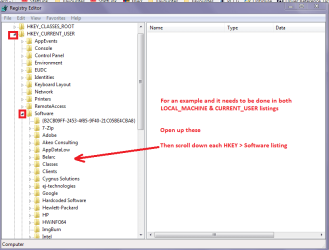
I don't know if Mellon Head will agree with me but I would be very inclined to look in the registry for any entries for that program. Now looking at that Fraps site it appears to me to be produced by some software company called beepa and because I am a very suspicious person like Norton is really Symantec in the registry perhaps the Fraps entries are listed as this beepa brand?

Now one tip before you do look in the registry do this Registry - Backup and Restore

To look > Start > type regedit > right click run as admin > go to the HKEY's LOCAL_MACHINE & CURRENT_USER > open the HKEY > then Software > then scroll down that listing to see if there are any entries for either Fraps or beepa. see pic

You might like to have a look for starters and let us know if there are any such entries.
 

Attachments

  • REG ENTRIES.PNG
    REG ENTRIES.PNG
    77.6 KB · Views: 1

My Computer

Computer type
PC/Desktop
Computer Manufacturer/Model Number
Own build (new) Desk1 / Asus ROG Win 7 / Desk2 1st build
OS
Desk1 7 Home Prem / Desk2 10 Pro / Main lap Asus ROG 10 Pro 2 laptop Toshiba 7 Pro Asus P2520 7 & 10
CPU
Desk1 i5 3750K / Laptop i7 GTX 860M / Desk2 i5 2500
Motherboard
Desk1 Asus P877-V / Desk2 Gigabyte H67 UD3H / Laptop ?
Memory
Desk1 8GB (1866) / Desk2 16GB (1333) / Laptop 8Gb DDR3
Graphics Card(s)
Desk 1& 2NVidia GTX 650 & Laptops on board Intel
Sound Card
Desk 1 & 2 -XONAR DG Realtek High Def audio Laptop
Monitor(s) Displays
Desk 1 Benq HD 2450 / Desk2 Philips 24" / Laptop 17.5"
Screen Resolution
1920x1080 D1 & D2 & Laptop 1
Hard Drives
Desk1 Samsung 120GB 830 SSD
Asus ROG 256GB 850 Pro SSD
Desk2 Samsung 840 256 SSD
Toshiba 120GB EVO
PSU
Desk 1 Corsair HX 1050/ Laptop ? / Desk 2 Corsair HX 650
Case
Desk 1 Cooler HAF XM ? Toshiba laptop / Desk2 Coolermaster
Cooling
Fans on all Desk1 -2 Desk2 - all Coolermasters 5 Laptop ?
Keyboard
Desk 1 MS Sidewinder X6 Desk 2 MS Sidewinder X 4
Mouse
Desk 1&2 - Gigabyte MS 900 gamer - laptop - Logitec wireless
Internet Speed
ADSL2+
Other Info
One other Desktop (tester) and spare Toshba laptop both with SSD's
Running Kaspersky 2016 ISS on all machines config'd identically
Logitec audio stereo systems on each machine (x3)
Canon MG5250MFC
Router/modem TP-Link running WPA2SK
Well, I went through the registry and deleted all references to Fraps.
I also scanned and deleted a couple of frap-related .dll files that I found there.
I then un-installed MSI Afterburner, deleted all files in its directory, rebooted, then re-installed current version.

I still have the periodic pause that I described previously...

Hmm ok well at least that has covered any issues from that direction - that included any listed as that beepa I mentioned? because as I mentioned before some softwares are listed as something that appears to be quite unrelated if one doesn't know. An example as I also mentioned is the Norton AV stuff it is listed as Symantec in the reg.

Now I am wondering what if any difference disabling the Avast would make - it wouldn't hurt to try as odd as it may sound AV's can interfere with a system causing odd issues.
 

My Computer

Computer type
PC/Desktop
Computer Manufacturer/Model Number
Own build (new) Desk1 / Asus ROG Win 7 / Desk2 1st build
OS
Desk1 7 Home Prem / Desk2 10 Pro / Main lap Asus ROG 10 Pro 2 laptop Toshiba 7 Pro Asus P2520 7 & 10
CPU
Desk1 i5 3750K / Laptop i7 GTX 860M / Desk2 i5 2500
Motherboard
Desk1 Asus P877-V / Desk2 Gigabyte H67 UD3H / Laptop ?
Memory
Desk1 8GB (1866) / Desk2 16GB (1333) / Laptop 8Gb DDR3
Graphics Card(s)
Desk 1& 2NVidia GTX 650 & Laptops on board Intel
Sound Card
Desk 1 & 2 -XONAR DG Realtek High Def audio Laptop
Monitor(s) Displays
Desk 1 Benq HD 2450 / Desk2 Philips 24" / Laptop 17.5"
Screen Resolution
1920x1080 D1 & D2 & Laptop 1
Hard Drives
Desk1 Samsung 120GB 830 SSD
Asus ROG 256GB 850 Pro SSD
Desk2 Samsung 840 256 SSD
Toshiba 120GB EVO
PSU
Desk 1 Corsair HX 1050/ Laptop ? / Desk 2 Corsair HX 650
Case
Desk 1 Cooler HAF XM ? Toshiba laptop / Desk2 Coolermaster
Cooling
Fans on all Desk1 -2 Desk2 - all Coolermasters 5 Laptop ?
Keyboard
Desk 1 MS Sidewinder X6 Desk 2 MS Sidewinder X 4
Mouse
Desk 1&2 - Gigabyte MS 900 gamer - laptop - Logitec wireless
Internet Speed
ADSL2+
Other Info
One other Desktop (tester) and spare Toshba laptop both with SSD's
Running Kaspersky 2016 ISS on all machines config'd identically
Logitec audio stereo systems on each machine (x3)
Canon MG5250MFC
Router/modem TP-Link running WPA2SK
*** I THINK I FOUND IT !!! ****
I use both Avast antivirus and Malwarebytes anti-malware programs. Turning off Avast did nothing, but...

Turning off Malwarebytes appears to have solved this problem!!! Both Fallout 4 and Skyrim SE are now running smoothly.
Amazing... I've been using Malwarebytes real-time scanner for several years, and it never previously caused such an issue; I wonder why it started now?

I'll do more-thorough testing later to see if this solution is consistent. I'll also try re-starting MB and see if I can just exclude the games.

BTW, checked registry for "beepa" references, there were none.
Also rechecked registry for "frap", no longer found any.
 

My Computer

Computer type
PC/Desktop
Computer Manufacturer/Model Number
iBuyPower custom build
OS
Windows 7 Professional 64bit
CPU
Intel Core i7-3820 (Sandybridge-E) OC to 4GHz
Motherboard
Gigabyte X79-UP4
Memory
32GB PC3-12800
Graphics Card(s)
NVidia GTX 1070 ti, 8GB GDDR5
Monitor(s) Displays
HP ZR30w 30"
Screen Resolution
2560x1600
Hard Drives
WDC WD2003FZEX-00Z4SA0 - 2TB
OCZ-VERTEX4 256GB
NVMe Samsung SSD 950 512GB
PSU
Corsair TX750
Cooling
Corsair H50
Antivirus
Avast
Browser
Pale Moon
Other Info
System Temperatures during game:
CPUs 40C - 50C
GPU about 55C
The newest release of MalwareBytes has had some issues. There have been a number of complaints about it. I'm not sure of the specifics at the moment, but there are a number of threads about it in this forum. Check in the Security sub forum for details. You may find some useful information there.
 

My Computer

Computer type
PC/Desktop
Computer Manufacturer/Model Number
Mellon Labs (custom build)
OS
Win 7 Pro x64/Win 10 Pro x64 dual boot
CPU
AMD FX 8350 Vishera @ 4200
Motherboard
ASUS M5A97 R2.0
Memory
16 GB Mushkin Blackline DDR3-2400 @ 1866 (9-10-10-10-31)
Graphics Card(s)
XFX Radeon R9 280 Double D Black Edition
Sound Card
Realtek HD Audio on MB. Sounds great.
Monitor(s) Displays
Acer 24", Acer 22"
Screen Resolution
3840 x 1080
Hard Drives
1 x Mushkin Chronos 120 GB SSD (Win 10)
1 x Samsung 850 EVO 250 GB SSD (Win 7)
1 x WD 1TB SATA Blue
1 x WD 1TB SATA Green
PSU
Corsair TX-750
Case
CoolerMaster HAF 912+
Cooling
Coolermaster Seidon 240M Liquid AIO. 6 case fans
Keyboard
Logitech G710+
Mouse
Logitech G500s
Internet Speed
Much better since I got fiber, but still way overpriced.
Antivirus
MSE, Malware Bytes for scanning
Browser
Firefox
Other Info
Corsair VOID USB headphones.

A Mellon Labs X-1 - LCD Smartie driven system status display.

Brought to you by the letter E
Thank you, Mellon Head !! I will read through that forum. I think I'll also see how responsive their support forum is; I've never had reason to contact them before...
 

My Computer

Computer type
PC/Desktop
Computer Manufacturer/Model Number
iBuyPower custom build
OS
Windows 7 Professional 64bit
CPU
Intel Core i7-3820 (Sandybridge-E) OC to 4GHz
Motherboard
Gigabyte X79-UP4
Memory
32GB PC3-12800
Graphics Card(s)
NVidia GTX 1070 ti, 8GB GDDR5
Monitor(s) Displays
HP ZR30w 30"
Screen Resolution
2560x1600
Hard Drives
WDC WD2003FZEX-00Z4SA0 - 2TB
OCZ-VERTEX4 256GB
NVMe Samsung SSD 950 512GB
PSU
Corsair TX750
Cooling
Corsair H50
Antivirus
Avast
Browser
Pale Moon
Other Info
System Temperatures during game:
CPUs 40C - 50C
GPU about 55C
Ok well done as always things are never what they seem to be with issues on our machines - they can be something very complicated hardware or software it is just a matter of sifting through the lot and finding the problem.
It never ceases to amaze me that some issues are the most innocuous things and ones that you would never think of.
For example my main desktop (Ivy Bridge) lost all the USB ports some time back now and after a few months of tracking down what it was and thinking the board was bad - a very clever member here knew straightaway what it was - it turned out to be the Samsung SSD Magician software > uninstalled it and the ports came back. It was very frustrating at the time but such a simple thing;)
 

My Computer

Computer type
PC/Desktop
Computer Manufacturer/Model Number
Own build (new) Desk1 / Asus ROG Win 7 / Desk2 1st build
OS
Desk1 7 Home Prem / Desk2 10 Pro / Main lap Asus ROG 10 Pro 2 laptop Toshiba 7 Pro Asus P2520 7 & 10
CPU
Desk1 i5 3750K / Laptop i7 GTX 860M / Desk2 i5 2500
Motherboard
Desk1 Asus P877-V / Desk2 Gigabyte H67 UD3H / Laptop ?
Memory
Desk1 8GB (1866) / Desk2 16GB (1333) / Laptop 8Gb DDR3
Graphics Card(s)
Desk 1& 2NVidia GTX 650 & Laptops on board Intel
Sound Card
Desk 1 & 2 -XONAR DG Realtek High Def audio Laptop
Monitor(s) Displays
Desk 1 Benq HD 2450 / Desk2 Philips 24" / Laptop 17.5"
Screen Resolution
1920x1080 D1 & D2 & Laptop 1
Hard Drives
Desk1 Samsung 120GB 830 SSD
Asus ROG 256GB 850 Pro SSD
Desk2 Samsung 840 256 SSD
Toshiba 120GB EVO
PSU
Desk 1 Corsair HX 1050/ Laptop ? / Desk 2 Corsair HX 650
Case
Desk 1 Cooler HAF XM ? Toshiba laptop / Desk2 Coolermaster
Cooling
Fans on all Desk1 -2 Desk2 - all Coolermasters 5 Laptop ?
Keyboard
Desk 1 MS Sidewinder X6 Desk 2 MS Sidewinder X 4
Mouse
Desk 1&2 - Gigabyte MS 900 gamer - laptop - Logitec wireless
Internet Speed
ADSL2+
Other Info
One other Desktop (tester) and spare Toshba laptop both with SSD's
Running Kaspersky 2016 ISS on all machines config'd identically
Logitec audio stereo systems on each machine (x3)
Canon MG5250MFC
Router/modem TP-Link running WPA2SK
Back
Top