Odd startup sequence

scoobydog

New member
Member
VIP
Local time
4:25 PM
Messages
120
Howdy

Ive been doing some work on my friends computer. He has a Gigabyte Ultra Durable 3 Motherboard. (he has windows 7 ultimate x86)

Firstly when you start it up it goes to the Gigabyte Ultra Durable 3 screen (normal) and then the display flashes off and then the Gigabyte Durable 3 screen comes back and then it goes to the DMI pool screen and then it says starting windows. Then the monitor turns off and then say 30 seconds later the monitor comes back on and it goes welcome screen and then desktop. All in all it gets there.

My computer on the other hand (I have Windows 7 Home premium x64) also Gigabyte Durable 3 Mboard does it all in one smooth motion, no loss of monitor part way through.

Now I know this is not hard disk/windows related as I have been through a massive post with the guys over at Setup and Installation and they have put me though the works.

Now his 2 external drives are on all the time. It was only though an accident that I had them turned off today and did a reboot then wola the start up sequence was perfect.

So this is it. External drives on, dodgy start up. External drives off, perfect start up

What do you think of that?

Thanks
 

My Computer

Computer type
PC/Desktop
Computer Manufacturer/Model Number
Custom Build
OS
Windows 7 64bit
CPU
intel I7 960 Quad Core 3.2
Motherboard
Gigabyte x58a-ud5
Memory
10 Gig
Graphics Card(s)
nvidia gforce 750TI
Monitor(s) Displays
Asus LCD
Hard Drives
Seagate 1TB Sata 3 HDD
PSU
850W
Case
Storm Enforcer
Cooling
200mm fans front/top Thermtake lownoise CPU fan and Heatsink
Antivirus
Norton
What is on those external drives? Any operating systems?

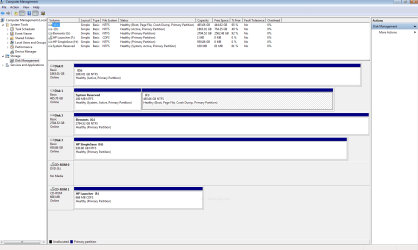
Check to see if any of the partitions on the external drives are marked ACTIVE in Disk Management. Or post a screenshot of the Disk Management window, expanded to show all, with all externals connected.
 

My Computer

Computer type
PC/Desktop
Computer Manufacturer/Model Number
Home Built - Jan 2013
OS
Windows 7 64 Bit Home Premium SP1
CPU
i7-3820
Motherboard
Asus P9X79-PRO - Bios 4608
Memory
GSkill F3-14900CL9Q - 16GB
Graphics Card(s)
EVGA GeForce GTX660 - Driver 352.86
Sound Card
On board Realtek ALC898
Monitor(s) Displays
Acer S271HL
Screen Resolution
1920 x 1080
Hard Drives
#1- Samsung 840 Pro Series
#2- Western Digital WD1002FAEX Sata3 Black
#3- Western Digital WD1002FAEX Sata3 Black
PSU
Corsair CMPSU-850TX-V2 - 850 watt (by Seasonic)
Case
Corsair Obsidian 550D
Cooling
Standard 3 120mm case fans, Cooler Master Hyper 212 EVO
Keyboard
MS KC-0405
Mouse
Intellimouse 5-button
Internet Speed
56 Mbits/Sec (on a good day)
Antivirus
Avast & Malwarebytes
Browser
Firefox
Other Info
Asus DVD - DRW-24B1ST 24X
Check the BIOS to see what the first boot device, or boot device order is? Make sure the first boot device is set to the internal hard drive. It may be trying to boot from a USB device and then just moves on to what ever is set next until it finds a bootable device. Someone may have booted from a thumb drive etc and forgot to switch the BIOS back to the hard drive.
 

My Computer

Computer type
PC/Desktop
Computer Manufacturer/Model Number
Home Built
OS
Windows 10 Education 64 bit
CPU
AMD Phenom II X4 980 Black Edition Deneb 3.7GHz
Motherboard
Asus M4N68T-M V2 µATX Motherboard
Memory
8GB 4GBx2 Kingston PC10600 DDR3 1333 Memory
Graphics Card(s)
Zotac NVIDIA Geforce GT640 2 Gig DDR3 PCIe
Sound Card
VIA VT1708s High Definition Audio 8-channel Onboard
Monitor(s) Displays
22" LG E2242 1080p and 2 19" I-INC AG191D
Screen Resolution
1280x1024 - 1920x1080 - 1280x1024
Hard Drives
Crucial M100 256 GB SSD and 500 GB WD Blue SATA
PSU
Thermaltake TR 620
Case
Power Up Black ATX Mid-Tower Case
Cooling
Stock heatsink and fan
Keyboard
Logitech Wireless K350 Wave
Mouse
Logitech Wireless M570 Trackman Wheel
Internet Speed
80 Mbps Down 30 Mbps Up
Antivirus
Windows Defender
Browser
Internet Explorer 11
Other Info
HP DVD1040e Lightscribe - External USB2
My thinking too
- the way it switches monitor off-on.

2x Bios chips onboard like other Gigabyte?

Could even be borked bios chip#1 / update / setting stops it starting
> it swiches to boot (auto) from spare bios#2 chip
= monitor goes off.

Shot in dark - haven't used that board yet

When you (first time) boot these type of boards - you know you have to leave them alone - to go thru auto-setup/discover

- they then auto-restart then you go in bios and fiddle!
 

My Computer

Computer type
PC/Desktop
Computer Manufacturer/Model Number
D.I.Y.
OS
WIN7 Ultimate 64bit
CPU
AMD FX8150/Trinity A10-5700
Motherboard
Asus Sabertooth v.1 /Asus F2A85-M Pro
Memory
G-Skill 2400 x2 @ 1866 (both pc's)
Graphics Card(s)
Sapphire (factory OC version) AMD 7770
Sound Card
onboard
Monitor(s) Displays
T260 Samsung
Screen Resolution
1920x1080
Hard Drives
Western Digital Sata 2TB/1TB Caviar Blacks
Buffalo 1TB usb (excellent drive)
PSU
Be-Quiet 700W E-9/Be-Quiet 550W E-9(E-9 = built by FSP)
Case
Antec P183/Antec P180mini
Cooling
x2 Xigmatek SXHH7-U01 + C-Master R4-EXBB-20PK-R0 120mm Fans
Keyboard
Cherry
Mouse
MS Explorer 3.0
Other Info
LG Blu ray combo
Pioneer 207D/208 Blu ray burners
The boot order is CD first, HHD 2nd. I don't know about the chip thing but I do know if you turn the externals of the start up sequence is spot on. It has also been pointed out to me the OS should be in disk 0

No OS's on externals, purely data, but there does seem to be leftover OS on 1.8TB drive.

Here is a screen shot.
 

Attachments

  • Capture.PNG
    Capture.PNG
    34.5 KB · Views: 12

My Computer

Computer type
PC/Desktop
Computer Manufacturer/Model Number
Custom Build
OS
Windows 7 64bit
CPU
intel I7 960 Quad Core 3.2
Motherboard
Gigabyte x58a-ud5
Memory
10 Gig
Graphics Card(s)
nvidia gforce 750TI
Monitor(s) Displays
Asus LCD
Hard Drives
Seagate 1TB Sata 3 HDD
PSU
850W
Case
Storm Enforcer
Cooling
200mm fans front/top Thermtake lownoise CPU fan and Heatsink
Antivirus
Norton
The OS doesn't have to be disk O, but the boot order has to be pointed to the correct hard drive if there is more than one physical internal drive. My BIOS will list the two drives and let me select which one is to be the boot drive. Switching the order to hard drive first from CD-ROM will speed things up some. My BIOS has a one time quick boot option that will let me boot from a thumb drive or CD/DVD that one boot. After that it goes back to the preset hard drive. The only time I would boot from a CD/DVD would be on a reinstall so why waste time checking for a Bootable CD on every boot. ;) I just use the BIOS quick boot menu.
 

My Computer

Computer type
PC/Desktop
Computer Manufacturer/Model Number
Home Built
OS
Windows 10 Education 64 bit
CPU
AMD Phenom II X4 980 Black Edition Deneb 3.7GHz
Motherboard
Asus M4N68T-M V2 µATX Motherboard
Memory
8GB 4GBx2 Kingston PC10600 DDR3 1333 Memory
Graphics Card(s)
Zotac NVIDIA Geforce GT640 2 Gig DDR3 PCIe
Sound Card
VIA VT1708s High Definition Audio 8-channel Onboard
Monitor(s) Displays
22" LG E2242 1080p and 2 19" I-INC AG191D
Screen Resolution
1280x1024 - 1920x1080 - 1280x1024
Hard Drives
Crucial M100 256 GB SSD and 500 GB WD Blue SATA
PSU
Thermaltake TR 620
Case
Power Up Black ATX Mid-Tower Case
Cooling
Stock heatsink and fan
Keyboard
Logitech Wireless K350 Wave
Mouse
Logitech Wireless M570 Trackman Wheel
Internet Speed
80 Mbps Down 30 Mbps Up
Antivirus
Windows Defender
Browser
Internet Explorer 11
Other Info
HP DVD1040e Lightscribe - External USB2
H/drives set up weird (C: isnt on sata cable 0 where it usualy looks first)

With boot from cd first order
- if anything like Win 7 is sitting in your cd/dvd players it will try starting the system from there or fail booting if another type cd interferes
 

My Computer

Computer type
PC/Desktop
Computer Manufacturer/Model Number
D.I.Y.
OS
WIN7 Ultimate 64bit
CPU
AMD FX8150/Trinity A10-5700
Motherboard
Asus Sabertooth v.1 /Asus F2A85-M Pro
Memory
G-Skill 2400 x2 @ 1866 (both pc's)
Graphics Card(s)
Sapphire (factory OC version) AMD 7770
Sound Card
onboard
Monitor(s) Displays
T260 Samsung
Screen Resolution
1920x1080
Hard Drives
Western Digital Sata 2TB/1TB Caviar Blacks
Buffalo 1TB usb (excellent drive)
PSU
Be-Quiet 700W E-9/Be-Quiet 550W E-9(E-9 = built by FSP)
Case
Antec P183/Antec P180mini
Cooling
x2 Xigmatek SXHH7-U01 + C-Master R4-EXBB-20PK-R0 120mm Fans
Keyboard
Cherry
Mouse
MS Explorer 3.0
Other Info
LG Blu ray combo
Pioneer 207D/208 Blu ray burners
OK. See that Drive 0 (D: )? That partition is marked ACTIVE. This is telling the system that there is a bootable OS on that drive, but there isn't. So it could be hanging while the problem is resolved.

I would remove the ACTIVE flag from that drive and see if that clears up the problem.
http://www.sevenforums.com/tutorials/197157-partition-mark-inactive.html
 

My Computer

Computer type
PC/Desktop
Computer Manufacturer/Model Number
Home Built - Jan 2013
OS
Windows 7 64 Bit Home Premium SP1
CPU
i7-3820
Motherboard
Asus P9X79-PRO - Bios 4608
Memory
GSkill F3-14900CL9Q - 16GB
Graphics Card(s)
EVGA GeForce GTX660 - Driver 352.86
Sound Card
On board Realtek ALC898
Monitor(s) Displays
Acer S271HL
Screen Resolution
1920 x 1080
Hard Drives
#1- Samsung 840 Pro Series
#2- Western Digital WD1002FAEX Sata3 Black
#3- Western Digital WD1002FAEX Sata3 Black
PSU
Corsair CMPSU-850TX-V2 - 850 watt (by Seasonic)
Case
Corsair Obsidian 550D
Cooling
Standard 3 120mm case fans, Cooler Master Hyper 212 EVO
Keyboard
MS KC-0405
Mouse
Intellimouse 5-button
Internet Speed
56 Mbits/Sec (on a good day)
Antivirus
Avast & Malwarebytes
Browser
Firefox
Other Info
Asus DVD - DRW-24B1ST 24X
Back
Top