OE -> Live Mail Not Working

kuhn

New member
Local time
2:32 PM
Messages
5
I am attempting to migrate from XP to Win 7 and it's been a nightmare. Half my programs don't work,. Mail has been a particular problem.

1. I have put all the same OE settings (server name, port, etc) in Live mail but it still won't connect.

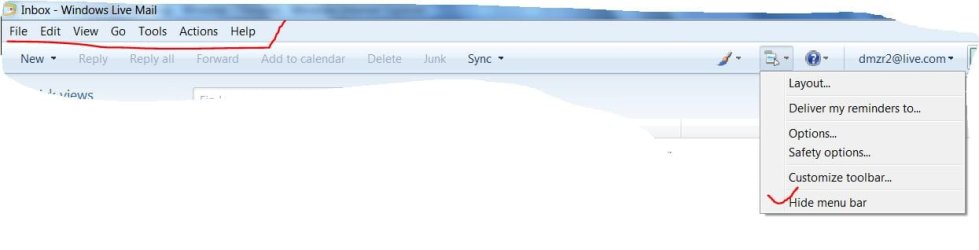
2. I can't import mail files, address books, etc into Live Mail. All the web advice is to use the "file->import option." Well, my Live Mail has no "File" option anywhere.

Advice appreciated.
 

My Computer

OS
win 7
kuhn Welcome to Seven Forums. All your problems can be worked out so good luck to you. I sent you a snip to show how to enable your menu bar with the file edit etc..
win live mail menubar.JPG
 

My Computer

Computer Manufacturer/Model Number
Gateway GT5692
OS
Windows 7 Ulti. x64
CPU
AMD Phenom 8450 triple-core 2.10 ghz
Memory
4GB
Graphics Card(s)
ATI Radion HD 3200
Monitor(s) Displays
Gateway FPD1775W
Screen Resolution
1280x720
Hard Drives
465.6613 Gibibytes
Thanks. Why in the world would MS hide "File" a top level menu item in 99% of all software three levels down in a menu system located to the far right where the least important information is shown? And then they make the default "hide." Unbelievable. It's hard to believe that they actually put any thought into this.

I still can't figure out why it won't work. The setting are exactly the same as OE. I can Thunderbird to read in but not out.

BTW. They also screwed up badly on the task bar. You used to just right click on a window and then delete. You can't to that anymore. You right click and then you have to move the cursor up to delete. This makes it 3 time the trouble to close a window.
 

My Computer

OS
win 7
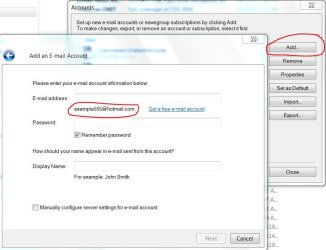
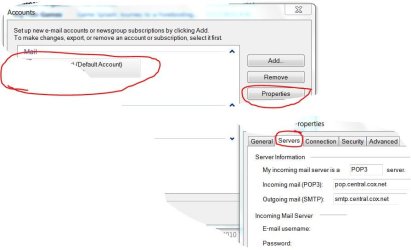
kuhn Are you going to tools / accounts.. then add ? Or how are you adding settings? Once you add a email address then highlight it and select properties then servers? Not sure about the taskbar thing if you have aero enabled then you can just mouse over the icon and then mouse over the preview and it has a red x to close it.
accounts add.JPG

win live mail account props.JPG
 

My Computer

Computer Manufacturer/Model Number
Gateway GT5692
OS
Windows 7 Ulti. x64
CPU
AMD Phenom 8450 triple-core 2.10 ghz
Memory
4GB
Graphics Card(s)
ATI Radion HD 3200
Monitor(s) Displays
Gateway FPD1775W
Screen Resolution
1280x720
Hard Drives
465.6613 Gibibytes
...Why in the world would MS hide "File" a top level menu item in 99% of all software three levels down in a menu system located to the far right where the least important information is shown? And then they make the default "hide." Unbelievable. It's hard to believe that they actually put any thought into this...
In all their prodcuts, Microsoft is moving away from "Menu" bars to other types of icon filled bars and ribbons. Perhaps they were influenced by Apple or their own "designers" who find text boring.
 

My Computer

Computer type
PC/Desktop
Computer Manufacturer/Model Number
OQO 2+
OS
Windows 8 Pro w/MC 32-bit
CPU
Intel Atom 1.86 GHz
Motherboard
OQO 2+
Memory
2 GB
Graphics Card(s)
Intel GMA 500
Sound Card
IDT
Monitor(s) Displays
LCD
Screen Resolution
800 x 480 (portable) 1280 x 1024 (docked)
Hard Drives
64 GB SSD
PSU
9 Ah Battery (portable) or OQO Brick (docked)
Case
Shirt Pocket Sized
Cooling
Tiny Fan
Keyboard
Slide out (portable) DiNovo Edge (docked)
Mouse
Eraser head (portable) Logitech Bluetooth (docked)
Internet Speed
WWAN or 802.11G (portable) T1 (docked)
Browser
IE 10
Other Info
DVD-RW OQO Docking Station
Back
Top