Of course network issues

Alexanderiiv

New member
Local time
5:45 AM
Messages
7
To start.... Just updated computer mobo to Asus crosshair formula z and now can't connect to internet....

1. Used CD that came with the new mobo to install drivers. Everything is good except two yellow "!" In the device manager. A. Teredo tunneling though I was able to fix that and B. Other device-unknown device, not fixed

2. Even the the internet connection icon in the bottom right of the screen says OK I still can't connect to anything. Trouble shooter doesn't work. Reinstalled drivers from CD.. Didn't work. Got drivers from Intel and didn't work. Tried ipconfig/renew in command prompt and say no files through c:windows/system32.

Network adapter is Intel 82583v gigabit Ethernet controller. Says all is well in the device manager.

OS is win 7 premium

Also I haven't tried safe mode yet but will when I get off work.

Also thinking of getting a cheap Ethernet card and see if I can fix it that way.

Trying to do all I can before reinstalling windows.

More options are appreciated.

Thanks for your time in advance.
 

My Computer

Computer type
PC/Desktop
Computer Manufacturer/Model Number
Custom buuld
OS
Win 7 64 bit premium
CPU
Fx8350 black
Motherboard
Asus crosshair formula z
How did you move to the new mainboard? Plugged in the old HDD/SSD or clean installed?
 

My Computer

Computer type
PC/Desktop
Computer Manufacturer/Model Number
Custom Build
OS
Windows 7 Ultimate x64 SP1
CPU
AMD Phenom 2 1090T
Motherboard
Gigabyte GA-890FXA-UD5
Memory
2x8GB Kingston HyperX Fury Black 1600Mhz Unganged
Graphics Card(s)
MSI GTX 970 Gaming 4G
Sound Card
Realtek On-Board HD 7.1 Audio / Logitech G35
Monitor(s) Displays
3xAcer GD245HQ
Screen Resolution
1920x1080
Hard Drives
Samsung 850 Pro 512GB SSD - OS /
WD Caviar Black SATA 3 - 1 TBx2 - Dynamic RAID 0 /
WD Caviar Green SATA 2 - 640GBx2 - Dynamic RAID 0 /
WD Caviar Green SATA 2 - 640GB - Internal Backup /
Seagate Barracude SATA 3 - 3TB - External Backup/ Sync
PSU
HighPower 1000W
Case
Cooler Master HAF 932
Cooling
Noctua NH-D14
Keyboard
Logitech G19
Mouse
Logitech G500
Internet Speed
100/4 Mbit Cable (100GB quota)
Antivirus
ZoneAlarm Extreme Security / MBAM Pro / MBAE Free / SAS Free
Browser
IE 11 - Firefox - Chrome
Other Info
Logitech F710/ G27/ G940/ Z5500 // TrackIR 5 // Nvidia 3D Surround Vision
Old hd
 

My Computer

Computer type
PC/Desktop
Computer Manufacturer/Model Number
Custom buuld
OS
Win 7 64 bit premium
CPU
Fx8350 black
Motherboard
Asus crosshair formula z

My Computer

Computer type
PC/Desktop
Computer Manufacturer/Model Number
Custom Build
OS
Windows 7 Ultimate x64 SP1
CPU
AMD Phenom 2 1090T
Motherboard
Gigabyte GA-890FXA-UD5
Memory
2x8GB Kingston HyperX Fury Black 1600Mhz Unganged
Graphics Card(s)
MSI GTX 970 Gaming 4G
Sound Card
Realtek On-Board HD 7.1 Audio / Logitech G35
Monitor(s) Displays
3xAcer GD245HQ
Screen Resolution
1920x1080
Hard Drives
Samsung 850 Pro 512GB SSD - OS /
WD Caviar Black SATA 3 - 1 TBx2 - Dynamic RAID 0 /
WD Caviar Green SATA 2 - 640GBx2 - Dynamic RAID 0 /
WD Caviar Green SATA 2 - 640GB - Internal Backup /
Seagate Barracude SATA 3 - 3TB - External Backup/ Sync
PSU
HighPower 1000W
Case
Cooler Master HAF 932
Cooling
Noctua NH-D14
Keyboard
Logitech G19
Mouse
Logitech G500
Internet Speed
100/4 Mbit Cable (100GB quota)
Antivirus
ZoneAlarm Extreme Security / MBAM Pro / MBAE Free / SAS Free
Browser
IE 11 - Firefox - Chrome
Other Info
Logitech F710/ G27/ G940/ Z5500 // TrackIR 5 // Nvidia 3D Surround Vision
Alright. I'll give that a go when I get home. Ty.
 

My Computer

Computer type
PC/Desktop
Computer Manufacturer/Model Number
Custom buuld
OS
Win 7 64 bit premium
CPU
Fx8350 black
Motherboard
Asus crosshair formula z
says there are no network or boot critical devices requiring drivers. No drivers planed to be installed.System HAL will be checked and corrected.

Edit: also tried the configure network option but it reads "The network is not present or not started."
Edit 2: ok using usb wireless adapter, installed drivers via flash drive downloaded from another computer. everything says i have a good connection to internet through the router but cant actually open a web page and troubleshooter says it cant fix.
 
Last edited:

My Computer

Computer type
PC/Desktop
Computer Manufacturer/Model Number
Custom buuld
OS
Win 7 64 bit premium
CPU
Fx8350 black
Motherboard
Asus crosshair formula z
Could there be an issue with the IP and or DNS? i have them both on auto. if so how would i find the right input values for manual input?
 

My Computer

Computer type
PC/Desktop
Computer Manufacturer/Model Number
Custom buuld
OS
Win 7 64 bit premium
CPU
Fx8350 black
Motherboard
Asus crosshair formula z
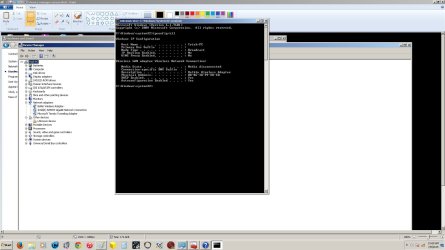
Open a cmd: ipconfig -all
Copy and paste here

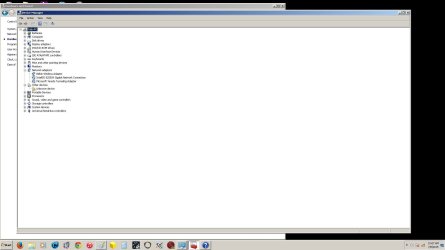
Also post a screenshot of device management
 

My Computer

Computer type
PC/Desktop
Computer Manufacturer/Model Number
Custom Build
OS
Windows 7 Ultimate x64 SP1
CPU
AMD Phenom 2 1090T
Motherboard
Gigabyte GA-890FXA-UD5
Memory
2x8GB Kingston HyperX Fury Black 1600Mhz Unganged
Graphics Card(s)
MSI GTX 970 Gaming 4G
Sound Card
Realtek On-Board HD 7.1 Audio / Logitech G35
Monitor(s) Displays
3xAcer GD245HQ
Screen Resolution
1920x1080
Hard Drives
Samsung 850 Pro 512GB SSD - OS /
WD Caviar Black SATA 3 - 1 TBx2 - Dynamic RAID 0 /
WD Caviar Green SATA 2 - 640GBx2 - Dynamic RAID 0 /
WD Caviar Green SATA 2 - 640GB - Internal Backup /
Seagate Barracude SATA 3 - 3TB - External Backup/ Sync
PSU
HighPower 1000W
Case
Cooler Master HAF 932
Cooling
Noctua NH-D14
Keyboard
Logitech G19
Mouse
Logitech G500
Internet Speed
100/4 Mbit Cable (100GB quota)
Antivirus
ZoneAlarm Extreme Security / MBAM Pro / MBAE Free / SAS Free
Browser
IE 11 - Firefox - Chrome
Other Info
Logitech F710/ G27/ G940/ Z5500 // TrackIR 5 // Nvidia 3D Surround Vision
here's screenshot of cmd ipconfig/all and device manager
 

Attachments

  • Device manager screen shot.jpg
    Device manager screen shot.jpg
    77.5 KB · Views: 2
  • ipconfig screenshot.jpg
    ipconfig screenshot.jpg
    134.3 KB · Views: 3

My Computer

Computer type
PC/Desktop
Computer Manufacturer/Model Number
Custom buuld
OS
Win 7 64 bit premium
CPU
Fx8350 black
Motherboard
Asus crosshair formula z
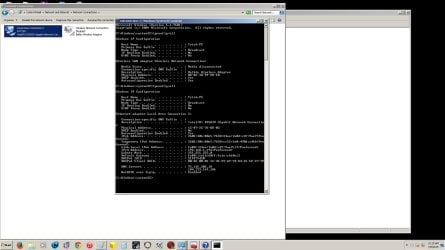
hers a screenshot with the onboard lan enabled
 

Attachments

  • ipconfig LAN.jpg
    ipconfig LAN.jpg
    142.2 KB · Views: 4

My Computer

Computer type
PC/Desktop
Computer Manufacturer/Model Number
Custom buuld
OS
Win 7 64 bit premium
CPU
Fx8350 black
Motherboard
Asus crosshair formula z
The problem with Wireless is it doesn't show any IP related configuration (address, dns, dhcp etc)

Run Download Complete Internet Repair - MajorGeeks as admin in Safe Mode with Networking.

And select:
- Reset Internet Protocol
- Repair Winsock
- Renew Internet Connections
- Reset Windows Firewall

Report back

Also try, disabling IPv6 - un-tick at LAN properties
 

My Computer

Computer type
PC/Desktop
Computer Manufacturer/Model Number
Custom Build
OS
Windows 7 Ultimate x64 SP1
CPU
AMD Phenom 2 1090T
Motherboard
Gigabyte GA-890FXA-UD5
Memory
2x8GB Kingston HyperX Fury Black 1600Mhz Unganged
Graphics Card(s)
MSI GTX 970 Gaming 4G
Sound Card
Realtek On-Board HD 7.1 Audio / Logitech G35
Monitor(s) Displays
3xAcer GD245HQ
Screen Resolution
1920x1080
Hard Drives
Samsung 850 Pro 512GB SSD - OS /
WD Caviar Black SATA 3 - 1 TBx2 - Dynamic RAID 0 /
WD Caviar Green SATA 2 - 640GBx2 - Dynamic RAID 0 /
WD Caviar Green SATA 2 - 640GB - Internal Backup /
Seagate Barracude SATA 3 - 3TB - External Backup/ Sync
PSU
HighPower 1000W
Case
Cooler Master HAF 932
Cooling
Noctua NH-D14
Keyboard
Logitech G19
Mouse
Logitech G500
Internet Speed
100/4 Mbit Cable (100GB quota)
Antivirus
ZoneAlarm Extreme Security / MBAM Pro / MBAE Free / SAS Free
Browser
IE 11 - Firefox - Chrome
Other Info
Logitech F710/ G27/ G940/ Z5500 // TrackIR 5 // Nvidia 3D Surround Vision
Back
Top