Solved Offered security update for version of .NET Framework I don't have?

Rick1441

New member
Local time
4:25 AM
Messages
34
Yesterday's patch Tuesday Updates offered KB3072305, which is described as an important security update for Microsoft .NET Framework 3.5.1 (*not* "3.5.1 and above"). Why would this be offered to me when the only version I have listed in Program and Features is 4.5.2? I applied the update, but I am still wondering about this. Thanks.
 

My Computer My Computer

Computer type
PC/Desktop
Computer Manufacturer/Model Number
Lenovo
OS
Windows 7 Pro x64
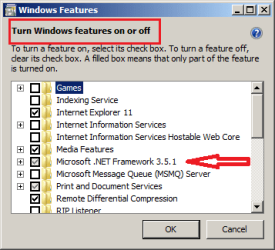
Microsoft .NET Framework 3.5.1 is native to Windows 7.

You have it if you have Windows 7.

Installing Microsoft .NET Framework 4.5.2 does not uninstall Microsoft .NET Framework 3.5.1.

net.png
 

My Computer My Computer

Computer type
Laptop
Computer Manufacturer/Model Number
Employer provided Dell Latitude
OS
W7 Pro SP1 64bit
CPU
i7
Memory
8GB
Graphics Card(s)
Intel HD Graphics
Hard Drives
crappy SSD
Antivirus
Employer mandated Symantec Endpoint Protection
Browser
Pale Moon 64bit, IE11 64bit & Chrome 64bit
In addition if you open an Elevated Command Prompt and use the following command it will list all installed NET Framework versions:

dir %WINDIR%\Microsoft.Net\Framework\v*

Here's what I've got:

NET Framework versions.jpg
 

My Computer My Computer

Computer type
Laptop
Computer Manufacturer/Model Number
ASUS
OS
Microsoft Windows 7 Home Premium 64-bit 7601 Multiprocessor Free Service Pack 1
CPU
AMD C-60 APU with Radeon(tm) HD Graphics
Motherboard
ASUSTeK COMPUTER INC. X501U
Memory
4.00 GB
Graphics Card(s)
AMD Radeon HD 6290 Graphics
Sound Card
(1) AMD High Definition Audio Device (2) Realtek High Defi
Screen Resolution
1366 x 768 x 32 bits (4294967296 colors) @ 60 Hz
Hard Drives
Hitachi HTS545050A7E380 SATA Disk Device
Antivirus
Comodo CIS & FW, SecureAplus App Whitelisting, Threatfire
Browser
Cyberfox 64bit, Opera 64bit, Airfox
Other Info
Spy-The-Spy, HitmanPro.Alert, Norton Connect Safe, MJRegWatcher, BitDefender TrafficLight, Voodoo Shield, Zemana AntiMalware
Thanks for the answers and tips, UsernameIssues and Callender! IIRC (and maybe I don't) in XP (which I had until 1.5 years ago) Add/Remove Programs would list all of the installed versions of .NET Framework. Your replies also explain why my previous .NET version *seemed* to go away when I installed 4.5.2 awhile back, which surprised me.
 

My Computer My Computer

Computer type
PC/Desktop
Computer Manufacturer/Model Number
Lenovo
OS
Windows 7 Pro x64
Some versions of .NET will remove old versions... sort of.

There have been several versions of .NET 4 (version 4.6 is out now). Each version of 4.x removes previous versions of .NET 4.x from the list shown via Programs and Features. However, if you use the DIR commend line that Callender offered, you should still see a folder for version 4.0... Some of the files for version 4.5 is inside of the folder for version 4.0.

To add to the confusion, you might notice that .NET version 4.5.2 is listed as version 4.5.51209 in the version column in Programs and Features. If you have .NET version 4.5.2 installed, then you should have a folder named: C:\Windows\Microsoft.NET\Framework64\v4.0.30319\SetupCache\v4.5.51209. As the folder name implies, those might just be setup files. I'm not sure where the actual files are that run when some app needs .NET stuff.
 

My Computer My Computer

Computer type
Laptop
Computer Manufacturer/Model Number
Employer provided Dell Latitude
OS
W7 Pro SP1 64bit
CPU
i7
Memory
8GB
Graphics Card(s)
Intel HD Graphics
Hard Drives
crappy SSD
Antivirus
Employer mandated Symantec Endpoint Protection
Browser
Pale Moon 64bit, IE11 64bit & Chrome 64bit
Back
Top