Office 2000 - problem when quitting Word

Gwaihir

Member
Member
VIP
Local time
11:17 PM
Messages
135
Hello,

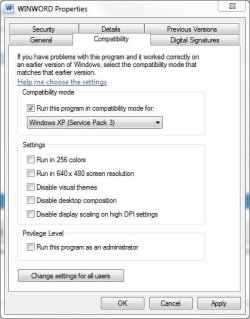
I've encountered a problem running Word 2000 under W7 Proff 64-bit. Word runs, edits and saves ok but when I try to quit I get a popup "Microsoft Word for Windows has stopped working" (see attachment). I've tried changing the compatibility setting to various earlier versions and also let Windows look for a fix.

The odd thing is that this has only happened since a I did a clean re-install of Windows 7 (after reformatting system partition). Under my original virgin install it worked properly.

Any thoughts would be very welcome.
 

Attachments
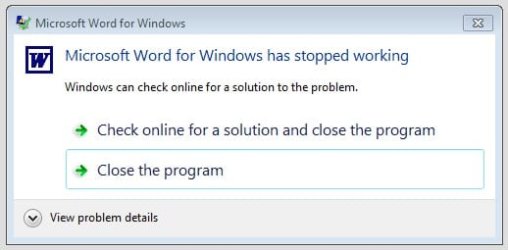
  • WordExit.jpg
    WordExit.jpg
    18.2 KB · Views: 28

My Computer

Computer type
PC/Desktop
Computer Manufacturer/Model Number
Home build
OS
Windows 7 Professional 64-bit SP1
CPU
Pentium Core i5-2500 3.3GHz
Motherboard
Gigabyte P61-USB3-B3
Memory
2 x 4GB DDR3 1333MHz
Graphics Card(s)
Asus GT440 1GB GDDR5
Sound Card
Realtek integrated sound
Monitor(s) Displays
LG L1942PE
Screen Resolution
1280 x 1024 @ 60Hz
Hard Drives
2 x 1TB Western Digital WD10EARS, 1 x 1TB Seagate ST1000DM010
PSU
EVGA 450BR
Case
Novatech Panther ATX
Cooling
Sharkoon Silent Eagle 1000 120mm in case rear extracting
Keyboard
Logitech K120
You can try to spot errors with Event Viewer.

Open the Start Menu, and type eventvwr.msc in the search box and press enter.
If prompted by UAC, then click on Yes.
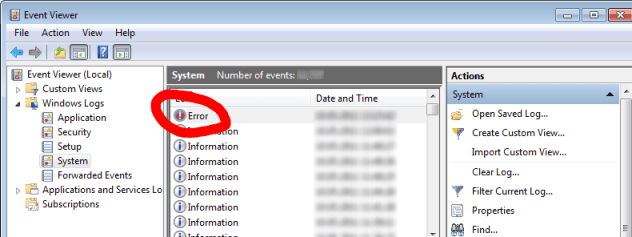
In the left pane of Event Viewer, double click on Windows Logs to expand it, then right click on Application and check for errors (see screenshot). If no related errors will be in Application, please check System section.

Please post description of errors occurred within the described time.
 

Attachments

  • 177316d1317333340-explorer-exe-issues-153966d1305130158-any-particular-idea-why-ie9-freezes-when.png
    177316d1317333340-explorer-exe-issues-153966d1305130158-any-particular-idea-why-ie9-freezes-when.png
    23.5 KB · Views: 42

My Computer

Computer type
PC/Desktop
OS
Windows 8.1 ; Windows 7 x86 (Dec2008-Jan2013)
Other Info
"The scale icon at the top right of a post or tutorial is how you can give rep to the member."
  • Like
Reactions: JMH
Hi Neutron16, thanks for your reply. The information you requested is attached.

A couple of things I forgot to mention in my first post : All the other components of Office 2000 terminate normally, and I have tried uninstalling and re-installing the suite.
 

Attachments

  • Evntvwr_2.jpg
    Evntvwr_2.jpg
    40.1 KB · Views: 35
  • Evntvwr_1.jpg
    Evntvwr_1.jpg
    54.8 KB · Views: 36

My Computer

Computer type
PC/Desktop
Computer Manufacturer/Model Number
Home build
OS
Windows 7 Professional 64-bit SP1
CPU
Pentium Core i5-2500 3.3GHz
Motherboard
Gigabyte P61-USB3-B3
Memory
2 x 4GB DDR3 1333MHz
Graphics Card(s)
Asus GT440 1GB GDDR5
Sound Card
Realtek integrated sound
Monitor(s) Displays
LG L1942PE
Screen Resolution
1280 x 1024 @ 60Hz
Hard Drives
2 x 1TB Western Digital WD10EARS, 1 x 1TB Seagate ST1000DM010
PSU
EVGA 450BR
Case
Novatech Panther ATX
Cooling
Sharkoon Silent Eagle 1000 120mm in case rear extracting
Keyboard
Logitech K120
Please, backup Normal.dot and then delete originals (could be more than one).
 

My Computer

Computer type
PC/Desktop
OS
Windows 8.1 ; Windows 7 x86 (Dec2008-Jan2013)
Other Info
"The scale icon at the top right of a post or tutorial is how you can give rep to the member."
Ok, I did that. I did a search of the entire computer and there was only one file found. I moved that to my Temp folder (cut & paste) then did another search to verify. I then ran Word again and I'm sorry to report there was no improvement.

Incidentally whilst running Event Viewer I used the link to search for info on the error but that didn't find any results.
 

My Computer

Computer type
PC/Desktop
Computer Manufacturer/Model Number
Home build
OS
Windows 7 Professional 64-bit SP1
CPU
Pentium Core i5-2500 3.3GHz
Motherboard
Gigabyte P61-USB3-B3
Memory
2 x 4GB DDR3 1333MHz
Graphics Card(s)
Asus GT440 1GB GDDR5
Sound Card
Realtek integrated sound
Monitor(s) Displays
LG L1942PE
Screen Resolution
1280 x 1024 @ 60Hz
Hard Drives
2 x 1TB Western Digital WD10EARS, 1 x 1TB Seagate ST1000DM010
PSU
EVGA 450BR
Case
Novatech Panther ATX
Cooling
Sharkoon Silent Eagle 1000 120mm in case rear extracting
Keyboard
Logitech K120
Here is the advice that help in similar Word thread.
Tony said:
Application: WINWORD.EXE - In my case, this was caused by a corrupt printer driver. I uninstalled my current printer and found this fixed my problem.

Also, you might want to check out this article.
 

My Computer

Computer type
PC/Desktop
OS
Windows 8.1 ; Windows 7 x86 (Dec2008-Jan2013)
Other Info
"The scale icon at the top right of a post or tutorial is how you can give rep to the member."
Hi Neutron16,

Before I try this are you sure Tony's thread was related to quitting Word? Because in the link you provided all the references to problems caused by the printer relate to Word crashing on start-up. In my case Word works perfectly normally, including printing on my default printer, until I try to quit. That's when I get the error pop-up attached to my original post.
 

My Computer

Computer type
PC/Desktop
Computer Manufacturer/Model Number
Home build
OS
Windows 7 Professional 64-bit SP1
CPU
Pentium Core i5-2500 3.3GHz
Motherboard
Gigabyte P61-USB3-B3
Memory
2 x 4GB DDR3 1333MHz
Graphics Card(s)
Asus GT440 1GB GDDR5
Sound Card
Realtek integrated sound
Monitor(s) Displays
LG L1942PE
Screen Resolution
1280 x 1024 @ 60Hz
Hard Drives
2 x 1TB Western Digital WD10EARS, 1 x 1TB Seagate ST1000DM010
PSU
EVGA 450BR
Case
Novatech Panther ATX
Cooling
Sharkoon Silent Eagle 1000 120mm in case rear extracting
Keyboard
Logitech K120
You are right, likely printer is not the issue.

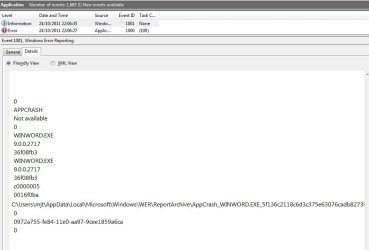
Btw, what is the info event (event id 1001) 2 seconds right after that error?
 

My Computer

Computer type
PC/Desktop
OS
Windows 8.1 ; Windows 7 x86 (Dec2008-Jan2013)
Other Info
"The scale icon at the top right of a post or tutorial is how you can give rep to the member."
Ok. Info attached.
 

Attachments

  • Evntvwr_3.jpg
    Evntvwr_3.jpg
    51.2 KB · Views: 18
  • Evntvwr_4.jpg
    Evntvwr_4.jpg
    39.9 KB · Views: 13

My Computer

Computer type
PC/Desktop
Computer Manufacturer/Model Number
Home build
OS
Windows 7 Professional 64-bit SP1
CPU
Pentium Core i5-2500 3.3GHz
Motherboard
Gigabyte P61-USB3-B3
Memory
2 x 4GB DDR3 1333MHz
Graphics Card(s)
Asus GT440 1GB GDDR5
Sound Card
Realtek integrated sound
Monitor(s) Displays
LG L1942PE
Screen Resolution
1280 x 1024 @ 60Hz
Hard Drives
2 x 1TB Western Digital WD10EARS, 1 x 1TB Seagate ST1000DM010
PSU
EVGA 450BR
Case
Novatech Panther ATX
Cooling
Sharkoon Silent Eagle 1000 120mm in case rear extracting
Keyboard
Logitech K120

My Computer

Computer type
PC/Desktop
Computer Manufacturer/Model Number
Packard Bell
OS
Windows 7 Home Premium 64bit
CPU
Intel(R) Core(TM) i3-2120 CPU @ 3.30GHz
Motherboard
Packard Bell IPISB-AG
Memory
3.00 GB
Graphics Card(s)
(1) Intel(R) HD Graphics (2) VNC Mirror Driver
Sound Card
Realtek High Definition Audio
Monitor(s) Displays
AIO LCD
Screen Resolution
1920 x 1080
Hard Drives
WDC WD10EADX-22TDHB0 ATA Device
Fixed hard disk media
4 partitions
931.51 GB
Keyboard
Wireless
Mouse
Wireless
Antivirus
Microsoft Security Essentials
Browser
IE; Firefox
Other Info
Also:
Samsung N220 Plus Netbook - Windows 7 Home
HP laptop
iPad 5
Well, yes, I expected some issues with compatibility but the odd thing is that I used it for a month without this problem, which didn't appear until after I'd done a second install (clean, from scratch) of Windows.

This seems to imply that there is no inherent compatibility problem with my version of Winword.exe (9.0.2720) but rather that something in the new installation hasn't got set up properly.

To reiterate: Word works perfectly fine; opens, edits, saves and prints. There is no problem until I try to quit which is when I get the error pop-up attached to my OP. Also, all the other components of the Office 2000 suite launch and quit gracefully.
 

My Computer

Computer type
PC/Desktop
Computer Manufacturer/Model Number
Home build
OS
Windows 7 Professional 64-bit SP1
CPU
Pentium Core i5-2500 3.3GHz
Motherboard
Gigabyte P61-USB3-B3
Memory
2 x 4GB DDR3 1333MHz
Graphics Card(s)
Asus GT440 1GB GDDR5
Sound Card
Realtek integrated sound
Monitor(s) Displays
LG L1942PE
Screen Resolution
1280 x 1024 @ 60Hz
Hard Drives
2 x 1TB Western Digital WD10EARS, 1 x 1TB Seagate ST1000DM010
PSU
EVGA 450BR
Case
Novatech Panther ATX
Cooling
Sharkoon Silent Eagle 1000 120mm in case rear extracting
Keyboard
Logitech K120

My Computer

Computer type
PC/Desktop
Computer Manufacturer/Model Number
Packard Bell
OS
Windows 7 Home Premium 64bit
CPU
Intel(R) Core(TM) i3-2120 CPU @ 3.30GHz
Motherboard
Packard Bell IPISB-AG
Memory
3.00 GB
Graphics Card(s)
(1) Intel(R) HD Graphics (2) VNC Mirror Driver
Sound Card
Realtek High Definition Audio
Monitor(s) Displays
AIO LCD
Screen Resolution
1920 x 1080
Hard Drives
WDC WD10EADX-22TDHB0 ATA Device
Fixed hard disk media
4 partitions
931.51 GB
Keyboard
Wireless
Mouse
Wireless
Antivirus
Microsoft Security Essentials
Browser
IE; Firefox
Other Info
Also:
Samsung N220 Plus Netbook - Windows 7 Home
HP laptop
iPad 5
Ok, thanks for your suggestion. I have run SFC. It reported "no integrity violations". sfcdetails.txt contains no error messages and the last few lines state "Repairing 0 components" and "Repair complete".

I've previously tried un-installing and then re-installing the Office 2000 suite. That made no difference, so I'm at a bit of a loss where to go from here.

The fact that Word crashes on exit is obviously not a major issue. It's just that it didn't do it first time around and I really would like to know what is different now.
 

My Computer

Computer type
PC/Desktop
Computer Manufacturer/Model Number
Home build
OS
Windows 7 Professional 64-bit SP1
CPU
Pentium Core i5-2500 3.3GHz
Motherboard
Gigabyte P61-USB3-B3
Memory
2 x 4GB DDR3 1333MHz
Graphics Card(s)
Asus GT440 1GB GDDR5
Sound Card
Realtek integrated sound
Monitor(s) Displays
LG L1942PE
Screen Resolution
1280 x 1024 @ 60Hz
Hard Drives
2 x 1TB Western Digital WD10EARS, 1 x 1TB Seagate ST1000DM010
PSU
EVGA 450BR
Case
Novatech Panther ATX
Cooling
Sharkoon Silent Eagle 1000 120mm in case rear extracting
Keyboard
Logitech K120
Check your Office 2000 updates for KB830347. If it is not already installed, download it from the link offered in this Article:
Description of the Word 2000 Security Patch: November 11, 2003

Create a restore point first..

Install Only the Word 2000 Security Patch: KB830347

The following file is available for download from the Microsoft Download Center:

Download.gif

Download the client version of the Word 2000 Security Patch: KB830347 package now.

Release Date: November 11, 2003
 

My Computer

Computer type
PC/Desktop
Computer Manufacturer/Model Number
Packard Bell
OS
Windows 7 Home Premium 64bit
CPU
Intel(R) Core(TM) i3-2120 CPU @ 3.30GHz
Motherboard
Packard Bell IPISB-AG
Memory
3.00 GB
Graphics Card(s)
(1) Intel(R) HD Graphics (2) VNC Mirror Driver
Sound Card
Realtek High Definition Audio
Monitor(s) Displays
AIO LCD
Screen Resolution
1920 x 1080
Hard Drives
WDC WD10EADX-22TDHB0 ATA Device
Fixed hard disk media
4 partitions
931.51 GB
Keyboard
Wireless
Mouse
Wireless
Antivirus
Microsoft Security Essentials
Browser
IE; Firefox
Other Info
Also:
Samsung N220 Plus Netbook - Windows 7 Home
HP laptop
iPad 5
Hi,

Thanks for that suggestion but when I try to install that patch it reports "The expected version of the product was not found on your system" so I suppose my version is just too old for that.

I also tried using the other link on the page you referred to :-
http://office.microsoft.com/en-us/downloads/maincatalog.aspx
but that just says to use Windows Update to check for updates to Office. Windows Update does not show any recommended updates for my installation of Office 2000.
 

My Computer

Computer type
PC/Desktop
Computer Manufacturer/Model Number
Home build
OS
Windows 7 Professional 64-bit SP1
CPU
Pentium Core i5-2500 3.3GHz
Motherboard
Gigabyte P61-USB3-B3
Memory
2 x 4GB DDR3 1333MHz
Graphics Card(s)
Asus GT440 1GB GDDR5
Sound Card
Realtek integrated sound
Monitor(s) Displays
LG L1942PE
Screen Resolution
1280 x 1024 @ 60Hz
Hard Drives
2 x 1TB Western Digital WD10EARS, 1 x 1TB Seagate ST1000DM010
PSU
EVGA 450BR
Case
Novatech Panther ATX
Cooling
Sharkoon Silent Eagle 1000 120mm in case rear extracting
Keyboard
Logitech K120
Do you have Office 2000 SP3 installed?
Description of the Word 2000 Security Patch: November 11, 2003
How to Download and Install the Patch

Important Before you install this patch, make sure that you meet the following requirements:
  • Microsoft Windows Installer 2.0.
    Before you install this patch, you must install Windows Installer 2.0 or later. For additional information about this requirement, see the "Windows Installer Patch Requirements" section of this article.
  • Microsoft Office 2000 Service Pack 3 (SP-3)
    Before you install this patch, install Office 2000 SP-3.

    For additional information about how to install Office 2000 Service Pack 3, click the following article number to view the article in the Microsoft Knowledge Base: 326585 OFF2000: Overview of Office 2000 Service Pack 3

Download Details - Microsoft Download Center - Office 2000 Update: Service Pack 3 (SP3)
 

My Computer

Computer type
PC/Desktop
Computer Manufacturer/Model Number
Packard Bell
OS
Windows 7 Home Premium 64bit
CPU
Intel(R) Core(TM) i3-2120 CPU @ 3.30GHz
Motherboard
Packard Bell IPISB-AG
Memory
3.00 GB
Graphics Card(s)
(1) Intel(R) HD Graphics (2) VNC Mirror Driver
Sound Card
Realtek High Definition Audio
Monitor(s) Displays
AIO LCD
Screen Resolution
1920 x 1080
Hard Drives
WDC WD10EADX-22TDHB0 ATA Device
Fixed hard disk media
4 partitions
931.51 GB
Keyboard
Wireless
Mouse
Wireless
Antivirus
Microsoft Security Essentials
Browser
IE; Firefox
Other Info
Also:
Samsung N220 Plus Netbook - Windows 7 Home
HP laptop
iPad 5
Hi Irene,

Sorry about that. I (perhaps naively) assumed that my version of Windows would already have a suitable up-to-date version of Windows Installer (in fact it has 5.0.7601.17514). I did a search for Installer 2 on the Microsoft site and it says it's for NT4 SP6 and Windows 2000. It also says the download is not required for XP SP3 and, by implication, newer versions such as Vista and Windows 7.

l found and downloaded the Office 2000 SP3 update (O2kSp3.exe) but my version of Installer won't install it (gives the same error message as for the KB830347 patch). I noticed that one of the preconditions for installing SP3 is to install Office 2000 SR1/1a, so I downloaded and tried to install that. This failed with the following log file entry:-

-----------------------------------------------------------------------
Starting execution.
Command line: /c /L2
Opening the patch source file, C:\Users\mjt\AppData\Local\Temp\IXP001.TMP\source.ini.
Searching installed products.
Detected the following products for patching:
{00000409-78E1-11D2-B60F-006097C998E7}
Product is not installed.
Microsoft Office 2000 Professional (9.0.2720), {00010409-78E1-11D2-B60F-006097C998E7}
Product is patchable.
{00020409-78E1-11D2-B60F-006097C998E7}
Product is not installed.
{00030409-78E1-11D2-B60F-006097C998E7}
Product is not installed.
{00100409-78E1-11D2-B60F-006097C998E7}
Product is not installed.
{00110409-78E1-11D2-B60F-006097C998E7}
Product is not installed.
{00120409-78E1-11D2-B60F-006097C998E7}
Product is not installed.
{00130409-78E1-11D2-B60F-006097C998E7}
Product is not installed.
{00160409-78E1-11D2-B60F-006097C998E7}
Product is not installed.
{00170409-78E1-11D2-B60F-006097C998E7}
Product is not installed.
{00180409-78E1-11D2-B60F-006097C998E7}
Product is not installed.
{00040409-78E1-11D2-B60F-006097C998E7}
Product is not installed.
{00140409-78E1-11D2-B60F-006097C998E7}
Product is not installed.
{004A0409-78E1-11D2-B60F-006097C998E7}
Product is not installed.
{00150409-78E1-11D2-B60F-006097C998E7}
Product is not installed.
{3C5E0FF2-BE09-11D1-998E-00A0C90A43B3}
Product is not installed.
The following patches are applicable:
Office 2000 SR-1 Core Update, {0DC0F122-1B1C-11D4-AED6-00C04F022C53}
Location: http://download.microsoft.com/download/office2000prem/Update/3821h/WIN98/EN-US/data1.msp
The version of IE installed on the computer is 8.0.7601.17514
IE has already been updated to the level of Office 2000 SR-1 or above
Error: The file, C:\Users\mjt\AppData\Local\Temp\sr1patch\{0DC0F122-1B1C-11D4-AED6-00C04F022C53}, has an invalid size.
Beginning download of http://download.microsoft.com/download/office2000prem/Update/3821h/WIN98/EN-US/data1.msp.
Finished downloading http://download.microsoft.com/download/office2000prem/Update/3821h/WIN98/EN-US/data1.msp.
Error: The file, C:\Users\mjt\AppData\Local\Temp\sr1patch\{0DC0F122-1B1C-11D4-AED6-00C04F022C53}, has an invalid size.
------------------------------------------------------------------------

Could those "invalid size" messages be related to the fact that my hard drives have Advanced-Format 4096-byte sectors?

Are you suggesting I use Installer 2, even though it appears to be unsuitable for Windows 7, and if so will it overwrite my existing installer with consequent future issues?
 

My Computer

Computer type
PC/Desktop
Computer Manufacturer/Model Number
Home build
OS
Windows 7 Professional 64-bit SP1
CPU
Pentium Core i5-2500 3.3GHz
Motherboard
Gigabyte P61-USB3-B3
Memory
2 x 4GB DDR3 1333MHz
Graphics Card(s)
Asus GT440 1GB GDDR5
Sound Card
Realtek integrated sound
Monitor(s) Displays
LG L1942PE
Screen Resolution
1280 x 1024 @ 60Hz
Hard Drives
2 x 1TB Western Digital WD10EARS, 1 x 1TB Seagate ST1000DM010
PSU
EVGA 450BR
Case
Novatech Panther ATX
Cooling
Sharkoon Silent Eagle 1000 120mm in case rear extracting
Keyboard
Logitech K120
Regrettably, it still comes down to the fact that in broad terms Office 2000 is not really compatible with Windows 7.

I would not feel uncomfortable overwriting anything which might have serious effect on your operating system installations. I will post on our 'helpers' thread for more assistance from others who might have more knowledge and experience on this matter. :)
 

My Computer

Computer type
PC/Desktop
Computer Manufacturer/Model Number
Packard Bell
OS
Windows 7 Home Premium 64bit
CPU
Intel(R) Core(TM) i3-2120 CPU @ 3.30GHz
Motherboard
Packard Bell IPISB-AG
Memory
3.00 GB
Graphics Card(s)
(1) Intel(R) HD Graphics (2) VNC Mirror Driver
Sound Card
Realtek High Definition Audio
Monitor(s) Displays
AIO LCD
Screen Resolution
1920 x 1080
Hard Drives
WDC WD10EADX-22TDHB0 ATA Device
Fixed hard disk media
4 partitions
931.51 GB
Keyboard
Wireless
Mouse
Wireless
Antivirus
Microsoft Security Essentials
Browser
IE; Firefox
Other Info
Also:
Samsung N220 Plus Netbook - Windows 7 Home
HP laptop
iPad 5
Have you considered installing Word 2000 in compatibility mode for Windows XP SP3?

Word.JPG
 

My Computer

Computer Manufacturer/Model Number
HP Pavilion Elite 495UK
OS
Windows 7 Ultimate SP1 64-Bit
CPU
Intel Core i7 870 @ 2.93GHz
Motherboard
MSI 2A9C (CPU1)
Memory
8Gb Dual-Channel DDR3 @ 664MHz
Graphics Card(s)
nVidia GeForce GTX 460 1024MB dedicated RAM
Sound Card
Realtek HD Audio
Monitor(s) Displays
HP2310i
Screen Resolution
1920 x 1080
Hard Drives
1x1954GB Hitachi HDS22020ALA 330 (RAID), 1x1954GB Hitachi External for backup and storage
PSU
460W
Case
HP Elite
Cooling
Air cooled
Keyboard
Logitech K750 solar-powered keyboard
Mouse
Logitech Wireless M180 mouse
Internet Speed
2Mb
Other Info
Pure Avanti Flow Internet Radio with iPod Dock, 64Gb iPod, HP USB Speakers, Sony MDR-V500 Headphones, Sony Vaio F-Series Laptop
Hi seavixen,

Sorry I've taken so long to reply, the thread subscription didn't flag up your post, even though it's still active.

I've tried running in several other compatibility modes, including XP SP3, (as I mentioned in my original post). I haven't tried running the setup executable that way though. Is that likely to make any difference?

I have downloaded Windows XP Mode but have not yet installed it. I was hoping that I wouldn't need it because Office has previously worked ok under 7. I have one or two old third-party programs that won't install under 7 so I might need to use it at some point but until then I would rather like to get Word sorted out running under 7.
 

My Computer

Computer type
PC/Desktop
Computer Manufacturer/Model Number
Home build
OS
Windows 7 Professional 64-bit SP1
CPU
Pentium Core i5-2500 3.3GHz
Motherboard
Gigabyte P61-USB3-B3
Memory
2 x 4GB DDR3 1333MHz
Graphics Card(s)
Asus GT440 1GB GDDR5
Sound Card
Realtek integrated sound
Monitor(s) Displays
LG L1942PE
Screen Resolution
1280 x 1024 @ 60Hz
Hard Drives
2 x 1TB Western Digital WD10EARS, 1 x 1TB Seagate ST1000DM010
PSU
EVGA 450BR
Case
Novatech Panther ATX
Cooling
Sharkoon Silent Eagle 1000 120mm in case rear extracting
Keyboard
Logitech K120
Back
Top