Office 2007 in Windows 7 64 bits as Administrator

maymoned

New member
Local time
7:41 AM
Messages
2
Hello,
I am facing this problem:
If I open any MS-Word document as Administrator (the compatibility of MS-Word was set to "Run as Administrator") I receive this error message: There was a problem sending the command to the program. But if I open just the MS-Word Application and from the File/Open I open any document, the document is opened successfully.
If the compatibility of MS-Word is set to not "Run as Adminstrator" and I double-click any word document in the windows explorer the document is also opened successfully.
Can anyone help me how to solve this problem?
Thank you
Maymone.


My Computer My Computer

At a glance

Windows Professional 7 64 bits
OS
Windows Professional 7 64 bits
Hello maymoned, welcome to Windows Seven Forums.

You could try repairing your Office 2007 installation providing you have the installation DVD.

How to install the individual 2007 Office features or to repair the installed 2007 Office programs

How to use the repair process in the 2007 Office programs

Failing that, you could try uninstalling the application, and then re-installing it.

How do I uninstall the 2007 Office suites if I cannot uninstall it by using the "Add or Remove Programs" feature?
 

My Computer My Computer

At a glance

Windows 7 Ultimate SP1 64-BitIntel Core i7 870 @ 2.93GHz8Gb Dual-Channel DDR3 @ 664MHznVidia GeForce GTX 460 1024MB dedicated RAM
Computer Manufacturer/Model Number
HP Pavilion Elite 495UK
OS
Windows 7 Ultimate SP1 64-Bit
CPU
Intel Core i7 870 @ 2.93GHz
Motherboard
MSI 2A9C (CPU1)
Memory
8Gb Dual-Channel DDR3 @ 664MHz
Graphics Card(s)
nVidia GeForce GTX 460 1024MB dedicated RAM
Sound Card
Realtek HD Audio
Monitor(s) Displays
HP2310i
Screen Resolution
1920 x 1080
Hard Drives
1x1954GB Hitachi HDS22020ALA 330 (RAID), 1x1954GB Hitachi External for backup and storage
PSU
460W
Case
HP Elite
Cooling
Air cooled
Keyboard
Logitech K750 solar-powered keyboard
Mouse
Logitech Wireless M180 mouse
Internet Speed
2Mb
Other Info
Pure Avanti Flow Internet Radio with iPod Dock, 64Gb iPod, HP USB Speakers, Sony MDR-V500 Headphones, Sony Vaio F-Series Laptop
Did not solve the problem

Hello,
1. I have run the Repair of Office 2007 - Did not solve
2. Uninstalled the Microsoft Office and Reinstalled it. Did not solve.
3. By the way I have another computer with Windows 7 - Starter and I received the same errors and the same behavior with Office 2007.
Maymone
 

My Computer My Computer

At a glance

Windows Professional 7 64 bits
OS
Windows Professional 7 64 bits
word documents not recognized by MS Office 2007

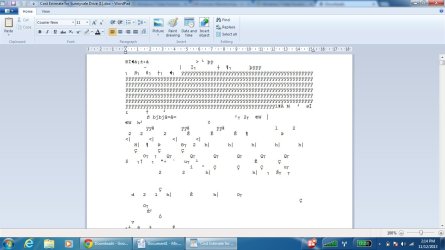
We installed MS Office Enterprise 2007 on our 64 bit lenovo laptop. When we download any word documents MS office 2007 is not recognizing new word documents, when i open the new downloaded documents they are opening with the content missing and un-understandable format. Please find the screenshot attached.
Hope somebody will help me with a solution.

Thanks,
Deepa
 

Attachments

  • unformated word document.jpg
    unformated word document.jpg
    95.3 KB · Views: 3

My Computer My Computer

At a glance

windows 7 professional x64
Computer type
PC/Desktop
Computer Manufacturer/Model Number
Lenevo
OS
windows 7 professional x64
Hello deepaaku,

I notice in the screenshot that you are opening a .doc file in WordPad. Just to verify, did you try opening in Word?

Regards,
Peatawn
 

My Computer My Computer

At a glance

Windows 7 Home (x64)
OS
Windows 7 Home (x64)
word documents not recognized by MS Office 2007

Hi Peatawn,

Thanks for the reply. When i go into the location i can open the document in MS Word format.

Thanks for the thought,

Deepa
 

My Computer My Computer

At a glance

windows 7 professional x64
Computer type
PC/Desktop
Computer Manufacturer/Model Number
Lenevo
OS
windows 7 professional x64
Back
Top