Office 2007 name edit question

SilverGator

New member
Local time
8:52 AM
Messages
24
Hey everyone. I know this is probably not the correct Web site to post this in. However, it is the only site where I have found helpful and intelligent users who I can trust. So please help if possible.

When installing Office 2007 onto my new Windows 7, I forgot to input my name and company name as default. I have absolutely no idea (a) how or (b) if I can go back and set this.

If anyone knows, I would greatly appreciate it. And yes, I already searched Google for a half hour without finding an answer! :)
 

My Computer

Computer Manufacturer/Model Number
DELL m1530
OS
Windows 7 Home Premium 64-Bit
Memory
4 GB
Screen Resolution
1440x900
Hard Drives
250GB, 500GB (external)
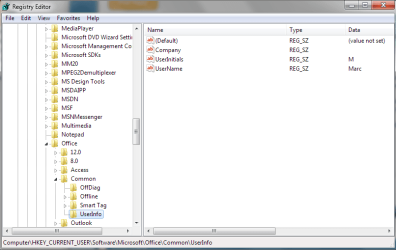
Well I have never tried to to edit/change that info from within an Office app. I spend my days combing the registry. I happened upon the key that you need though.

Open regedit and goto the following key...
HKEY_CURRENT_USER\Software\Microsoft\Office\Common\UserInfo

There in the right pane you can double click to enter your company name, user name and initials.

I attached a screenshot. Let me know if you need anything else.
 

Attachments

  • Office User Info.PNG
    Office User Info.PNG
    18 KB · Views: 75

My Computer

Computer Manufacturer/Model Number
Dell Dimension E520
OS
Windows 7 Ultimate (x86)
CPU
Intel 2.20 Dual Core
Memory
4 GB
Graphics Card(s)
nVidia 9400 GT (512 MB)
Sound Card
Sigmatel C Major HD
Monitor(s) Displays
22" Samsung 2232 bw
Screen Resolution
1680x1050
Mouse
Microsoft Arc
Other Info
Wacom Graphire 4 (6x8) Tablet
I really didn't want to do a Registry edit. I mean, just installed Windows 7 and don't want to mess anything. Is there any other way? Is that safe? How would I get there?
 

My Computer

Computer Manufacturer/Model Number
DELL m1530
OS
Windows 7 Home Premium 64-Bit
Memory
4 GB
Screen Resolution
1440x900
Hard Drives
250GB, 500GB (external)
Yes, it is safe as long as you use it exactly as directed. You can get onto it by going to run and then typing "regedit". I hope you suceed!
 

My Computer

Computer Manufacturer/Model Number
Compaq Presario F700
OS
Windows 7 x32
CPU
AMD Turion 64 Mobile TK-53
Motherboard
Quanta 30EA
Memory
DDR2 - 2048 Mbytes
Graphics Card(s)
NVIDIA GeForce 7000M/nForce 610M
Sound Card
?
Monitor(s) Displays
Normal Laptop Screen
Hard Drives
?
PSU
?
Case
?
Cooling
?
I really didn't want to do a Registry edit. I mean, just installed Windows 7 and don't want to mess anything. Is there any other way? Is that safe? How would I get there?

The alternative is to remove and re-install Office 2007, a real pain.

Here are the steps:

1. In the Orb's white box, enter "regedit" (without the quotes)
2. Click on the program (regedit) that will appear
3. Answer yes to the UAC prompt about changing things.
4. Click on "Computer" at the top of the right pane in regedit
5. Click on "File" - "Export..."
6. Make sure "Export range" at the bottom is set to "All"
7. pick a name for the ".reg" file - it will probably default to saving it in your "My Documents" folder.

Now you have a backup of the registry in case anything goes sideways.

8. Follow the path from the post above and make the changes. (You'll first click on the triangle next to KEY_CURRENT_USER, then scroll down to Software, do the same click, then scroll down to Microsoft, then to Office then to Common then to UserInfo)
9. After you have made the changes, Exit.

I know it seems daunting, but just take it a step at a time, and remember that you have a backup saved.
 

My Computer

Computer Manufacturer/Model Number
Gateway, Toshiba Laptop, and Home Brew
OS
Windows 7 x64 HP, Windows 7 HP, Windows 7 Ult
CPU
Intel I3, Cerelon, Pentium 4 @ 3Ghz
Motherboard
Intel, Intel, Asus
Memory
8G, 3G, 3G
Graphics Card(s)
On-board Intel, On-board nVidia, nVIDIA card
Sound Card
on-board, on-board, SoundBlaster
Monitor(s) Displays
Hannspree HF237, Toshiba, SyncMaster 931B
Screen Resolution
default (all)
Hard Drives
1T internal, 320G internal, 160G internal, 1T networked
PSU
300w, unk, 650w
Case
black, black, grey
Cooling
air (all)
Keyboard
standard wired (all)
Mouse
standard wired (all)
Internet Speed
6M down, 768K up
Other Info
Home LAN through Linksys hub to 4 port and wireless switch/router. Networked HP 2600n. Wife's computer running Windows 7, and spare laptop running Ubuntu "Karmic Kola" (9.10).
So after going through all that and being worried the whole time - I find out it was all filled in automatically (I suppose based on my computer name).

Hysterical. Thank you VERY much for the instructions. At least I have a back-up of my registry now.
 

My Computer

Computer Manufacturer/Model Number
DELL m1530
OS
Windows 7 Home Premium 64-Bit
Memory
4 GB
Screen Resolution
1440x900
Hard Drives
250GB, 500GB (external)
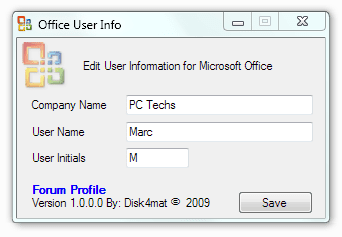
For the sake of simplicity I created a tool to edit the user info. I used VS 2008 and did it in VB. Uses .NET v2 so the tool will run under Vista and W7 without installing.

Unzip the file and run. Change user info and click Save.

Tested with Office 2007 and W7 x86
 

Attachments

My Computer

Computer Manufacturer/Model Number
Dell Dimension E520
OS
Windows 7 Ultimate (x86)
CPU
Intel 2.20 Dual Core
Memory
4 GB
Graphics Card(s)
nVidia 9400 GT (512 MB)
Sound Card
Sigmatel C Major HD
Monitor(s) Displays
22" Samsung 2232 bw
Screen Resolution
1680x1050
Mouse
Microsoft Arc
Other Info
Wacom Graphire 4 (6x8) Tablet
So after going through all that and being worried the whole time - I find out it was all filled in automatically (I suppose based on my computer name).

Hysterical. Thank you VERY much for the instructions. At least I have a back-up of my registry now.

Glad it all worked out for the best... :)

For the sake of simplicity I created a tool to edit the user info. I used VS 2008 and did it in VB. Uses .NET v2 so the tool will run under Vista and W7 without installing.

Unzip the file and run. Change user info and click Save.

Tested with Office 2007 and W7 x86

Nice. Thanks. :)
 

My Computer

Computer Manufacturer/Model Number
Gateway, Toshiba Laptop, and Home Brew
OS
Windows 7 x64 HP, Windows 7 HP, Windows 7 Ult
CPU
Intel I3, Cerelon, Pentium 4 @ 3Ghz
Motherboard
Intel, Intel, Asus
Memory
8G, 3G, 3G
Graphics Card(s)
On-board Intel, On-board nVidia, nVIDIA card
Sound Card
on-board, on-board, SoundBlaster
Monitor(s) Displays
Hannspree HF237, Toshiba, SyncMaster 931B
Screen Resolution
default (all)
Hard Drives
1T internal, 320G internal, 160G internal, 1T networked
PSU
300w, unk, 650w
Case
black, black, grey
Cooling
air (all)
Keyboard
standard wired (all)
Mouse
standard wired (all)
Internet Speed
6M down, 768K up
Other Info
Home LAN through Linksys hub to 4 port and wireless switch/router. Networked HP 2600n. Wife's computer running Windows 7, and spare laptop running Ubuntu "Karmic Kola" (9.10).
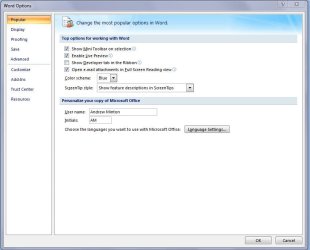
Even simpler, though you can't add you Company Name, you could just click the orb in one of the office products (2007) click, in this example, "Word Options", click "Popular", look for "Personalize your copy of Microsoft Office" and there you have it, you can input your name and initials. No scripts or registry hacks required. :)

Office Info.JPG
 

My Computer

Computer type
PC/Desktop
Computer Manufacturer/Model Number
Custom built by me.
OS
Windows 10 Pro
CPU
Intel Core i7-4770K (3.5Ghz)
Motherboard
Gigabyte G1 Sniper 5 (F10 Bios)
Memory
32 gig Corsair Dominator Platinum (4x8Gig)
Graphics Card(s)
Sapphire Tri-X R9 Fury
Sound Card
Soundblaster ZXR
Monitor(s) Displays
NEC PA242W 24" LCD Monitor
Screen Resolution
1920 x 1200
Hard Drives
Primary - Samsung 850 Pro (512gig), Samsung 840 Pro (256gig), 2TB WD Caviar Black.
PSU
EVGA Supernova 1000 G2
Case
Cooler Master HAF X
Cooling
Corsair H100i with Corsair Air Series SP120 Quiet Fans
Keyboard
Logitech Wireless Wave
Mouse
Logitech Performance MX
Internet Speed
High Speed Cable
Antivirus
Norton Security
Browser
IE11
Other Info
Memory Timings - 1866MHz @ 9-9-9-27-1T @ 1.5 volts
Back
Top