Office 2007 not installing on W7

Falcula

New member
Local time
6:21 AM
Messages
5
Read a few threads about this but can't find a fix. Trying to install Office Home and Student 2007. I enter the Product Key and begin. The Installation Progress box appears but makes no progress. After about 30 seconds, a new box appears with the following:

--------------------
Microsoft Office Home and Student Setup has stopped working. A problem caused the program to stop working correctly. Windows will close the program and notify you if a solution is available.
[Close Program]
--------------------

I've tried browsing the CD and right-clicking the setup icon and using the 'Troubleshoot Compatibility' feature to run the program through all Service Pack modes for XP and Vista, but the same problem occurs every time.

How can I get Microsoft to stop fighting with its own program and install?
 
Last edited by a moderator:

My Computer My Computer

Computer Manufacturer/Model Number
Custom
OS
Windows 7 Ultimate x64
CPU
i7 950
Motherboard
EVGA x58 SLI
Memory
12GB Corsair Dominator 2700 (6x2)
Graphics Card(s)
GTX 295
Sound Card
Omega Striker 7.1
Monitor(s) Displays
LG Flatron 27"
Hard Drives
WD 1TB
PSU
Corsair 850W
Cooling
Water on CPU, air throughout.
try to right click on the setup.exe file and select "Run as administrator".
 

My Computer My Computer

OS
7 Pro
I forgot to mention that. I did try it, with the same result. It didn't offer any other options when selecting 'Run as Administrator'.
 

My Computer My Computer

Computer Manufacturer/Model Number
Custom
OS
Windows 7 Ultimate x64
CPU
i7 950
Motherboard
EVGA x58 SLI
Memory
12GB Corsair Dominator 2700 (6x2)
Graphics Card(s)
GTX 295
Sound Card
Omega Striker 7.1
Monitor(s) Displays
LG Flatron 27"
Hard Drives
WD 1TB
PSU
Corsair 850W
Cooling
Water on CPU, air throughout.

My Computer My Computer

Computer Manufacturer/Model Number
Micro-Star International/MS-7529
OS
Windows 7 Ultimate x32
CPU
DualCore Intel Pentium E2200, 2218 MHz (11 x 202)
Motherboard
MSI G31M3 V2 (MS-7529) (2 PCI, 1 PCI-E x16,2 DDR2 DIMM)
Memory
2 GB DDR2-800 DDR2 SDRAM
Graphics Card(s)
nVIDIA GeForce 9500GT 1GB
Sound Card
Realtek ALC888/1200 @ Intel 82801GB ICH7
Monitor(s) Displays
Samsung SyncMaster 2253BW (Digital) 22'' LCD
Screen Resolution
1680x1050
Hard Drives
SAMSUNG HD322IJ ATA Device (298 GB , IDE)
Do you have any other versions of office installed? Also, are you running 32 or 64 bit? And what is the version number? I am not sure if versions prior to 12.0 is compatible with w7, of course I could be wrong. One other thing, are you doing an upgrade or a fresh install? (well question 1 would answer this as well).
 

My Computer My Computer

Computer Manufacturer/Model Number
Gigabyte
OS
Windows 7 Ultimate
CPU
Intel Core(TM)2 Quad- Q9550, 2.83GHz
Motherboard
G31M-ES2L
Memory
4GB
Graphics Card(s)
ATI Radeon HD4600
Sound Card
On Board:
Monitor(s) Displays
Acer AL2223W, Acer AL1916
Screen Resolution
1680 x 1050, 1280 x 1024
Hard Drives
160GB
350GB
250GB
250GB
PSU
600W
Case
Cooler Master
Keyboard
Microsoft Laser 6000
Mouse
Logitech Optical Trackman
Internet Speed
1.5MB
Other Info
I am also running a quasar gamatron flux capacitor with twin pulse tronic phasers......jk, I have no such stuff.
Read a few threads about this but can't find a fix. Trying to install Office Home and Student 2007. I enter the Product Key and begin. The Installation Progress box appears but makes no progress. After about 30 seconds, a new box appears with the following:

--------------------
Microsoft Office Home and Student Setup has stopped working. A problem caused the program to stop working correctly. Windows will close the program and notify you if a solution is available.
[Close Program]
--------------------

I've tried browsing the CD and right-clicking the setup icon and using the 'Troubleshoot Compatibility' feature to run the program through all Service Pack modes for XP and Vista, but the same problem occurs every time.

How can I get Microsoft to stop fighting with its own program and install?

Hi Falcula, Welcome to SF,

Can you check the Event Viewer where you find any errors

Start > Event Viewer > Windows Logs > Application check for Errors and Post the description.

Also you could Login to Build-in Administrator account and try to install it from that Account.

Make sure the Microsoft Office 2007 that your installing is with the Latest Service Pack. If you have the product key you could download the trial and register using your existing serial number.

Hope this helps,
Captain
 

My Computer My Computer

Computer Manufacturer/Model Number
Samsung NP550P5C-S02IN
OS
Windows 7 Ultimate - 64-bit | Windows 8 Pro - 64-bit
CPU
Intel® Core™ i7 Processor 3,610QM (2.30Hz, 6MB L3 Cach
Memory
8 GB
Graphics Card(s)
NVIDIA® GeForce® GT 650M 2GB Graphics, Optimus™ techno
Sound Card
SoundAlive™ JBL 3 Speakers (With sub-Woofer)
Monitor(s) Displays
39.62cm (15.6) SuperBright 300nit HD+ LED Display
Screen Resolution
1,600 x 900, Anti-Reflective
Hard Drives
1TB S-ATA II Hard Drive (5,400RPM)
I have been running 2010 for a while now, love it, can't wait for the full release. The beta is still missing some stuff, especially for outlook.
 

My Computer My Computer

Computer Manufacturer/Model Number
Gigabyte
OS
Windows 7 Ultimate
CPU
Intel Core(TM)2 Quad- Q9550, 2.83GHz
Motherboard
G31M-ES2L
Memory
4GB
Graphics Card(s)
ATI Radeon HD4600
Sound Card
On Board:
Monitor(s) Displays
Acer AL2223W, Acer AL1916
Screen Resolution
1680 x 1050, 1280 x 1024
Hard Drives
160GB
350GB
250GB
250GB
PSU
600W
Case
Cooler Master
Keyboard
Microsoft Laser 6000
Mouse
Logitech Optical Trackman
Internet Speed
1.5MB
Other Info
I am also running a quasar gamatron flux capacitor with twin pulse tronic phasers......jk, I have no such stuff.

Since I just spent $100 on 2007, this, unfortunately, isn't a viable solution.

Do you have any other versions of office installed? Also, are you running 32 or 64 bit? And what is the version number? I am not sure if versions prior to 12.0 is compatible with w7, of course I could be wrong. One other thing, are you doing an upgrade or a fresh install? (well question 1 would answer this as well).

W7 Ultimate x64. Fresh full version install, no previous versions of Office have ever been on this drive. The only 'version' anywhere on the packaging is "Version 2007" on the disc itself.

Read a few threads about this but can't find a fix. Trying to install Office Home and Student 2007. I enter the Product Key and begin. The Installation Progress box appears but makes no progress. After about 30 seconds, a new box appears with the following:

--------------------
Microsoft Office Home and Student Setup has stopped working. A problem caused the program to stop working correctly. Windows will close the program and notify you if a solution is available.
[Close Program]
--------------------

I've tried browsing the CD and right-clicking the setup icon and using the 'Troubleshoot Compatibility' feature to run the program through all Service Pack modes for XP and Vista, but the same problem occurs every time.

How can I get Microsoft to stop fighting with its own program and install?

Hi Falcula, Welcome to SF,

Can you check the Event Viewer where you find any errors

Start > Event Viewer > Windows Logs > Application check for Errors and Post the description.

Also you could Login to Build-in Administrator account and try to install it from that Account.

Make sure the Microsoft Office 2007 that your installing is with the Latest Service Pack. If you have the product key you could download the trial and register using your existing serial number.

Hope this helps,
Captain

Event Viewer didn't produce any errors that appear to be related to this installation. Ran it through Build-In Administrator and had the same issue. Guess I'll have to try the download. Rather annoying since I went out of my way to get a hard copy :(
 

My Computer My Computer

Computer Manufacturer/Model Number
Custom
OS
Windows 7 Ultimate x64
CPU
i7 950
Motherboard
EVGA x58 SLI
Memory
12GB Corsair Dominator 2700 (6x2)
Graphics Card(s)
GTX 295
Sound Card
Omega Striker 7.1
Monitor(s) Displays
LG Flatron 27"
Hard Drives
WD 1TB
PSU
Corsair 850W
Cooling
Water on CPU, air throughout.
Try the downloading the software and installing it
Let us know how it goes
 

My Computer My Computer

Computer Manufacturer/Model Number
Samsung NP550P5C-S02IN
OS
Windows 7 Ultimate - 64-bit | Windows 8 Pro - 64-bit
CPU
Intel® Core™ i7 Processor 3,610QM (2.30Hz, 6MB L3 Cach
Memory
8 GB
Graphics Card(s)
NVIDIA® GeForce® GT 650M 2GB Graphics, Optimus™ techno
Sound Card
SoundAlive™ JBL 3 Speakers (With sub-Woofer)
Monitor(s) Displays
39.62cm (15.6) SuperBright 300nit HD+ LED Display
Screen Resolution
1,600 x 900, Anti-Reflective
Hard Drives
1TB S-ATA II Hard Drive (5,400RPM)
The download appears to have worked. Strange. I noticed the file name begins with "x12", which I assume is version 12. My hard copy has the same "part number" on the CoA sticker and on the disc as well. Oh well. Hopefully the download stays there as long as the physical life of the disc, for future re-installs.
 

My Computer My Computer

Computer Manufacturer/Model Number
Custom
OS
Windows 7 Ultimate x64
CPU
i7 950
Motherboard
EVGA x58 SLI
Memory
12GB Corsair Dominator 2700 (6x2)
Graphics Card(s)
GTX 295
Sound Card
Omega Striker 7.1
Monitor(s) Displays
LG Flatron 27"
Hard Drives
WD 1TB
PSU
Corsair 850W
Cooling
Water on CPU, air throughout.
The download appears to have worked. Strange. I noticed the file name begins with "x12", which I assume is version 12. My hard copy has the same "part number" on the CoA sticker and on the disc as well. Oh well. Hopefully the download stays there as long as the physical life of the disc, for future re-installs.

Glad that you got it working :D
You could save the download to a Disk and keep it for future installs in case and ask for a replacement disk from MS.
 

My Computer My Computer

Computer Manufacturer/Model Number
Samsung NP550P5C-S02IN
OS
Windows 7 Ultimate - 64-bit | Windows 8 Pro - 64-bit
CPU
Intel® Core™ i7 Processor 3,610QM (2.30Hz, 6MB L3 Cach
Memory
8 GB
Graphics Card(s)
NVIDIA® GeForce® GT 650M 2GB Graphics, Optimus™ techno
Sound Card
SoundAlive™ JBL 3 Speakers (With sub-Woofer)
Monitor(s) Displays
39.62cm (15.6) SuperBright 300nit HD+ LED Display
Screen Resolution
1,600 x 900, Anti-Reflective
Hard Drives
1TB S-ATA II Hard Drive (5,400RPM)
You could save the download for future use. Glad you got it working.
 

My Computer My Computer

Computer Manufacturer/Model Number
Gigabyte
OS
Windows 7 Ultimate
CPU
Intel Core(TM)2 Quad- Q9550, 2.83GHz
Motherboard
G31M-ES2L
Memory
4GB
Graphics Card(s)
ATI Radeon HD4600
Sound Card
On Board:
Monitor(s) Displays
Acer AL2223W, Acer AL1916
Screen Resolution
1680 x 1050, 1280 x 1024
Hard Drives
160GB
350GB
250GB
250GB
PSU
600W
Case
Cooler Master
Keyboard
Microsoft Laser 6000
Mouse
Logitech Optical Trackman
Internet Speed
1.5MB
Other Info
I am also running a quasar gamatron flux capacitor with twin pulse tronic phasers......jk, I have no such stuff.
Thanks guys. Strange that people were friendly with a new person on a message board. This is still the internet..... right? :shock:

I'll check with Microsoft about a working hard copy. Wonder what they'll charge for it.
 

My Computer My Computer

Computer Manufacturer/Model Number
Custom
OS
Windows 7 Ultimate x64
CPU
i7 950
Motherboard
EVGA x58 SLI
Memory
12GB Corsair Dominator 2700 (6x2)
Graphics Card(s)
GTX 295
Sound Card
Omega Striker 7.1
Monitor(s) Displays
LG Flatron 27"
Hard Drives
WD 1TB
PSU
Corsair 850W
Cooling
Water on CPU, air throughout.
Thanks guys. Strange that people were friendly with a new person on a message board. This is still the internet..... right? :shock:

I'll check with Microsoft about a working hard copy. Wonder what they'll charge for it.

Your Most Welcome Mate :D
LOL. This is still Internet .. But its Seven Forum :geek:
They should not charge because it a defective disk we are not responsible for it
 

My Computer My Computer

Computer Manufacturer/Model Number
Samsung NP550P5C-S02IN
OS
Windows 7 Ultimate - 64-bit | Windows 8 Pro - 64-bit
CPU
Intel® Core™ i7 Processor 3,610QM (2.30Hz, 6MB L3 Cach
Memory
8 GB
Graphics Card(s)
NVIDIA® GeForce® GT 650M 2GB Graphics, Optimus™ techno
Sound Card
SoundAlive™ JBL 3 Speakers (With sub-Woofer)
Monitor(s) Displays
39.62cm (15.6) SuperBright 300nit HD+ LED Display
Screen Resolution
1,600 x 900, Anti-Reflective
Hard Drives
1TB S-ATA II Hard Drive (5,400RPM)
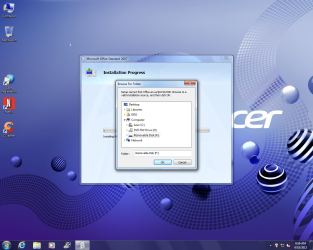
Office Standard 2007 install errors for Windows 7 HP!

Help a newbee. Brand new desktop, Acer AMD X4 X64 with Windows 7 Home Premium.
I have installed Office 2007 on my laptop with Windows 7 just a couple months ago so the hard copy is good.
If tried the admin install, no luck.
I get these cannot find errors on installation.
Any help, Thanks, Rick.
 

Attachments

  • error.png
    error.png
    370.1 KB · Views: 8
  • error1.png
    error1.png
    94.2 KB · Views: 7

My Computer My Computer

Computer Manufacturer/Model Number
acer
OS
Windows 7 Home Premium x64
CPU
AMD X4
Back
Top