
office 2007 or 2010?

drugo

New member
Member
VIP
Local time
9:37 PM
Messages
476
Hi
i have a legit version of office 2007

i use mostly word

i know the office 2007 has a buggy installer ,indeed there is a cleaner

i have never installed office 2007

so i'm worried about install it or upgrade to 2010

as i said i use mostly word

i would like to read some feebacks

do you use office 2007 under w7 32bit ?
is worth to upgrade to 2010 ?
is office 2010 multi-language like w7 ultimate?


thanks
i know lots of questions :(

cheers
 

My Computer

Computer type
PC/Desktop
OS
windows 7 ultimate 64bit
There are a few advantages to 2010. You can copy from one document, paste to another, and have a choice of which formatting to retain. I actually installed the 64-bit version, which was of course a mistake. Certain plug-ins will not work, such as EndNote 4. You can take screen shots directly from Word, new word art effects. etc. Nothing really major that would warrant me, personally, from upgrading. But I am entitled to the latest software where I work, so it's a no brainer. If you have the money to blow, get 2010. If you are conserving cash, stay with 2007. If you are broke, go with OpenOffice (which has now changed its name).
 

My Computer

Computer Manufacturer/Model Number
Dell and Custom
OS
Systems 1 and 2: Windows 7 Enterprise x64, Win 8 Developer
CPU
System 1: i7 [email protected], System 2: AMD FX-4100 Zambezi 3.6G
Motherboard
System 1:Dell 06NWYK System 2: ASUS M5A97 AM3+
Memory
System 1: 8GB System 2: 8GB
Graphics Card(s)
System 1: ATI FirePro V4800 System 2: Radeon HD 6850
Sound Card
System 1: onboard System 2: onboard
Monitor(s) Displays
System1: Viewsonic HDMI 24"
Screen Resolution
System 1: 1920x1080 System 2: 1920x1080
Hard Drives
System 1: Mirrored .5B drives System 2: Seagate Barracuda ST1000DM003 1TB 7200 RPM 64MB Cache SATA 6.0Gb/s
Case
System 1: Dell System 2: Cooler Master
Internet Speed
10 MBPS
well here's my opinion: why pay for office 2010 if you already have 2007?

unless there's a compelling new feature of 2010 that you need and isn't available in 2007, then save your money and stick with what you've got.

i don't know about the dodgy 2007 installer - it's worked fine each time i've tried it.
 

My Computer

Computer Manufacturer/Model Number
mickey megabyte 1234
OS
ultimate 64 sp1
CPU
i5 2500K [email protected]
Motherboard
MSI P67A-GD53
Memory
8 gigs GSkill Ripjaws 1600
Graphics Card(s)
amd hd6950
Sound Card
creative x-fi gamer
Monitor(s) Displays
samsung 24"
Screen Resolution
1920x1080
Hard Drives
ocz vertex 2e 60 gig, samsung f3 1tb, buffalo 2tb ext
PSU
antec 550
Case
antec three hundred
Cooling
i'm a cooling fan
Keyboard
saitek eclipse ii
Mouse
logitech g3
Internet Speed
about 4 Mbps
Other Info
i love win7
There are a few advantages to 2010. You can copy from one document, paste to another, and have a choice of which formatting to retain. I actually installed the 64-bit version, which was of course a mistake. Certain plug-ins will not work, such as EndNote 4. You can take screen shots directly from Word, new word art effects. etc. Nothing really major that would warrant me, personally, from upgrading. But I am entitled to the latest software where I work, so it's a no brainer. If you have the money to blow, get 2010. If you are conserving cash, stay with 2007. If you are broke, go with OpenOffice (which has now changed its name).
thanks a lot

my worry, trouble is the 2007 installer , i installed under xp , and it mess up my xp
thanks for the sincere, honest help

by the way office 2010 is in multi language ? i mean can i have the english and my native language and maybe german too ,like w7 ultimate


why does openoffice change the name ? OpenOffice.org - The Free and Open Productivity Suite
and openoffice it's great and free but it's a lot more slow then microsoft office , at least compared to office 2003 and 2007
 

My Computer

Computer type
PC/Desktop
OS
windows 7 ultimate 64bit
well here's my opinion: why pay for office 2010 if you already have 2007?

unless there's a compelling new feature of 2010 that you need and isn't available in 2007, then save your money and stick with what you've got.

i don't know about the dodgy 2007 installer - it's worked fine each time i've tried it.
thanks
don't know why mess up my xp

one thing i would like about 2010 is the possibility to have it in muli language , but don't know if it has this feature
 

My Computer

Computer type
PC/Desktop
OS
windows 7 ultimate 64bit
i'm sorry, i don't know about multi-language options...

...but i think you can add multi-language packs to any version of office, i don't know how easy it is.
 

My Computer

Computer Manufacturer/Model Number
mickey megabyte 1234
OS
ultimate 64 sp1
CPU
i5 2500K [email protected]
Motherboard
MSI P67A-GD53
Memory
8 gigs GSkill Ripjaws 1600
Graphics Card(s)
amd hd6950
Sound Card
creative x-fi gamer
Monitor(s) Displays
samsung 24"
Screen Resolution
1920x1080
Hard Drives
ocz vertex 2e 60 gig, samsung f3 1tb, buffalo 2tb ext
PSU
antec 550
Case
antec three hundred
Cooling
i'm a cooling fan
Keyboard
saitek eclipse ii
Mouse
logitech g3
Internet Speed
about 4 Mbps
Other Info
i love win7
By the way is office 2010 is in multi language ? I mean can I have the english and my native language and maybe German too, like w7 ultimate?

In Office 2007 (and in Office 2010) you can add languages. I have done it with no problems.

Add a Language to Office Programs


But the only way you can add spell check for these lanquages is by purchasing a language pack from Microsoft. :(

Buy, install, configure or uninstall a Microsoft Office 2007 Language Pack


Why did OpenOffice change its name ?
OpenOffice is great and it's free but it's a lot more slow then microsoft office , at least compared to office 2003 and 2007

Open Office is open source but published by a big company called Oracle. The open source developers said that Oracle had to much control over the project, so they left and created a new office suite called LibreOffice. Apparently LibreOffice is much faster then OpenOffice.

The Document Foundation

LibreOffice
 

My Computer

Computer Manufacturer/Model Number
Self-built on 31/1/11
OS
Windows 7 Ultimate 64 bit
CPU
Intel i5 2400 @ 3.80 GHz
Motherboard
Ashrock P67 Extreme 4
Memory
Mushkin Silverline 996768 4GB
Graphics Card(s)
MSI GTX 460 760MB Cyclone Overclocked
Sound Card
Integrated
Monitor(s) Displays
Asus VH202T 20" Widescreen
Screen Resolution
1600x900
Hard Drives
SSD: OCZ Vertex 2 60GB
HDD: Hitachi Deskstar 7K1000.C 500GB
PSU
Silverstone Strider 500W
Case
Zalman Z9 Plus
Cooling
Cooler Master Hyper 212 Plus
Keyboard
Logitech Wireless Keyboard MK520
Mouse
Logitech M310
Internet Speed
3 Mbps
Other Info
UEFI: Ashrock P67/
Network Card :TP-Link WN350GD/
WEI: 7.4/
ODD: Lite-On IHAS324
  • Like
Reactions: JMH

My Computer

Computer type
PC/Desktop
OS
windows 7 ultimate 64bit

My Computer

Computer Manufacturer/Model Number
Self-built on 31/1/11
OS
Windows 7 Ultimate 64 bit
CPU
Intel i5 2400 @ 3.80 GHz
Motherboard
Ashrock P67 Extreme 4
Memory
Mushkin Silverline 996768 4GB
Graphics Card(s)
MSI GTX 460 760MB Cyclone Overclocked
Sound Card
Integrated
Monitor(s) Displays
Asus VH202T 20" Widescreen
Screen Resolution
1600x900
Hard Drives
SSD: OCZ Vertex 2 60GB
HDD: Hitachi Deskstar 7K1000.C 500GB
PSU
Silverstone Strider 500W
Case
Zalman Z9 Plus
Cooling
Cooler Master Hyper 212 Plus
Keyboard
Logitech Wireless Keyboard MK520
Mouse
Logitech M310
Internet Speed
3 Mbps
Other Info
UEFI: Ashrock P67/
Network Card :TP-Link WN350GD/
WEI: 7.4/
ODD: Lite-On IHAS324
i'm sorry, i don't know about multi-language options...

...but i think you can add multi-language packs to any version of office, i don't know how easy it is.

what i hate about office 2007 ,is that it changes my font system and if i uninstall it , it did not restore them

is there a way to export via regedit the fonts system setting?
 

My Computer

Computer type
PC/Desktop
OS
windows 7 ultimate 64bit
so can i have a gui in english ?
The guide is in english.....

i mean can i have office 2007 or 2010 in english italian and german ?

like windows7 ultimate , i can download language pack ,this is the reason i paid a lot for w7 ultimate
 

My Computer

Computer type
PC/Desktop
OS
windows 7 ultimate 64bit
Oh the GUI my bad :o. I think the only way to get the office interface in another language is by buying a language pack for office. A language pack gives you the office interface in that language.
Language Packs for the 2007 Microsoft Office system product overview - Office Suites - Microsoft Office

If the language you need is not available in a language pack, then you can download a language interface pack (only available for lesser known languages, so German is not included).

http://office.microsoft.com/en-in/d...interface-pack-lip-downloads-HA001113350.aspx
 

My Computer

Computer Manufacturer/Model Number
Self-built on 31/1/11
OS
Windows 7 Ultimate 64 bit
CPU
Intel i5 2400 @ 3.80 GHz
Motherboard
Ashrock P67 Extreme 4
Memory
Mushkin Silverline 996768 4GB
Graphics Card(s)
MSI GTX 460 760MB Cyclone Overclocked
Sound Card
Integrated
Monitor(s) Displays
Asus VH202T 20" Widescreen
Screen Resolution
1600x900
Hard Drives
SSD: OCZ Vertex 2 60GB
HDD: Hitachi Deskstar 7K1000.C 500GB
PSU
Silverstone Strider 500W
Case
Zalman Z9 Plus
Cooling
Cooler Master Hyper 212 Plus
Keyboard
Logitech Wireless Keyboard MK520
Mouse
Logitech M310
Internet Speed
3 Mbps
Other Info
UEFI: Ashrock P67/
Network Card :TP-Link WN350GD/
WEI: 7.4/
ODD: Lite-On IHAS324
Oh the GUI my bad /QUOTE]

about office 2007 changes my windows fonts settings

i did a test with xp
after the 2007 installation ,my fonts changes
i mean for fonts
about the fonts
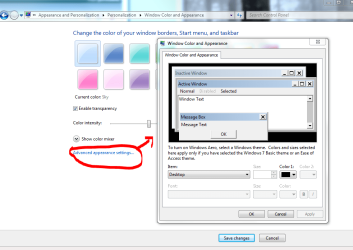
desktop->proprierty->where can i select the visual style->advanced-> i have font and size about many part of system (windows....)
whis is xp

i would like to export via regedit such settings
 

My Computer

Computer type
PC/Desktop
OS
windows 7 ultimate 64bit
do you mean the screen below?

desktop >> right-click >> personalize >> window color >> advanced appearance settings...

i don't know where these values are stored in registry, so i cannot help you there.
 

Attachments

  • adv.PNG
    adv.PNG
    47.1 KB · Views: 9

My Computer

Computer Manufacturer/Model Number
mickey megabyte 1234
OS
ultimate 64 sp1
CPU
i5 2500K [email protected]
Motherboard
MSI P67A-GD53
Memory
8 gigs GSkill Ripjaws 1600
Graphics Card(s)
amd hd6950
Sound Card
creative x-fi gamer
Monitor(s) Displays
samsung 24"
Screen Resolution
1920x1080
Hard Drives
ocz vertex 2e 60 gig, samsung f3 1tb, buffalo 2tb ext
PSU
antec 550
Case
antec three hundred
Cooling
i'm a cooling fan
Keyboard
saitek eclipse ii
Mouse
logitech g3
Internet Speed
about 4 Mbps
Other Info
i love win7
do you mean the screen below?

desktop >> right-click >> personalize >> window color >> advanced appearance settings...

i don't know where these values are stored in registry, so i cannot help you there.
yes
right!

i don't know either where these settings are stored
i'm sure in the registry
i guess the same value like xp
but can find in the net an anwer :cry:
 

My Computer

Computer type
PC/Desktop
OS
windows 7 ultimate 64bit
2007 italian language pack not available?

help please - I'm clicking on the microsoft 2007 download link for italian language pack and it takes me to the 2010 language pack. any ideas what this means? is 2007 not available any more so does that mean the 2010 italian pack would work with my 2007 office?
 

My Computer

OS
windows xp
Microsoft Office Online

This page seems to have the '07 language packs

help please - I'm clicking on the microsoft 2007 download link for italian language pack and it takes me to the 2010 language pack. any ideas what this means? is 2007 not available any more so does that mean the 2010 italian pack would work with my 2007 office?
 

My Computer

Computer Manufacturer/Model Number
HP DV6 1330sa
OS
Windows 7 Professional 64 Bit SP1
CPU
INTEL DUAL CORE 2.1Ghz
Motherboard
N/A
Memory
4GB DDR3
Graphics Card(s)
INTEL
Sound Card
LAPTOP
Monitor(s) Displays
2
Screen Resolution
3200x1080
Hard Drives
250GB
PSU
LAPTOP
Case
LAPTOP
Cooling
LAPTOP
Keyboard
SOLID YEAR 260U
Mouse
USB
Internet Speed
20 MB/S
italian language pack for 07

many thanks for the lik. works fine for 2007 until i get to order, then says i cannot order from the US, have to put UK in, then it reverts to 2010 again! Any ideas?
 

My Computer

OS
windows xp
There are a few advantages to 2010. You can copy from one document, paste to another, and have a choice of which formatting to retain. I actually installed the 64-bit version, which was of course a mistake. Certain plug-ins will not work, such as EndNote 4. You can take screen shots directly from Word, new word art effects. etc. Nothing really major that would warrant me, personally, from upgrading. But I am entitled to the latest software where I work, so it's a no brainer. If you have the money to blow, get 2010. If you are conserving cash, stay with 2007. If you are broke, go with OpenOffice (which has now changed its name).
thanks a lot

my worry, trouble is the 2007 installer , i installed under xp , and it mess up my xp
thanks for the sincere, honest help

by the way office 2010 is in multi language ? i mean can i have the english and my native language and maybe german too ,like w7 ultimate


why does openoffice change the name ? OpenOffice.org - The Free and Open Productivity Suite
and openoffice it's great and free but it's a lot more slow then microsoft office , at least compared to office 2003 and 2007


Hi there office 2007 has loads of Language packs even for languages like Icelandic and Welsh.

Office 2010 doesn't have these all ready yet.


Office Language Interface Pack (LIP) downloads - Downloads - Microsoft Office


Cheers
jimbo
 

My Computer

Computer type
PC/Desktop
Computer Manufacturer/Model Number
Custom built, several laptops HP/ASUS
OS
Linux CENTOS 7 / various Windows OS'es and servers
CPU
Intel i7 Intel i5
Memory
8GB, 16GB
Graphics Card(s)
On Motherboard
Sound Card
Realtek HD audio
Monitor(s) Displays
Apple Cinema display, Samsung LCD
Screen Resolution
1920 X 1080
Hard Drives
4 X 1TB SATA
Mouse
Toshiba wireless laser
Internet Speed
> 20MB up
Back
Top