Office 2007 security

chrisgray

New member
Local time
4:08 AM
Messages
6
Hi,

Please can you help me. I have just installed office 2007 in the projects department. The problem is when one of the users opens his emails with an attachment, he is prompt for the following

' you should only open attachments from a trustworthy source'

Apart from opening outlook as a administrator, can I disable this? Or can I had the extensions that the user is trying to open in the trusted centre some how?

Thanks for your help

Chris
 

My Computer

OS
windows 7 x64 professional
Hi, chrisgray, welcome to the Seven Forums! :)

Upon opening any attachment not already in the "trusted" list, the prompt should give you the option to always open without asking.

Is the prompt being shown not offering that option?
 

My Computer

Computer Manufacturer/Model Number
Toshiba L355D
OS
Windows 7 Ultimate x64 SP1
CPU
Core2 Duo
Motherboard
Intel
Memory
4 GB
Graphics Card(s)
GM965 on-board
Sound Card
RealTek on-board
Monitor(s) Displays
19"+17"(laptop)
Screen Resolution
1440x900 (x 2)
Hard Drives
500GB Ext. 200GB Internal
PSU
N/A
Case
N/A
Cooling
N/A
Hi,

The option is there, but it is greyed out. I can untick it, but I have to run it as ' the administrator'
 

My Computer

OS
windows 7 x64 professional
Hi Mikedl,

How do you add attachments to the trusted list?
 

My Computer

OS
windows 7 x64 professional
Hi, chrisgray! :)

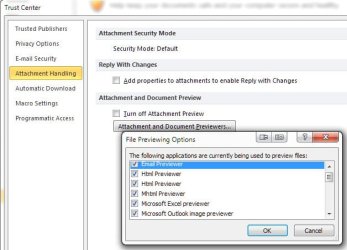
It's been a while since I used 2007 but 2010 has a Trust Center:

ScreenShot00401.jpg

Later today, I'll boot my XP VM and check out 2007 where it's still installed. I wish I could be of more help right now. I'll check back in later.
 

My Computer

Computer Manufacturer/Model Number
Toshiba L355D
OS
Windows 7 Ultimate x64 SP1
CPU
Core2 Duo
Motherboard
Intel
Memory
4 GB
Graphics Card(s)
GM965 on-board
Sound Card
RealTek on-board
Monitor(s) Displays
19"+17"(laptop)
Screen Resolution
1440x900 (x 2)
Hard Drives
500GB Ext. 200GB Internal
PSU
N/A
Case
N/A
Cooling
N/A
Hi Mikedl,

Did you have any luck with your virtual machine?


Thanks again for your help

Chris
 

My Computer

OS
windows 7 x64 professional
Hi, Chris!

I apologize for not getting back with you sooner. I was mistaken about the Outlook on my virtual Machine. I've got Office 2003 installed on it. Sorry, I really wish I could be of more help. :( Heck, it's been so long since I fired up the XP VM, I had 28 updates to install. :shock:

However, here is a site that covers the Trust Center for Outlook 2007. Here and here are MS sites dealing with the 2007 Trust Center. The latter of the three appears to be the most interesting to me.

Good luck, Chris! Again, sorry I couldn't have been more help.
 

My Computer

Computer Manufacturer/Model Number
Toshiba L355D
OS
Windows 7 Ultimate x64 SP1
CPU
Core2 Duo
Motherboard
Intel
Memory
4 GB
Graphics Card(s)
GM965 on-board
Sound Card
RealTek on-board
Monitor(s) Displays
19"+17"(laptop)
Screen Resolution
1440x900 (x 2)
Hard Drives
500GB Ext. 200GB Internal
PSU
N/A
Case
N/A
Cooling
N/A
Hey Sorry to hijack this thread, I couldn't found new post option.. in this forum.. I am new-bee here...
I am into a strange situation...I brought my laptop from family friend. Which was installed by windows 7 and office 2007 professional. After one month unusual manufacturer issue, then return to manufacturer for repair. They sent my laptop back with brand new hard-drive in it(Don't know why they changed it?)... that means I lost all softwares....

The reason I am here to discuss.. How can I retrieve my office 2007 professional software? Unfortunately, family friend lost KEY, so no use and I tried different key finder softwares.. but those showing only after the new hard drive installed(Of course I changed Admin name.. ). Is it too late to find the office 2007 KEY ? Can some suggest me how to retrieve KEY? As far as I know this KEY can only use for one system only.....By changing the Hard drive(and admin name) is it not retrievable?

Sorry once again to hijack this thread....
Thanks
 

My Computer

Computer Manufacturer/Model Number
VPCS12V9E
OS
Window 7 professional X64
CPU
2.4GHz
Motherboard
I5 520
Memory
6GB
Graphics Card(s)
NVIDIA GeForce310M

My Computer

Computer Manufacturer/Model Number
LAPTOP. HP Pavilion dv7-4010TX .
OS
Win 7 Ultimate 64-bit. SP1.
CPU
Intel i7 -720QM.[1.6GHz Turbo Boost 2.8GHz. 6MB Cache.]
Memory
8 DDR 3 RAM. 1066MHZ
Graphics Card(s)
ATI 1024 MB. DDR3. Radeon HD5650
Monitor(s) Displays
17.3" High Definition Brightview LCD. LED Backlit.
Screen Resolution
1600 x 900.
Hard Drives
640GB
Case
Laptop / notebook.
Mouse
Logitech Anywhere mouse. MX.
Internet Speed
ADSL [ but too slow ]
Back
Top