Office 2010 + 2003

Birdulike

New member
Member
Local time
2:10 PM
Messages
62
Hi, currently installed on my machine is Office 2010. I want install Access 2003 because I'm going to be doing a course which requires 2003. 2010 is not backward compatible to 2003!

Now I've done a duel install on my Toshiba Satellite (32bit) and they seem to have cozied up together very well.:) However on my main machine (64bit system) as soon as I put the 2010 Office on it seemed to have kick 2003 three out of bed:dinesh::dinesh:
I'm assuming it’s a dust up between the 32bt system and the 64bit??????
I could do the course on the lappy but I prefer 32inch screen to 17 any day!

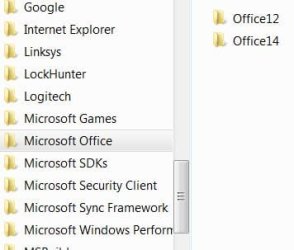
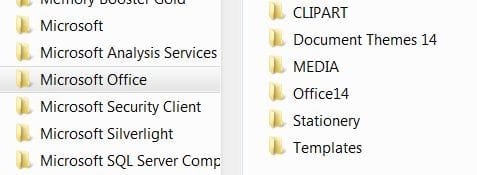
Access 2003 is not installed at the moment but I'm thinking should I install it to another directory "Programme Files" for win 7U or X86?
But on checking out dir's it seems that "office12/14 are in Prog files and there is "office 12" in X86 not sure if that is left over bits from when 2003 was previously Installed.

How do I get both to work on my 64bit system like they do on my 32bit system?????

Thank you for reading:sleepy:
 

Attachments

  • Prog Files W7 Ultimate.JPG
    Prog Files W7 Ultimate.JPG
    21.7 KB · Views: 10
  • Prog file x86.JPG
    Prog file x86.JPG
    20.9 KB · Views: 3

My Computer

OS
VISTA HP UPGRADED TO WIN7 HP
CPU
AND PHENOM II X4 965 BLACK EDITION 3.4 GHZSOCKET AM3CACHE
Motherboard
ASUS® CROSSHAIR II FORMULA: SATA II, 3 x PCI-Ex, 2 x PCI
Memory
8GB CORSAIR XMS2 DUAL-DDR2 800MHz - LIFETIME WARRANTY!
Graphics Card(s)
1GB NVIDIA GEFORCE 9600GT PCI EXPRESS
Screen Resolution
SONY TN 1024X768
Hard Drives
X2 1TB SERIAL ATA 3-Gb/s HARD DRIVE WITH 16MB CACHE (7,200rpm)
PSU
700W Quiet Quad Rail PSU + 120mm Case Fan
Other Info
Power Supply & Case Cooling
22x DUAL LAYER DVD WRITER ±R/±RW/RAM


700W Quiet Quad Rail PSU + 120mm Case Fan
This is what you need, I guess.

As to our other question, uninstalling Office rarely removes the corresponding Office12 (or whatever version number) folder from ProgramFiles, so I guess that's where it's coming from.

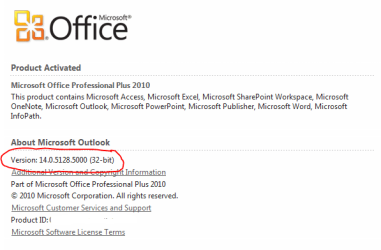
Which version is your Office 2010? If 32 bit, then the fact that your OS is 54 bit would make no difference.
 

My Computer

Computer Manufacturer/Model Number
Dell Inspiron 530
OS
Windows 7 Ultimate (x64)
CPU
Q6600
Memory
8 GB
Graphics Card(s)
ATI Radeon HD 2600 XT
Monitor(s) Displays
Samsung Syncmaster P2450
Screen Resolution
1920x1080
Hard Drives
Samsung HD103UJ
Samsung HD501LJ
Internet Speed
25 Mb/s
I dont know which version it is just twenty ten
 

My Computer

OS
VISTA HP UPGRADED TO WIN7 HP
CPU
AND PHENOM II X4 965 BLACK EDITION 3.4 GHZSOCKET AM3CACHE
Motherboard
ASUS® CROSSHAIR II FORMULA: SATA II, 3 x PCI-Ex, 2 x PCI
Memory
8GB CORSAIR XMS2 DUAL-DDR2 800MHz - LIFETIME WARRANTY!
Graphics Card(s)
1GB NVIDIA GEFORCE 9600GT PCI EXPRESS
Screen Resolution
SONY TN 1024X768
Hard Drives
X2 1TB SERIAL ATA 3-Gb/s HARD DRIVE WITH 16MB CACHE (7,200rpm)
PSU
700W Quiet Quad Rail PSU + 120mm Case Fan
Other Info
Power Supply & Case Cooling
22x DUAL LAYER DVD WRITER ±R/±RW/RAM


700W Quiet Quad Rail PSU + 120mm Case Fan
I dont know which version it is just twenty ten

Hi,

Click File > Help, and you should see something similar to this.

Regards,
Golden
 

Attachments

  • Capture.PNG
    Capture.PNG
    10.8 KB · Views: 7

My Computer

Computer type
PC/Desktop
Computer Manufacturer/Model Number
Golden Mk. I.4
OS
Windows 10 Pro x64 ; Xubuntu x64
CPU
Intel i7 860 @ 2.80 GHz O/C'ed to 4.0GHz
Motherboard
Gigabyte P55A-UD3R Rev.1. Award BIOS F13
Memory
16GB Corsair Vengance DDR3 @ 661 MHz Dual Channel (9-9-9-24)
Graphics Card(s)
EVGA NVidia GTX 560 1024MB
Sound Card
Realtek Integrated
Monitor(s) Displays
Dual Samsung SyncMaster 2494HS
Screen Resolution
1920*1080 and 1920*1080
Hard Drives
1*Samsung 840 EVO 120GB SSD;
1*OCZ Vertex 2 60GB SSD;
2*Samsung F3 SpinPoint 1TB in RAID0;
1*Samsung F1 SpinPoint 1TB;
2*Western Digital 1TB External USB 3.0
1*Western Digital 500GB External USB 3.0
1*Seagate 500GB External USB 2.0
PSU
Thermaltake ToughPower QFan 750W
Case
Thermaltake Element S VK60001W2Z
Cooling
Corsair H60 Water Cooling, 2*230mm and 2*80mm case fans
Keyboard
Logitech G110
Mouse
Logitech MX518
Also I cant seeem to open my old 2003 spreadsheet ther opening in wordpad!
 

Attachments

  • 02.JPG
    02.JPG
    11.6 KB · Views: 910

My Computer

OS
VISTA HP UPGRADED TO WIN7 HP
CPU
AND PHENOM II X4 965 BLACK EDITION 3.4 GHZSOCKET AM3CACHE
Motherboard
ASUS® CROSSHAIR II FORMULA: SATA II, 3 x PCI-Ex, 2 x PCI
Memory
8GB CORSAIR XMS2 DUAL-DDR2 800MHz - LIFETIME WARRANTY!
Graphics Card(s)
1GB NVIDIA GEFORCE 9600GT PCI EXPRESS
Screen Resolution
SONY TN 1024X768
Hard Drives
X2 1TB SERIAL ATA 3-Gb/s HARD DRIVE WITH 16MB CACHE (7,200rpm)
PSU
700W Quiet Quad Rail PSU + 120mm Case Fan
Other Info
Power Supply & Case Cooling
22x DUAL LAYER DVD WRITER ±R/±RW/RAM


700W Quiet Quad Rail PSU + 120mm Case Fan
I can't imagine wanting both on the same system, but it seems as though you'd be better off specifying different install folders, so instead of Office, make them Office2010 and Office2003...but then again it seems to have been done again later on.

The files can be made backwards compatible, for reference. But, if you only need it for a class, I'd virtualize an old copy of XP, throuw Access 2003 in it, and then you'll be able to clean it up and remove it when the class is done.
 

My Computer

OS
Windows 7 Ultimate x64 SP1
CPU
Intel Core i7-2600
Motherboard
Gigabyte GA-P67A-UD3P-B3
Memory
12 GB Patriot Extreme DDR3-1333
Graphics Card(s)
Nvidia GTX 470
Monitor(s) Displays
Dell UltraSharp 2209WA
Hard Drives
OCZ Agility3 240 GB, WD5001AALS, WD7501AALS
PSU
OCZ ModStream 700W
Case
CoolerMaster HAF 912 Advanced
Cooling
CoolerMaster Hyper 212 Plus
Deaconfrost

Code:
Hi, currently installed on my machine is Office 2010. I want install Access 2003 because I'm going to be doing a course which requires 2003. 2010 is not backward compatible to 2003!
 

My Computer

OS
VISTA HP UPGRADED TO WIN7 HP
CPU
AND PHENOM II X4 965 BLACK EDITION 3.4 GHZSOCKET AM3CACHE
Motherboard
ASUS® CROSSHAIR II FORMULA: SATA II, 3 x PCI-Ex, 2 x PCI
Memory
8GB CORSAIR XMS2 DUAL-DDR2 800MHz - LIFETIME WARRANTY!
Graphics Card(s)
1GB NVIDIA GEFORCE 9600GT PCI EXPRESS
Screen Resolution
SONY TN 1024X768
Hard Drives
X2 1TB SERIAL ATA 3-Gb/s HARD DRIVE WITH 16MB CACHE (7,200rpm)
PSU
700W Quiet Quad Rail PSU + 120mm Case Fan
Other Info
Power Supply & Case Cooling
22x DUAL LAYER DVD WRITER ±R/±RW/RAM


700W Quiet Quad Rail PSU + 120mm Case Fan

I'm not sure if you had something to add besides quoting me your original post...but I currently use Office 2010 on my work laptop, and many of the schools my company deals with are still running Office 2003. A few of our contractors are as well, and we have no problems sharing documents, spreadsheets, presentations, or a few Access DBs.
 

My Computer

OS
Windows 7 Ultimate x64 SP1
CPU
Intel Core i7-2600
Motherboard
Gigabyte GA-P67A-UD3P-B3
Memory
12 GB Patriot Extreme DDR3-1333
Graphics Card(s)
Nvidia GTX 470
Monitor(s) Displays
Dell UltraSharp 2209WA
Hard Drives
OCZ Agility3 240 GB, WD5001AALS, WD7501AALS
PSU
OCZ ModStream 700W
Case
CoolerMaster HAF 912 Advanced
Cooling
CoolerMaster Hyper 212 Plus
I dont why they cant open! I 've tried right clicking and open with.....but theres no Excel listed in the "preferred Programmes list" only wordpad! Tried browseing option, still no good
 

My Computer

OS
VISTA HP UPGRADED TO WIN7 HP
CPU
AND PHENOM II X4 965 BLACK EDITION 3.4 GHZSOCKET AM3CACHE
Motherboard
ASUS® CROSSHAIR II FORMULA: SATA II, 3 x PCI-Ex, 2 x PCI
Memory
8GB CORSAIR XMS2 DUAL-DDR2 800MHz - LIFETIME WARRANTY!
Graphics Card(s)
1GB NVIDIA GEFORCE 9600GT PCI EXPRESS
Screen Resolution
SONY TN 1024X768
Hard Drives
X2 1TB SERIAL ATA 3-Gb/s HARD DRIVE WITH 16MB CACHE (7,200rpm)
PSU
700W Quiet Quad Rail PSU + 120mm Case Fan
Other Info
Power Supply & Case Cooling
22x DUAL LAYER DVD WRITER ±R/±RW/RAM


700W Quiet Quad Rail PSU + 120mm Case Fan
They should open by double-clicking, unless you don't have the file associations set up. Do they have the the proper icons?
 

My Computer

OS
Windows 7 Ultimate x64 SP1
CPU
Intel Core i7-2600
Motherboard
Gigabyte GA-P67A-UD3P-B3
Memory
12 GB Patriot Extreme DDR3-1333
Graphics Card(s)
Nvidia GTX 470
Monitor(s) Displays
Dell UltraSharp 2209WA
Hard Drives
OCZ Agility3 240 GB, WD5001AALS, WD7501AALS
PSU
OCZ ModStream 700W
Case
CoolerMaster HAF 912 Advanced
Cooling
CoolerMaster Hyper 212 Plus
They should open by double-clicking, unless you don't have the file associations set up. Do they have the the proper icons?
You may have it there..file associations, how do I set that up. The Icon seem the same
 

My Computer

OS
VISTA HP UPGRADED TO WIN7 HP
CPU
AND PHENOM II X4 965 BLACK EDITION 3.4 GHZSOCKET AM3CACHE
Motherboard
ASUS® CROSSHAIR II FORMULA: SATA II, 3 x PCI-Ex, 2 x PCI
Memory
8GB CORSAIR XMS2 DUAL-DDR2 800MHz - LIFETIME WARRANTY!
Graphics Card(s)
1GB NVIDIA GEFORCE 9600GT PCI EXPRESS
Screen Resolution
SONY TN 1024X768
Hard Drives
X2 1TB SERIAL ATA 3-Gb/s HARD DRIVE WITH 16MB CACHE (7,200rpm)
PSU
700W Quiet Quad Rail PSU + 120mm Case Fan
Other Info
Power Supply & Case Cooling
22x DUAL LAYER DVD WRITER ±R/±RW/RAM


700W Quiet Quad Rail PSU + 120mm Case Fan
Tried file association and again nothing ion the "preferred Programmes list"
 

My Computer

OS
VISTA HP UPGRADED TO WIN7 HP
CPU
AND PHENOM II X4 965 BLACK EDITION 3.4 GHZSOCKET AM3CACHE
Motherboard
ASUS® CROSSHAIR II FORMULA: SATA II, 3 x PCI-Ex, 2 x PCI
Memory
8GB CORSAIR XMS2 DUAL-DDR2 800MHz - LIFETIME WARRANTY!
Graphics Card(s)
1GB NVIDIA GEFORCE 9600GT PCI EXPRESS
Screen Resolution
SONY TN 1024X768
Hard Drives
X2 1TB SERIAL ATA 3-Gb/s HARD DRIVE WITH 16MB CACHE (7,200rpm)
PSU
700W Quiet Quad Rail PSU + 120mm Case Fan
Other Info
Power Supply & Case Cooling
22x DUAL LAYER DVD WRITER ±R/±RW/RAM


700W Quiet Quad Rail PSU + 120mm Case Fan
There's a recommended programs section, yes, but there's also a Browse button. Use that to browse to the proper 2010 executable. It works the same as it has in XP and Vista. Most likely, the 2003 installer broke the associations. There may also be an option to repair or restore them from within one of the 2010 applications, maybe in the options or the Diagnostics.
 

My Computer

OS
Windows 7 Ultimate x64 SP1
CPU
Intel Core i7-2600
Motherboard
Gigabyte GA-P67A-UD3P-B3
Memory
12 GB Patriot Extreme DDR3-1333
Graphics Card(s)
Nvidia GTX 470
Monitor(s) Displays
Dell UltraSharp 2209WA
Hard Drives
OCZ Agility3 240 GB, WD5001AALS, WD7501AALS
PSU
OCZ ModStream 700W
Case
CoolerMaster HAF 912 Advanced
Cooling
CoolerMaster Hyper 212 Plus
I can't imagine wanting both on the same system, but it seems as though you'd be better off specifying different install folders, so instead of Office, make them Office2010 and Office2003...but then again it seems to have been done again later on.

The files can be made backwards compatible, for reference. But, if you only need it for a class, I'd virtualize an old copy of XP, throuw Access 2003 in it, and then you'll be able to clean it up and remove it when the class is done.

Hi there

the OP said he NEEDED both because 2010 was NOT backwards compatable with 2003 -- however IMO you CAN save office documents on 2010 in a format 2003 can understand. This isn't exactly the same as using 2003 since the menus etc are different and there are extra features.

The EASIEST way IMO to do this would be to install the office 2003 on either an XP or a W7 VIRTUAL machine -- use vbox / vmware player both free.

If you just install the OS and Office your VM will be very small ( could be in the case of XP a 512MB machine) and take up almost no resources. You'll also learn about Virtual Machines and can shut it down when you are not using it.

Use "Host only" networking to share files between your VM and the Host W7 system. There are plenty of tutorials o the Virtualisation section on the Forum.

Incidentally this is often an "Industry" standard method of developing / testing software by running different versions on Virtual Machines and comparing them to the current released version.

Cheers
jimbo
 

My Computer

Computer type
PC/Desktop
Computer Manufacturer/Model Number
Custom built, several laptops HP/ASUS
OS
Linux CENTOS 7 / various Windows OS'es and servers
CPU
Intel i7 Intel i5
Memory
8GB, 16GB
Graphics Card(s)
On Motherboard
Sound Card
Realtek HD audio
Monitor(s) Displays
Apple Cinema display, Samsung LCD
Screen Resolution
1920 X 1080
Hard Drives
4 X 1TB SATA
Mouse
Toshiba wireless laser
Internet Speed
> 20MB up
Back
Top