Office 2010 Calendar

rtj6751

New member
Local time
12:11 AM
Messages
6
Location
Plano, Tx
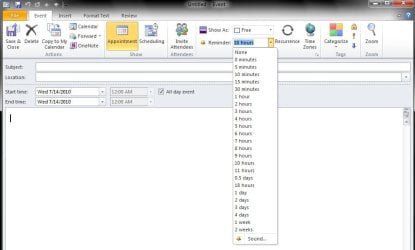
When I set an appointment in calendar with reminder notifications the software will not let me change the reminder time, but continually rings until you delete the appointment.
 

My Computer

Computer Manufacturer/Model Number
Dell/Optiplex 330
OS
XP Professional
Memory
2gb
Monitor(s) Displays
22 NEC
Here it is::D
 

Attachments

  • Outlook 2010 Appointment.jpg
    Outlook 2010 Appointment.jpg
    45.9 KB · Views: 48

My Computer

Computer type
PC/Desktop
Computer Manufacturer/Model Number
custom build
OS
WinXP / Win 7 / Win 8.1 64bit Dual Boot
CPU
i7-4770K
Motherboard
Asus Z87-A
Memory
16 gb G.Skill Ripjaws
Graphics Card(s)
on board 4600
Sound Card
On Board Soundmax HD
Monitor(s) Displays
Dell 19" Flat Panel
Screen Resolution
1280x1024
Hard Drives
Samsung 840 Pro 512gb SSD
WD1001 Caviar Win 7 Boot
WD500 Caviar Win XP Boot
2xWD500 Caviar (Raid 0)
WD750 Caviar (Backup)
PSU
Aerocool StrikeX 800w x2
Case
Aerocool Strike X
Cooling
Air
Keyboard
Microsoft Wireless
Mouse
Microsoft Wireless
Internet Speed
Cable
Other Info
Asus 12x Blu-ray writer
I know how to set the reminder. . . I can't get it to quit ringing when you dismiss or change the reminder time. I tried to repair the software in control panel, but that didn't work.
 

My Computer

Computer Manufacturer/Model Number
Dell/Optiplex 330
OS
XP Professional
Memory
2gb
Monitor(s) Displays
22 NEC
OK I guess I misunderstood. Do you mean that when you get a reminder notification you can not turn off the sound?
 

My Computer

Computer type
PC/Desktop
Computer Manufacturer/Model Number
custom build
OS
WinXP / Win 7 / Win 8.1 64bit Dual Boot
CPU
i7-4770K
Motherboard
Asus Z87-A
Memory
16 gb G.Skill Ripjaws
Graphics Card(s)
on board 4600
Sound Card
On Board Soundmax HD
Monitor(s) Displays
Dell 19" Flat Panel
Screen Resolution
1280x1024
Hard Drives
Samsung 840 Pro 512gb SSD
WD1001 Caviar Win 7 Boot
WD500 Caviar Win XP Boot
2xWD500 Caviar (Raid 0)
WD750 Caviar (Backup)
PSU
Aerocool StrikeX 800w x2
Case
Aerocool Strike X
Cooling
Air
Keyboard
Microsoft Wireless
Mouse
Microsoft Wireless
Internet Speed
Cable
Other Info
Asus 12x Blu-ray writer
Yeah it's weird. You can set an appointment with a 1 day reminder, or 1 hour whatever. When the reminder box comes up after 1 day or 1 hour, you can't get the reminder to snooze. Say you wanted the reminder to snooze for 15 minutes. . it will pop back up after 60 seconds. Hit snooze again OR dismiss and here it comes again. The only way I've been able to get it to go away is dismiss and then immediatley close office. This morning I went into control panel and removed office, did a system restart and then reloaded the software. Still there.:mad:
I've never seen anything like it. I thought maybe I missed a setup.
 

My Computer

Computer Manufacturer/Model Number
Dell/Optiplex 330
OS
XP Professional
Memory
2gb
Monitor(s) Displays
22 NEC
Hmmm! Maybe dumb question. are you using beta or RTM!
I don't have this problem and can't replicate it either???:confused:
 

My Computer

Computer type
PC/Desktop
Computer Manufacturer/Model Number
custom build
OS
WinXP / Win 7 / Win 8.1 64bit Dual Boot
CPU
i7-4770K
Motherboard
Asus Z87-A
Memory
16 gb G.Skill Ripjaws
Graphics Card(s)
on board 4600
Sound Card
On Board Soundmax HD
Monitor(s) Displays
Dell 19" Flat Panel
Screen Resolution
1280x1024
Hard Drives
Samsung 840 Pro 512gb SSD
WD1001 Caviar Win 7 Boot
WD500 Caviar Win XP Boot
2xWD500 Caviar (Raid 0)
WD750 Caviar (Backup)
PSU
Aerocool StrikeX 800w x2
Case
Aerocool Strike X
Cooling
Air
Keyboard
Microsoft Wireless
Mouse
Microsoft Wireless
Internet Speed
Cable
Other Info
Asus 12x Blu-ray writer
I had beta to try it out and then bought the home and office suite when it rolled out. The only thing I can figure is this particular cd has a bad piece of code. I made sure I uninstalled the beta before I installed the RTM. I'm at my wits end. Maybe if I get time today i'll see if I can get someone at Microsoft support to answer the phone.
 

My Computer

Computer Manufacturer/Model Number
Dell/Optiplex 330
OS
XP Professional
Memory
2gb
Monitor(s) Displays
22 NEC
Also try a full uninstall and install, I know its a pain in the ass but it might work!

Good luck!
Kukag
 

My Computer

Computer Manufacturer/Model Number
Custom
OS
Windows 7
CPU
AMD Phenom II X4 940 3.0 Stock
Motherboard
Gigabyte GA-MA78GM-S2H
Memory
G.SKILL DDR2 800 PI Black 4GB+Corsair XMS2 Xtrm Gaming 2GB
Graphics Card(s)
ASUS EN8800GT TOP (Fact OC)
Monitor(s) Displays
Optiquest 20" Flatscreen
Screen Resolution
1680x1050
Hard Drives
Seagate 3.5' 7200RPM 750GB HDD
PSU
Antec NeoHE 550W
Cooling
Stock AMD Phenom HSF
Keyboard
Logitech G15
Internet Speed
Charter HighSpeed 10 Down / 5 Up
Back
Top