Solved Office 2010 (Installation & Screenshots)

Orbital Shark

New member
Guru
Gold Member
VIP
Local time
7:11 PM
Messages
6,298
Location
Milton Keynes, United Kingdom
After downloading the Techincal Preview of Office 2010 i thought i'd make this thread detailing the installation & some notes/screenshots of it in action.

Installation can be run from both DVD & Hard Disk, just double-click the Setup.exe file.

Check the box to agree to the terms, then click next.
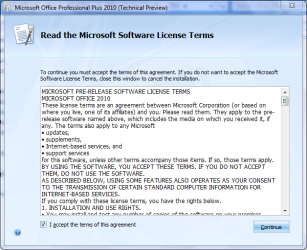
Office 2010 (Agreement).PNG
[Personal preference] the best way to guarantee a full installation is to choose a custom install by clicking Customize.
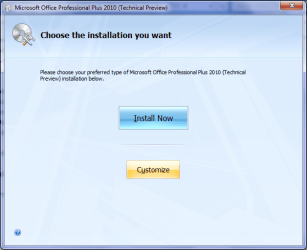
Office 2010 (Install Option).png
You can select each component (application) that is installed with Office, I find the best option is to Run all from My Computer. This will install all Office 2010 applications.
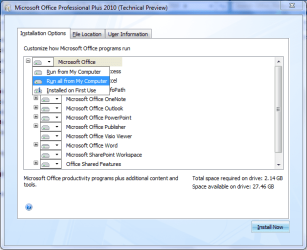
Office 2010 (Install Option 2).png
Once done, click Install Now to finalise the installation & commence copying files.
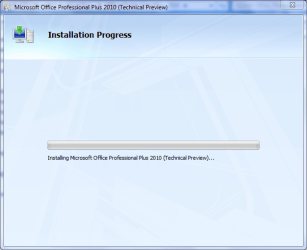
Office 2010 (Installing).PNG

First thing to note is the rather flashy splash screen that runs with each application
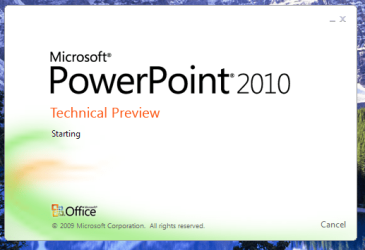
Office 2010 (Splash).png
and the sheer speed at which the apps open up (sooo much fast than 2003 & even 2007).

All applications run as expected, with a whole host of new features at your fingertips (far too many to mention :p).

Below is a list of the main Office 2010 (and indeed every Office) applications.

Microsoft Access:
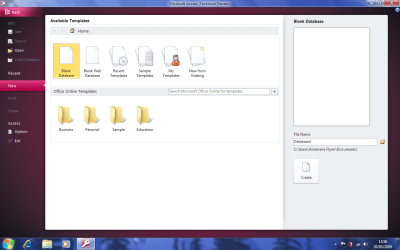
Office 2010 (Access).png
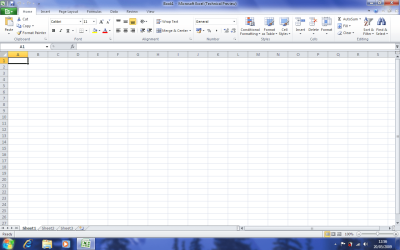
Microsoft Excel
Office 2010 (Excel).png
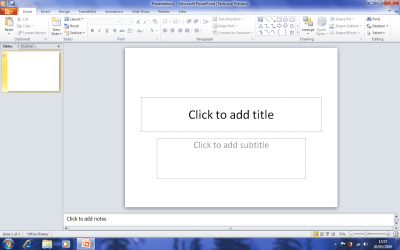
Microsoft Powerpoint
Office 2010 (PowerPoint).png
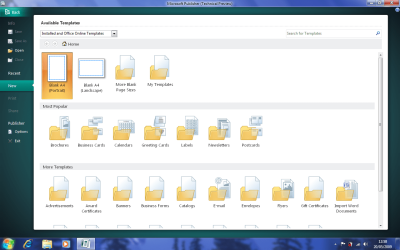
Microsoft Publisher
Office 2010 (Publisher).png
Microsoft Word
Office 2010 (Word).png

There is (as of yet) no key required to activate this Technical Preview.

Hope you ind this useful


Jeff
 

My Computer

Computer Manufacturer/Model Number
Compaq Desktop
OS
Windows 7 Ultimate x64
CPU
AMD Sempron Dual Core
Memory
3GB
Graphics Card(s)
NVIDIA GeForce 6150SE nForce 430
Screen Resolution
1024x768
Hard Drives
150GB Sata
Not sure I like the look of 2010.

It seems like visually they've taken a step back from 2007. I liked the blue colour and the drop down menu design with the jewel. This just looks a bit bland. Plus the tabs and especially the replacement for the jewel look kind of clunky...

Does 'Technical Preview' mean that this version is just for testing out the interface and features with aesthetics being added at a later date?

What does everyone else think?
 

My Computer

Computer Manufacturer/Model Number
HP / Pavilion dv7 1135ea
OS
Windows 7 Professional x86
CPU
Intel Core 2 Duo - P8400 @ 2.26Ghz
Memory
2.998GB
Graphics Card(s)
NVIDIA GeForce 9600M GT
Screen Resolution
1440x900
Hard Drives
2x Serial ATA-150 (2x 250GB)
Case
HP Vader 1.0a apparently ;)
Internet Speed
10MB/s
I hope that is the case dannet because Im not liking the design. I much prefer 2007 as well.
 

My Computer

Computer Manufacturer/Model Number
self built
OS
Windows 7 Professional 64-bit
CPU
Intel E8400 3GHz
Motherboard
Intel DX48BT2
Memory
Kingston PC3-10700H 4Gb
Graphics Card(s)
XFX Radeon HD 5850 BlackEd.
Sound Card
Asus Xonar DG
Monitor(s) Displays
2x Samsung SM-T220HD 22"
Screen Resolution
1680x1050 on two monitors
Hard Drives
OCZ Vertex 2 120gb 3.5" (OS)
Seagate Momentus XT 500gb
Samsung F3 1Tb (games)
2x Samsung F1 1Tb
PSU
Thermaltake ToughPower 850w
Case
Thermaltake Armor
Cooling
Scythe Mugen II
Keyboard
Microsoft Comfort Curve USB
Mouse
Razer Diamondback 3G
Internet Speed
8128/443
I wonder, is the blue color on the top due to the desktop background? As in, the tool bar being partially transparent.
 

My Computer

OS
Windows 7 Ultimate x64 RC (7100)
I wonder, is the blue color on the top due to the desktop background? As in, the tool bar being partially transparent.

Yeah the bar at the top features the glass effect. The blue colour must be the blue desktop showing through.
 

My Computer

Computer Manufacturer/Model Number
HP / Pavilion dv7 1135ea
OS
Windows 7 Professional x86
CPU
Intel Core 2 Duo - P8400 @ 2.26Ghz
Memory
2.998GB
Graphics Card(s)
NVIDIA GeForce 9600M GT
Screen Resolution
1440x900
Hard Drives
2x Serial ATA-150 (2x 250GB)
Case
HP Vader 1.0a apparently ;)
Internet Speed
10MB/s
How do you select "set transparent colour" in Publisher 2010 ?
It was a doddle in 2007. Nowhere to be seen in 2010
 

My Computer

Computer Manufacturer/Model Number
Home made !
OS
Windows 7 Home Premium x64
CPU
Pentium Dual Core E6300 2.8ghz o/c - 3.4ghz
Motherboard
Gigabyte GA-G31M-ES2L
Memory
4gb Corsair DDR2 800MHz/PC2-6400 XMS2 Memory
Graphics Card(s)
XFX 9800GT 512MB DDR3 Dual DVI HDTV Out
Sound Card
on Motherboard
Monitor(s) Displays
Samsung 2032mw
Screen Resolution
1600x1050
Hard Drives
3.
2x1tb
1x750gb
All Samsung
PSU
450
Case
Coolermaster 330
Cooling
Zalman
Keyboard
Microsoft Curve
Mouse
Logitech Lazer
Internet Speed
20mb
This is a technical preview which means it is pre beta - the GUI is at best half finished. In fact some UI options are actually absent such as the option to change the colour of the UI and other than the default action gives an error message stating that this feature will be added in the beta phase
 

My Computers

System One System Two

  • Computer type
    PC/Desktop
    Computer Manufacturer/Model Number
    ChillBlast - Custom to my design
    OS
    Windows 11 Pro x64 [Latest Release and Release Preview]
    CPU
    Ryzen 9 5950X, 3.8 - 5.2 MHz
    Motherboard
    Asus Prime X570-Pro
    Memory
    64GB [2 x 32GB] DDR4 3200MHz
    Graphics Card(s)
    4GB NVIDIA GEFORCE GTX 1650 Ti
    Sound Card
    On-board SPDIF to 5.1 System + HDMI [5.1 system]
    Monitor(s) Displays
    32" UHD 32 Bit HDR Monitor + 43" UHD 4K 32Bit HDR TV
    Screen Resolution
    2 x 3840 x 2160 @60Hz
    Hard Drives
    1TB M2 SSD OS, 500GB Fast Access SSD, 2 x 8TB Data + Various Externals from 1TB to 4TB, 10TB NAS
    PSU
    NZXT C750 80 PLUS Gold 750W Modular PSU
    Case
    Workstation Case [Matt Black]
    Cooling
    NZXT Kraken X63 280mm CPU Cooler +2x Quiet Case fans
    Keyboard
    Logitech Wireless MX Keys & K400 + others
    Mouse
    Logitech Wireless MX Master 3S
    Internet Speed
    920 MB Down 50 MB Up
    Antivirus
    BitDefender Total Security Pro
    Browser
    Chrome (always run latest Non-Beta)
    Other Info
    Also run ...
    Laptop - Quad 8GB - Windows 10 Pro x64
    Nexus 7 Android tablet x2
    Samsung 10.2" tablet
    Blackview TAB 8 4G Android Tablet c/w Keyboard
    Wacom Intuos Pro Medium Pen Pad
    Wacom Intuos Pro Small Pen Pad
    Wacom Expresskeys Remote
    Loopdeck+ Graphics Controller
    Shuttle Pro v2 Control
  • Computer type
    Laptop
    System Manufacturer/Model Number
    Dell XPS 17 10750H
    OS
    Windows 11 Pro x64 Latest RP
    CPU
    Intel I7 10750H 5.0GHz
    Motherboard
    Dell XPS
    Memory
    32GB [2x16GB] DDR4 2933 MHz
    Graphics Card(s)
    nVidia GTX1650Ti 4 GB GDDR6
    Sound Card
    Stock [Realtek] 4 Speaker
    Monitor(s) Displays
    17" IPS UHD+ Infinity Edge Touchscreen
    Screen Resolution
    3840 x 2400
    Hard Drives
    2TB M2 NVMe, 4TB External + various 500GB & 1TB External NVMe (also have access to spinner HDD from
    PSU
    Stock
    Case
    Stock XPS Aluminium & Carbon Fibre
    Cooling
    Stock - Active Fan Control
    Keyboard
    Backlit + Various Logitech
    Mouse
    Stock Track Pad + Logitech MX Trackball
    Internet Speed
    72 MB Down 18MB Up
    Browser
    Chrome
    Other Info
    Also run ...
    Laptop - Quad 8GB - Windows 10 Pro x64
    Nexus 7 Android tablet x2
    10.2" tablet
    Sony Z3 Android Smartphone
    Wacom Intuos Pro Medium Pen Pad
    Wacom Intuos Pro Small Pen Pad
    Wacom Expresskeys Remote
    Loopdeck+ Graphics Controller
    Shuttle Pro v2 Control Pad
    10TB NAS
Office 2010 Home & Business Installation

I'm upgrading to 2010. . .since Microsoft didn't come out with an upgrade package do I need to uninstall '07 or just install over it?
 

My Computer

Computer Manufacturer/Model Number
Dell/Optiplex 330
OS
XP Professional
Memory
2gb
Monitor(s) Displays
22 NEC
Thanks. . I saw that out there too. I just wasn't sure if Office 10 deleted all the old 07 files when you over loaded the program. I had run into that problem with the 07 release and wound up deleting the office directory to get a clean install. Based on a lot of the posts about lock ups during installs with 2010, I think I'll just delete the directory and go for a clean install again.
 

My Computer

Computer Manufacturer/Model Number
Dell/Optiplex 330
OS
XP Professional
Memory
2gb
Monitor(s) Displays
22 NEC
Back
Top