Office 2010 - Need outbox prompt on exit

EphesiansSIx

New member
Local time
2:23 AM
Messages
8
How can I get the unsent messages prompt back if I try to close with messages in the outbox?

Thanks! - Alex


Details: On exit, if there are messages in my outbox, it warn and ask if I want to send/receive. (I use POP3 with a 5-minute send delay). The warning doesn't appear though. I have a vague recollection that it may have been working, but I chose "don't show me this warning" at some point...no idea where the "show it to me again" option is.

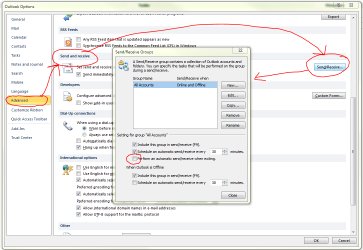
A workaround is to set "perform automatic send/receive on exit" at
Send / Receive --> Send / Receive Groups -- > Define Send / Receive Groups

But it will always send/receive on exit, whether you select or not.

People also wondering here: Outlook 2010 Unsent Messages Exit Dialog
 

My Computer My Computer

At a glance

Windows 7 Ultimatei5 520M4GBIntel GMA
Computer Manufacturer/Model Number
Lenovo X201
OS
Windows 7 Ultimate
CPU
i5 520M
Memory
4GB
Graphics Card(s)
Intel GMA
Hi,

Mmmm....I can't find any mention of the old unsent message dialogue in Outlook2010. The only thing I can see that will help, is to force a Send/Receive on exit as shown in the image below (i think this is the same as your mentioned work-around).

Regards,
Golden
 

Attachments

  • Capture.PNG
    Capture.PNG
    49.7 KB · Views: 141

My Computer My Computer

At a glance

Windows 10 Pro x64 ; Xubuntu x64Intel i7 860 @ 2.80 GHz O/C'ed to 4.0GHz16GB Corsair Vengance DDR3 @ 661 MHz Dual Cha...EVGA NVidia GTX 560 1024MB
Computer type
PC/Desktop
Computer Manufacturer/Model Number
Golden Mk. I.4
OS
Windows 10 Pro x64 ; Xubuntu x64
CPU
Intel i7 860 @ 2.80 GHz O/C'ed to 4.0GHz
Motherboard
Gigabyte P55A-UD3R Rev.1. Award BIOS F13
Memory
16GB Corsair Vengance DDR3 @ 661 MHz Dual Channel (9-9-9-24)
Graphics Card(s)
EVGA NVidia GTX 560 1024MB
Sound Card
Realtek Integrated
Monitor(s) Displays
Dual Samsung SyncMaster 2494HS
Screen Resolution
1920*1080 and 1920*1080
Hard Drives
1*Samsung 840 EVO 120GB SSD;
1*OCZ Vertex 2 60GB SSD;
2*Samsung F3 SpinPoint 1TB in RAID0;
1*Samsung F1 SpinPoint 1TB;
2*Western Digital 1TB External USB 3.0
1*Western Digital 500GB External USB 3.0
1*Seagate 500GB External USB 2.0
PSU
Thermaltake ToughPower QFan 750W
Case
Thermaltake Element S VK60001W2Z
Cooling
Corsair H60 Water Cooling, 2*230mm and 2*80mm case fans
Keyboard
Logitech G110
Mouse
Logitech MX518
Thanks Golden, especially for the neat graphic. That is what I had found...it seems the familiar "unsent message" option is missing. I may try a re-install at some point.
 

My Computer My Computer

At a glance

Windows 7 Ultimatei5 520M4GBIntel GMA
Computer Manufacturer/Model Number
Lenovo X201
OS
Windows 7 Ultimate
CPU
i5 520M
Memory
4GB
Graphics Card(s)
Intel GMA
Hi,

No problem. I'm not sure a re-installation will help : it sounds to me like the "unsent message" does not actually exist in Outlook 2010.

Do you know under which menu option in Outlook 2007 it existed?

Regards,
Golden
 

My Computer My Computer

At a glance

Windows 10 Pro x64 ; Xubuntu x64Intel i7 860 @ 2.80 GHz O/C'ed to 4.0GHz16GB Corsair Vengance DDR3 @ 661 MHz Dual Cha...EVGA NVidia GTX 560 1024MB
Computer type
PC/Desktop
Computer Manufacturer/Model Number
Golden Mk. I.4
OS
Windows 10 Pro x64 ; Xubuntu x64
CPU
Intel i7 860 @ 2.80 GHz O/C'ed to 4.0GHz
Motherboard
Gigabyte P55A-UD3R Rev.1. Award BIOS F13
Memory
16GB Corsair Vengance DDR3 @ 661 MHz Dual Channel (9-9-9-24)
Graphics Card(s)
EVGA NVidia GTX 560 1024MB
Sound Card
Realtek Integrated
Monitor(s) Displays
Dual Samsung SyncMaster 2494HS
Screen Resolution
1920*1080 and 1920*1080
Hard Drives
1*Samsung 840 EVO 120GB SSD;
1*OCZ Vertex 2 60GB SSD;
2*Samsung F3 SpinPoint 1TB in RAID0;
1*Samsung F1 SpinPoint 1TB;
2*Western Digital 1TB External USB 3.0
1*Western Digital 500GB External USB 3.0
1*Seagate 500GB External USB 2.0
PSU
Thermaltake ToughPower QFan 750W
Case
Thermaltake Element S VK60001W2Z
Cooling
Corsair H60 Water Cooling, 2*230mm and 2*80mm case fans
Keyboard
Logitech G110
Mouse
Logitech MX518
I don't recall from the brief time I had 2007, but the 2003 prompt would have looked something like that below, and then I would choose "no," send/receive, and then exit. In 2010 I thought it had this same dialog but with a "don't show this warning again" box that I had checked. Maybe that was 2007 though...

Figure_01.gif


What I'm looking for is a way to:
i) Delay email send by 5 minutes in case I realize a mistake and want to prevent sending
ii) IF I exit Outlook, be prompted to send the email because it's still in the outbox. (i.e. if I create and "send" the email, then exit quickly)

The send/receive on exit is a workaround, but Outlook will always try to do that (and take a while for all my accounts) on every exit.
 

My Computer My Computer

At a glance

Windows 7 Ultimatei5 520M4GBIntel GMA
Computer Manufacturer/Model Number
Lenovo X201
OS
Windows 7 Ultimate
CPU
i5 520M
Memory
4GB
Graphics Card(s)
Intel GMA
Hi all,
I found a work-around and thought I'd share. Hope this helps until Microsoft fixes their problem:
1. Make a new send/receive group titled "Exit"
2. Check the box to include the first account (checkmark at the top of each account page) in the send/receive. HOWEVER - make sure that in the boxes on the bottom half of the page, you have only checked the "send mail items" box.
3. Repeat this process for your other email accounts, all under the same send/receive group.
4. Click OK
5. Main page for the send/receive groups, uncheck the boxes to include this with the F9 send/recieve. Also, uncheck the box to automatically send/receive every X minutes. Make sure that the third box has been checked - "Perform an automatic send/receive when exiting". This should be the only box that is checked on the page (you might have to uncheck the boxes under "When Outlook is Offline" as well).
6. Click close and give it a shot.
Hope that works!
NPrince
 

My Computer My Computer

At a glance

7 64bit
OS
7 64bit
Back
Top