
Office 2010 opens files slow from network....

Cr00zng

New member
Pro User
Local time
7:11 PM
Messages
568
In my home network, 100MB/s fully switched with Windows 7 and Office 2010, opening documents from a network share takes 20-30 seconds. The size of the documents are small, in the range of 60-100KB. This is how Word 2010 looks like, after double-clicking the file name:
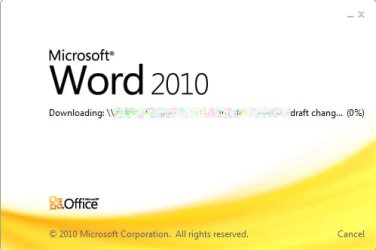
word 2010.jpg

Once it finishes, it greats me with this:
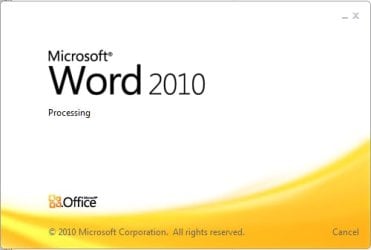
ms word 2010.jpg

It's not like my network is slow; transferring a 200MBs video between the same machines gives me this:
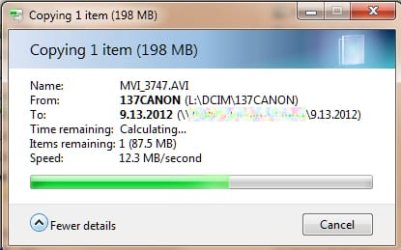
video transfer.jpg

All of the Office files experience the same issue, such as Excel, Power Point, Visio, etc. The very same file can be copy pasted to my machine and open it in less time than Office opens the same file directly.

This issue only impacts files without the "x" in the file extension, such as ".doc, .xls, .ppt, etc., even if these files were created by Office 2010. With the "x" in the extension, such as ".docx", ".xlsx", etc., the files open up just fine from the network share, like they should.

Is this issue relate to the "legacy" file format and can it be adjusted, other than using the "x" in the file extension?

TIA...
 

My Computer My Computer

Computer type
PC/Desktop
Computer Manufacturer/Model Number
Custom built at Home
OS
Windows 7 64-bit, Windows 8.1 64-bit, OSX El Capitan, Windows 10 (VMware)
CPU
Intel i5-3350P 3.1 GHz
Motherboard
Gigabyte GA-Z77X-UP5 TH
Memory
16 GBs GSkill Sniper
Graphics Card(s)
Radeon HD 7850
Sound Card
VIA HD Audio
Monitor(s) Displays
Dell U2410 24"
Screen Resolution
1920x1200
Hard Drives
1 x Intel 520 240 GBs
1 x Seagate 1TBs SATA 2.0,
1 x Seagate 1TBs eSATA 2.0
PSU
Thermaltake 850W
Case
Antec P183
Cooling
Noctua NH-D14 Heatsink 2 x 120mm fans, 4 x 120mm case fans
Keyboard
Dell Multimedia keyboard
Mouse
Logitech Trackball
Internet Speed
28.5 Mb/s

My Computer My Computer

Computer Manufacturer/Model Number
Insane hobo technologies. ;-)
OS
Windows 7 x64
CPU
Intel i7 2600k
Motherboard
Asrock z68 extreme 4 gen 3
Memory
G.skill Ripjaw 16gigs @ 1866
Graphics Card(s)
Nvidia gtx580 (evga)
Sound Card
Integrated HD audio + hdmi
Monitor(s) Displays
24" ASUS widescreen + 42" insignia
Screen Resolution
1080p (1920x1080)
Hard Drives
128 Samsung 830
256 Samsung 840
3 x 1tb storage drive (various)
1 western digital 1tb (eSATA)
1 Seagate 1tb (eSATA)
PSU
1 kilowatt SLI/Crossfire rated Silverstone modular
Case
NZXT Phantom + additional 220 fan
Cooling
Zalmann
Keyboard
Microsoft wireless 3000 (v2)
Mouse
MS - wireless 5000 (bluetrack)
Internet Speed
depends on if you ask me or my provider.
Other Info
The above information is provided as is, and the author assumes no responsibility for issues it may cause with your sanity or fanboyism.
Thanks Magus...

I've tried that, but no change; the files are still opening slow.

Interestingly, opening files hosted my machine has no issue on the other machine, regardless of the file extension. Office and OS are the same versions and patch levels. Certainly, it seems that something on my system doesn't want to cooperate...
 

My Computer My Computer

Computer type
PC/Desktop
Computer Manufacturer/Model Number
Custom built at Home
OS
Windows 7 64-bit, Windows 8.1 64-bit, OSX El Capitan, Windows 10 (VMware)
CPU
Intel i5-3350P 3.1 GHz
Motherboard
Gigabyte GA-Z77X-UP5 TH
Memory
16 GBs GSkill Sniper
Graphics Card(s)
Radeon HD 7850
Sound Card
VIA HD Audio
Monitor(s) Displays
Dell U2410 24"
Screen Resolution
1920x1200
Hard Drives
1 x Intel 520 240 GBs
1 x Seagate 1TBs SATA 2.0,
1 x Seagate 1TBs eSATA 2.0
PSU
Thermaltake 850W
Case
Antec P183
Cooling
Noctua NH-D14 Heatsink 2 x 120mm fans, 4 x 120mm case fans
Keyboard
Dell Multimedia keyboard
Mouse
Logitech Trackball
Internet Speed
28.5 Mb/s
same firewall and antivirus too?
Could try snoozing them and see if the problem still happens there as well.
There's not a ton of things that can really cause this.
 

My Computer My Computer

Computer Manufacturer/Model Number
Insane hobo technologies. ;-)
OS
Windows 7 x64
CPU
Intel i7 2600k
Motherboard
Asrock z68 extreme 4 gen 3
Memory
G.skill Ripjaw 16gigs @ 1866
Graphics Card(s)
Nvidia gtx580 (evga)
Sound Card
Integrated HD audio + hdmi
Monitor(s) Displays
24" ASUS widescreen + 42" insignia
Screen Resolution
1080p (1920x1080)
Hard Drives
128 Samsung 830
256 Samsung 840
3 x 1tb storage drive (various)
1 western digital 1tb (eSATA)
1 Seagate 1tb (eSATA)
PSU
1 kilowatt SLI/Crossfire rated Silverstone modular
Case
NZXT Phantom + additional 220 fan
Cooling
Zalmann
Keyboard
Microsoft wireless 3000 (v2)
Mouse
MS - wireless 5000 (bluetrack)
Internet Speed
depends on if you ask me or my provider.
Other Info
The above information is provided as is, and the author assumes no responsibility for issues it may cause with your sanity or fanboyism.
These machines are behind a broadband router/firewall and as such, the Windows firewalls are not turned on.

On the A/V side there are differences, Vipre vs MSE on my machine. Disabling MSE real-time protection didn't make a difference, as far as opening legacy Office extension is concerned.
 

My Computer My Computer

Computer type
PC/Desktop
Computer Manufacturer/Model Number
Custom built at Home
OS
Windows 7 64-bit, Windows 8.1 64-bit, OSX El Capitan, Windows 10 (VMware)
CPU
Intel i5-3350P 3.1 GHz
Motherboard
Gigabyte GA-Z77X-UP5 TH
Memory
16 GBs GSkill Sniper
Graphics Card(s)
Radeon HD 7850
Sound Card
VIA HD Audio
Monitor(s) Displays
Dell U2410 24"
Screen Resolution
1920x1200
Hard Drives
1 x Intel 520 240 GBs
1 x Seagate 1TBs SATA 2.0,
1 x Seagate 1TBs eSATA 2.0
PSU
Thermaltake 850W
Case
Antec P183
Cooling
Noctua NH-D14 Heatsink 2 x 120mm fans, 4 x 120mm case fans
Keyboard
Dell Multimedia keyboard
Mouse
Logitech Trackball
Internet Speed
28.5 Mb/s
Sollution?

Hey there,
Did you ever find a fix for this? I know this is an old post. But I'm just looking for some help.
Thanks, God Bless
 

My Computer My Computer

Computer type
PC/Desktop
OS
xp 32 bit
There are several things that can cause this.

1) Office File Validation (OFV) see: An Office program is slow or may appear to stop responding (hang) when you open a file from a network location

2) Slow network performance when you open a file that is located in a shared folder on a remote network computer

3) For Word 2010: File | Options | Add-ins | Manage: Templates...Go | click Attach, then select a normal.dotm stored on a local drive.


4) Run through the "Add/Remove features" for Office 2010 and disable/make "not available" the option under Office Tools called "Microsoft Sharepoint Foundation Support"
 

My Computer My Computer

OS
Windows 7 Ultimate x64
Back
Top