Solved Office 2016 Professional Updates Query

Iain

New member
Member
Local time
12:27 AM
Messages
46
I've been running Office 2016 on my X64 machine since it became available in 2016.

I 'm also running Office 2010 Pro on my 32-bit machine.

Office 2010 installation is updated via Microsoft Update, whilst Office 2016 is updated via the new mechanism which I'm not keen of because I have no control over what it does.

Is there any way to revert to Microsoft Update method for the Office 2016 installation?
 

My Computer

Computer type
Laptop
Computer Manufacturer/Model Number
Toshiba Tecra W50-A
OS
Windows 7 Professional x64
CPU
Intel i7-4810MQ vPro
I asked that question on the tenforums.com and the short answer is no. In Win 10 there is an option on the updates panel to "give me updates for other Microsoft products too" and Office will not update. It has its own update mechanism.
 

My Computer

Computer type
PC/Desktop
Computer Manufacturer/Model Number
My Own Build
OS
Windows 10 64 bit
CPU
Intel i7 6700K
Motherboard
ASUS ROG Maximus VIII Hero
Memory
16GB Corsair Dominator
Graphics Card(s)
Intel CPU Graphics
Sound Card
RealTek
Monitor(s) Displays
27" Dell S2719dgf
Screen Resolution
2560X1440
Hard Drives
1 TB Samsung 850 EVO SSD for Win 10 Pro
500GB Samsung 850 EVO SSD for Win 10 Insider
2 TB drive for backup
PSU
EVGA Supernova 750G2
Case
BeQuiet Silent Base 600
Cooling
Deepcool Captain 120EX
Keyboard
Microsoft Wireless 2000
Mouse
Microsoft wireless
Internet Speed
100 MB/sec (Cable)
Antivirus
Microsoft Defender and Malwarebytes
Browser
Edge/Firefox
Other Info
Cakewalk (Sonar) by BandLab and Studio One 4.1 Pro recording studio software. MOTU 896Mk3 Hybrid recording interface, Frontier Tranzport wireless control unit, Behringer X-Touch Control Surface.
Five USB connected optical drives for CD Audio production using Nero BurningROM
Iain. What fireberd has said is correct.

Office 2016 is the same as Office 2013 which I have been using for the past 4 years & Updates occur automatically. This has not been a problem & you can check on when it was last updated by looking in Control Panel, Programs & Features then scroll down to Microsoft Office 2016 & see the 'Installed on" date & the Version.

If you wish to see if an Update is needed you can open any Office program, such as Excel, select File up on the top LH edge, then click on Account, this will show a box that says Update Options, click on that & select Update Now. This will do a check & if updating is needed it will start the update, which will run in the background if you wish to do other work on the computer.
 

My Computer

Computer type
PC/Desktop
Computer Manufacturer/Model Number
Self built using existing case
OS
Windows 7 Home Premium 64 bit sp1
CPU
Intel i5 3570 3.4Ghz Ivy Bridge SKT 1155 quad core
Motherboard
Gigabyte Z77-HD3 SKT 1155 2xSata 3, 4x USB 3.0
Memory
G-Skill Rip Jaws 16Gb (8x2) DDR3 -1600 PC3 12800 CL 10 red
Graphics Card(s)
Gigabyte NVIDIA GT610 1Gb DDR3 810/1200 PCI-E 2.0 Silent
Sound Card
NVIDIA High Definition & Realtech High Definition Audio
Monitor(s) Displays
2 x Philips 226V4L 16:9 aspect ratio
Screen Resolution
1920 x 1080 HD
Hard Drives
Samsung 840 Pro 256gb SSD, SATA 3.
Hitachi Touro Portable 1tb, USB 3.0 HDD used for image b/ups.
PSU
Corsair VS450
Case
Codeng
Cooling
PSU fan & CPU fan
Keyboard
Logitech
Mouse
Logitech Wireless trackball M570
Internet Speed
Wireless 3G. 3mg down & 550kb up.
Antivirus
Bitdefender Internet Security 2020
Browser
Opera (Current Version) & Firefox
Other Info
MS Office 2013 Pro. Davis weather station software. MGE Nova 600 avr UPS.
I asked that question on the tenforums.com and the short answer is no. In Win 10 there is an option on the updates panel to "give me updates for other Microsoft products too" and Office will not update. It has its own update mechanism.

Iain. What fireberd has said is correct.

Office 2016 is the same as Office 2013 which I have been using for the past 4 years & Updates occur automatically. This has not been a problem & you can check on when it was last updated by looking in Control Panel, Programs & Features then scroll down to Microsoft Office 2016 & see the 'Installed on" date & the Version.

If you wish to see if an Update is needed you can open any Office program, such as Excel, select File up on the top LH edge, then click on Account, this will show a box that says Update Options, click on that & select Update Now. This will do a check & if updating is needed it will start the update, which will run in the background if you wish to do other work on the computer.

Thanks for the input.

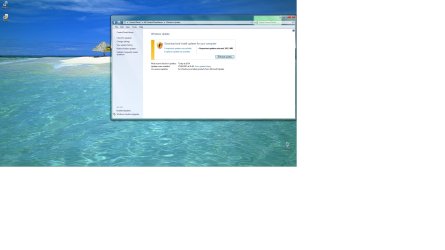
Attached is a Control Panel image showing Microsoft Update method is in use here. I've always wondered why it didn't work as expected for Office 2016.

The Office 2016 manual update method is better than automatic updates, but it still doesn't explain what specific product (Access, Outlook etc.) updates occured. For troubleshooting, that would be nice to know if the Office update went wonky.
 

Attachments

  • ControlPanel.jpg
    ControlPanel.jpg
    215.8 KB · Views: 8

My Computer

Computer type
Laptop
Computer Manufacturer/Model Number
Toshiba Tecra W50-A
OS
Windows 7 Professional x64
CPU
Intel i7-4810MQ vPro

My Computer

Computer type
PC/Desktop
Computer Manufacturer/Model Number
My Own Build
OS
Windows 10 64 bit
CPU
Intel i7 6700K
Motherboard
ASUS ROG Maximus VIII Hero
Memory
16GB Corsair Dominator
Graphics Card(s)
Intel CPU Graphics
Sound Card
RealTek
Monitor(s) Displays
27" Dell S2719dgf
Screen Resolution
2560X1440
Hard Drives
1 TB Samsung 850 EVO SSD for Win 10 Pro
500GB Samsung 850 EVO SSD for Win 10 Insider
2 TB drive for backup
PSU
EVGA Supernova 750G2
Case
BeQuiet Silent Base 600
Cooling
Deepcool Captain 120EX
Keyboard
Microsoft Wireless 2000
Mouse
Microsoft wireless
Internet Speed
100 MB/sec (Cable)
Antivirus
Microsoft Defender and Malwarebytes
Browser
Edge/Firefox
Other Info
Cakewalk (Sonar) by BandLab and Studio One 4.1 Pro recording studio software. MOTU 896Mk3 Hybrid recording interface, Frontier Tranzport wireless control unit, Behringer X-Touch Control Surface.
Five USB connected optical drives for CD Audio production using Nero BurningROM
Iain. You can see what Office updates have occurred by using what I suggested in Post #3 concerning Automatic Updates. When you have opened File, then Accounts, click on Update Options & the drop down menu has an option of View Updates. Select that & you will be taken to an MS website & you can see what updates were installed & when & you can also view the particular KB numbers if you wish.

Office 2013 & Office 2016 are what MS calls Click to Run, which means that most of the installation gets installed via the internet & not from the DVD that comes with it's purchase. So when you install it you get the latest version rather than having to install it & then go through an update process. As I mentioned above I have been using Office 2013 Pro for the last 4 years & I have not had any problems with it or any updates. As you probably know the Pro version includes Access which I use, & some other programs that the Standard version does not have.
 

My Computer

Computer type
PC/Desktop
Computer Manufacturer/Model Number
Self built using existing case
OS
Windows 7 Home Premium 64 bit sp1
CPU
Intel i5 3570 3.4Ghz Ivy Bridge SKT 1155 quad core
Motherboard
Gigabyte Z77-HD3 SKT 1155 2xSata 3, 4x USB 3.0
Memory
G-Skill Rip Jaws 16Gb (8x2) DDR3 -1600 PC3 12800 CL 10 red
Graphics Card(s)
Gigabyte NVIDIA GT610 1Gb DDR3 810/1200 PCI-E 2.0 Silent
Sound Card
NVIDIA High Definition & Realtech High Definition Audio
Monitor(s) Displays
2 x Philips 226V4L 16:9 aspect ratio
Screen Resolution
1920 x 1080 HD
Hard Drives
Samsung 840 Pro 256gb SSD, SATA 3.
Hitachi Touro Portable 1tb, USB 3.0 HDD used for image b/ups.
PSU
Corsair VS450
Case
Codeng
Cooling
PSU fan & CPU fan
Keyboard
Logitech
Mouse
Logitech Wireless trackball M570
Internet Speed
Wireless 3G. 3mg down & 550kb up.
Antivirus
Bitdefender Internet Security 2020
Browser
Opera (Current Version) & Firefox
Other Info
MS Office 2013 Pro. Davis weather station software. MGE Nova 600 avr UPS.
Iain. You can see what Office updates have occurred by using what I suggested in Post #3 concerning Automatic Updates. When you have opened File, then Accounts, click on Update Options & the drop down menu has an option of View Updates. Select that & you will be taken to an MS website & you can see what updates were installed & when & you can also view the particular KB numbers if you wish.

Office 2013 & Office 2016 are what MS calls Click to Run, which means that most of the installation gets installed via the internet & not from the DVD that comes with it's purchase. So when you install it you get the latest version rather than having to install it & then go through an update process. As I mentioned above I have been using Office 2013 Pro for the last 4 years & I have not had any problems with it or any updates. As you probably know the Pro version includes Access which I use, & some other programs that the Standard version does not have.

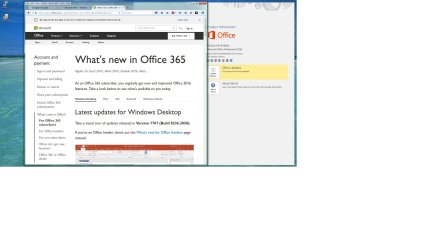
I saw that web site a few days ago, but all it displays are Microsoft adverts for something called Office 365. Not sure what that is, but it's irrelevant to me and it obfuscates the issue.
 

Attachments

  • ControlPanel.2jpg.jpg
    ControlPanel.2jpg.jpg
    190.5 KB · Views: 9

My Computer

Computer type
Laptop
Computer Manufacturer/Model Number
Toshiba Tecra W50-A
OS
Windows 7 Professional x64
CPU
Intel i7-4810MQ vPro
I have Office 365 but it contains Office 2016 apps. e.g. I have MSWord 2016.
 

My Computer

Computer type
PC/Desktop
Computer Manufacturer/Model Number
My Own Build
OS
Windows 10 64 bit
CPU
Intel i7 6700K
Motherboard
ASUS ROG Maximus VIII Hero
Memory
16GB Corsair Dominator
Graphics Card(s)
Intel CPU Graphics
Sound Card
RealTek
Monitor(s) Displays
27" Dell S2719dgf
Screen Resolution
2560X1440
Hard Drives
1 TB Samsung 850 EVO SSD for Win 10 Pro
500GB Samsung 850 EVO SSD for Win 10 Insider
2 TB drive for backup
PSU
EVGA Supernova 750G2
Case
BeQuiet Silent Base 600
Cooling
Deepcool Captain 120EX
Keyboard
Microsoft Wireless 2000
Mouse
Microsoft wireless
Internet Speed
100 MB/sec (Cable)
Antivirus
Microsoft Defender and Malwarebytes
Browser
Edge/Firefox
Other Info
Cakewalk (Sonar) by BandLab and Studio One 4.1 Pro recording studio software. MOTU 896Mk3 Hybrid recording interface, Frontier Tranzport wireless control unit, Behringer X-Touch Control Surface.
Five USB connected optical drives for CD Audio production using Nero BurningROM
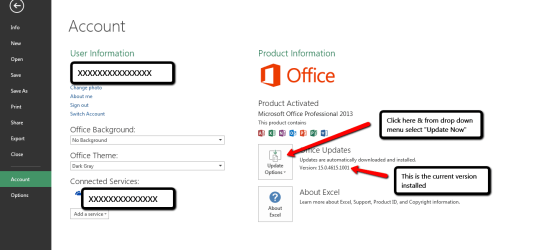
Iain. Your screen shot shows that you do not have Office set for Automatic Updates. You should definitely have it set for Automatic Updates, which you can select by clicking on that button & selecting Enable Updates. Once you have it set for Auto Updates, you can select Update Now & it will update you Office installation. Then you can follow what I explained in Post #6 to see the explanation of updates.

Below is a screen shot of how I have office 2013 updates set.

Office_2013_Update_Check.png
 
Last edited:

My Computer

Computer type
PC/Desktop
Computer Manufacturer/Model Number
Self built using existing case
OS
Windows 7 Home Premium 64 bit sp1
CPU
Intel i5 3570 3.4Ghz Ivy Bridge SKT 1155 quad core
Motherboard
Gigabyte Z77-HD3 SKT 1155 2xSata 3, 4x USB 3.0
Memory
G-Skill Rip Jaws 16Gb (8x2) DDR3 -1600 PC3 12800 CL 10 red
Graphics Card(s)
Gigabyte NVIDIA GT610 1Gb DDR3 810/1200 PCI-E 2.0 Silent
Sound Card
NVIDIA High Definition & Realtech High Definition Audio
Monitor(s) Displays
2 x Philips 226V4L 16:9 aspect ratio
Screen Resolution
1920 x 1080 HD
Hard Drives
Samsung 840 Pro 256gb SSD, SATA 3.
Hitachi Touro Portable 1tb, USB 3.0 HDD used for image b/ups.
PSU
Corsair VS450
Case
Codeng
Cooling
PSU fan & CPU fan
Keyboard
Logitech
Mouse
Logitech Wireless trackball M570
Internet Speed
Wireless 3G. 3mg down & 550kb up.
Antivirus
Bitdefender Internet Security 2020
Browser
Opera (Current Version) & Firefox
Other Info
MS Office 2013 Pro. Davis weather station software. MGE Nova 600 avr UPS.
The current Office update method doesn't state what it does. However, Brink (one of the forum guru's and moderators) usually posts a notice about what is in the current update.

Here is Brink's forum post on the Aug 8 Office update

August 8, 2017, update for Microsoft Office - Windows 7 Help Forums

Iain. Your screen shot shows that you do not have Office set for Automatic Updates. You should definitely have it set for Automatic Updates, which you can select by clicking on that button & selecting Enable Updates. Once you have it set for Auto Updates, you can select Update Now & it will update you Office installation. Then you can follow what I explained in Post #6 to see the explanation of updates.

Below is a screen shot of how I have office 2013 updates set.

View attachment 400371

I changed from automatic updates to manual updates a few days ago, as that setting gives a bit more control over my Office installation. I choose the time for updates rather than have some impersonal machine make that choice for me.

If that update goes awry, then I'll have Brink's website to refer to.

Still, I would rather have Microsoft Update involved in the update, as it's the ultimate in flexibility.
 

My Computer

Computer type
Laptop
Computer Manufacturer/Model Number
Toshiba Tecra W50-A
OS
Windows 7 Professional x64
CPU
Intel i7-4810MQ vPro
Back
Top