
Office Home/Student 2010 asks for key and configuration EVERY time

Gums

New member
Power User
Local time
8:32 AM
Messages
106
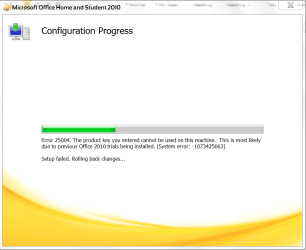
Downloaded and installed MS Office Home and Student 2010 successfully, (or so I thought), but every time I open Excel or Word upon startup, I receive a prompt asking me for my key and then a configuration. Once complete, I activate the program just like anyone would the very FIRST time you installed Office 2010. However, when I power down and then restart, Office will ask me for the key AGAIN for another configuration. Sometimes I'll receive this error message. ms error 1.PNG Followed by this message. ms error 2.PNG If so, I re-enter the key and configure a second, or sometimes even a third time. Eventually I can get Home and Student 2010 to open up Word or Excel but this can be anywhere from a five to fifteen minute process. This is never ending and it's driving me bananas! I've tried the Microsoft Fix It download in an attempt to completely uninstall any and all previous versions of Office (trial, beta, etc.) then reinstall but the pc still remembers something somewhere. Is this a potential fatal error from Microsoft? Any advice and assistance is greatly appreciated.
 

My Computer My Computer

At a glance

Windows 7 64 bit
OS
Windows 7 64 bit

My Computer My Computer

At a glance

Windows 7 Home Premium 64 bit sp1Intel i5 3570 3.4Ghz Ivy Bridge SKT 1155 quad...G-Skill Rip Jaws 16Gb (8x2) DDR3 -1600 PC3 12...Gigabyte NVIDIA GT610 1Gb DDR3 810/1200 PCI-E...
Computer type
PC/Desktop
Computer Manufacturer/Model Number
Self built using existing case
OS
Windows 7 Home Premium 64 bit sp1
CPU
Intel i5 3570 3.4Ghz Ivy Bridge SKT 1155 quad core
Motherboard
Gigabyte Z77-HD3 SKT 1155 2xSata 3, 4x USB 3.0
Memory
G-Skill Rip Jaws 16Gb (8x2) DDR3 -1600 PC3 12800 CL 10 red
Graphics Card(s)
Gigabyte NVIDIA GT610 1Gb DDR3 810/1200 PCI-E 2.0 Silent
Sound Card
NVIDIA High Definition & Realtech High Definition Audio
Monitor(s) Displays
2 x Philips 226V4L 16:9 aspect ratio
Screen Resolution
1920 x 1080 HD
Hard Drives
Samsung 840 Pro 256gb SSD, SATA 3.
Hitachi Touro Portable 1tb, USB 3.0 HDD used for image b/ups.
PSU
Corsair VS450
Case
Codeng
Cooling
PSU fan & CPU fan
Keyboard
Logitech
Mouse
Logitech Wireless trackball M570
Internet Speed
Wireless 3G. 3mg down & 550kb up.
Antivirus
Bitdefender Internet Security 2020
Browser
Opera (Current Version) & Firefox
Other Info
MS Office 2013 Pro. Davis weather station software. MGE Nova 600 avr UPS.
Run as administrator didn't help any. It's got to be something within the registry. Very frustrating. I've been working on this for three days now.
 

My Computer My Computer

At a glance

Windows 7 64 bit
OS
Windows 7 64 bit
Okay let start off at the beginning.

Where did you get MS Office Home and Student 2010 from and where did you get the key from?
 

My Computer My Computer

At a glance

Windows 10 Pro. 64/ version 1709 Windows 7 Pr...Intel i7-6800K @ 4.3Corsair Platinum 16 gig @2400EVGA GTX 1070 OC
Computer type
PC/Desktop
Computer Manufacturer/Model Number
Home made Desktop
OS
Windows 10 Pro. 64/ version 1709 Windows 7 Pro/64
CPU
Intel i7-6800K @ 4.3
Motherboard
ASUS X-99 Deluxe II
Memory
Corsair Platinum 16 gig @2400
Graphics Card(s)
EVGA GTX 1070 OC
Monitor(s) Displays
Asus 27" LED LCD/VE278Q
Screen Resolution
1920-1080 or 1280-720 HDMI
Hard Drives
INTEL SSD 730-240 Gb Sata 3.0/
PSU
EVGA Platium 1200W
Case
Phanteks Luxe Tempered Glass 8 fans/ one radiator
Cooling
XSPC/ Water Cooled CPU
Keyboard
Das 4 Professional
Mouse
Logitech M705/MX Anywhere 2-S
Internet Speed
100 mbits
Antivirus
Microsoft Security Essentials/ Malwarebytes Premium 3.0/ SAS
Browser
I.E. 11 default/Firefox/ ISP Time Warner Cable/Spectrum
Other Info
LG BluRay Burner/
Sound system-KLipsch-THX/
Icy Dock ssd Hot Swap bays.
I downloaded it from an online retailer (a Microsoft partner authorized retailer). They email you a link and a key. Software Speedy is the retailer.
 

My Computer My Computer

At a glance

Windows 7 64 bit
OS
Windows 7 64 bit
The reviews I have read indicate that some people getting software from Software Speedy had to call them for their help to get their activation key to work.
 

My Computer My Computer

At a glance

Windows 10 Pro. 64/ version 1709 Windows 7 Pr...Intel i7-6800K @ 4.3Corsair Platinum 16 gig @2400EVGA GTX 1070 OC
Computer type
PC/Desktop
Computer Manufacturer/Model Number
Home made Desktop
OS
Windows 10 Pro. 64/ version 1709 Windows 7 Pro/64
CPU
Intel i7-6800K @ 4.3
Motherboard
ASUS X-99 Deluxe II
Memory
Corsair Platinum 16 gig @2400
Graphics Card(s)
EVGA GTX 1070 OC
Monitor(s) Displays
Asus 27" LED LCD/VE278Q
Screen Resolution
1920-1080 or 1280-720 HDMI
Hard Drives
INTEL SSD 730-240 Gb Sata 3.0/
PSU
EVGA Platium 1200W
Case
Phanteks Luxe Tempered Glass 8 fans/ one radiator
Cooling
XSPC/ Water Cooled CPU
Keyboard
Das 4 Professional
Mouse
Logitech M705/MX Anywhere 2-S
Internet Speed
100 mbits
Antivirus
Microsoft Security Essentials/ Malwarebytes Premium 3.0/ SAS
Browser
I.E. 11 default/Firefox/ ISP Time Warner Cable/Spectrum
Other Info
LG BluRay Burner/
Sound system-KLipsch-THX/
Icy Dock ssd Hot Swap bays.
Oh yeah, the folks over at Software Speedy have been most helpful. Didn't call directly but used their chat feature over the course of two days. The issue is not the key itself or activation. The key is valid. Configuration and activation works every time. Although sometimes configuration and activation may take more than one attempt. Sometimes two attempts. Rarely three. Once activated all Office applications run perfectly. The issue occurs after shutdown. On Startup, when any Office application is opened, be it Excel or Word, I am required to enter the key, configure and activate. The people at Software Speedy had me uninstall, run MS Fix It, install and still nothing. We also tried activation via internet and telephone. Still nothing. I still think that the pc recognizes a previous trial or beta version of Office somewhere on the HDD. Software Speedy and I came to the conclusion that it may be a fatal MS error that is more than likely unresolvable. Except for having to enter the key for configuration each and every single time after startup, which is a PITA, MS Office Home and Student 2010 runs just as it should. I was hoping that anyone here at Seven Forums had any other insight or experience with this issue.
 

My Computer My Computer

At a glance

Windows 7 64 bit
OS
Windows 7 64 bit

My Computer My Computer

At a glance

Windows 7 Home Premium 64 bit sp1Intel i5 3570 3.4Ghz Ivy Bridge SKT 1155 quad...G-Skill Rip Jaws 16Gb (8x2) DDR3 -1600 PC3 12...Gigabyte NVIDIA GT610 1Gb DDR3 810/1200 PCI-E...
Computer type
PC/Desktop
Computer Manufacturer/Model Number
Self built using existing case
OS
Windows 7 Home Premium 64 bit sp1
CPU
Intel i5 3570 3.4Ghz Ivy Bridge SKT 1155 quad core
Motherboard
Gigabyte Z77-HD3 SKT 1155 2xSata 3, 4x USB 3.0
Memory
G-Skill Rip Jaws 16Gb (8x2) DDR3 -1600 PC3 12800 CL 10 red
Graphics Card(s)
Gigabyte NVIDIA GT610 1Gb DDR3 810/1200 PCI-E 2.0 Silent
Sound Card
NVIDIA High Definition & Realtech High Definition Audio
Monitor(s) Displays
2 x Philips 226V4L 16:9 aspect ratio
Screen Resolution
1920 x 1080 HD
Hard Drives
Samsung 840 Pro 256gb SSD, SATA 3.
Hitachi Touro Portable 1tb, USB 3.0 HDD used for image b/ups.
PSU
Corsair VS450
Case
Codeng
Cooling
PSU fan & CPU fan
Keyboard
Logitech
Mouse
Logitech Wireless trackball M570
Internet Speed
Wireless 3G. 3mg down & 550kb up.
Antivirus
Bitdefender Internet Security 2020
Browser
Opera (Current Version) & Firefox
Other Info
MS Office 2013 Pro. Davis weather station software. MGE Nova 600 avr UPS.
Back
Top
